

DeepSeek can use web search in supported surfaces, but “DeepSeek web search” can mean different things. DeepSeek officially announced Internet Search for the web chat in December 2024, the official status page tracks Search Service as a separate component, and DeepSeek’s Claude Code integration documents Web Search through the DeepSeek API. The current Responses API supports server-side web_search with deepseek-v4-pro and ignores that tool with deepseek-flash. DeepSeek also documents separate Search and Fetch APIs, so developers must distinguish the model, endpoint, and integration they use.
The safest way to understand this feature is to separate consumer DeepSeek Web search from API behavior, agent integrations, and third-party wrappers. Web search can improve freshness, but it does not make answers automatically correct. For important claims, open the sources, check dates, and prefer official or primary sources.
API search details rechecked: October 16, 2026. Screenshots reflect the interfaces and documentation captured for an earlier version of this guide. DeepSeek UI labels, API compatibility, model names, and search availability can change, so verify current details on the official pages before publishing instructions or building an integration.
What “DeepSeek web search” can mean
The phrase can refer to several different features or workflows. They are related, but they are not interchangeable.
| Meaning | Where it appears | Best for | What to verify | Main caution |
|---|---|---|---|---|
| DeepSeek Web / Chat Internet Search | The consumer web chat at chat.deepseek.com, where available. | Current information, recent facts, product updates, news, and source-backed answers. | Whether the current interface shows a search option for your account/session. | UI labels may change, and search does not guarantee perfect accuracy. |
| Search Service | The official DeepSeek Status page. | Checking whether the search component is operational. | Whether Search Service is operational, degraded, or in an incident. | The status page tells you service health, not the exact UI steps for using search. |
| Claude Code Web Search | DeepSeek’s official Claude Code integration docs. | Agentic coding workflows where Claude Code decides a question needs web search. | Current integration docs, model mapping, and extra token costs. | This behavior is specific to Claude Code integration and should not be generalized to every API client. |
Responses API built-in web_search | DeepSeek’s Responses API with deepseek-v4-pro. | Server-side search that adds retrieved results to the model’s context. | The selected model and DeepSeek’s current Responses API compatibility table. | Supported with deepseek-v4-pro; ignored with deepseek-flash. Support is not universal across models or API paths. |
| Third-party DeepSeek search tools | Browser extensions, AI sidebars, gateways, workflow tools, or local apps. | Convenience features such as page summarization or external retrieval. | Publisher, permissions, privacy policy, data flow, and provider route. | Third-party search is not official DeepSeek web search unless DeepSeek itself documents it. |
| Search engine + DeepSeek summarization | Google, Bing, another search engine, or your own retrieval layer plus DeepSeek. | Manual source gathering followed by summarization or comparison. | Source quality, publication dates, and what the model actually saw. | DeepSeek is summarizing supplied or retrieved material, not necessarily browsing by itself. |
DeepSeek Web search for ordinary users
DeepSeek announced Internet Search for the web in a December 2024 update and directed users to chat.deepseek.com to use it for real-time answers. That historical announcement confirms that DeepSeek Web search exists as a consumer-facing feature, but it does not guarantee that the current UI label, account access, or placement is unchanged for every user.
Where the current DeepSeek interface shows a search option, enable it before sending a prompt that needs current information. If the interface does not show a search option, do not rely on old screenshots or third-party tutorials. Check the official site, the current chat interface, and the official status page instead.
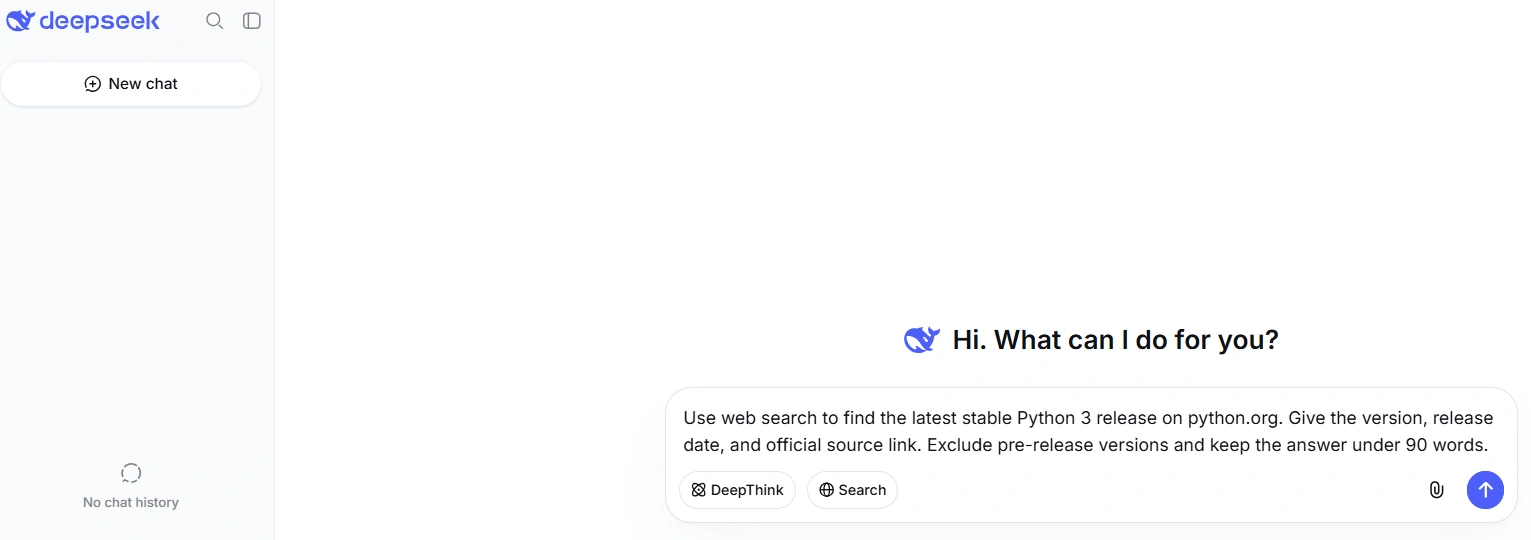
Use web search when freshness matters. For example, ask DeepSeek to search before answering questions about current pricing, recent product documentation, new software versions, recent announcements, market news, or public events.
How to prompt DeepSeek web search
A good search-based prompt should tell DeepSeek to use current sources, include dates, separate confirmed facts from uncertainty, and show which sources support which claims.
Current facts
Use web search for current information. Give the answer with dates and cite the sources you used. If the official source does not confirm a claim, say so.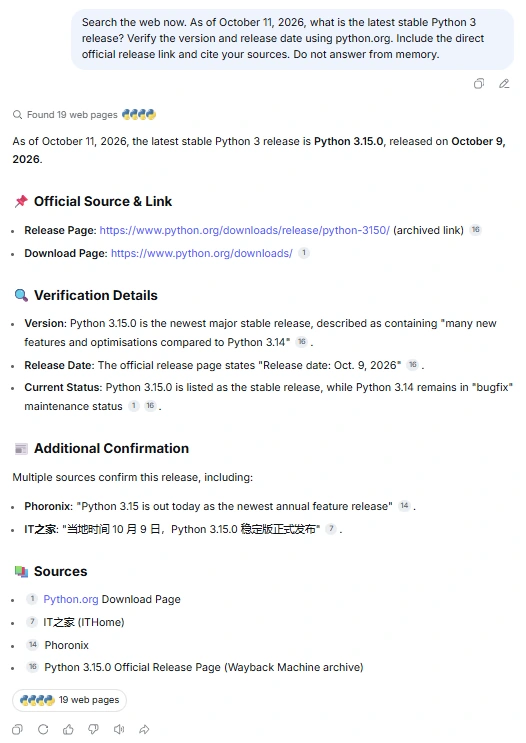
News or recent events
Search the web for the latest reliable reports about [topic]. Separate confirmed facts from reports, rumors, and analysis. Include the publication dates.Product or pricing research
Search official sources first for [product/pricing]. If official information is unavailable, say that before using secondary sources.Source comparison
Search for at least three reliable sources, compare what they agree on, and flag contradictions. Prefer official or primary sources where available.Verification-focused answer
List the sources you used and explain which claim each source supports. Do not overstate a source if it only partially supports the answer.Avoid stale knowledge
Do not answer from memory if the information may have changed. Use web search, mention publication dates, and tell me what still needs manual verification.When to use DeepSeek web search
Use web search when the answer depends on information that may have changed. It is most useful for:
- recent news and announcements;
- current pricing, limits, or product documentation;
- software version changes and API updates;
- events, schedules, and release dates;
- company, market, or regulatory developments;
- fact-checking a claim against official or primary sources;
- finding sources before asking DeepSeek to summarize or compare them.
Do not rely on web search alone for medical, legal, financial, safety-critical, academic, or professional decisions. Search improves freshness, but it does not remove hallucination, misreading, source-quality problems, or the need for human review.
How to verify DeepSeek web search answers
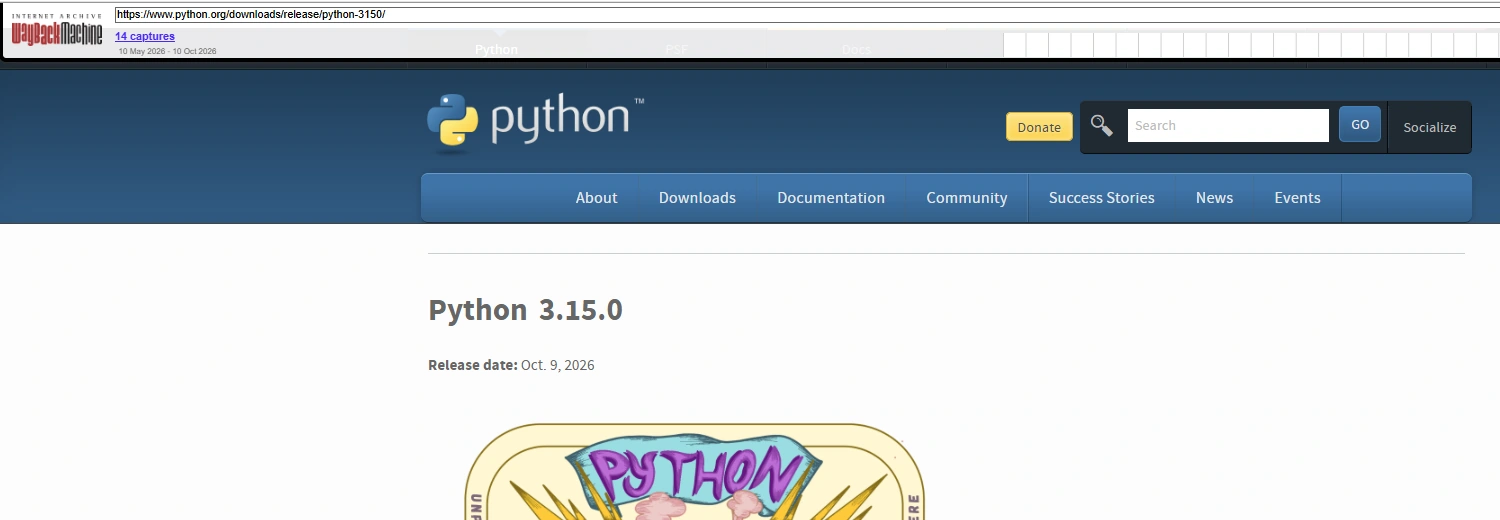
Search-based answers are only as reliable as the retrieved sources and the model’s synthesis. Citations can be old, irrelevant, too broad, or misinterpreted. For important claims, open the source yourself.
| Check | Why it matters | What to do |
|---|---|---|
| Source title | The title often reveals whether the page is an official document, news article, blog, forum, or opinion piece. | Prefer official or primary pages for product facts, laws, pricing, policies, and documentation. |
| Publisher | A source’s authority depends on the claim being made. | Use official company docs for product behavior; use reputable news or regulators for external events. |
| Publication or update date | Old pages can rank well while no longer describing current behavior. | Check whether a newer official page or changelog overrides it. |
| Direct support | A citation may not support the exact claim in the answer. | Open the page and confirm the cited paragraph actually says what the answer claims. |
| Source type | Official, primary, secondary, community, and commentary sources have different reliability. | Label uncertain or reported claims instead of presenting them as confirmed facts. |
| Contradictions | Sources may disagree because of date, scope, region, or product surface. | Ask DeepSeek to summarize the disagreement rather than forcing one answer. |
| Over-interpretation | AI may infer beyond what a source says. | Ask: “Which source supports this exact claim?” and verify manually. |
What DeepSeek Search Service means on the status page
The official DeepSeek Status page tracks Search Service as a separate component alongside chat, API, and file upload services. At the documentation check for this article, the status page reported that everything was running smoothly and listed Search Service as one of the tracked components.
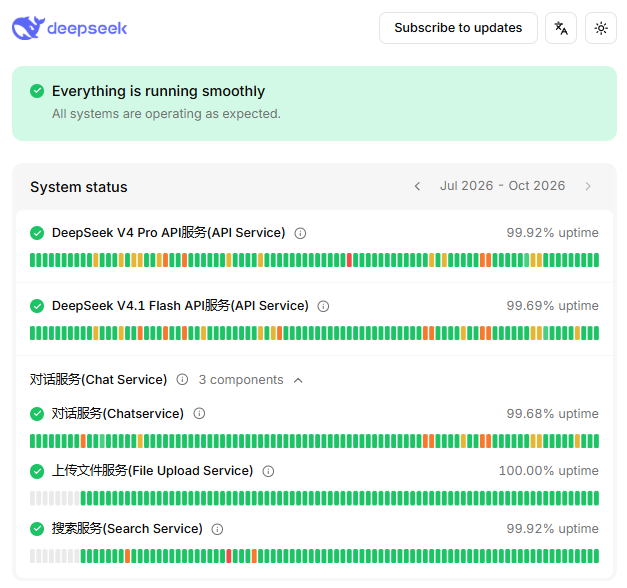
If DeepSeek web search is not working, check the status page first. A Search Service incident can affect search even if chat still loads. A normal status page, however, does not rule out local browser issues, account-specific access, regional network problems, UI changes, or third-party-wrapper issues.
Does the DeepSeek API support web search?
Yes. DeepSeek documents server-side web_search in the Responses API for deepseek-v4-pro, plus standalone Search and Fetch endpoints. These developer features are distinct from consumer DeepSeek Web search, and their availability depends on the API route and model.
DeepSeek’s Responses API uses https://api.deepseek.com as its base URL. With deepseek-v4-pro, a {"type":"web_search"} tool lets the server perform search, place the results in context, and continue generating the response. The same tool is ignored with deepseek-flash. Other built-in types, including file_search, code_interpreter, computer_use, and mcp, remain documented as ignored.
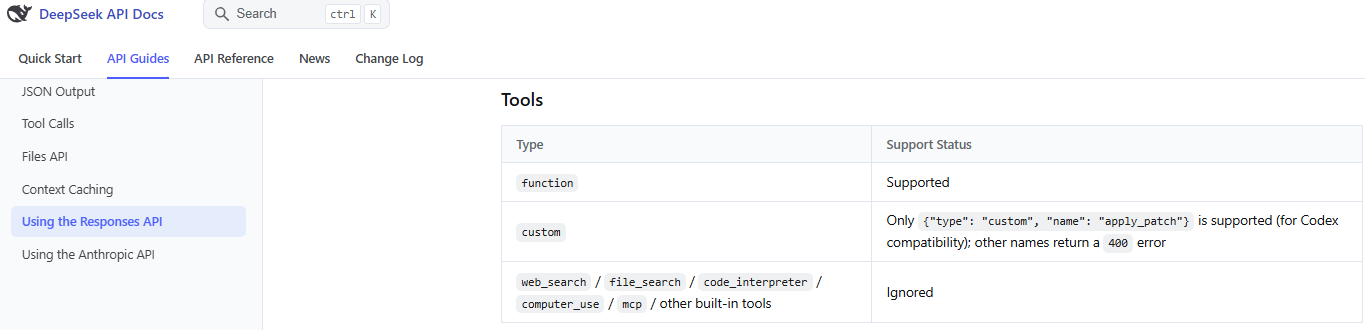
The Responses API can also restore results from earlier web_search_call items passed back in input. Reusing those results is distinct from executing a new search; it does not remove the model requirement for fresh server-side web_search.
If you need web search in an API product, choose the route deliberately:
- use Responses API
web_searchwithdeepseek-v4-prowhen you want the server to search and continue the answer; - call DeepSeek’s standalone
POST /v1/tools/searchfor structured search results orPOST /v1/tools/fetchfor a page’s Markdown content; both use your DeepSeek bearer API key; - use a documented agent integration, or build a retrieval layer and send the retrieved source text to DeepSeek for summarization or reasoning;
- check the chosen endpoint’s request format, billing, and limits; standalone Search and Fetch calls are separate from model generation and are not the same operation as a Responses tool call.
DeepSeek web search in Claude Code
DeepSeek’s official Claude Code integration is a special case. The documentation says DeepSeek API natively supports the Web Search feature in Claude Code. When Claude Code determines that a question requires web search, it can invoke the Web Search tool and perform the search through the API provided by DeepSeek.
The same documentation warns that invoking Web Search generates additional LLM API requests to summarize retrieved search content, so additional model token costs can be incurred. It also documents model mapping in the Claude Code / Claude Desktop context, including mappings from Claude model-name patterns to DeepSeek model IDs.

Do not generalize this to every DeepSeek API client. Claude Code Web Search is an integration-specific behavior. If you are using Codex, OpenCode, a browser extension, a gateway, or your own OpenAI-compatible client, check that tool’s current DeepSeek integration docs before assuming web search works the same way.
Third-party DeepSeek search tools
Some Chrome extensions, AI sidebars, workflow tools, IDE plugins, gateways, and local apps advertise DeepSeek search or DeepSeek-powered browsing. These tools may add their own retrieval layer and use DeepSeek only as the model that summarizes or reasons over results.
That can be useful, but it is not official DeepSeek behavior unless DeepSeek documents it. Third-party tools may send your prompts, page content, search queries, or API keys to their own servers. Before using them, check the publisher, permissions, privacy policy, provider route, pricing, and whether they use official DeepSeek API, another provider, or a local model.
Privacy and safety when using search
Search prompts can accidentally contain sensitive information. DeepSeek’s Privacy Policy says the service may process user input, and it also says DeepSeek integrates third-party APIs to provide search services and may share input keywords to provide those services. That makes prompt hygiene important when you use web search.
Do not search with or paste:
- passwords or API keys;
- private links or access tokens;
- internal dashboards or non-public URLs;
- customer data or employee data;
- confidential workplace documents;
- unreleased business plans;
- medical, legal, or financial records;
- proprietary source code;
- regulated or sensitive personal data.
DeepSeek web search is not a substitute for secure enterprise search, legal discovery, medical research review, or a private knowledge-base system unless your organization has approved the exact workflow and data route.
Troubleshooting: DeepSeek web search not working
| Symptom | Likely cause | What to check | Safe next step |
|---|---|---|---|
| Search option is not visible | The current UI may not expose search for your account, region, mode, or session. | Official chat interface, product updates, and whether you are using an official route. | Use the current UI rather than old screenshots; try official chat directly instead of third-party wrappers. |
| Search results do not appear | Search may not have been enabled, may not be triggered, or the search service may be unavailable. | DeepSeek Status page, Search Service status, and whether the prompt clearly asks for current sources. | Check status, then retry later or rephrase with an explicit search instruction. |
| Answer says it cannot browse | You may be in a surface that does not support web search, or search may not be active. | Whether you are using web chat, API, Claude Code, or a third-party tool. | Use a supported search surface or provide sources manually. |
| Answer seems stale | The model may have answered from memory, or search retrieved old pages. | Publication dates, official changelogs, and whether sources are current. | Ask DeepSeek to search again and prioritize official updated sources. |
| Citations are missing | The surface may not expose citations, or the model may have summarized without showing sources. | Current product behavior and prompt wording. | Ask for source titles, dates, and links, then verify manually. |
| Sources are irrelevant | Search query interpretation may be poor or sources may be too broad. | Whether the prompt names the exact product, date range, region, or source type. | Use a narrower prompt and ask for official sources first. |
| Search works in chat but not API | Chat search and API search use different routes; Responses web_search is model-specific. | The selected model, Responses tool configuration, and integration docs. | Use deepseek-v4-pro for Responses web_search, or use standalone Search and Fetch in your retrieval workflow. |
| Claude Code search does not trigger | The tool may decide the question does not require search, or configuration may be wrong. | Claude Code integration docs, model mapping, environment variables, and whether the task clearly requires web search. | Ask a clearly current-source question and verify the integration setup. |
Responses API web_search is ignored | The request may use deepseek-flash, which ignores this built-in tool. | The request’s model ID and current Responses API compatibility table. | Use deepseek-v4-pro for this tool, or retrieve sources separately through Search and Fetch. |
| Third-party extension search fails | The issue may belong to the extension, provider, permissions, or its own search backend. | Extension settings, permissions, provider status, and official DeepSeek status separately. | Test the same prompt in official DeepSeek Web Chat. |
Common misconceptions about DeepSeek web search
| Myth | More accurate fact | What to check |
|---|---|---|
| “DeepSeek always searches the web.” | DeepSeek may answer from model knowledge unless search is available, enabled, or triggered in a supported surface. | Current chat UI, prompt wording, and source visibility. |
| “DeepSeek web search is the same as Google.” | DeepSeek search is an AI-assisted retrieval and synthesis workflow, not a standard search results page. | Open sources directly and compare them yourself. |
| “DeepSeek API supports generic web search everywhere.” | Responses API web_search is supported with deepseek-v4-pro and ignored with deepseek-flash. Separate Search and Fetch endpoints are also documented. | Official Responses API compatibility table. |
| “Search Service is a public search API.” | Search Service on the status page reports service health. The separate Search and Fetch API documentation defines the public developer endpoints. | Status page and API docs. |
| “If an answer has citations, it must be correct.” | Citations can be irrelevant, outdated, broad, or misread. | Open the cited pages and confirm exact support. |
| “Claude Code Web Search means every DeepSeek client has web search.” | Claude Code Web Search is a documented integration-specific behavior. | Claude Code integration docs and the client you actually use. |
| “Third-party DeepSeek search extensions are official.” | Third-party tools may use DeepSeek models or branding but have separate publishers, permissions, and data flows. | Publisher, privacy policy, permissions, and official DeepSeek links. |
| “Web search can safely process private company data.” | Web search queries may leave your organization’s controlled environment and may involve service providers or third-party search APIs. | Privacy policy, enterprise policy, and approved data routes. |
Best practices for reliable search-based answers
- Ask for web search only when freshness matters.
- Tell DeepSeek to prefer official or primary sources first.
- Ask for publication dates and source names.
- Ask the model to separate confirmed facts from reports, assumptions, and uncertainty.
- Open the sources before using the answer in public, professional, legal, medical, financial, or business-critical work.
- Do not search with confidential, regulated, or personal data.
- Use the official status page when search appears unavailable.
- For developers, check the exact API surface before assuming a
web_searchtool exists.
Bottom line
DeepSeek web search is real in supported surfaces, but it is not one universal feature across every product and API path. Consumer DeepSeek Web search, Search Service status, Claude Code Web Search, Responses API tools, standalone Search and Fetch, and third-party wrappers are distinct routes.
For ordinary users, use the official DeepSeek web interface where search is available and verify sources manually. For developers, use deepseek-v4-pro for Responses API web_search; deepseek-flash ignores this tool. Use standalone Search and Fetch when you want to retrieve results or page content separately, and check the documentation for your exact integration.
FAQ
Can DeepSeek search the web?
Yes, DeepSeek can use web search in supported surfaces. DeepSeek announced Internet Search for the web chat in December 2024, and its status page tracks Search Service separately. Availability and UI labels may vary, so check the current official interface.
How do I use DeepSeek web search?
Use the official DeepSeek web chat. Where the current interface shows a search option, enable it before sending a prompt that needs current information. Ask for sources, dates, and uncertainty rather than a generic answer.
Does DeepSeek web search show citations?
It may show sources or citations where the current surface supports them, but do not assume every answer includes reliable citations. For important claims, open the sources and verify that they support the answer.
Is DeepSeek web search the same as Google Search?
No. Google Search is a search engine results page. DeepSeek web search is an AI-assisted answer workflow that may retrieve and summarize web information. Use it for synthesis, but verify sources directly.
What is DeepSeek Search Service?
Search Service is a component on the official DeepSeek Status page that reports service health. Developer endpoints are documented separately in DeepSeek’s Search and Fetch API guide; the status component itself is not an endpoint specification.
Why is DeepSeek search not working?
Possible reasons include a Search Service incident, a UI/account surface that does not expose search, a third-party wrapper issue, unclear prompt wording, browser/network problems, or API misuse. Check the official status page first, then identify whether the issue is in chat, API, Claude Code, or a third-party tool.
Does the DeepSeek API support web search?
Yes. The Responses API supports server-side web_search with deepseek-v4-pro and ignores it with deepseek-flash. DeepSeek also provides separate POST /v1/tools/search and POST /v1/tools/fetch endpoints for structured search results and page content. Choose the route deliberately and check its current requirements.
How does DeepSeek web search work in Claude Code?
DeepSeek’s Claude Code integration docs say Claude Code can invoke the Web Search tool through the DeepSeek API when the model determines that a question requires search. The docs also warn that summarizing retrieved search content can create additional LLM API requests and token costs.
Can DeepSeek search private websites?
Do not assume it can access private websites, internal dashboards, paywalled systems, or authenticated pages. If you need to analyze private content, use an approved secure workflow and avoid pasting credentials, private links, or confidential data into search prompts.
Are third-party DeepSeek search tools official?
Not automatically. A browser extension, gateway, or AI sidebar may add its own search feature while using DeepSeek as a model. Check the publisher, permissions, privacy policy, and data flow before treating it as trustworthy or official.