

Gemini is usually the better all-in-one AI assistant if you already live in Google’s ecosystem and need Workspace integration, file analysis, image and video tools, Google Search grounding, and a polished consumer product. DeepSeek is often more attractive for developers and technical teams that care about API cost, open weights, self-hosting options, and high-volume coding or agent workloads.
The right choice is not “Gemini always wins” or “DeepSeek always wins.” Choose based on the surface you actually need: Gemini app, Google AI plans, Gemini API, DeepSeek Chat, DeepSeek API, DeepSeek Harness, or DeepSeek open-weight models.
Sources checked: October 10, 2026. Product names, model access, prices, limits, privacy controls, and API features can change. Verify current details on the official Gemini subscriptions page, Gemini API docs, DeepSeek website, and DeepSeek Models & Pricing page before making business or technical decisions.
DeepSeek vs Gemini: quick verdict
| Need | Better starting choice | Why | What to verify | Main caveat |
|---|---|---|---|---|
| Everyday AI assistant | Gemini | Gemini is a polished Google assistant with tight access to Google services, personal productivity tools, and Google AI plan benefits. | Gemini subscriptions and Google AI plans. | Features and limits vary by plan, country, age, account type, and workspace settings. |
| Writing and editing | Gemini for Google ecosystem work; DeepSeek for direct text and technical drafting | Gemini is stronger when writing connects to Gmail, Docs, Drive, Notebook, Search, or uploaded files. DeepSeek can still be useful for direct drafting, summaries, and technical explanations. | Whether the workflow depends on Google Workspace or only text output. | Both require human review before publishing important work. |
| Research with web sources | Gemini | Gemini has Google Search grounding, Deep Research, and Google ecosystem context in supported plans and surfaces. | Google AI plan benefits and Gemini API pricing and grounding terms. | Search-grounded answers still need source verification. |
| Google Workspace productivity | Gemini | Gemini can work directly across Google apps such as Gmail, Docs, Drive, and other Google surfaces where the plan and account settings allow it. | Google AI plan, Workspace admin settings, connected apps, and supported languages. | Do not assume every personal or work account has the same access. |
| Coding help | Depends on workflow | Gemini has Google AI Studio, Google developer tools, Jules, Antigravity, and Workspace context. DeepSeek can be attractive for API-driven coding agents and cost-sensitive model workloads. | API features, model access, IDE/agent route, code privacy rules, and cost. | Generated code must be tested, reviewed, and security-checked. |
| Image generation | Gemini | Gemini includes official image-generation and image-editing model routes such as Nano Banana models in Google’s model list. | Gemini API model list and Google AI plan benefits. | Do not assume all Gemini image features are available on every plan or API tier. |
| Video generation | Gemini | Google’s Gemini ecosystem includes video-generation routes such as Flow/Veo/Gemini Omni model options in supported plans or APIs. | Gemini subscriptions and Gemini model docs. | Video access is highly plan-, region-, model-, and quota-dependent. |
| Image understanding | Both, depending on route | Gemini is broadly multimodal. DeepSeek supports image understanding through deepseek-flash in the official API. | DeepSeek Vision docs and Gemini model docs. | Image understanding is not the same as image generation or guaranteed OCR. |
| File and document workflows | Gemini | Gemini Apps can upload documents, spreadsheets, notebooks, photos, videos, and more; Gemini API Files API supports media and documents. DeepSeek API file upload is more image-focused in official docs. | Gemini file upload help, Gemini Files API, and DeepSeek Upload File docs. | Never upload sensitive files unless the workflow is approved. |
| Low-cost API usage | DeepSeek | DeepSeek publishes token-based API pricing for deepseek-flash and deepseek-v4-pro, with cached input, uncached input, output, and peak/off-peak distinctions. | DeepSeek Models & Pricing. | Lower token prices do not automatically mean lower total project cost. |
| Multimodal API workloads | Gemini for broad media; DeepSeek for image-text and cost-sensitive tasks | Gemini API has wide file/media support. DeepSeek Flash supports vision and long-context text/image workflows. | File types, model support, pricing, limits, and data policy. | Compare the exact task, not the brand name. |
| Open weights and local deployment | DeepSeek | DeepSeek publishes official model resources on Hugging Face and GitHub. | Exact model card, license, serving route, and hardware reality. | Open weights do not automatically mean full open source, easy self-hosting, or guaranteed privacy. |
| Private or regulated work | Depends on approved workflow | Gemini and DeepSeek have different data policies, account types, and deployment routes. Local/open-weight DeepSeek may help in some controlled environments, but only if secured correctly. | Gemini Apps Privacy Hub and DeepSeek Privacy Policy. | Neither public hosted chat should be treated as automatically approved for confidential or regulated data. |
| Team/business workspace | Gemini for Google Workspace; DeepSeek for custom API systems | Gemini is stronger when a team already works in Google Workspace. DeepSeek is stronger when a team wants a custom model/API/open-weight layer. | Workspace policy, Google AI plan, API terms, and procurement rules. | Do not compare a managed workspace product to a raw API as if they are the same category. |
What exactly are we comparing?
A fair DeepSeek vs Gemini comparison must separate product surfaces. “Gemini” can mean the Gemini app, Google AI plans, Google Workspace integrations, Google AI Studio, Gemini API, or Vertex/enterprise routes. “DeepSeek” can mean DeepSeek Chat, the DeepSeek app, DeepSeek Harness, the DeepSeek API Platform, or open-weight model resources.
| Comparison layer | Gemini side | DeepSeek side | Why it matters |
|---|---|---|---|
| Consumer assistant | Gemini app and web experience. | DeepSeek Chat and DeepSeek app. | This is what most everyday users mean. |
| Productivity ecosystem | Gemini in Google apps such as Gmail, Docs, Drive, Chrome, Notebook, and other supported surfaces. | More standalone chat, app, Harness, and API surfaces. | Gemini has the stronger Google ecosystem advantage. |
| Developer API | Gemini API, Google AI Studio, Google Cloud or Vertex routes where relevant. | Official DeepSeek API Platform and docs. | API pricing, model features, tools, and file support need separate comparison. |
| Models | Gemini model families, image/video/audio models, embeddings, and agent models. | deepseek-flash, deepseek-v4-pro, and open-weight model families. | Model capability and product UX are not the same thing. |
| Files and media | Broad app and API file/media support. | Strong text/API route and image understanding through Flash; more limited official API file upload scope. | This is a major Gemini advantage for ordinary users. |
| Privacy | Gemini Apps Privacy Hub, Google account controls, connected apps, and Workspace policies. | DeepSeek Privacy Policy, hosted API terms, and local/open-weight deployment trade-offs. | Risk depends on surface, plan, data type, and organization policy. |
| Local/open-weight use | Gemini is primarily hosted; Gemma/open models are separate and should not be confused with Gemini. | DeepSeek publishes open-weight model resources. | DeepSeek is stronger for self-hosting and model-control experiments. |
Everyday user experience
Gemini is usually the stronger choice for everyday users who already use Google. The official Gemini subscriptions page lists the Gemini app, Google Flow, Gemini Notebook, Gemini in Gmail and Docs, Gemini in Chrome, Search benefits, storage, and other Google One-style benefits across plan tiers. It also highlights Google AI Pro and Ultra as ways to get higher access to Gemini features and Google’s most capable models.
DeepSeek is more straightforward and technical. Its official homepage points users to DeepSeek Web, Harness, the API Platform, API Docs, app download, model/pricing information, service status, GitHub, and Hugging Face. This makes DeepSeek useful for users who want direct chat, a desktop agent workflow, or developer API access, but it is not as deeply integrated into a consumer productivity ecosystem as Gemini.
Practical recommendation: choose Gemini if your daily work already happens in Search, Gmail, Docs, Drive, Chrome, Notebook, or Google Workspace. Choose DeepSeek if you want a standalone AI assistant, a lower-cost API route, or open-weight model options.
Writing, studying, and research
Both tools can help with writing, summaries, outlines, translation, study plans, and research. The difference is context and workflow.
| Task | Gemini advantage | DeepSeek advantage | Best practice |
|---|---|---|---|
| Drafting and rewriting | Strong when connected to Docs, Gmail, Drive, Notebook, or uploaded files. | Good for direct drafting, rewriting, technical explanation, and structured summaries. | Provide audience, tone, purpose, format, and constraints. |
| Studying | Gemini can use uploaded documents and images to create study guides and practice-style help in supported plans. | DeepSeek can explain concepts, simplify technical material, and help with coding or reasoning practice. | Ask for step-by-step explanations and test yourself with follow-up questions. |
| Research | Gemini has Deep Research and Google Search grounding in supported plans and APIs. | DeepSeek can support research through chat/search surfaces or custom retrieval, but developers must verify exact search behavior. | Ask for source dates, source names, and uncertainty; open sources yourself. |
| Long documents | Gemini has clearer consumer and API file workflows for documents, videos, photos, code, and other supported files. | DeepSeek can be part of custom document pipelines, but its official API file upload is more image-focused. | Do not upload confidential files unless the workflow is approved. |
For source-heavy research and file-heavy study workflows, Gemini is usually the easier choice. For standalone technical explanation, code reasoning, or cost-sensitive API use, DeepSeek can be enough and may be more economical.
Google Workspace and productivity
This is where Gemini has its clearest product advantage. Google’s subscription materials describe Gemini in Gmail, Docs, Vids, Chrome, Notebook, and related Google services. For users who already live in Google Workspace, Gemini can become a layer over existing email, documents, files, meetings, and research workflows.
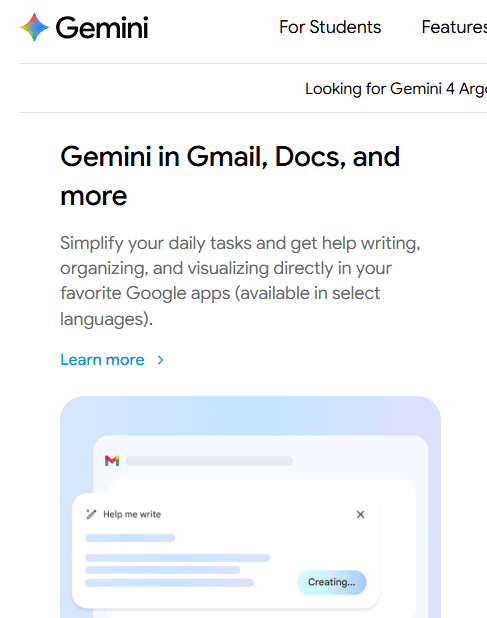
Google’s official illustration of Gemini in Gmail and Docs. Availability depends on the plan and account.DeepSeek does not have the same native Google Workspace product layer. It has DeepSeek Web Chat, the official app, DeepSeek Harness, the API Platform, and open-weight resources. You can build custom workflows around DeepSeek, but that is different from having native Gemini access inside Google apps.
| Productivity need | Gemini | DeepSeek | Recommendation |
|---|---|---|---|
| Gmail and Docs help | Native Google ecosystem route in supported plans. | No native official Gmail/Docs integration confirmed from DeepSeek sources. | Use Gemini if this is central. |
| Drive file context | Can connect with Drive and uploaded files where account settings allow. | Requires custom workflow or manual context transfer. | Use Gemini for Google files; use DeepSeek for independent API pipelines. |
| Notebook-style research | Gemini Notebook and research features are part of Google AI plan positioning. | DeepSeek can summarize and reason, but does not provide the same Google Notebook product layer. | Use Gemini for managed research workspace. |
| Independent AI backend | Possible through Gemini API, but tied to Google developer ecosystem. | Strong fit through DeepSeek API and open weights. | Use DeepSeek when independence and model-cost control matter. |
Coding and developer workflows
For coding, the comparison depends on whether you are a user asking for coding help or a developer building an AI-powered system.
Gemini is strong for developers who want Google AI Studio, Google’s current model family, Gemini API file and media handling, Google Search grounding, Jules, Antigravity, and Google ecosystem tooling. The Gemini API model list currently includes Flash, Pro, Live, TTS, image, video, embedding, Deep Research, and agent-related models.
DeepSeek is strong for developers who care about API economics, long-context model calls, Tool Calls, JSON Output, Responses API, Anthropic-compatible routes, coding agents, and open-weight experiments. Its current model table lists deepseek-flash and deepseek-v4-pro, with both supporting JSON Output, Tool Calls, Responses API, and Anthropic API, while Vision is supported by deepseek-flash and not by deepseek-v4-pro.
| Coding need | Better fit | Why | Safety rule |
|---|---|---|---|
| Explain a snippet | Either | Both can explain code when given enough context. | Ask for assumptions, edge cases, and examples. |
| Debug a small error | Either | Both can reason from error messages and source snippets. | Run the fix and write a regression test. |
| Agentic coding | Depends on tooling | Gemini has Google agent/dev tools; DeepSeek can power compatible coding agents through API routes. | Never allow unsupervised destructive changes without review. |
| Large codebase analysis | Gemini for productized uploads; DeepSeek for custom pipelines | Gemini has clearer user-facing repo/file flows in supported plans; DeepSeek can be wired into custom code-analysis systems. | Do not paste private repositories without approval. |
| High-volume code review | Often DeepSeek API after evaluation | DeepSeek token economics may be attractive for batch jobs. | Use queues, validation, and human review. |
| Google Cloud or AI Studio workflows | Gemini | Gemini is native to Google’s developer ecosystem. | Separate prototyping quotas from production billing. |
For serious software work, neither tool replaces engineering discipline. Do not paste secrets, API keys, private repositories, customer data, proprietary code, or production logs into any hosted tool unless the workflow is approved.
Images, files, video, and multimodal work
Gemini has the stronger broad multimodal ecosystem. Gemini Apps Help says users can upload documents, spreadsheets, notebooks, photos, videos, and more to Gemini Apps to get answers, summaries, and insights. The Gemini API Files API also says Gemini can handle different input types, including text, images, and audio at the same time, and that the Files API works with audio files, images, videos, documents, and other supported file types.
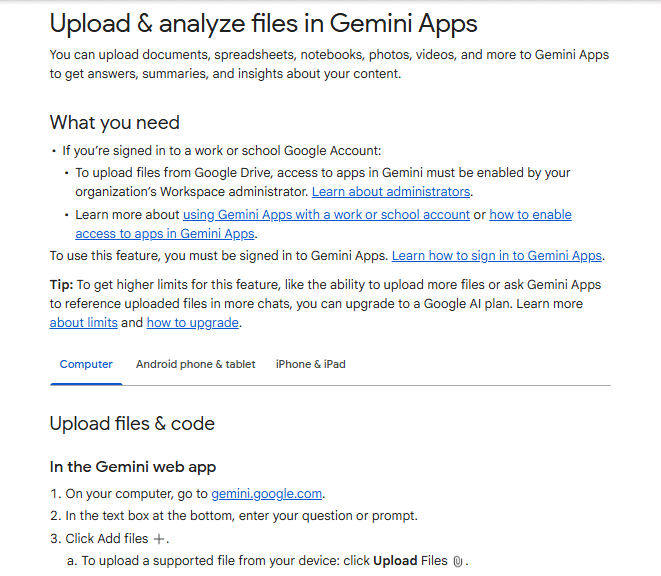
Google’s file-upload guidance for Gemini Apps, including supported content and web upload options.DeepSeek supports image understanding through deepseek-flash. The official DeepSeek Vision guide says deepseek-flash accepts images with text and can describe pictures, read screenshots, and analyze charts. DeepSeek also supports image input through base64, external URLs, or Files API file_id. But this is image understanding, not broad media generation.
| Capability | Gemini | DeepSeek | Decision note |
|---|---|---|---|
| Documents | Strong app and API support for documents and supported file types. | Consumer chat behavior may vary; API file upload is image-focused in current docs. | Gemini is easier for general document workflows. |
| Spreadsheets | Supported as a Gemini Apps upload category and useful inside Google ecosystem workflows. | Requires custom extraction or workflow unless the current chat UI supports the file. | Gemini is usually better for non-technical users. |
| Images | Image understanding plus image-generation/editing model routes in Gemini API and Google AI plans. | Image understanding through deepseek-flash. | Use Gemini for image creation; use either for image analysis depending on workflow. |
| Video | Gemini ecosystem includes video input and generation routes where supported. | No equivalent official standard DeepSeek API video-generation route established from current DeepSeek docs. | Gemini is the better default for video workflows. |
| Audio | Gemini API model list includes speech/audio and TTS-related models. | DeepSeek is primarily text/API plus vision through Flash. | Gemini is broader for audio. |
| Image token/cost control | Depends on Gemini API model and pricing. | DeepSeek Vision documents image token behavior and image limits. | For API workloads, compare exact model and file path. |
API and pricing: compare like with like
Do not compare Google AI Pro’s monthly consumer subscription directly against DeepSeek’s per-token API pricing. These are different categories.
Consumer subscriptions
For ordinary users, compare Gemini Free, Google AI Plus, Google AI Pro, and Google AI Ultra against DeepSeek Chat and the official DeepSeek app. Google’s Gemini subscriptions page lists Free, Plus, Pro, and Ultra-style plan options, with different access to models, video generation, Deep Research, Gemini Notebook, Google Flow, Gemini in Google apps, Chrome, storage, Jules, and Antigravity depending on plan and region.
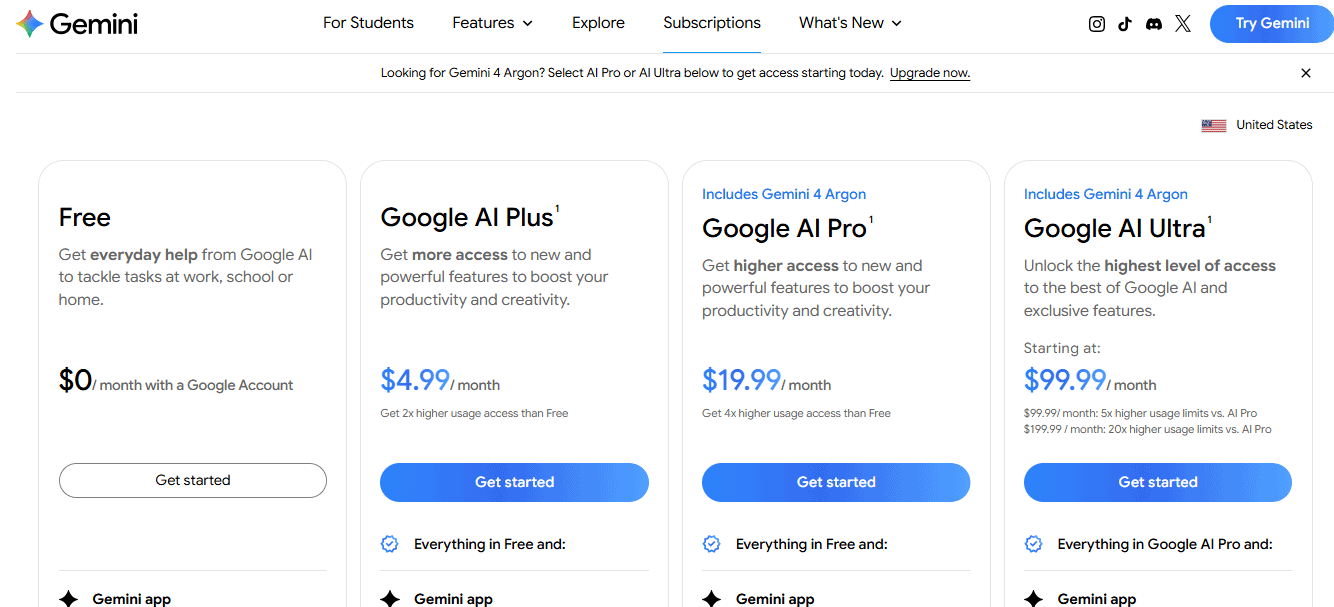
Gemini consumer subscription plans and US monthly prices shown on Google’s official website at the time of capture.DeepSeek’s official download page describes the DeepSeek app as the official AI assistant from DeepSeek and says users can chat with leading AI models for free. That consumer route is separate from DeepSeek API billing.
Developer APIs
For developers, compare Gemini API with DeepSeek API. Gemini API pricing currently separates Free, Paid, and Enterprise tiers and states that the Free tier has free input/output tokens for certain models while Paid unlocks higher rate limits and advanced features. It also states that Free-tier content may be used to improve Google products, while Paid-tier content is not used to improve Google products.
DeepSeek API pricing is token-based and model-specific. The official table lists deepseek-flash and deepseek-v4-pro, with separate cached input, uncached input, and output prices, plus peak/off-peak pricing and concurrency limits. It also states that expense equals number of tokens multiplied by price, deducted from topped-up or granted balance.
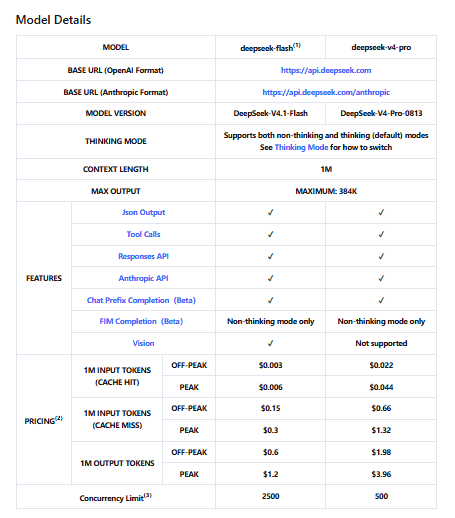
DeepSeek’s official API pricing distinguishes models, cache status, and peak versus off-peak usage.Practical rule: Gemini API is usually stronger for broad multimodal and Google-grounded products. DeepSeek API is often more attractive when text-heavy or agent-heavy workloads are cost-sensitive and your team can build the surrounding product, monitoring, and validation layers.
Privacy and data controls
Privacy is not a simple “Gemini is safe” or “DeepSeek is unsafe” question. It depends on the surface, account type, settings, plan, data type, and organization policy.
Gemini privacy posture
The Gemini Apps Privacy Hub says Gemini Apps may collect information you provide, including prompts, tasks, files, videos, screens, photos, imported chats, and browser page content you share. It also says human reviewers review some collected data and warns users not to enter confidential information they would not want a reviewer to see or Google to use to improve services.
Gemini is powerful because it can connect to Google services and apps, but that also means you must understand Connected Apps, Google account settings, Gemini Apps Activity, Workspace controls, and administrator policies before using it with private or work data.
DeepSeek privacy posture
DeepSeek’s Privacy Policy says the services are not designed or intended to process sensitive personal data and users should not provide it. The policy also says DeepSeek may use personal data to operate, develop, improve, and train its technology, and that personal data collected from users is directly collected, processed, and stored in the People’s Republic of China.
For low-risk public tasks, either tool may be acceptable. For confidential work, regulated data, customer records, private code, legal files, medical records, financial data, or identity documents, use only approved workflows and review the exact plan, policy, deployment route, and organization requirements.
Open weights and local deployment
DeepSeek has the stronger open-weight and local-deployment story. DeepSeek maintains official organizations on Hugging Face and GitHub. That matters for researchers, AI infrastructure teams, local deployment experiments, and organizations that want more model-control options.
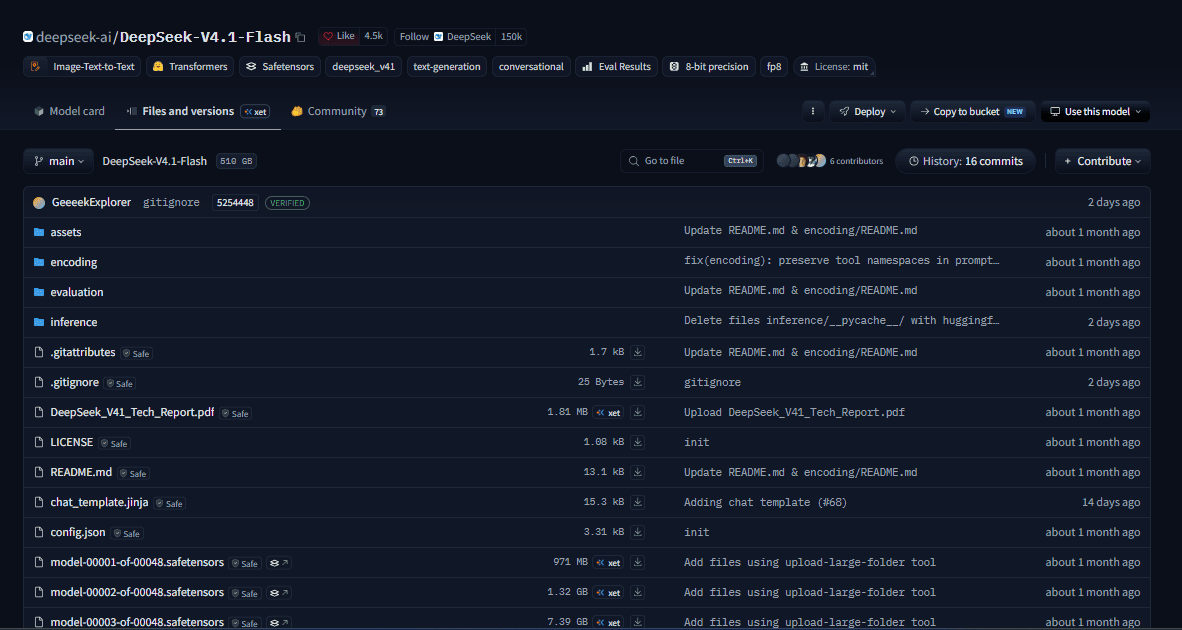
Model weight files in DeepSeek’s official Hugging Face repository. This screenshot documents availability, not a local deployment test.Gemini is primarily a hosted Google product and API ecosystem. Google also has open models such as Gemma, but Gemma should not be confused with Gemini. If your comparison is specifically DeepSeek vs Gemini, DeepSeek is the clearer choice for open-weight experimentation, while Gemini is the clearer choice for managed Google-product integration.
| Question | DeepSeek | Gemini | Practical meaning |
|---|---|---|---|
| Can I use public model weights? | Yes, for some DeepSeek model families via official model cards and repositories. | Gemini itself is primarily hosted; do not confuse Gemini with Gemma/open models. | DeepSeek is better for open-weight experiments. |
| Can I self-host? | Possible for some DeepSeek open-weight models or variants, depending on hardware and serving stack. | Gemini is usually consumed through Google products/APIs. | Choose DeepSeek if local control is the project goal. |
| Is local automatically private? | No. You still control logs, storage, access, network exposure, and security. | Hosted privacy depends on Google account, plan, and policy. | Both need governance for sensitive data. |
| Is local cheaper? | Only sometimes. | Hosted plans/APIs may be simpler for many teams. | Compare total cost of ownership, not just token price. |
Business and team use
For organizations already using Google Workspace, Gemini is usually the more natural starting point. Google AI plans and Gemini in Google apps can support workflows in Gmail, Docs, Drive, Meet, Chrome, Notebook, and related Google surfaces where enabled. Enterprise or Workspace buyers should still verify admin controls, data settings, supported regions, and organization-specific terms.
DeepSeek is more attractive when a team wants to build its own AI layer: backend agents, batch processing, local/open-weight experiments, independent model evaluation, or cost-sensitive API systems. This can be powerful, but it shifts more responsibility to the team: API-key security, logging, redaction, access controls, monitoring, privacy review, and output validation.
| Organization need | Likely better starting point | Why |
|---|---|---|
| Google Workspace productivity | Gemini | Native Google app integration is the main advantage. |
| Custom AI product backend | DeepSeek API or Gemini API after evaluation | API choice depends on cost, media needs, grounding, model quality, privacy, and latency. |
| Video or creative media workflows | Gemini | Google’s ecosystem includes image/video/music-generation routes. |
| Open-weight model evaluation | DeepSeek | DeepSeek has public model resources and local-deployment potential. |
| Regulated data | Approved internal workflow only | Neither public consumer chat should be treated as automatically approved. |
| High-volume text/API jobs | Often DeepSeek after workload testing | DeepSeek’s token economics may be attractive, but operations and quality validation still matter. |
Which is cheaper?
It depends on the surface you compare.
- Gemini consumer cost: Google AI plan price, plan limits, Workspace benefits, storage, media credits, and productivity value.
- Gemini API cost: model, input tokens, output tokens, thinking tokens, context caching, grounding, media usage, tier, and billing setup.
- DeepSeek API cost: input tokens, output tokens, cache hit/miss, model choice, peak/off-peak timing, concurrency, and retry behavior.
- DeepSeek local cost: hardware or cloud GPUs, storage, power/runtime, serving stack, security, monitoring, and engineering time.
DeepSeek can be cheaper for some high-volume text and agent workloads. Gemini can be cheaper in practice if its Google ecosystem integration saves time for a person or team. API buyers should test a real workload rather than choosing from headline prices.
Common misconceptions
| Myth | More accurate answer | What to check |
|---|---|---|
| “DeepSeek is just a cheaper Gemini.” | DeepSeek is a model/API/open-weight ecosystem plus chat/app surfaces. Gemini is a Google consumer, Workspace, and developer AI ecosystem. | Which product surface you mean. |
| “Gemini is always better because it is Google.” | Gemini is stronger for Google ecosystem productivity and broad multimodal tools, but DeepSeek may be better for cost-sensitive API or open-weight workflows. | Your actual task and deployment route. |
| “DeepSeek is always better at coding.” | DeepSeek can be strong for coding workflows, especially API/agent use, but Gemini has strong developer and agent tooling too. | Code correctness, tests, latency, privacy, and cost. |
| “Gemini is only a chatbot.” | Gemini includes app, Google AI plans, Workspace integrations, API models, files, media, and developer tooling. | Gemini product and API pages. |
| “DeepSeek is fully open source, so it is automatically private.” | Open weights are not the same as full open source or automatic privacy. Hosted DeepSeek still follows DeepSeek’s privacy policy. | Model card, license, deployment route, and logs. |
| “Gemini API and Google AI Pro are the same thing.” | Google AI Pro is a consumer/subscription plan. Gemini API is a developer API with separate pricing and billing. | Google AI plan docs and Gemini API pricing. |
| “Free app access and API pricing are the same thing.” | Consumer chat plans and developer API billing are separate categories for both ecosystems. | Subscription page vs API pricing page. |
| “Image understanding means image generation.” | They are different capabilities. Gemini has official generation models; DeepSeek Vision is image understanding through deepseek-flash. | Model docs for the exact surface. |
| “DeepSeek can do everything Gemini can do with files.” | Gemini has broader consumer and API file/media support. DeepSeek API file upload is more image-focused in current official docs. | Gemini file upload docs and DeepSeek Files API docs. |
| “Connected apps are always safe for company data.” | Connected apps can be powerful, but data access depends on account settings, Workspace policy, admin controls, and privacy terms. | Gemini Apps Privacy Hub and organization policy. |
Use Gemini if…
- You live in Google Search, Gmail, Docs, Sheets, Slides, Meet, Drive, Chrome, or Google Workspace.
- You want a polished multimodal assistant for files, images, video, research, and productivity.
- You need official image generation, video generation, or media-focused creative workflows.
- You want Google AI plan benefits, storage, Notebook, Flow, or Google app integrations.
- Your organization has approved Google Workspace or Gemini workflows.
Use DeepSeek if…
- You need a cost-sensitive API route for high-volume model calls.
- You want open-weight or local deployment options.
- You are building a custom model pipeline, backend agent, coding agent, or batch-processing workflow.
- You can engineer retrieval, validation, monitoring, privacy, rate limiting, and logging yourself.
- You want an independent model layer outside Google’s ecosystem.
Use both if…
- You use Gemini for Google Workspace, research, files, images, and video, while using DeepSeek API for selected backend or batch workloads.
- You want redundancy across providers for important tasks.
- You want to compare outputs before making a high-value decision.
- You want Gemini’s polished multimodal product and DeepSeek’s API/open-weight economics.
- You use local or self-hosted DeepSeek for approved experiments and Gemini for productivity workflows.
Avoid both for these uses unless you have an approved workflow
- Medical, legal, financial, or safety-critical decisions without qualified human review.
- Confidential company data without organizational approval.
- Customer records, regulated data, identity documents, private legal files, or health records.
- Passwords, API keys, private keys, tokens, and credentials.
- Private repositories, proprietary source code, and production logs containing sensitive information.
- Public claims that require exact current sources but have not been verified.
Official resources used in this comparison
Use these official resources to verify features, pricing, privacy, and model status before making a final decision:
- Gemini app
- Gemini subscriptions
- Google AI plans
- Upload and analyze files in Gemini Apps
- Gemini Apps Privacy Hub
- Gemini API docs
- Gemini API models
- Gemini API pricing
- Gemini API Files API
- Official DeepSeek website
- DeepSeek Web Chat
- DeepSeek app download page
- DeepSeek Harness
- DeepSeek API Platform
- DeepSeek API Docs
- DeepSeek Models & Pricing
- DeepSeek Vision guide
- DeepSeek on Hugging Face
- DeepSeek on GitHub
- DeepSeek Privacy Policy
- DeepSeek Terms of Use
Final recommendation
Choose Gemini if you want the best Google-native AI assistant experience: Search, Gmail, Docs, Drive, Chrome, Notebook, file uploads, image and video creation, Google AI plans, and a polished consumer productivity workflow.
Choose DeepSeek if your decision is technical: API economics, open weights, local deployment, coding agents, custom backend workflows, or high-volume model workloads where your team can build the surrounding product, security, monitoring, and validation layers.
For many serious users, the strongest answer is not “DeepSeek or Gemini.” It is Gemini for Google ecosystem productivity and multimodal workflows, and DeepSeek for selected API, open-weight, or infrastructure workloads, with clear rules for what data can be sent where.
FAQ
Is DeepSeek better than Gemini?
Sometimes, but not universally. DeepSeek is often better for cost-sensitive API workloads, open-weight experiments, local deployment, and custom engineering workflows. Gemini is usually better as a Google-native all-in-one assistant.
Is Gemini better than DeepSeek?
For most everyday users, especially Google users, yes. Gemini is usually the better starting point because it integrates with Google apps, file workflows, Search, image/video tools, and Google AI plans. DeepSeek may be better for developers who need lower-cost API or open-weight options.
Which is better for everyday use?
Gemini is usually better for everyday use if you use Google services. DeepSeek is useful as a standalone chat/app and can be strong for technical explanations, coding help, and API-based workflows.
Which is better for coding?
It depends on the workflow. Gemini is strong when you use Google AI Studio, Google developer tools, Workspace context, Jules, or Antigravity. DeepSeek can be strong for cost-sensitive coding agents, code-review pipelines, and custom API workflows. In both cases, generated code should be tested and reviewed.
Which is better for research?
Gemini is usually easier for research because it can combine Google Search, Deep Research, files, notebooks, and Google ecosystem context in supported plans. DeepSeek can support research through chat/search surfaces or custom retrieval, but developers must verify the exact search behavior of the surface they use.
Which is better for Google Workspace users?
Gemini is the better default for Google Workspace users because its main advantage is integration with Google apps and account context. DeepSeek can still be used separately, but it is not a native Google Workspace assistant.
Which has better file upload?
Gemini generally has stronger file upload and document workflows for ordinary users. Gemini Apps can upload documents, spreadsheets, notebooks, photos, videos, and more. DeepSeek API file upload is more image-focused in current official documentation.
Which handles images and video better?
Gemini is stronger for broad image and video workflows, including image generation, image editing, video generation, and multimodal API models. DeepSeek supports image understanding through deepseek-flash, but its standard Vision API should not be treated as image generation or video generation.
Which API is cheaper?
DeepSeek can be cheaper for some text-heavy or high-volume API workloads, but the answer depends on input tokens, output tokens, cache behavior, grounding, media input, peak/off-peak timing, retries, and engineering cost. Compare real workload cost, not only headline prices.
Which API is better for developers?
Gemini API is usually better for broad multimodal products, Google Search grounding, Google AI Studio, files, media, and Google ecosystem apps. DeepSeek API is often attractive for lower-cost text/agent workloads, OpenAI-compatible or Anthropic-compatible integration, and open-weight model strategy.
Which is better for privacy?
There is no universal answer. Gemini has Google account controls, Gemini Apps privacy settings, and Workspace-dependent behavior. DeepSeek has its own privacy policy and open-weight/local options. The safer choice depends on data type, plan, settings, deployment route, and organization policy.
Does DeepSeek have open weights?
Yes, DeepSeek publishes public model resources and open-weight releases for some model families through official Hugging Face and GitHub organizations. Check the exact model card and license before using any release.
Can Gemini run locally?
Gemini is primarily a hosted Google product and API ecosystem. Google also offers open models such as Gemma, but Gemma is not the same thing as Gemini. If local deployment is central, DeepSeek open-weight models are usually the more relevant comparison point.
Should developers use DeepSeek API or Gemini API?
Developers should test both with real workload data: quality, cost, latency, file/media needs, search grounding, structured output, tool calls, safety controls, privacy, and fallback behavior. Use Gemini API for broad multimodal and Google-grounded products; evaluate DeepSeek API for cost-sensitive text, coding, and agent workloads.
Can I use both DeepSeek and Gemini?
Yes. A practical setup is to use Gemini for Google ecosystem productivity, research, files, and media, while using DeepSeek for selected API, batch, coding-agent, open-weight, or local workloads. Keep data-routing rules clear so sensitive information is not sent to the wrong tool.
What should I not share with either tool?
Do not share passwords, API keys, private keys, confidential files, customer data, regulated records, medical/legal/financial documents, private code, production secrets, or sensitive personal data unless your workflow is approved and secured.