

DeepSeek Tool Calls let the model request an external function, but the model does not execute that function itself. Your application defines the available tools, DeepSeek can return one or more function calls with arguments, your code validates and executes the approved function, and then sends the result back so the model can continue or produce its final answer.
That distinction is the foundation of a correct implementation. A tool_calls response is a structured request for your application to do something; it is not proof that the action has already happened.
Documentation checked: October 3, 2026. The Python example below was syntax-checked locally. No authenticated or billable DeepSeek API request was run.
How DeepSeek Tool Calls work
DeepSeek currently supports functions as the tool type in its Chat Completions API. A normal tool-calling cycle looks like this:
- Your application describes the functions the model is allowed to request.
- Your application sends the user message and those tool definitions to DeepSeek.
- DeepSeek either answers directly or returns one or more
tool_calls. - Your application checks the requested function name and parses its arguments.
- Your application validates the arguments and applies its own authorization or business rules.
- Your application executes the approved function.
- The function result is sent back in a
toolmessage with the matchingtool_call_id. - DeepSeek receives the result and can answer the user or request another tool.
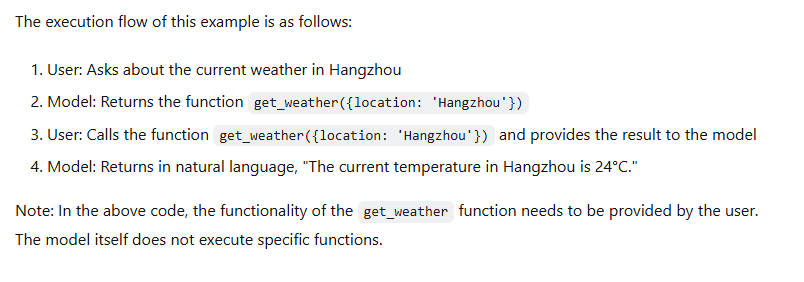
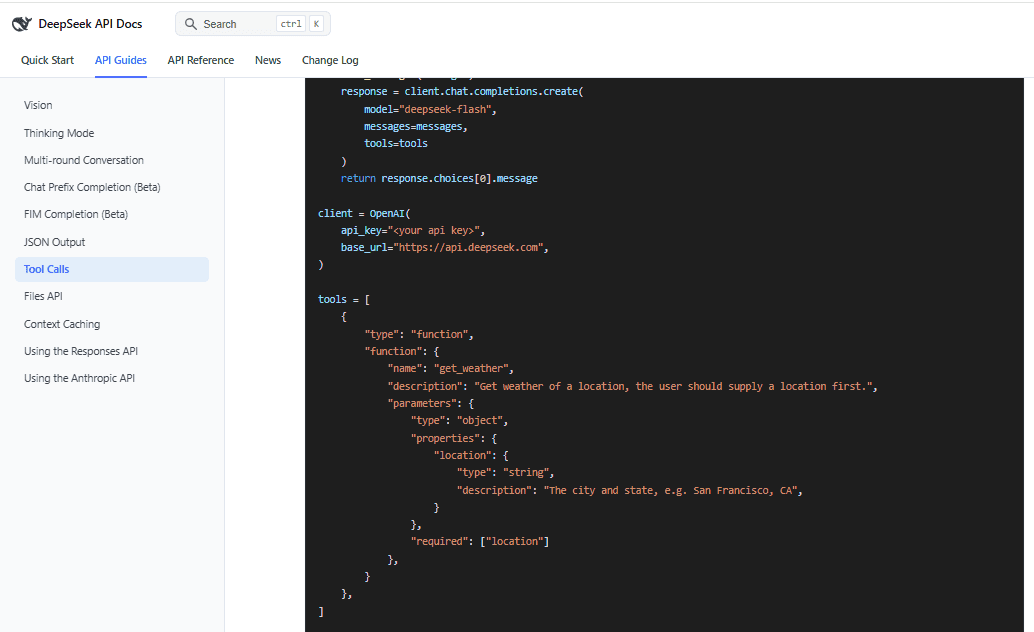
The official DeepSeek Tool Calls guide demonstrates the same pattern. Its sample weather function is supplied by the application; DeepSeek only decides that the function should be called and generates its arguments.
The tools definition tells DeepSeek what it may request
Each Chat Completions tool currently uses type: "function". The function definition can contain a name, a description, and a JSON Schema describing accepted parameters.
The current Chat Completions reference says function names can contain letters, numbers, underscores, and dashes and can be up to 128 characters long. Tool names in one request must be unique.
{
    "type": "function",
    "function": {
        "name": "get_inventory",
        "description": "Look up current inventory for one catalog SKU.",
        "parameters": {
            "type": "object",
            "properties": {
                "sku": {
                    "type": "string",
                    "description": "Exact catalog SKU to look up."
                }
            },
            "required": ["sku"]
        }
    }
}
Descriptions matter because the model uses the tool name, description, and parameter schema when deciding whether and how to call it. “Get data” gives the model much less useful guidance than “Look up current inventory for one catalog SKU.”
Omitting parameters currently defines a function with no parameters. Do not add placeholder arguments when the function genuinely needs none.
A complete Python Tool Calls example
The following example uses a local mock inventory catalog, so the tool itself requires no external API key. It demonstrates a complete loop rather than stopping as soon as DeepSeek requests a function.
The example deliberately uses non-thinking mode. This keeps the basic tool lifecycle separate from the additional reasoning_content requirements explained later.
Install the current OpenAI Python client, which DeepSeek supports with its OpenAI-compatible interface:
python -m pip install openaiSet your DeepSeek API key in the DEEPSEEK_API_KEY environment variable, then save this example as deepseek_tools.py:
import json
import os
from openai import OpenAI

MAX_TOOL_ROUNDS = 4

CATALOG = {
    "SKU-LAPTOP-13": {
        "name": "13-inch laptop",
        "in_stock": True,
        "quantity": 7,
    },
    "SKU-LAPTOP-15": {
        "name": "15-inch laptop",
        "in_stock": False,
        "quantity": 0,
    },
    "SKU-DOCK-01": {
        "name": "USB-C dock",
        "in_stock": True,
        "quantity": 12,
    },
}

TOOLS = [
    {
        "type": "function",
        "function": {
            "name": "get_inventory",
            "description": (
                "Look up current inventory for one catalog SKU. "
                "Use this when the user asks whether a listed product is in stock."
            ),
            "parameters": {
                "type": "object",
                "properties": {
                    "sku": {
                        "type": "string",
                        "enum": list(CATALOG),
                        "description": "Exact catalog SKU to look up.",
                    }
                },
                "required": ["sku"],
                "additionalProperties": False,
            },
        },
    }
]


def get_inventory(sku: str) -> dict:
    return {"sku": sku, **CATALOG[sku]}


TOOL_MAP = {
    "get_inventory": get_inventory,
}


def execute_tool_call(tool_call) -> str:
    name = tool_call.function.name

    if name not in TOOL_MAP:
        return json.dumps(
            {"error": "unknown_tool", "tool": name}
        )

    try:
        args = json.loads(tool_call.function.arguments)
    except json.JSONDecodeError:
        return json.dumps(
            {"error": "invalid_json_arguments"}
        )

    if not isinstance(args, dict) or set(args) != {"sku"}:
        return json.dumps(
            {"error": "invalid_arguments"}
        )

    sku = args["sku"]

    if not isinstance(sku, str) or sku not in CATALOG:
        return json.dumps(
            {"error": "unsupported_sku"}
        )

    result = TOOL_MAP[name](sku)

    return json.dumps(
        result,
        separators=(",", ":"),
    )


api_key = os.environ.get("DEEPSEEK_API_KEY")

if not api_key:
    raise RuntimeError(
        "Set DEEPSEEK_API_KEY before running this script."
    )

client = OpenAI(
    api_key=api_key,
    base_url="https://api.deepseek.com",
)

messages = [
    {
        "role": "user",
        "content": (
            "Check SKU-LAPTOP-13 and SKU-LAPTOP-15. "
            "Tell me which one is currently in stock."
        ),
    }
]

for _ in range(MAX_TOOL_ROUNDS):
    response = client.chat.completions.create(
        model="deepseek-flash",
        messages=messages,
        tools=TOOLS,
        tool_choice="auto",
        max_tokens=1024,
        extra_body={
            "thinking": {
                "type": "disabled"
            }
        },
    )

    choice = response.choices[0]
    assistant = choice.message

    # Preserve the assistant message before adding tool results.
    messages.append(assistant)

    if not assistant.tool_calls:
        if choice.finish_reason != "stop":
            raise RuntimeError(
                "Generation ended without a final answer: "
                f"{choice.finish_reason}"
            )

        print(assistant.content or "")
        break

    # DeepSeek may request more than one function.
    for tool_call in assistant.tool_calls:
        tool_result = execute_tool_call(tool_call)

        messages.append(
            {
                "role": "tool",
                "tool_call_id": tool_call.id,
                "content": tool_result,
            }
        )

else:
    raise RuntimeError(
        "Maximum tool-call rounds reached without a final answer."
    )
The code does several things that a minimal demonstration often omits: it allowlists function names, catches invalid JSON, validates the parameter set, checks allowed SKU values, supports multiple tool calls, preserves each returned ID, and places a hard limit on tool-call rounds.
The value returned by tool_call.id is important. The following tool result must use that exact ID:
{
    "role": "tool",
    "tool_call_id": tool_call.id,
    "content": tool_result
}
Do not invent a new ID or reuse one from another call. If the model requests several tools, keep each result paired with the corresponding returned call.
Never execute tool arguments blindly
DeepSeek’s current response reference explicitly warns that generated function arguments are not guaranteed to be valid JSON and can contain parameters that were not defined in the function schema.
This means the following pattern is unsafe:
# Do not use model output as unrestricted code dispatch.
globals()[tool_call.function.name](
    **json.loads(tool_call.function.arguments)
)
A safer implementation checks the tool name against a known map, parses JSON defensively, validates types and allowed values, and only then calls application code.
The same principle applies beyond Python. Do not feed model-generated arguments directly into shell commands, SQL strings, privileged URLs, filesystem paths, or dynamically imported modules.
How tool_choice controls whether DeepSeek calls a tool
Chat Completions currently supports several tool-selection modes:
| Setting | Behavior |
|---|---|
none | The model does not call a tool and generates a message instead. |
auto | The model can either answer normally or call one or more tools. |
required | The model must call one or more tools. |
| Named function | Forces a particular function when the selected mode supports forced tool choice. |
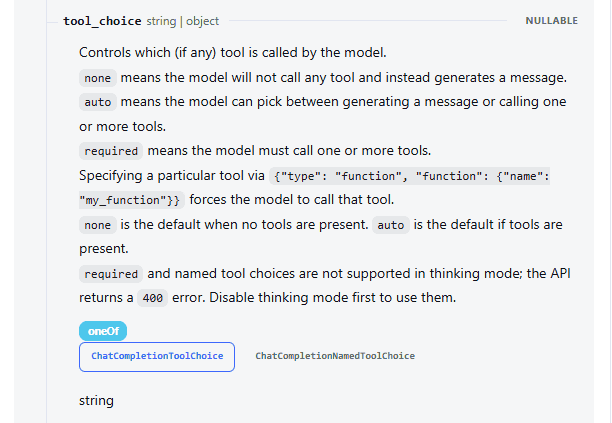
When no tools are supplied, the current default is none. When tools are supplied, the default is auto.
An important consequence of auto is that DeepSeek can decide that a tool is unnecessary and answer directly. An empty tool_calls field is therefore not automatically a bug.
Thinking Mode changes the tool-calling rules
DeepSeek supports Tool Calls while Thinking Mode is enabled, including multi-step reasoning and multiple tool-call sub-turns. However, conversation history has an additional requirement.
For requests that carry the tools parameter, DeepSeek’s Thinking Mode guide currently requires all previous reasoning_content to be passed back in subsequent requests, including reasoning from turns where no tool was called.
If an integration drops required reasoning_content, DeepSeek documents that the request can fail with HTTP 400.
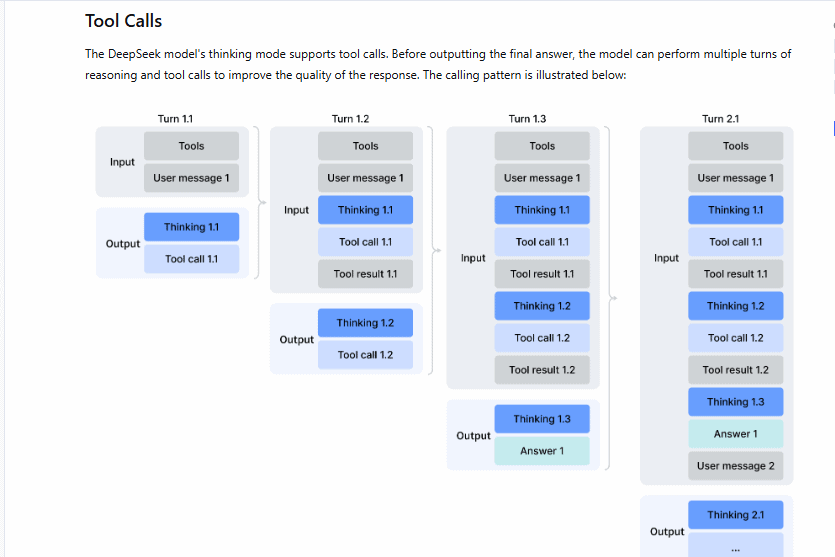
The simplest safe pattern with the Python SDK is to preserve the complete assistant message returned by DeepSeek:
assistant = response.choices[0].message
messages.append(assistant)
That message can contain content, reasoning_content, and tool_calls. Rebuilding it manually from only role, content, and tool_calls can accidentally remove the reasoning field that DeepSeek expects on later tool-enabled turns.
Do not create fake reasoning text to satisfy the requirement. Preserve the actual field returned by the API.
Forced tools have another Thinking Mode limitation
The current Chat Completions reference says tool_choice="required" and a specifically forced function are not supported in Thinking Mode. Using either returns HTTP 400. Disable Thinking Mode first if your Chat Completions workflow requires those tool-choice modes.
This restriction is specific to the API format and mode. Do not automatically apply it to DeepSeek’s Responses API, whose current tool-choice support differs.
Multiple tool calls need multiple matching results
tool_choice="auto" allows DeepSeek to request one or more functions. An application should therefore avoid assuming there will always be exactly one call.
This is why the Python example iterates over:
for tool_call in assistant.tool_calls:
    ...
For each call, independently:
- check the function name;
- parse and validate its arguments;
- execute the approved implementation;
- preserve its call ID;
- append the matching tool result.
Your application does not need to execute independent calls concurrently merely because the model produced them together. Parallel execution is an application-design decision; correctness is more important than adding concurrency.
A tool request can have empty text without being an error
In Chat Completions, inspect both message.tool_calls and finish_reason. DeepSeek currently documents tool_calls as a possible finish reason when the model is requesting a function.
That means this is not a sufficient error check:
if not message.content:
    raise RuntimeError("Empty response")
The text content can legitimately be empty while tool_calls contains the next action your application needs to process.
Other documented finish states include stop, length, content_filter, insufficient_system_resource, and aborted. Treat them according to their meaning rather than assuming every HTTP 200 response is already a complete user-facing answer.
Strict Mode can enforce the function schema—but not business safety
DeepSeek currently provides Strict Mode as a Beta feature for Tool Calls. It is available in both thinking and non-thinking modes and is designed to make generated arguments conform to the supported function JSON Schema.
According to the current Tool Calls guide, Strict Mode requires the Beta base URL:
https://api.deepseek.com/betaEach function supplied in the request must also set:
"strict": true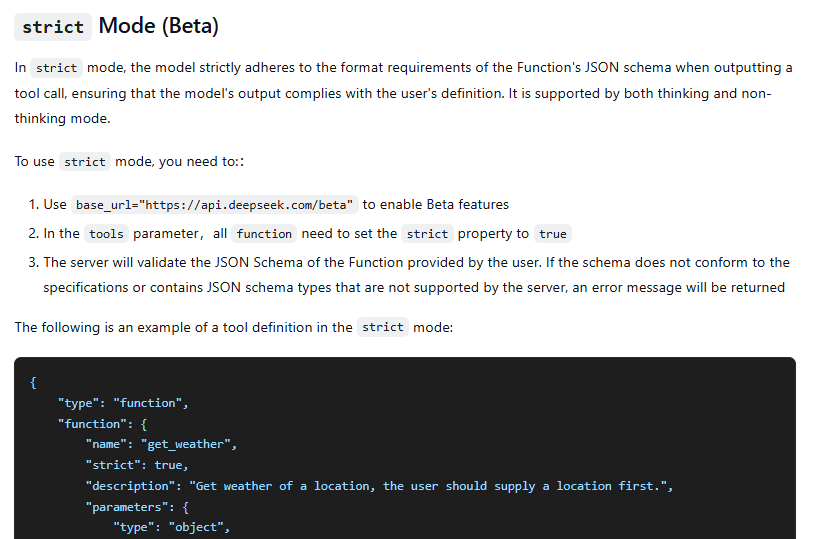
The server validates the tool schema before using it. DeepSeek currently documents Strict Mode support for JSON Schema structures including object, string, number, integer, boolean, array, enum, and anyOf, with additional restrictions on individual keywords.
For example, every property of an object must currently be listed in required, and additionalProperties must be false.
Strict Mode does not determine whether a user is authorized to perform an operation, whether a database value is true, or whether an action is safe. Valid schema and valid business action are separate questions.
Tool Calls vs JSON Output
These features solve different problems:
| Feature | Use it when |
|---|---|
| Tool Calls | You want the model to select or parameterize an external operation your application can execute. |
| JSON Output | You want the model’s answer itself to be structured JSON without invoking an external operation. |
For example, “extract the customer’s name and order ID as JSON” does not inherently need a tool. “Look up order 12345 in our order system” does, because the application needs to perform an external data operation.
Chat Completions and Responses API use different tool-call objects
DeepSeek supports function tools through both its Chat Completions interface and its Responses compatibility API, but the conversation objects are not interchangeable.
| Concept | Chat Completions | Responses API |
|---|---|---|
| Conversation input | messages | input |
| Model tool request | tool_calls | function_call output item |
| Call identifier | tool_call_id in the tool-result message | call_id |
| Return value | role: "tool" message | function_call_output input item |
| State | Client sends relevant message history | DeepSeek’s current implementation is stateless; client resends required input history |
The current Responses API reference supports none, auto, required, and a specifically named function in tool_choice.
DeepSeek also currently treats parallel_tool_calls as ignored in Responses compatibility because parallel tool calling is always enabled there. The max_tool_calls parameter is also ignored, so an application should enforce its own tool-loop limit.
Do not assume built-in OpenAI tools exist on DeepSeek
DeepSeek’s current Responses compatibility documentation lists ordinary function tools as supported. It also documents a narrowly supported custom tool named apply_patch for Codex compatibility.
The Responses API also supports the built-in web_search tool with deepseek-v4-pro. The server runs the search, adds the results to context, and continues the response. With deepseek-flash, web_search is ignored. Other built-in types—including file_search, code_interpreter, computer_use, and mcp—remain documented as ignored.
Use the documented Responses API web_search tool with deepseek-v4-pro when you want hosted search. This server-managed flow differs from a function call that your application executes. Copying a tool configuration does not enable search on an unsupported model or make other unsupported built-in tools work.
Mid-conversation tool insertion depends on the API format
Most applications simply replay tool calls that the model actually returned. Some advanced agent systems, however, need to insert synthetic tool-call history that did not originate from the model.
DeepSeek’s current Tool Calls guide documents different support for that pattern:
- The Responses API supports inserting tool-call items into conversation history.
- The Anthropic-compatible API supports its equivalent tool-use structure.
- Chat Completions does not support arbitrary inserted tool calls mid-conversation in the same way.
If your framework synthesizes tool history, choose an API format that officially supports that behavior rather than fabricating Chat Completions assistant calls.
Streaming Tool Calls require assembling arguments first
Tool calls can also be streamed. In the current Chat Completions stream, the first chunk for a tool call can contain its ID, type, function name, and the beginning of its arguments. Later chunks can continue only the argument string.
Do not parse and execute each argument fragment as if it were complete JSON. Accumulate fragments for the same tool-call index until the model has finished the call, then parse and validate the completed argument string.
Responses API streaming has its own event structure. Do not reuse a Chat Completions SSE parser unchanged for a Responses implementation.
Tool results are data, not trusted instructions
A function can return content from a database, webpage, file, customer record, or external API. That returned text can itself contain untrusted or malformed data.
Passing the result back to the model does not mean your application should automatically obey instructions found inside it. The application—not the language model—should continue to enforce permissions, business rules, and safety boundaries.
This is especially important for tools with side effects.
| Read-only example | Side-effecting example |
|---|---|
| Check product inventory | Place an order |
| Retrieve account status | Issue a refund |
| Read a weather forecast | Send an email |
| Calculate a value | Delete or modify a record |
If a model requests cancel_order, your application should still verify that the user is authenticated, owns the order, is allowed to cancel it, and has provided any required confirmation. The model’s choice of function is not authorization.
Keep agent tool loops bounded
A model can request another tool after receiving the first result, so real agent workflows may require several sub-turns. Avoid an unrestricted while True loop.
Use an application-defined maximum number of tool rounds and stop when:
- DeepSeek returns a final answer instead of another tool call;
- the maximum number of rounds is reached;
- argument validation fails and cannot be recovered safely;
- authorization fails;
- a tool returns a non-recoverable failure;
- the operation is cancelled.
The limit you choose is an application policy, not a universal DeepSeek requirement. Bounding the loop prevents one user request from causing unlimited model calls, external requests, latency, or side effects.
Common DeepSeek Tool Calls problems
| Symptom | What to check |
|---|---|
| No tool call is returned | If tool_choice is auto, the model is allowed to answer directly. Improve the tool description if the function’s purpose is unclear, or use an applicable forced mode when your API mode supports it. |
| Arguments fail JSON parsing | Catch the parsing error and do not execute the function. DeepSeek explicitly warns that generated arguments are not always valid JSON. |
| Unknown parameters appear | Validate generated arguments against the fields your application supports. Do not blindly pass arbitrary keys into a function. |
| Tool result is rejected | Check that the result uses the exact tool_call_id returned by the matching call and follows the assistant tool-call message in history. |
| Thinking-mode follow-up returns HTTP 400 | Check whether previous assistant messages lost their required reasoning_content while tools remained present. |
required fails in Thinking Mode | Chat Completions currently does not support required or named forced tools in Thinking Mode. Use auto or deliberately disable thinking when forced selection is needed. |
| Strict Mode rejects the request before inference | Check the function’s JSON Schema against DeepSeek’s current Beta Strict Mode requirements. |
| Streaming arguments are malformed | Make sure you concatenate all argument fragments belonging to the same tool call before parsing JSON. |
| Agent never reaches a final answer | Use a bounded tool loop, inspect repeated calls, and stop when the application-defined round limit is reached. |
| Behavior differs through another provider | Confirm which company is serving the model. A third-party DeepSeek endpoint can implement tool behavior differently from the official DeepSeek API. |
A practical checklist before using DeepSeek Tool Calls in an application
- Use specific tool names and descriptions. Make the intended purpose and parameters clear to the model.
- Allowlist executable functions. Never dynamically execute an arbitrary model-generated function name.
- Parse arguments defensively. Invalid JSON must not reach the function implementation.
- Validate the data after parsing. Check types, required fields, allowed values, and application-specific constraints.
- Preserve call identifiers. Every tool result must be paired with the ID of the call it answers.
- Handle all returned tool calls. Do not assume there will always be exactly one.
- Preserve full assistant history in Thinking Mode. In tool-enabled conversations, dropping required
reasoning_contentcan break later requests. - Keep authorization outside the model. A requested action is not permission to execute it.
- Bound the number of tool rounds. Avoid unlimited agent loops.
- Separate DeepSeek failures from tool failures. A database timeout or downstream API failure is not automatically a DeepSeek API error.
- Check the API format before copying examples. Chat Completions, Responses, and Anthropic-compatible interfaces do not use identical tool-history objects.
- Recheck current documentation for Beta features. Strict Mode and compatibility behavior can change independently of older tutorials.