
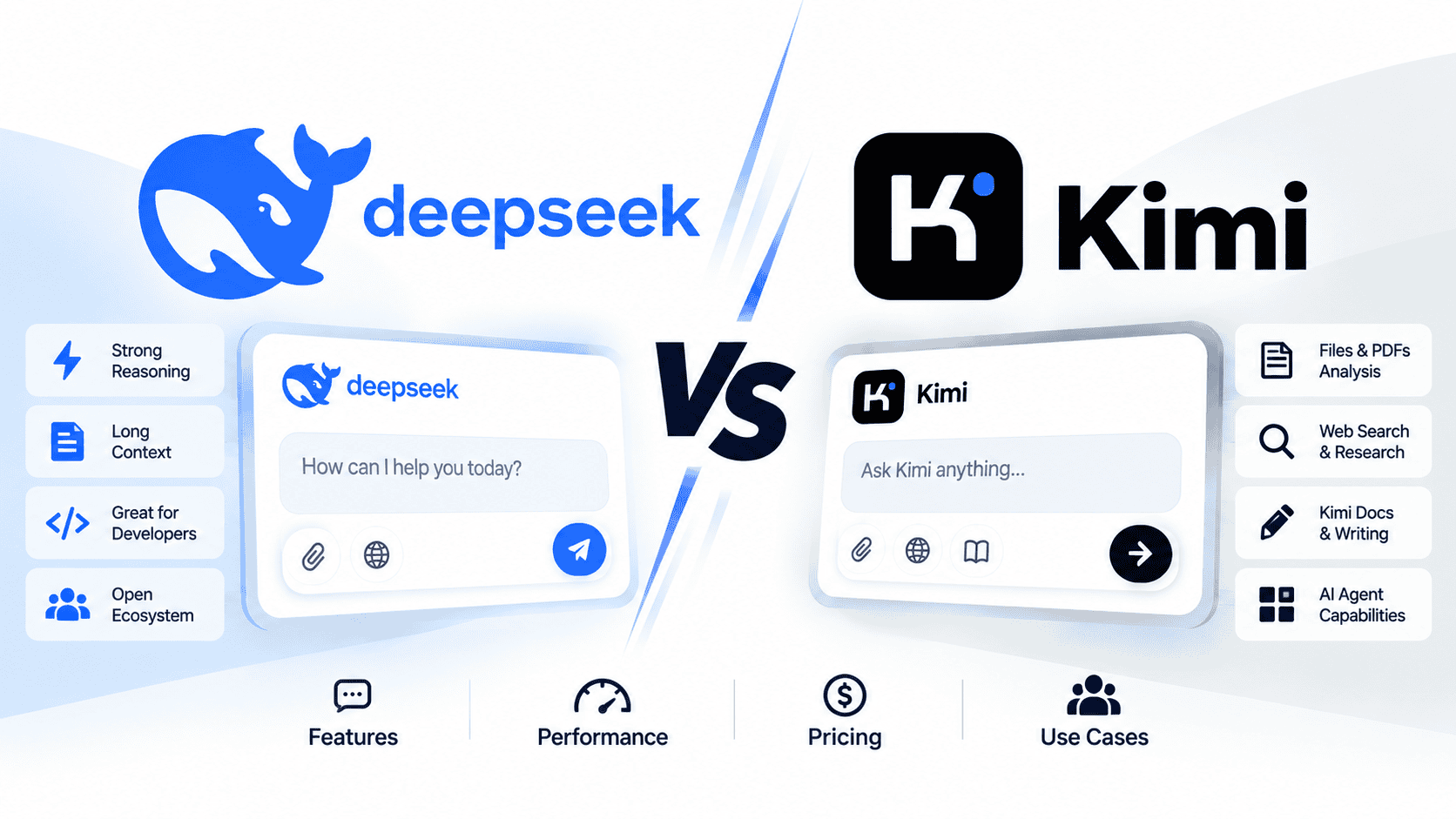

Kimi is usually the better choice if you want a broader productivity and agentic-work ecosystem: Kimi K3, Kimi Work, Kimi Code, long-context knowledge work, slides, sheets, documents, native multimodal workflows, and open-weight Kimi K3 access. DeepSeek is often the better choice if you want a simpler cost-focused API decision, strong long-context text and agent workflows, lower token pricing, OpenAI/Anthropic-compatible integrations, and current hosted models such as deepseek-flash and deepseek-v4-pro.
The right answer is not “DeepSeek always wins” or “Kimi always wins.” Choose based on the surface you actually need: DeepSeek Chat, DeepSeek Harness, the DeepSeek API Platform, Kimi, Kimi Work, Kimi Code, the Kimi API Platform, or open-weight model resources.
Sources checked: October 10, 2026. Model names, prices, limits, product access, and API features can change. Verify current details on the official DeepSeek Models & Pricing page, the Kimi API Platform, the Kimi K3 model page, and official model cards before making technical or business decisions.
DeepSeek vs Kimi: quick verdict
| Need | Better starting choice | Why | What to verify | Main caveat |
|---|---|---|---|---|
| Everyday AI assistant | Kimi for broader productivity; DeepSeek for focused chat/API use | Kimi is built around Kimi K3, Kimi Work, Kimi Code, and knowledge-work workflows. DeepSeek is strong for direct chat, Harness, API, and cost-sensitive model use. | Kimi official site and DeepSeek official site. | Consumer chat behavior and API behavior are separate. |
| Writing and editing | Either | Both can draft, rewrite, summarize, explain, and structure text. Kimi is stronger when the writing task involves files, research, slides, sheets, or long-context knowledge work. | Whether the workflow needs documents, tools, or only text output. | Both require human review before publishing important work. |
| Long documents and knowledge work | Kimi | Kimi K3 is positioned for long-horizon coding, knowledge work, deep reasoning, and 1M-token context workflows. | Kimi K3 technical blog and current Kimi product limits. | Do not assume every Kimi surface has the same limits or tools. |
| Slides, sheets, and office-style work | Kimi | Kimi Work is designed around local files, browser automation, scheduled work, PowerPoint decks, Excel sheets, and complex productivity tasks. | Kimi Work. | Local-file access and automation should be used only with files you are allowed to share or modify. |
| Coding help | Depends on workflow | Kimi is stronger for Kimi Code and long-horizon agentic coding. DeepSeek is attractive for cost-sensitive coding agents and structured API workflows. | Kimi Code and DeepSeek Tool Calls. | Generated code still needs tests, review, and security checks. |
| Agentic coding | Kimi for full coding workspace; DeepSeek for focused API economics | Kimi Code runs on desktop, terminal, and IDE plugins. DeepSeek API supports Tool Calls, JSON Output, Responses API, and Anthropic-compatible routes. | Agent framework, model choice, repo privacy, and API pricing. | Agent loops can multiply cost and risk on both platforms. |
| Low-cost API usage | DeepSeek | DeepSeek publishes a compact pricing table for deepseek-flash and deepseek-v4-pro. Kimi K3 is a more expensive flagship API model. | DeepSeek pricing and Kimi API pricing. | Lower token price does not automatically mean lower total project cost. |
| Highest-value complex work | Kimi K3, if cost is justified | Kimi K3 is positioned for complex software engineering, knowledge work, deep reasoning, native multimodality, and 1M context. | Kimi K3 GitHub. | Kimi K3 API cost is much higher than DeepSeek Flash. |
| Image and vision workflows | Kimi for native multimodal K3 workflows; DeepSeek Flash for image understanding | Kimi K3 is native multimodal. DeepSeek Flash supports Vision, while DeepSeek V4 Pro does not according to the current DeepSeek model table. | DeepSeek Vision and Kimi K3. | Image understanding is not the same as image generation or image editing. |
| Open weights and local deployment | Kimi K3 for Kimi-specific frontier open weights; DeepSeek for DeepSeek-specific open weights | Kimi K3 releases full model weights under the Kimi K3 License. DeepSeek also publishes official model resources on Hugging Face and GitHub. | Kimi K3 on Hugging Face and DeepSeek on Hugging Face. | Open weights do not automatically mean easy, cheap, private, or legally simple deployment. |
| Private or regulated work | Approved workflow only | Hosted chat, API, local weights, and third-party providers all have different data-handling implications. | Provider policy, API terms, enterprise agreement, and deployment route. | Never send sensitive or regulated data to an unapproved workflow. |
| Business/team use | Kimi for productivity workspace; DeepSeek for focused API/open-weight strategy | Kimi is stronger when teams need Kimi Work, Kimi Code, files, research, and office-style workflows. DeepSeek is stronger when teams want a compact API model set and cost control. | Product access, billing, data policy, and governance needs. | A workspace product and a raw API are different buying decisions. |
What exactly are we comparing?
A fair DeepSeek vs Kimi comparison must separate product layers. Kimi is not only a chatbot, and DeepSeek is not only an API. Each name can refer to several different surfaces.
| Layer | DeepSeek | Kimi | Why it matters |
|---|---|---|---|
| Consumer assistant | DeepSeek Chat and official app routes. | Kimi Chat and the main Kimi app experience. | This is what most ordinary users mean. |
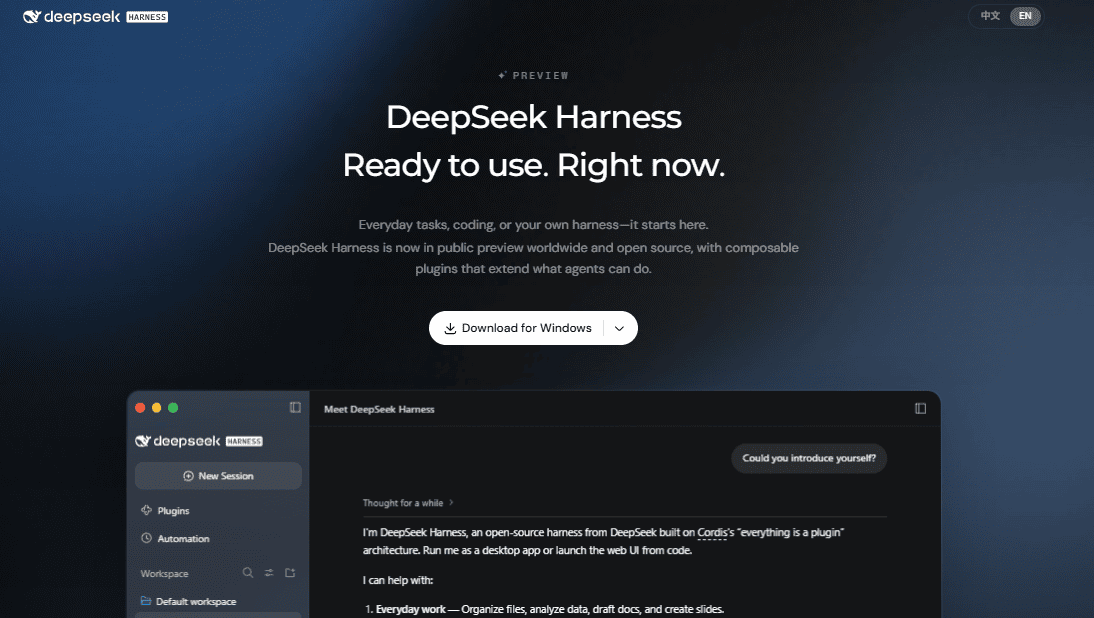
| Desktop/productivity workspace | DeepSeek Harness for agent-style desktop work. | Kimi Work for local files, browser automation, scheduled tasks, PowerPoint, Excel, and workflow automation. | Kimi has the broader productivity-workspace story. |
| Coding workspace | DeepSeek API and agent integrations such as Claude Code, Codex, OpenCode, and Harness routes where documented. | Kimi Code on desktop, CLI, and IDE plugins. | Kimi Code is closer to a dedicated coding-agent product. |
| Hosted API | DeepSeek API Platform with deepseek-flash and deepseek-v4-pro. | Kimi API Platform with Kimi K3, K2.7 Code, K2.6, and official tools. | API pricing and capabilities must be compared model by model. |
| Models | Current hosted models include deepseek-flash and deepseek-v4-pro. | Kimi K3, Kimi K2.7 Code, Kimi K2.6, and related Kimi models. | Do not compare an old model name or one surface against another current product unfairly. |
| Open weights | DeepSeek model resources on Hugging Face and GitHub. | Kimi K3 weights on Hugging Face and code/model materials on GitHub. | Open-weight use is separate from hosted API use. |
| Privacy and governance | DeepSeek hosted services, API terms, and local/open-weight options. | Kimi consumer products, Kimi API, Kimi Work/Code, and open-weight Kimi K3 route. | Risk depends on product surface, not just the model name. |
Everyday chat and writing
For ordinary chat, both DeepSeek and Kimi can answer questions, explain concepts, write drafts, summarize material, rewrite text, and help with coding snippets. Kimi becomes more attractive when the task involves larger knowledge-work flows: long documents, research, office files, slides, sheets, browser automation, or coding sessions that need a dedicated desktop/CLI/IDE assistant.
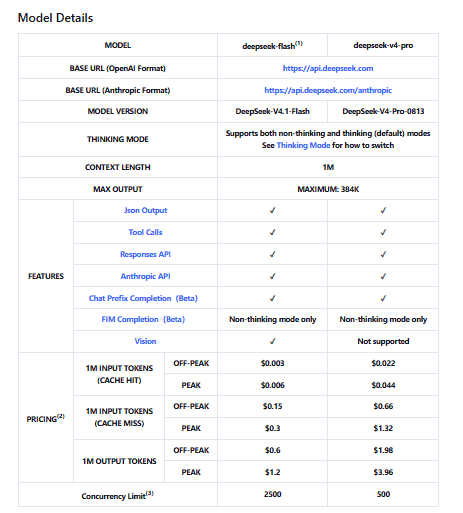
DeepSeek is attractive when you want a focused model ecosystem with a simpler hosted API decision. The current DeepSeek model table lists a compact pair of model IDs—deepseek-flash and deepseek-v4-pro—with the same 1M context length and 384K maximum output shown in the table. That makes DeepSeek easier to evaluate when the workload is mostly text, coding, structured output, and agent calls.
Practical recommendation: use Kimi if your “chat” work often becomes real work across documents, websites, codebases, slides, spreadsheets, and research. Use DeepSeek if you mostly need direct chat or a clear, lower-cost API route for text and coding workflows.
Research, long documents, slides, sheets, and knowledge work
Kimi’s strongest advantage is knowledge work. The Kimi K3 materials describe the model as a 2.8T-parameter native multimodal model with a 1-million-token context window, designed for long-horizon coding, knowledge work, and reasoning. The Kimi API Platform also positions Kimi K3 for software engineering, knowledge work, and deep reasoning.
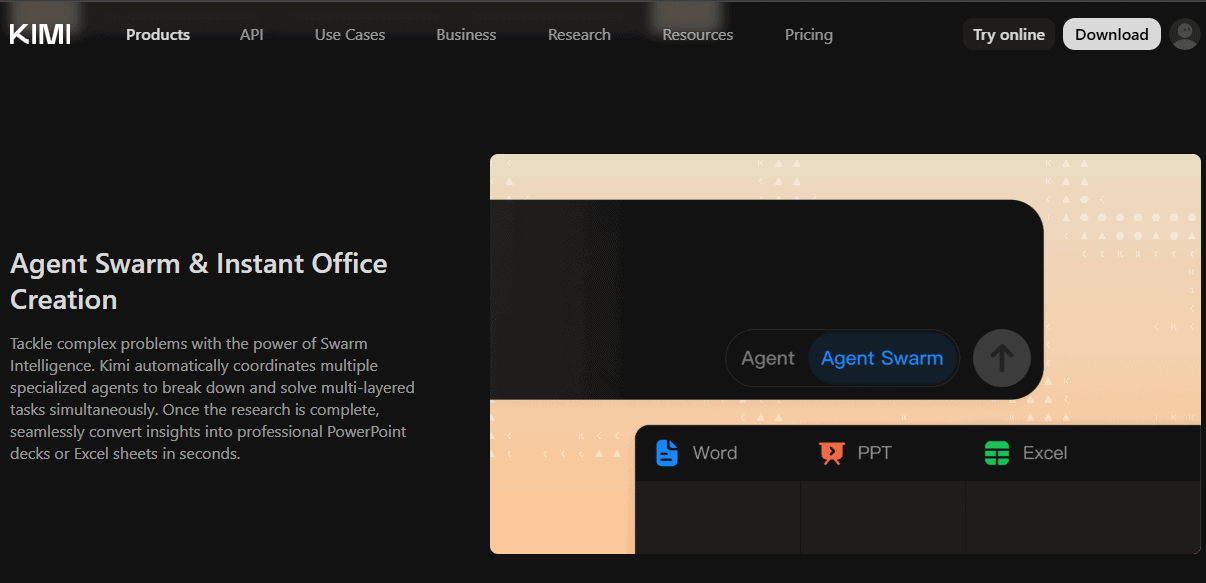
Kimi Work extends that model story into a product surface. Its official page describes a local agent connected to local folders, browser automation through Kimi Browser Extension, scheduled tasks, Python and shell execution, and the ability to convert research into PowerPoint decks or Excel sheets. That makes Kimi a stronger fit for users who want an AI coworker-style product rather than only a model endpoint.
| Knowledge-work task | Better fit | Why | What to verify |
|---|---|---|---|
| Long document review | Kimi | Kimi K3 is built around 1M context and knowledge-work positioning. | Exact file limits and the surface you use: chat, Kimi Work, or API. |
| Research brief | Kimi | Kimi Work and Kimi API tools include web search/fetch-style workflows. | Source quality, citation behavior, and whether web search is available in your plan/API route. |
| Slides and decks | Kimi | Kimi Work explicitly positions office creation and PowerPoint-style output as part of the desktop workflow. | Export format, editing control, and whether the output needs manual cleanup. |
| Spreadsheets and CSVs | Kimi | Kimi API lists Excel as an official tool for Excel and CSV analysis, and Kimi Work emphasizes Excel workflows. | Data sensitivity and file-size limits. |
| Structured text processing at scale | DeepSeek | DeepSeek’s lower-cost API can be more attractive for high-volume text extraction, classification, and structured summaries. | Token cost, retries, rate limits, and validation rules. |
Coding and agentic coding
Both ecosystems can help with coding, but they are optimized for different developer choices.
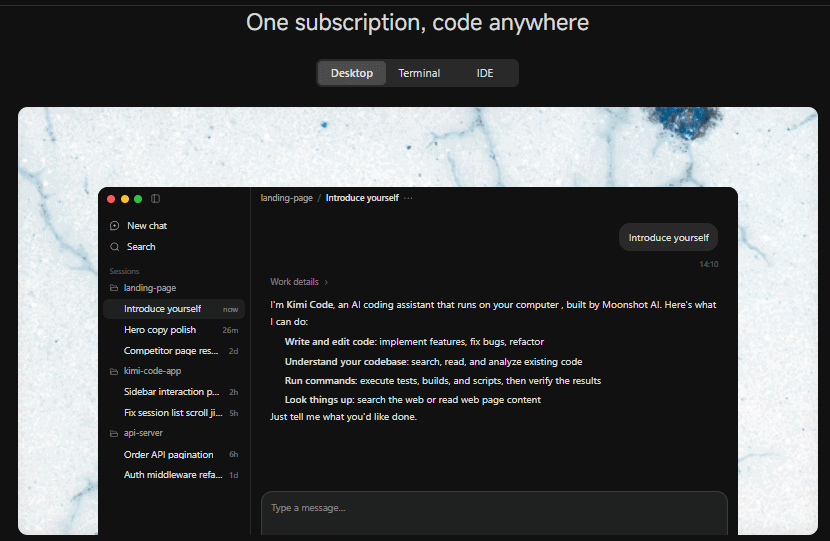
Kimi is stronger when you want a coding product, not only a model. Kimi Code is available on desktop, CLI, and IDE plugins. Its product page says it can write and edit code, understand a codebase, run commands such as tests and builds, and look up information on the web. Kimi K3 is also presented as a model for long-horizon coding and large-repository work.
DeepSeek is stronger when you want a focused hosted API for cost-sensitive coding agents. The current DeepSeek API table lists Tool Calls, JSON Output, Responses API, Anthropic API support, 1M context, and 384K max output for both deepseek-flash and deepseek-v4-pro. That makes it practical for automated code review, multi-step agents, structured patch plans, and backend coding assistants.
| Coding task | Better starting point | Why | Safety rule |
|---|---|---|---|
| Explain a snippet | Either | Both can explain code when given enough context. | Ask for assumptions, edge cases, and examples. |
| Debug a small error | Either | Both can reason from error text, expected behavior, and code snippets. | Run the fix and add a regression test. |
| Repo-level coding agent | Kimi Code | Kimi Code is explicitly built for desktop, terminal, and IDE workflows. | Do not give private repositories to unapproved tools. |
| High-volume automated code review | DeepSeek API | DeepSeek API is easier to price for repeated text/code processing. | Use queues, validation, and human review. |
| Vision-in-the-loop frontend debugging | Kimi K3 or deepseek-flash | Kimi K3 is native multimodal; DeepSeek Flash supports Vision. | Do not assume DeepSeek V4 Pro supports images. |
| Complex long-horizon build | Kimi K3 / Kimi Code, then evaluate DeepSeek as cost control | Kimi K3 is positioned for long engineering sessions; DeepSeek may reduce cost in supporting roles. | Measure success per task, not just cost per token. |
API pricing and production use
Do not compare Kimi membership or Kimi Code access directly with DeepSeek token pricing. Consumer products, desktop agents, coding products, and APIs are different categories.
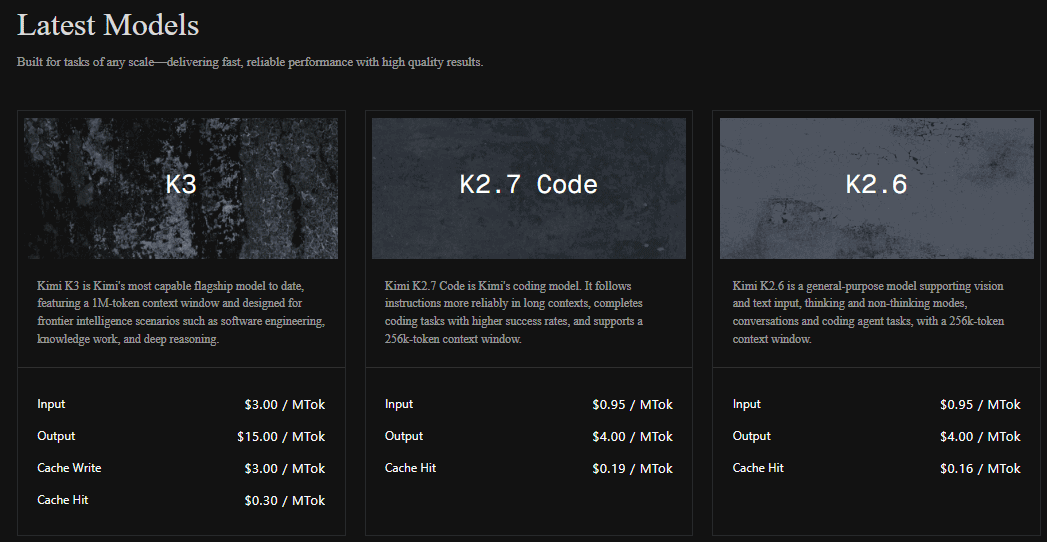
For developer API use, the pricing difference is significant. The Kimi API Platform currently lists Kimi K3 at $3.00 per million input tokens, $15.00 per million output tokens, $3.00 per million cache-write tokens, and $0.30 per million cache-hit tokens. It also lists Kimi K2.7 Code and Kimi K2.6 at lower rates than K3.
The DeepSeek Models & Pricing page lists prices per 1M tokens and separates cached input, uncached input, and output pricing for deepseek-flash and deepseek-v4-pro. DeepSeek Flash is generally the more cost-sensitive route, while V4 Pro is the higher-priced DeepSeek Pro model.
| Cost question | DeepSeek | Kimi | Practical decision |
|---|---|---|---|
| Which API is simpler to price? | DeepSeek | Kimi has more product/model/tool surfaces. | DeepSeek is easier for simple model-routing decisions. |
| Which is cheaper for high-volume text? | Usually DeepSeek Flash, after workload testing. | Kimi K3 is much more expensive per token. | Use DeepSeek for routine bulk text if output quality is sufficient. |
| Which may be worth higher cost? | DeepSeek V4 Pro for harder DeepSeek-specific text work. | Kimi K3 for complex agentic coding, knowledge work, and multimodal workflows. | Measure completed task cost, not only token price. |
| What changes final cost? | Input/output tokens, cache hit rate, tool loops, retries, thinking effort, model choice, and peak/off-peak rules. | Input/output tokens, cache write/hit, tool use, K3 vs K2.7/K2.6, web search, code execution, and workflow design. | Run a small real workload estimate before production. |
Model choice: DeepSeek Flash/Pro vs Kimi K3/K2.7/K2.6
The model choice matters more than the brand name. A fair comparison should not compare Kimi K3 against the cheapest DeepSeek model for every task, or DeepSeek V4 Pro against Kimi’s entire product suite.
| Model or product | Best for | Key facts to verify | Main caution |
|---|---|---|---|
deepseek-flash | Cost-sensitive text, coding help, high-throughput agent work, and image understanding. | Current model version, Vision support, pricing, concurrency, Thinking Mode, Tool Calls, JSON Output. | Lower cost does not automatically mean best quality for every task. |
deepseek-v4-pro | Higher-end DeepSeek reasoning, text, coding, and agent workloads. | Current model version DeepSeek-V4-Pro-0813, pricing, 1M context, 384K max output, no Vision support if current table still says so. | Do not use it for image input unless current docs change. |
| Kimi K3 | Long-horizon coding, knowledge work, deep reasoning, multimodal work, and high-value complex workflows. | 1M context, native vision, open weights, API price, Kimi K3 License, preserved thinking requirements. | API cost is much higher than DeepSeek Flash. |
| Kimi K2.7 Code | Long-context coding tasks at lower cost than K3. | Current Kimi API model card/pricing and context window. | Do not assume it equals K3 on complex agentic tasks. |
| Kimi K2.6 | General-purpose Kimi API work with vision/text and coding-agent tasks. | Current context length, pricing, thinking/non-thinking behavior, vision/text support. | Do not treat it as the same model as Kimi K3. |
Files, images, vision, and multimodal workflows
Kimi has the broader multimodal and workflow ecosystem. Kimi K3 is described by Moonshot as native multimodal, understanding text, images, and video inside the same model, with a 1M-token context window. Kimi Work also emphasizes local files, browser automation, Python execution, scheduled tasks, PowerPoint decks, and Excel sheets.
DeepSeek is narrower but still useful. DeepSeek Flash supports image understanding through the official DeepSeek Vision route. The current DeepSeek pricing table marks Vision support for deepseek-flash and not for deepseek-v4-pro. That means you should not copy a Flash vision example and simply switch the model to V4 Pro.
| Workflow | DeepSeek | Kimi | Recommendation |
|---|---|---|---|
| Image understanding | Use deepseek-flash. | Use Kimi K3 or another current Kimi multimodal route. | Either can work; choose by cost, product surface, and task complexity. |
| Image generation | Do not assume standard DeepSeek API generates images. | Kimi K3 materials emphasize native multimodal knowledge work, not a generic image-generator claim in every surface. | Check the exact model/product route before promising generation. |
| File-heavy research | Possible through custom pipelines or Harness where supported. | Kimi Work is the stronger official productivity route. | Use Kimi when documents, slides, sheets, and local file workflows are central. |
| Excel/CSV analysis | Possible through custom code/API pipelines. | Kimi API lists Excel as an official tool for Excel and CSV files. | Kimi is the better default for spreadsheet-centered workflows. |
| Python execution | Use your own environment or tool-call system. | Kimi API lists Code-Runner, and Kimi Work describes background Python/script workflows. | Kimi is stronger for end-user workflow automation. |
Open weights and local deployment
Kimi K3 is an open-weight release. The official Kimi K3 GitHub repository says Kimi K3 is an open-weight native multimodal agentic model and that both the code repository and model weights are released under the Kimi K3 License. It also states that Kimi K3 can be accessed through the Kimi API by selecting kimi-k3, and that deployment routes include vLLM, SGLang, and TokenSpeed.
DeepSeek also publishes official model resources through DeepSeek on Hugging Face and DeepSeek on GitHub. For example, the DeepSeek-V4.1-Flash model card includes local serving examples and says the repository and model weights are licensed under the MIT License.
Open weights do not make deployment automatically cheap or private. They also do not mean the hosted product, API backend, training data, or full training pipeline is open. Before using either model family locally, check the exact model card, license, hardware feasibility, serving stack, and third-party terms.
Privacy and data controls
Privacy should be evaluated by route, not by brand. Hosted chat, desktop apps, cloud APIs, local open weights, third-party gateways, and coding agents all have different risk profiles.
For DeepSeek, review the official DeepSeek Privacy Policy and DeepSeek Open Platform Terms before using hosted chat or API workflows with sensitive data.
For Kimi API, the official Kimi API Data Processing and Security page states that user data submitted through the API, including input content and model outputs, is not used to train or improve Kimi models and is used only to fulfill the current API request. That statement applies to the documented API context; do not automatically apply it to every Kimi consumer product, third-party provider, or local deployment without checking the relevant terms.
| Data situation | Safer approach | What to avoid |
|---|---|---|
| Casual public prompts | Either tool may be acceptable if the content is low risk. | Adding unnecessary personal identifiers. |
| Private company code | Use an approved workplace workflow or local/self-hosted route if required. | Pasting secrets, API keys, proprietary code, or customer logs. |
| Local files and automation | Use Kimi Work or DeepSeek Harness only with files and folders you are authorized to access. | Letting an agent modify important files without review. |
| Customer records or regulated data | Use only approved enterprise or internal workflows with legal/security review. | Uploading raw sensitive data into consumer chat. |
| Open-weight deployment | Secure logs, storage, access, network exposure, and prompts. | Assuming local means private by default. |
Business and team use
Kimi is stronger for teams that need a workspace product. Kimi Work is positioned as a local agent for deep workflows, browser automation, scheduled tasks, and office creation. Kimi Code is positioned as a coding assistant across desktop, terminal, and IDE plugins. Kimi API adds K3, K2.7 Code, K2.6, and official tools such as Web Search, Memory, Excel, Code-Runner, Fetch, and Convert.
DeepSeek is stronger for teams that want a focused model/API layer. Its compact current model table, OpenAI/Anthropic-compatible base URLs, JSON Output, Tool Calls, Responses API, and cost-sensitive Flash route make it easier to wire into backend services, agents, and batch systems.
For organizations, the best choice depends on governance. A team that needs an end-user research/coding/productivity workspace may prefer Kimi. A team building its own model routing, coding-agent backend, document pipeline, or long-context text service may prefer DeepSeek for cost control and simpler model selection.
Common misconceptions
| Myth | More accurate answer | What to check |
|---|---|---|
| “DeepSeek is just a cheaper Kimi.” | DeepSeek is often cheaper at the API level, but Kimi offers broader productivity, coding, file, and knowledge-work products. | Product surface and workload. |
| “Kimi is only a chatbot.” | Kimi includes Kimi Chat, Kimi Work, Kimi Code, Kimi API, Kimi K3 open weights, and official tools. | Official Kimi product pages. |
| “Kimi K3 is the same thing as Kimi Chat.” | Kimi K3 is a model. Kimi Chat is one product surface that may use Kimi models. | Model page vs product route. |
| “Kimi API and Kimi Work are the same product.” | Kimi API is for developers. Kimi Work is a desktop productivity agent. | API docs and Kimi Work page. |
| “DeepSeek Chat and DeepSeek API are the same thing.” | DeepSeek Chat is a consumer route. DeepSeek API is a developer platform with token-based billing. | DeepSeek Chat and DeepSeek API docs. |
| “DeepSeek is always better at coding.” | DeepSeek can be strong for cost-sensitive coding agents, but Kimi Code and Kimi K3 are specifically positioned for long-horizon agentic coding. | Real coding workload, test pass rate, security review, and cost. |
| “Kimi is always better because K3 is bigger.” | A larger flagship model may be overkill or too expensive for routine extraction, classification, and text automation. | Cost per completed task. |
| “Kimi K3 open weights mean zero cost.” | Open weights still require infrastructure, serving, security, monitoring, and possibly inference partners. | Model card, license, and deployment route. |
| “DeepSeek Flash Vision means DeepSeek Pro supports Vision.” | The current DeepSeek model table marks Vision for deepseek-flash, not for deepseek-v4-pro. | Current DeepSeek model table. |
| “Image understanding means image generation.” | They are different capabilities. Do not claim either ecosystem generates or edits images in a specific surface unless that surface’s docs support it. | Exact model/product documentation. |
| “Third-party Kimi or DeepSeek tools are official.” | Gateways, hosted providers, browser extensions, and IDE wrappers may use these models without being official. | Publisher, terms, privacy policy, and model route. |
Use Kimi if…
- You need a broad productivity workspace, not only a model API.
- You want Kimi Work for local files, browser automation, scheduled tasks, slides, sheets, and documents.
- You want Kimi Code for desktop, terminal, and IDE coding-agent workflows.
- You need strong long-context knowledge work and can justify Kimi K3’s higher API cost.
- You want native multimodal Kimi K3 workflows where supported.
- You want open-weight Kimi K3 access and are prepared to evaluate the Kimi K3 License and infrastructure requirements.
Use DeepSeek if…
- You need a simple cost-focused API decision.
- You want hosted model choices such as
deepseek-flashanddeepseek-v4-pro. - You are building cost-sensitive coding agents or text-heavy backend workflows.
- You need OpenAI/Anthropic-compatible DeepSeek API workflows.
- You need JSON Output, Tool Calls, Responses API, Anthropic API, and long-context text workflows in a compact API surface.
- You want DeepSeek-specific model behavior or DeepSeek open-weight experiments.
Use both if…
- You use Kimi for knowledge work, Kimi Work, Kimi Code, and Kimi K3 long-context workflows while using DeepSeek for selected text-heavy or cost-sensitive backend workloads.
- You want redundancy across Chinese model providers.
- You want to benchmark each ecosystem on your own tasks before choosing a production route.
- You use Kimi K3 open weights for local experiments and DeepSeek hosted API as a production fallback.
- You use Kimi for high-value complex workflows and DeepSeek for lower-cost structured text processing.
Avoid both for these uses unless you have an approved workflow
- Unsupervised medical, legal, financial, or safety-critical decisions.
- Confidential company data without organizational approval.
- Customer records, regulated data, identity documents, private legal files, or health records.
- Passwords, API keys, private keys, tokens, and credentials.
- Private repositories, proprietary source code, and production logs containing sensitive information.
- Public claims that require exact current sources but have not been verified.
Official resources used in this comparison
Use these official resources to verify models, products, prices, licenses, and data-handling details before making a final decision:
- Official DeepSeek website
- DeepSeek Chat
- DeepSeek Harness
- DeepSeek API Platform
- DeepSeek API Docs
- DeepSeek Models & Pricing
- DeepSeek Vision guide
- DeepSeek JSON Output guide
- DeepSeek Tool Calls guide
- DeepSeek on Hugging Face
- DeepSeek on GitHub
- Kimi official site
- Kimi K3 model page
- Kimi K3 technical blog
- Kimi API Platform
- Kimi Work
- Kimi Code
- Kimi K3 on GitHub
- Kimi K3 on Hugging Face
- Kimi API Data Processing and Security
Final recommendation
Choose Kimi if you want a broader AI productivity and coding ecosystem: Kimi K3, Kimi Work, Kimi Code, long-context knowledge work, local files, browser automation, PowerPoint and Excel workflows, native multimodality, and open-weight Kimi K3 access.
Choose DeepSeek if your decision is technical and cost-driven: deepseek-flash, deepseek-v4-pro, lower-cost text-heavy API calls, structured output, tool calls, coding agents, Anthropic/OpenAI-compatible integration, and focused long-context text workflows.
For many serious users, the best answer is not “DeepSeek or Kimi.” It is Kimi for high-value knowledge work and agentic coding, and DeepSeek for selected cost-sensitive text, coding, and backend workloads, with clear rules for what data can be sent where.
FAQ
Is DeepSeek better than Kimi?
DeepSeek can be better for focused hosted API use, cost-sensitive text workloads, long-context agent workflows, and DeepSeek-specific model behavior. It is not universally better than Kimi.
Is Kimi better than DeepSeek?
Kimi is usually better if you need a broader productivity and agentic-work ecosystem: Kimi Work, Kimi Code, Kimi K3, long documents, slides, sheets, local file workflows, browser automation, and native multimodal knowledge work. It is not automatically better for cost-sensitive API automation.
Which is better for everyday use?
Kimi is often better for everyday users who want a broad assistant for documents, research, coding, and office-style workflows. DeepSeek is useful for direct chat, DeepSeek Harness, and focused AI model access.
Which is better for coding?
Kimi is stronger when you want Kimi Code, desktop/CLI/IDE workflows, and long-horizon software engineering with Kimi K3. DeepSeek is stronger when you need lower-cost coding-agent API calls, structured output, and compact model routing. In both cases, generated code should be tested and reviewed.
Which is better for agentic coding?
Kimi is often the better starting point for agentic coding as a product because Kimi Code is built for desktop, terminal, and IDE workflows. DeepSeek is better when you are building your own cost-sensitive coding agent or backend pipeline through the API.
Which is cheaper?
DeepSeek is generally the cheaper starting point for high-volume text/API workloads, especially through deepseek-flash. Kimi K3 is more expensive but may justify the cost for high-value complex coding, knowledge work, and multimodal agent workflows. Compare cost per completed task, not only cost per token.
Which has the better API?
DeepSeek has the simpler current hosted API model set and is easier to price. Kimi API has a broader tool ecosystem and models such as Kimi K3, K2.7 Code, and K2.6. Use DeepSeek for focused text/agent economics; use Kimi when the official tools and K3 capabilities matter.
Which handles files and documents better?
Kimi is the better default for file and document workflows because Kimi Work is designed around local folders, browser automation, scheduled tasks, PowerPoint decks, Excel sheets, and long knowledge-work tasks. DeepSeek can be used in custom document pipelines, but the official API file-upload route should not be treated as the same kind of productivity workspace.
Which handles images better?
Kimi K3 is native multimodal and supports text, images, and video according to its official materials. DeepSeek supports image understanding through deepseek-flash. Use Kimi for broader multimodal knowledge work; use DeepSeek Flash for cost-sensitive image-to-text understanding where it fits.
Does Kimi K3 have open weights?
Yes. The official Kimi K3 materials describe it as an open-weight model and say the model weights are released under the Kimi K3 License. Check the exact model card and license before research, deployment, or commercial use.
Does DeepSeek have open weights?
Yes. DeepSeek publishes official model resources through Hugging Face and GitHub. However, licenses, model sizes, deployment routes, and capabilities differ by release, so check the exact model card before using any model locally or commercially.
Should developers use DeepSeek API or Kimi API?
Developers should test both with their real workload. Use DeepSeek API when cost, simple routing, structured output, and long-context text agents dominate. Use Kimi API when Kimi K3, Kimi tools, web search, Excel, Code-Runner, Fetch, native multimodality, or long-horizon coding justify the higher cost.
Can I use both DeepSeek and Kimi?
Yes. A practical setup is to use Kimi for high-value knowledge work, Kimi Work, Kimi Code, and Kimi K3 tasks, while using DeepSeek for cost-sensitive backend jobs, structured text processing, coding-agent support, and fallback model routing.
What should I not share with either tool?
Do not share passwords, API keys, private keys, confidential files, customer data, regulated records, medical/legal/financial documents, private code, production secrets, or sensitive personal data unless the workflow is approved and secured.