
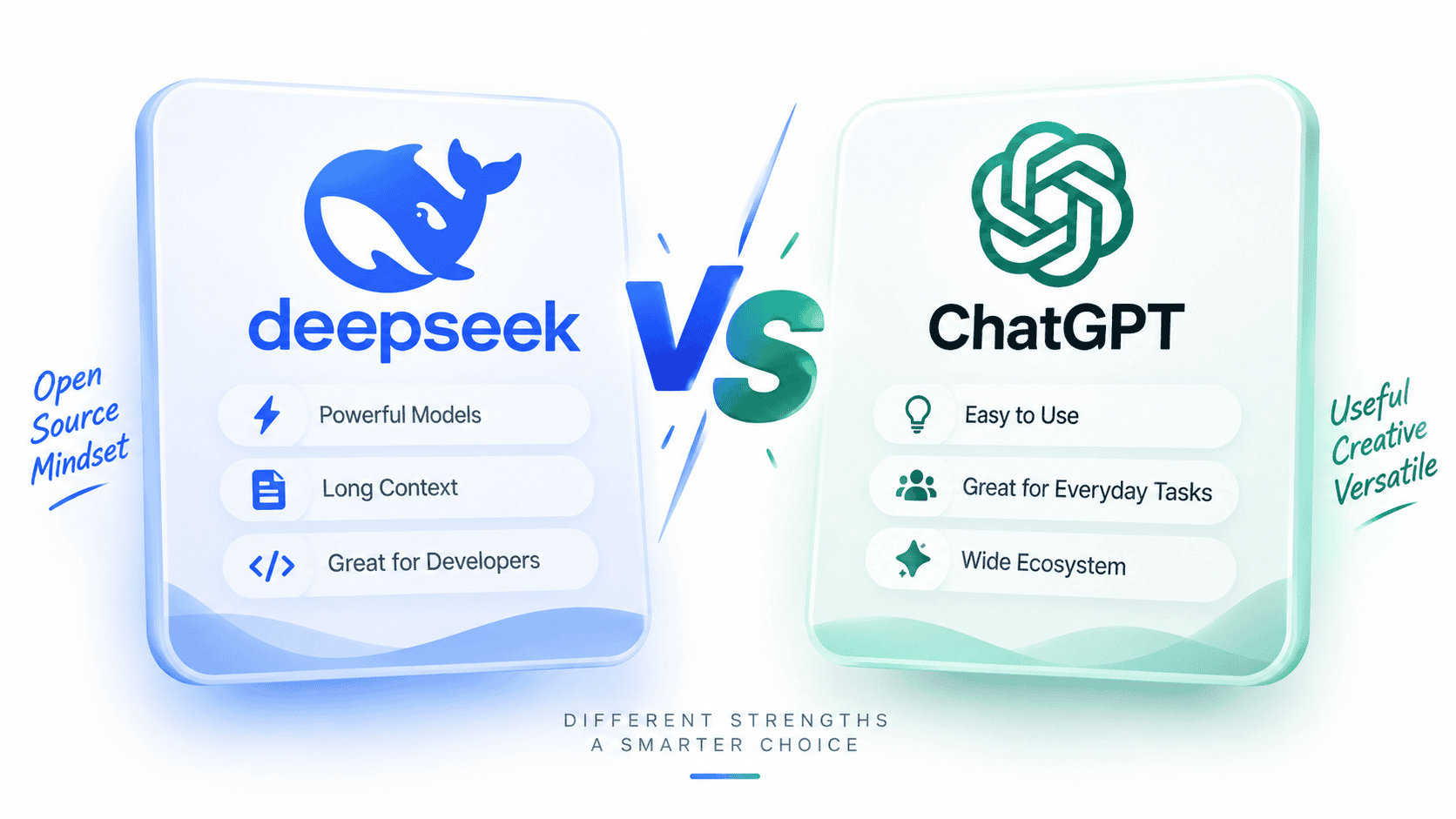

ChatGPT is usually the better all-in-one AI assistant for most everyday users, while DeepSeek is often more attractive for developers and technical teams that care about API cost, open weights, self-hosting options, and high-volume model workloads. The right choice depends on what you are doing, not on a universal winner.
Use ChatGPT if you want a polished product experience with broad tools for writing, studying, coding, web search, file analysis, image creation, voice, memory, projects, and business workspaces. Use DeepSeek if you are evaluating a lower-cost API route, current DeepSeek models such as deepseek-flash and deepseek-v4-pro, open-weight model resources, or custom agent infrastructure where your team can build and monitor the surrounding system.
Sources checked: October 7, 2026. Model names, pricing, limits, privacy settings, and product features can change. Verify current details on the official ChatGPT pricing page, the ChatGPT FAQ, the DeepSeek Models & Pricing page, and the official DeepSeek website before making technical, budget, or workplace decisions.
DeepSeek vs ChatGPT: quick verdict
| Need | Better starting choice | Why | What to verify | Main caveat |
|---|---|---|---|---|
| Everyday AI assistant | ChatGPT | ChatGPT is built as a broad assistant for daily tasks, with official support for writing, studying, planning, coding, image/file analysis, and web search in supported experiences. | ChatGPT FAQ and ChatGPT plans. | Tool access and limits vary by plan. |
| Writing and editing | ChatGPT for integrated workflows; DeepSeek for straightforward text tasks | ChatGPT has stronger surrounding product tools. DeepSeek can still be useful for drafting, rewriting, summarizing, and technical explanations. | Whether files, memory, projects, and search matter for your workflow. | Both need human review before publishing important work. |
| Research with web sources | ChatGPT for consumer research; DeepSeek where its search or custom retrieval route is approved | ChatGPT’s help center says it can search the web and cite sources when current information is needed in supported experiences. | ChatGPT web search notes and DeepSeek Status when using DeepSeek search. | Search improves freshness, but users still need to open and verify sources. |
| Coding help | Depends on workflow | ChatGPT is often easier for interactive coding and productivity. DeepSeek can be attractive for API-driven coding agents and cost-sensitive developer systems. | Tooling, model choice, private-code policy, and API cost. | Generated code must be tested, reviewed, and security-checked. |
| Image generation | ChatGPT | ChatGPT includes image creation in supported plans, while DeepSeek’s standard API Vision route is image understanding through deepseek-flash. | ChatGPT plan limits and DeepSeek Vision docs. | DeepSeek-related image generation usually means Janus/Janus-Pro or a third-party route, not the standard Vision API. |
| Image understanding | Both, depending on surface | ChatGPT supports image analysis in supported product workflows. DeepSeek supports image understanding through deepseek-flash. | DeepSeek Vision and current ChatGPT plan/tool access. | Image understanding is not guaranteed OCR or image editing. |
| File and document workflows | ChatGPT | ChatGPT has official file and Library workflows for supported plans. DeepSeek API file upload is more image-focused in the official API docs. | ChatGPT Library docs and DeepSeek Upload File docs. | Do not upload confidential files without approval. |
| Low-cost API usage | DeepSeek | DeepSeek publishes token-based API pricing for deepseek-flash and deepseek-v4-pro, including cached input, uncached input, output, and peak/off-peak rates. | DeepSeek Models & Pricing. | Lower token price does not automatically mean lower total project cost. |
| Open weights and local deployment | DeepSeek | DeepSeek maintains official model resources on Hugging Face and GitHub. | Exact model card, license, serving route, and hardware requirements. | Open weights do not automatically mean easy, free, private, or fully open-source AI. |
| Private or regulated work | Depends on approved workflow | ChatGPT has data controls and business/workspace options; DeepSeek has its own privacy policy and local/open-weight possibilities. | OpenAI data handling, ChatGPT data controls, and DeepSeek Privacy Policy. | Neither hosted public chat should be treated as automatically approved for sensitive data. |
| Business/team workspace | ChatGPT for managed workspace features; DeepSeek for custom API deployments | ChatGPT has clearer managed workspace and plan structure. DeepSeek is stronger when a team wants to build with API/open-weight infrastructure. | ChatGPT Business/Enterprise plan info and DeepSeek Platform. | Do not compare a ready workspace product to a raw API as if they are the same thing. |
What exactly are we comparing?
A fair DeepSeek vs ChatGPT comparison must separate consumer products from developer APIs and open-weight models. “ChatGPT” usually means the hosted assistant at chatgpt.com and its apps. “DeepSeek” can mean DeepSeek Web Chat, the DeepSeek mobile app, DeepSeek Harness, the DeepSeek API Platform, or public model repositories on Hugging Face and GitHub.
| Comparison layer | ChatGPT / OpenAI side | DeepSeek side | Why it matters |
|---|---|---|---|
| Consumer assistant | ChatGPT web, mobile, and desktop experiences. | DeepSeek Chat and DeepSeek app. | This is what most everyday users mean. |
| Developer API | OpenAI API and OpenAI SDK ecosystem. | Official DeepSeek API Platform and docs. | Pricing, model IDs, context, and features need a separate comparison. |
| Models | Current ChatGPT models by plan and OpenAI API models. | deepseek-flash, deepseek-v4-pro, and open-weight model families. | Model quality and product experience are not the same thing. |
| Tools | Search, file uploads, image creation, data analysis, voice, memory, projects, custom GPTs, and Codex depending on plan. | Tool Calls, JSON Output, Responses API, Thinking Mode, Vision through deepseek-flash, Harness, and open weights. | Tooling often matters more than raw model output. |
| Privacy | ChatGPT data controls, Temporary Chat, memory settings, and business/workspace commitments. | DeepSeek Privacy Policy, hosted API terms, and local/open-weight deployment trade-offs. | Safe use depends on plan, data type, and deployment route. |
Everyday user experience
For most everyday users, ChatGPT is the stronger starting point because it is a broader finished product. OpenAI’s ChatGPT FAQ describes ChatGPT as an assistant for tasks such as brainstorming, writing, studying, planning, math, coding, and analyzing images or files. The same FAQ says ChatGPT can search the web and cite sources in supported experiences. You can read the official overview on the ChatGPT FAQ.
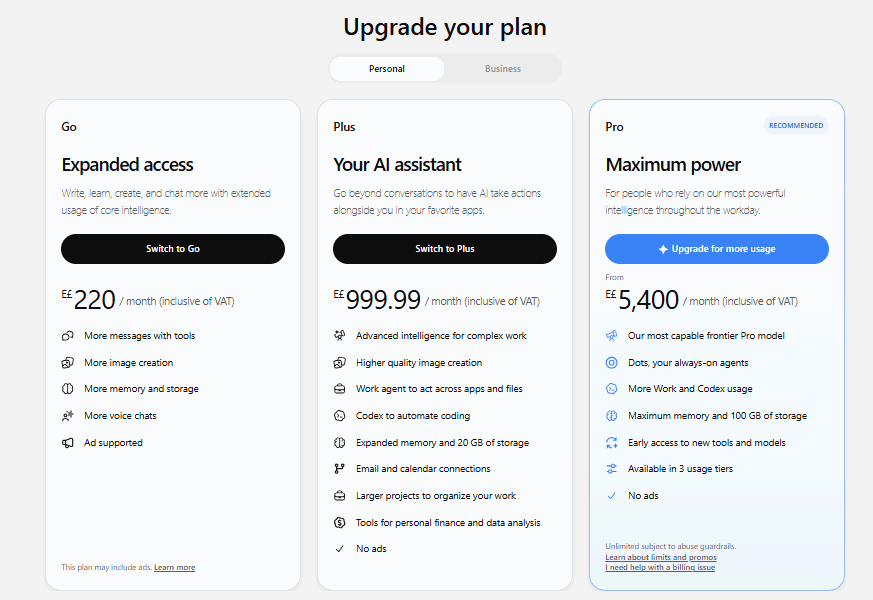
The current ChatGPT pricing page also shows a product ladder with Free, Go, Plus, Pro, Business, Enterprise, and Education-style plan categories. The important point is not simply the plan names; it is that ChatGPT bundles many user-facing tools in one place: uploads, image creation, voice, memory, projects, deep research, Codex, and workspace features depending on the plan.
DeepSeek Chat and the DeepSeek app are useful for direct question-answering, writing, coding help, file reading where supported, and everyday AI tasks. The official DeepSeek homepage links users to DeepSeek Web, Downloads, DeepSeek Harness, the API Platform, and the API Docs. DeepSeek becomes especially compelling when the user is technical enough to care about model IDs, token prices, API features, open weights, and deployment control.
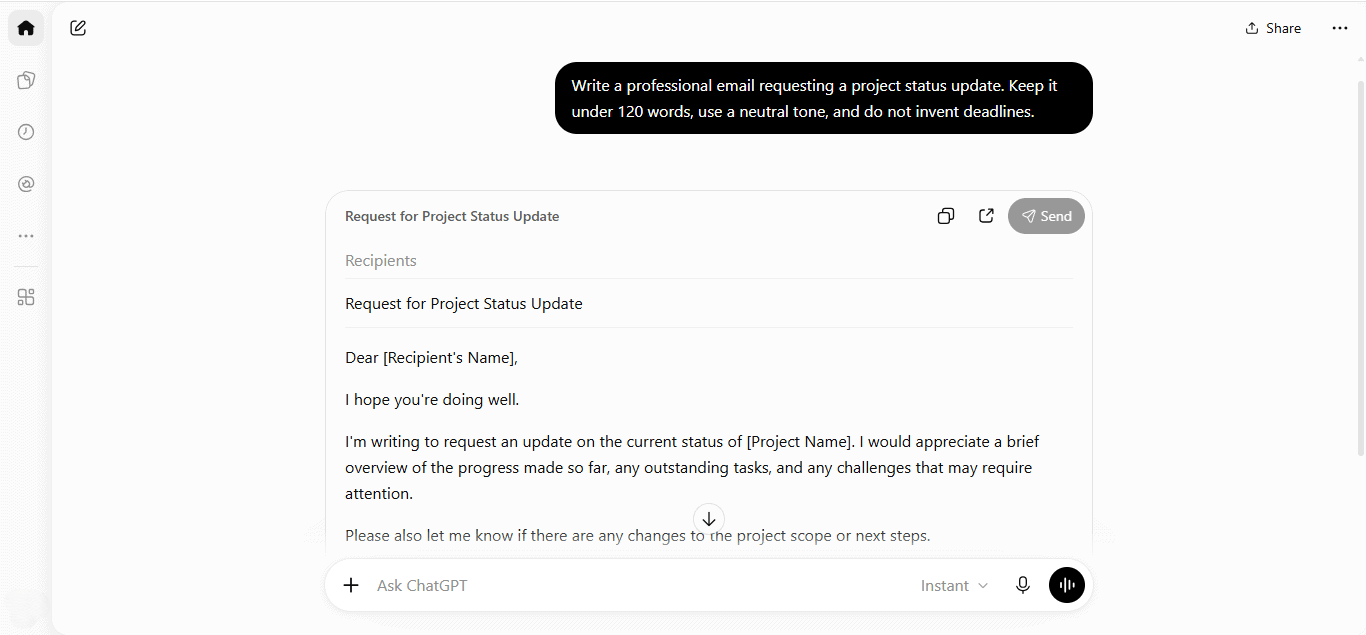
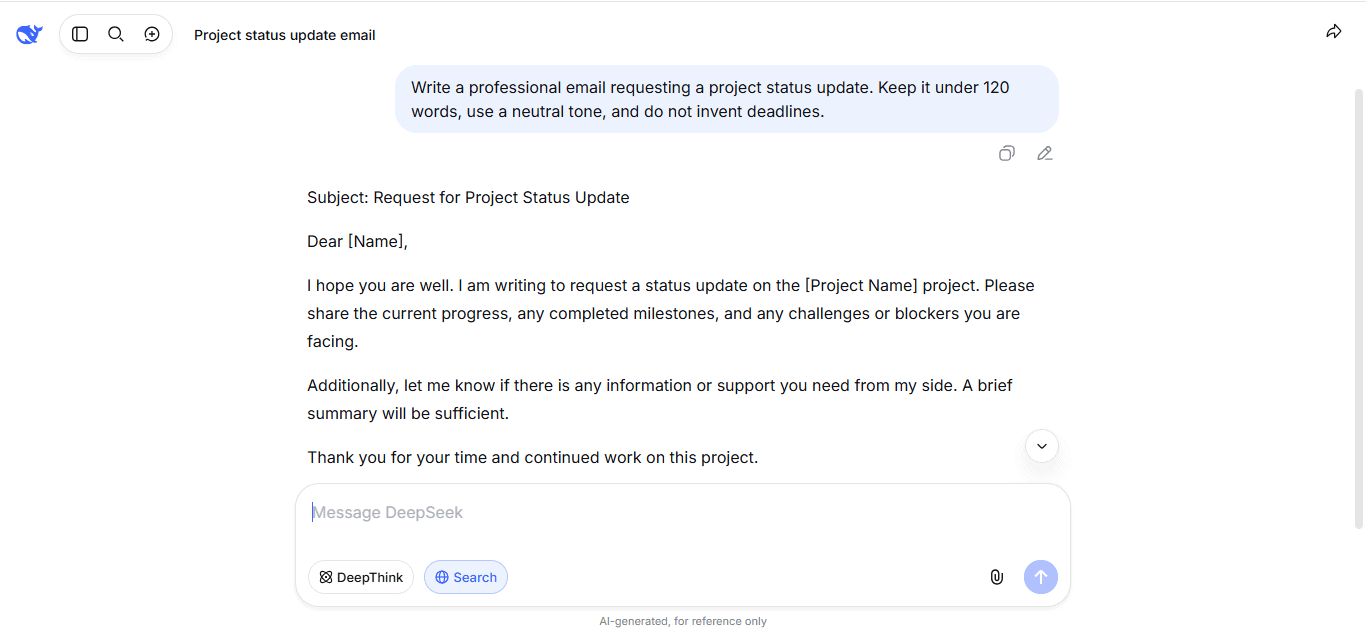
Writing, studying, and research
Both ChatGPT and DeepSeek can help with writing, editing, summarizing, studying, explaining difficult topics, and translating text. The difference is the surrounding workflow.
| Task | ChatGPT advantage | DeepSeek advantage | Best practice |
|---|---|---|---|
| Drafting and rewriting | Better integrated workspace with memory, files, projects, and images in supported plans. | Useful for direct writing, rewriting, summaries, and technical explanations. | Provide audience, tone, goal, source text, and constraints. |
| Studying | Strong guided-learning workflows, voice, images, files, and study-oriented tools depending on plan. | Useful for direct explanations, coding concepts, and reasoning practice. | Ask for step-by-step teaching and a short check question. |
| Research with sources | ChatGPT can search the web and cite sources in supported experiences. | DeepSeek can support research through chat/search surfaces or custom retrieval, but developers must verify exact behavior. | Ask for publication dates and open sources yourself. |
| Long documents | ChatGPT’s Library and file workflows are more visible and productized. | DeepSeek can be part of custom document pipelines, but API file upload is not the same as a broad document library. | Do not upload sensitive files without approval. |
For users who want an assistant that can combine writing, source search, files, images, memory, and projects, ChatGPT is usually the easier default. For users who mainly need a model to answer text prompts or power custom workflows, DeepSeek can be enough and may be more economical at API scale.
Coding and developer workflows
DeepSeek and ChatGPT can both help with coding. The best choice depends on whether you want an interactive assistant or a model/API building block.
ChatGPT is often easier for interactive coding help, debugging snippets, working with files, asking architectural questions, creating tests, and combining code assistance with documents, screenshots, or web research. OpenAI also has a broader product ecosystem around ChatGPT and developer tooling, including Codex-related product areas listed from the ChatGPT pricing and product navigation.
DeepSeek is attractive when the coding workflow is API-driven: batch code review, coding agents, custom IDE tools, repo analysis pipelines, structured outputs, long-context processing, or cost-sensitive high-volume workloads. The DeepSeek model table currently lists deepseek-flash and deepseek-v4-pro with support for Thinking Mode, JSON Output, Tool Calls, Responses API, Anthropic API, and large context/output limits.
| Coding task | Better fit | Why | Safety rule |
|---|---|---|---|
| Explain code | Either | Both can explain code when given enough context. | Ask for assumptions, edge cases, and examples. |
| Debug a small error | Either | Both can reason from error messages, code, and expected behavior. | Provide minimal reproducible code and run tests. |
| Repo-level work | ChatGPT for integrated file workflows; DeepSeek for custom API/local pipelines | ChatGPT is easier for ordinary users; DeepSeek fits custom engineering systems. | Do not paste private repositories unless approved. |
| Automated code review | DeepSeek API or OpenAI API after evaluation | The answer depends on model quality, latency, cost, privacy, and validation. | Use bounded retries, validation, and human review. |
| Agentic coding | Depends on tooling | DeepSeek can power compatible agent tools; ChatGPT/Codex-style workflows may be more integrated for end users. | Never allow unsupervised destructive changes without review. |
| Screenshot-based debugging | ChatGPT or deepseek-flash | Both can support image understanding in the right surface. | Text logs are usually better than screenshots when available. |
For serious engineering work, neither tool replaces review. Always run tests, lint code, inspect security implications, and avoid sharing passwords, API keys, private repositories, customer data, proprietary code, or production logs unless the workflow is approved.
Images, files, and multimodal work
ChatGPT is generally stronger for ordinary users who need multimodal work in one product. The official ChatGPT FAQ mentions file and image analysis, image creation, and web search in supported experiences. The ChatGPT Library documentation provides a clear user-facing file-management surface.
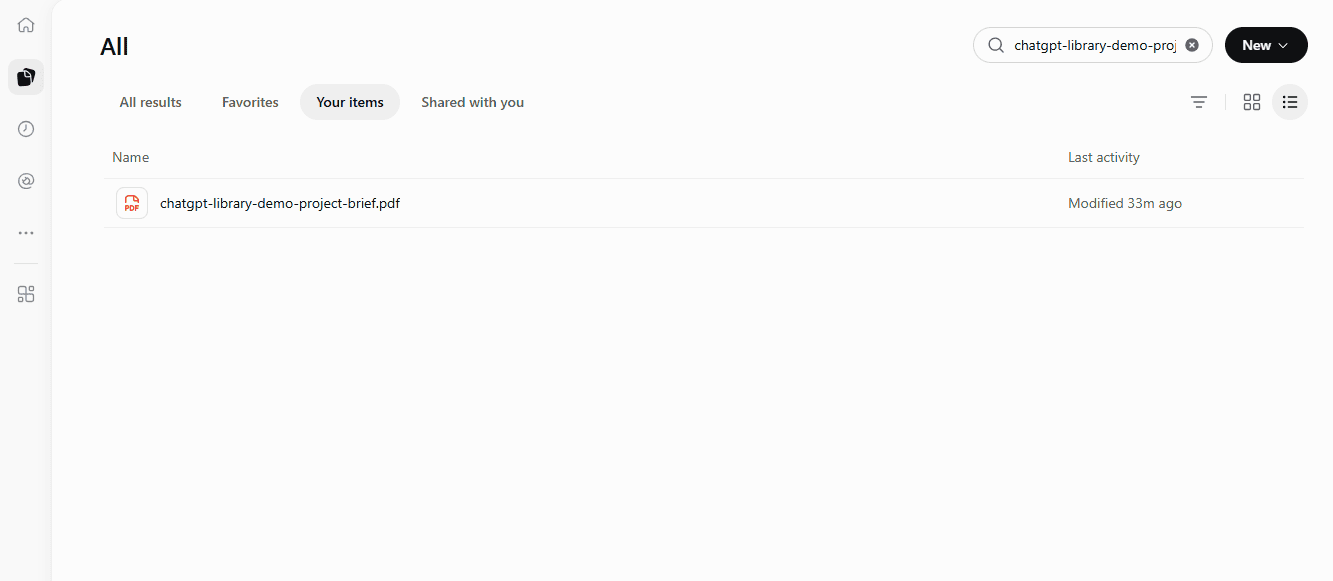
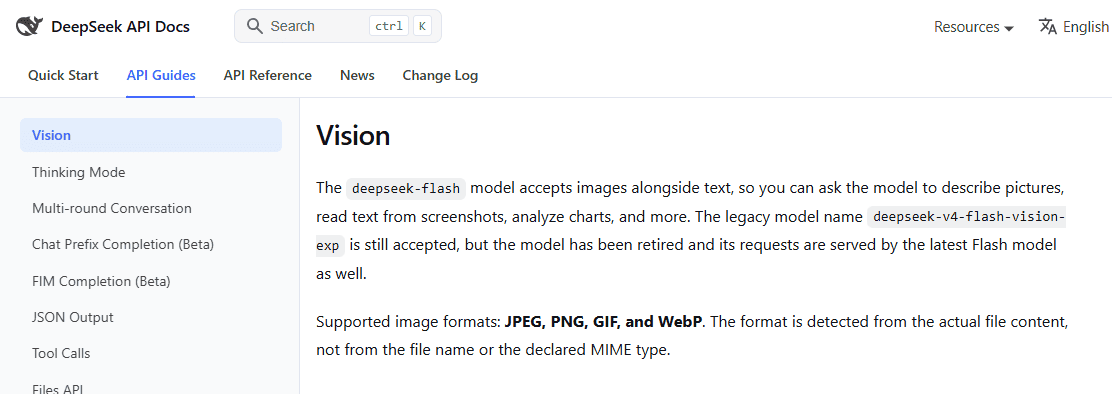
ChatGPT's file library interface showing an uploaded sample PDF and search controls.DeepSeek supports image understanding through the official API, especially with deepseek-flash. The DeepSeek Vision guide says deepseek-flash accepts images alongside text, supports JPEG, PNG, GIF, and WebP, and can be used to describe images, read screenshots, and analyze charts. The same DeepSeek model/pricing page shows Vision support for deepseek-flash and not for deepseek-v4-pro.
| Capability | ChatGPT | DeepSeek | Decision note |
|---|---|---|---|
| Image understanding | Available in supported ChatGPT tools and plans. | Supported through deepseek-flash in the official API. | Choose based on product workflow vs API workflow. |
| Image generation | Integrated in supported ChatGPT plans. | Not the standard DeepSeek Vision API path; DeepSeek-related generation points to Janus/Janus-Pro or third-party routes. | ChatGPT is easier for ordinary image creation. |
| File upload | Integrated consumer file workflows and Library. | API file upload is currently more image-focused in official docs. | ChatGPT is usually easier for documents. |
| Data analysis | Built into supported ChatGPT workflows with plan limits. | Possible through custom pipelines using DeepSeek API, but not the same ready-made product. | Choose ChatGPT for quick analysis; choose DeepSeek for custom systems. |
| General document workflows | More productized for everyday users. | More likely to require your own extraction, retrieval, and validation layer. | Do not confuse file upload with document search/RAG. |
API and pricing: compare like with like
The biggest mistake in DeepSeek vs ChatGPT comparisons is mixing product categories. A monthly ChatGPT plan is not the same thing as token-based API billing. DeepSeek API pricing is not the same thing as DeepSeek Chat access. OpenAI API pricing is not the same thing as ChatGPT Plus or Pro.
Consumer plans
For ordinary users, compare ChatGPT plans against DeepSeek Chat and the DeepSeek app. The ChatGPT pricing page lists individual and business plans with different levels of access to models, uploads, image creation, voice, memory, projects, Codex, and deep research. DeepSeek’s consumer app and web chat should be checked through the official DeepSeek website and download page.
Developer APIs
For developers, compare DeepSeek API with OpenAI API, not with a ChatGPT subscription. DeepSeek’s official Models & Pricing page lists deepseek-flash and deepseek-v4-pro, each priced per 1M tokens with separate rates for cached input, uncached input, and output. It also lists peak/off-peak pricing and concurrency limits.
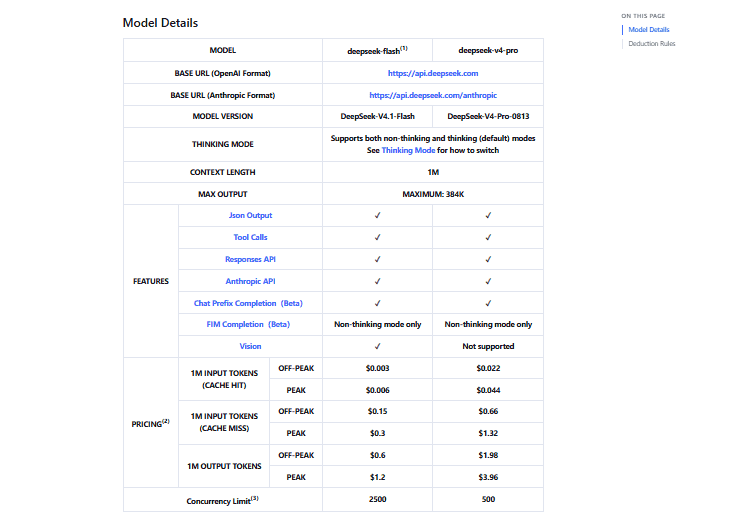
DeepSeek may be cheaper for some API workloads, especially when token economics dominate. But total cost also depends on input size, output length, cache hits, retries, agent loops, engineering time, latency requirements, monitoring, and safety validation.
Practical rule: choose DeepSeek API when cost-sensitive, high-volume, or custom-agent workloads dominate. Choose ChatGPT/OpenAI ecosystem when user-facing product polish, existing integrations, mature workspace tooling, or broader multimodal features matter more.
Open weights and local deployment
DeepSeek has a real advantage for teams that care about public model resources and local deployment. DeepSeek maintains an official Hugging Face organization and GitHub organization, with model cards and repositories for several model families.
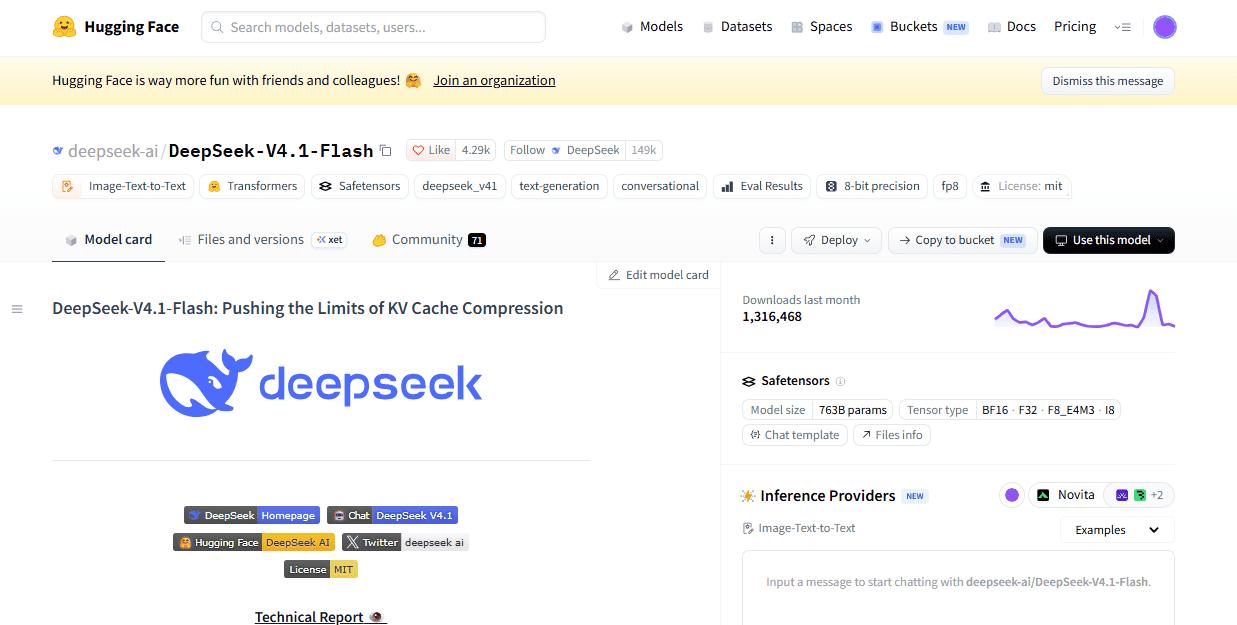
That does not mean every DeepSeek product is fully open source. Open weights are not the same as open training data, open training code, an open hosted chat interface, or a fully reproducible training pipeline. Local deployment also has its own cost: hardware, GPUs, storage, inference servers, monitoring, security, updates, and operational responsibility.
| Question | DeepSeek answer | ChatGPT answer | Practical implication |
|---|---|---|---|
| Can I inspect or download model weights? | For some DeepSeek model families, yes, through official repositories/model cards. | ChatGPT is primarily a hosted product/service. | DeepSeek is stronger for model research and self-hosting experiments. |
| Can I run it locally? | Some DeepSeek models or variants can be run locally with the right setup. | ChatGPT is not generally used as a local open-weight model. | DeepSeek is more flexible for local experimentation. |
| Is local automatically private? | No. You control more, but you also own logs, access control, storage, network exposure, and updates. | Hosted privacy depends on plan and controls. | Privacy-sensitive work needs an approved architecture either way. |
| Is local cheaper? | Only sometimes. | Hosted pricing may be simpler for bursty or low-volume usage. | Compare total cost, not only model availability. |
Privacy and data controls
Privacy is not a one-word comparison. It depends on product surface, plan, settings, and data type.
ChatGPT privacy posture
OpenAI provides ChatGPT data controls for consumer services, including model-improvement preferences, memory controls, Temporary Chat, account deletion, and privacy requests. OpenAI’s help center also says Temporary Chats do not show in history, do not create or update memories, and are not used to improve OpenAI models while they remain temporary. For details, see How OpenAI handles data in consumer services and Data controls in ChatGPT.
OpenAI also states that, by default, content from ChatGPT Business, Enterprise, Edu, ChatGPT for Healthcare workspaces, and the API Platform is not used to improve OpenAI models. That is different from personal consumer accounts, where settings and plan type matter. Always check the plan and workspace documentation before using any AI tool for work data.
DeepSeek privacy posture
DeepSeek’s Privacy Policy says user input can include text input, voice input, prompts, uploaded files, photos, feedback, and chat history. It also says the personal data DeepSeek collects is directly collected, processed, and stored in the People’s Republic of China. The same policy says the services are not designed or intended to process sensitive personal data, and users should not provide such data.
That does not mean every DeepSeek use case is unsafe. It means users and organizations should classify the data first. Public, low-risk prompts are different from customer data, private code, legal documents, financial records, medical information, or regulated data. For sensitive work, use only approved workflows and review the relevant policy, terms, and deployment route.
Business and team use
For organizations, ChatGPT is usually easier to evaluate as a managed workspace product. The ChatGPT pricing page lists business and enterprise-oriented plans, and OpenAI’s data-handling documentation distinguishes personal accounts from business and managed-workspace data. This matters for admins who need collaboration, workspace controls, and a clearer SaaS procurement path.
DeepSeek is more of a build-your-own route for teams that want API control, custom deployment, open-weight evaluation, or local/self-hosted infrastructure. This can be powerful, but it shifts more responsibility to the team: data governance, API-key security, logging, redaction, monitoring, fallback behavior, privacy review, and output validation.
| Organization need | Likely better starting point | Why |
|---|---|---|
| Managed team workspace | ChatGPT Business or Enterprise path | More visible admin, workspace, collaboration, and security controls. |
| Custom AI product backend | DeepSeek API or OpenAI API after evaluation | API choice depends on cost, quality, tools, data policy, latency, and support. |
| Self-hosted model evaluation | DeepSeek open weights | DeepSeek has public model resources that can support local experimentation. |
| Regulated data | Approved internal workflow only | Neither public consumer chat should be treated as automatically approved. |
| High-volume batch jobs | Often DeepSeek API or local/hybrid, after cost testing | Token economics and throughput matter, but operations cost must be included. |
Which is cheaper?
For casual users, “cheaper” usually means monthly plan cost. For developers, it means token cost, cache behavior, throughput, retries, latency, monitoring, engineering time, and operational complexity. Do not mix those two categories.
- ChatGPT consumer cost: monthly plan pricing, plan limits, and the productivity value of bundled tools.
- DeepSeek API cost: input tokens, output tokens, cached vs uncached input, model choice, peak/off-peak timing, and concurrency behavior.
- Local DeepSeek cost: hardware or cloud GPUs, storage, power/runtime, inference stack, monitoring, security, and engineering time.
- Third-party DeepSeek cost: whatever the gateway, IDE tool, hosted model provider, or wrapper charges.
DeepSeek can be cheaper for some API workloads. ChatGPT can be cheaper in practice for a person or team that gets high value from a bundled product. The only reliable answer is to evaluate your real workload.
Common misconceptions
| Myth | More accurate answer | What to check |
|---|---|---|
| “DeepSeek is just a cheaper ChatGPT.” | DeepSeek is better understood as a chat/app/API/open-weight ecosystem. ChatGPT is a broader hosted assistant and workspace product. | Which product surface you mean. |
| “ChatGPT always gives better answers.” | ChatGPT often has the better product experience, but answer quality depends on task, model, prompt, context, and tools. | Your own task-specific evaluations. |
| “DeepSeek is always better at coding.” | DeepSeek can be strong for coding workflows, especially API/agent use, but no tool should be declared universally better without testing. | Code correctness, tests, security review, and repo context. |
| “DeepSeek is open source, so it is automatically private.” | Open weights and privacy are different. Hosted DeepSeek has a privacy policy; local deployment has operational risks. | Model license, hosting route, logs, and data flow. |
| “ChatGPT is closed, so it is never suitable for business.” | ChatGPT Business and Enterprise-style plans may be suitable for some teams depending on their data and security requirements. | Plan documentation and organization policy. |
| “Free chat and API pricing are the same thing.” | Consumer chat and developer API billing are separate categories. | Official plan pages and API pricing docs. |
| “Image understanding means image generation.” | They are different. ChatGPT supports image generation in relevant plans; DeepSeek API Vision is image understanding through deepseek-flash. | Image-generation docs and model support. |
| “API benchmarks decide the best consumer product.” | A model benchmark does not measure product UX, file workflows, memory, team controls, or integrations. | Your end-to-end workflow. |
| “Open weights mean zero cost.” | Serving open-weight models can require expensive compute, engineering, and operations. | Total cost of ownership. |
| “Third-party DeepSeek tools are official DeepSeek.” | Many wrappers, browser extensions, and gateways are independent. | Publisher, privacy policy, terms, and model route. |
Use ChatGPT if…
- You want a polished all-in-one assistant for daily work.
- You rely on files, images, voice, web search, data analysis, memory, projects, or workspace tools.
- You prefer a consumer or business workspace over building your own AI system.
- You need a stronger default experience for non-technical users.
- Your organization has approved ChatGPT Business or Enterprise workflows.
Use DeepSeek if…
- You need a cost-sensitive API route for high-volume workloads.
- You want to evaluate open-weight models or local deployment.
- You are building a custom model pipeline, coding agent, or backend service.
- You can engineer retrieval, validation, logging, redaction, security, and monitoring yourself.
- You want to compare DeepSeek model behavior directly against other providers.
Use both if…
- You use ChatGPT for daily research, writing, file workflows, and image creation, while using DeepSeek API for backend or batch workloads.
- You want redundancy across providers for important workflows.
- You want to compare outputs before making a high-value decision.
- You want ChatGPT’s product experience and DeepSeek’s open-weight/API economics.
- You use local or self-hosted DeepSeek for sensitive preprocessing and a hosted model for approved non-sensitive generation.
Avoid both for these uses unless you have an approved workflow
- Medical, legal, financial, or safety-critical decisions without qualified human review.
- Confidential company data without organizational approval.
- Customer records, regulated data, identity documents, private legal files, or health records.
- Passwords, API keys, private keys, tokens, and credentials.
- Private repositories, proprietary source code, and production logs containing sensitive information.
- Public claims that require exact current sources but have not been verified.
Official resources used in this comparison
Use these official links to verify features, pricing, privacy, and model status before making a final decision:
- ChatGPT pricing and plans
- What is ChatGPT? FAQ
- ChatGPT Free Tier FAQ
- Using Library to manage files in ChatGPT
- Data controls in ChatGPT
- How OpenAI handles data in consumer services
- Official DeepSeek website
- DeepSeek Web Chat
- DeepSeek app download page
- DeepSeek Harness
- DeepSeek API Platform
- DeepSeek API Docs
- DeepSeek Models & Pricing
- DeepSeek Vision guide
- DeepSeek JSON Output guide
- DeepSeek V4.1 Flash announcement
- DeepSeek on Hugging Face
- DeepSeek on GitHub
- DeepSeek Privacy Policy
- DeepSeek Terms of Use
Final recommendation
Choose ChatGPT if you want the best general-purpose AI assistant experience with the least setup. It is the better default for most users, students, writers, marketers, and teams that need a polished workspace with files, images, search, memory, voice, projects, and collaboration features.
Choose DeepSeek if your decision is technical: API economics, open weights, local deployment, custom coding agents, or high-volume model workloads. DeepSeek can be the better engineering choice when your team is prepared to build the surrounding product, validation, privacy, and monitoring layers.
For many serious users, the strongest answer is not “DeepSeek or ChatGPT.” It is ChatGPT for daily work and DeepSeek for selected API, open-weight, or infrastructure workloads, with clear rules for what data can be sent where.
FAQ
Is DeepSeek better than ChatGPT?
Sometimes, but not universally. DeepSeek is often more attractive for cost-sensitive API workloads, open-weight experiments, and custom infrastructure. ChatGPT is usually better as an all-in-one consumer and workspace assistant.
Is ChatGPT better than DeepSeek?
For most everyday users, yes, ChatGPT is usually the better starting point because its product experience is broader and more mature. For developers building custom systems, DeepSeek may be the better choice depending on pricing, model behavior, and deployment needs.
Which is better for coding?
It depends on the workflow. ChatGPT is convenient for interactive coding help and integrated productivity. DeepSeek can be compelling for API-driven code review, coding agents, and cost-sensitive developer systems. In both cases, generated code should be tested and reviewed.
Which is better for writing?
ChatGPT is usually better for integrated writing workflows because it combines drafting with files, memory, projects, web search, and image tools. DeepSeek can still be useful for straightforward drafting, rewriting, summaries, and technical explanations.
Which is better for research?
ChatGPT is usually easier for consumer research because web search and source citations are integrated in supported experiences. DeepSeek can support research through its chat/search surfaces or through custom retrieval pipelines, but developers must verify the exact search behavior of the surface they use.
Which is cheaper?
DeepSeek can be cheaper for some API workloads, especially when token economics matter. ChatGPT may be more economical for people or teams that get high value from one bundled monthly product. Compare real workload cost, not just headline prices.
Which has a better API?
OpenAI has a broader developer ecosystem. DeepSeek can be attractive for cost-sensitive workloads, open-weight experiments, and teams that want to build custom agent infrastructure. Evaluate both against your required features: tool calls, JSON output, vision, context, latency, reliability, pricing, and support.
Can DeepSeek generate images like ChatGPT?
Not through the same standard route. ChatGPT supports image generation in supported plans. DeepSeek’s official API Vision route is for image understanding through deepseek-flash. DeepSeek-related image generation usually involves Janus/Janus-Pro open-weight routes or third-party tools.
Which is better for file upload and document analysis?
ChatGPT is usually easier for general file and document workflows because file upload and Library-style features are part of the consumer product. DeepSeek can be used in custom document pipelines, but its official API file upload should not be treated as a general document Library unless current DeepSeek docs explicitly support that behavior.
Which is better for privacy?
There is no universal answer. ChatGPT has personal data controls and business/workspace options; DeepSeek has its own privacy policy and open-weight/local deployment possibilities. The safer choice depends on your data type, plan, settings, deployment route, and organization policy.
Is DeepSeek open source?
DeepSeek publishes public model resources and open-weight releases for some models, but that does not mean every DeepSeek product, chat service, API backend, training dataset, or training pipeline is fully open source. Check the exact model card and license before use.
Can DeepSeek run locally?
Some DeepSeek models or variants can be run locally or self-hosted, depending on the model, quantization, hardware, and serving stack. Local deployment is an engineering project, not automatically a free or private shortcut.
Should developers use DeepSeek API or OpenAI API?
Developers should compare both on real workload data: model quality, cost, latency, context, tools, image support, structured output, retries, monitoring, privacy, and fallback strategy. Do not choose only from marketing claims or a single benchmark.
Can I use both DeepSeek and ChatGPT?
Yes. A practical setup is to use ChatGPT for daily user-facing work and DeepSeek for selected API, batch, open-weight, or local workloads. Keep data-routing rules clear so sensitive information is not sent to the wrong tool.
What should I not share with either tool?
Do not share passwords, API keys, private keys, confidential files, customer data, regulated records, medical/legal/financial documents, private code, production secrets, or sensitive personal data unless your workflow is approved and secured.