

The DeepSeek API lets your application send requests to DeepSeek-hosted models and receive generated responses. Start with the official DeepSeek API docs for onboarding, or open the Chat Completions reference for request parameters and response schemas.
The examples below use DeepSeek’s own service, not a third-party gateway. They show one text request in cURL, Python, and JavaScript, followed by the details that matter when you add streaming, manage costs, or troubleshoot failures.
Documentation checked: October 3, 2026. These documentation-based examples were syntax-checked; no authenticated DeepSeek API requests were run.
Official docs, connection settings, and model IDs
Keep three official destinations separate: documentation explains the API, the developer platform manages your account, and api.deepseek.com receives API requests. A documentation URL is not an API endpoint.
For the Chat Completions examples in this guide, use the following settings from DeepSeek’s quickstart and authentication reference:
| Setting | Value |
|---|---|
| SDK base URL | https://api.deepseek.com |
| Complete HTTP endpoint | https://api.deepseek.com/chat/completions |
| HTTP method | POST |
| Authentication | Authorization: Bearer YOUR_DEEPSEEK_API_KEY, with your own key replacing the placeholder |
| Model used below | deepseek-flash |
Give an SDK the base URL, not the complete endpoint: its chat method appends the endpoint path. Raw HTTP requests, including cURL, use the complete URL. Adding /chat/completions in both places creates an incorrect path.
The current model table maps deepseek-flash to DeepSeek-V4.1-Flash-1017 and deepseek-v4-pro to DeepSeek-V4-Pro-0813. Start with Flash for the example, then compare both on representative inputs before choosing a model for your application. A model name is not a guarantee of better results for every task.
Older tutorials may use deepseek-chat or deepseek-reasoner; the change log scheduled those names for discontinuation on July 24, 2026. It also documents that the older V4 Flash names are temporarily routed to V4.1-Flash. Use current IDs rather than assuming an old alias pins an old model.
Get a DeepSeek API key and prepare your account
- Sign in to the developer platform. Open the official DeepSeek Platform and complete the account steps shown there.
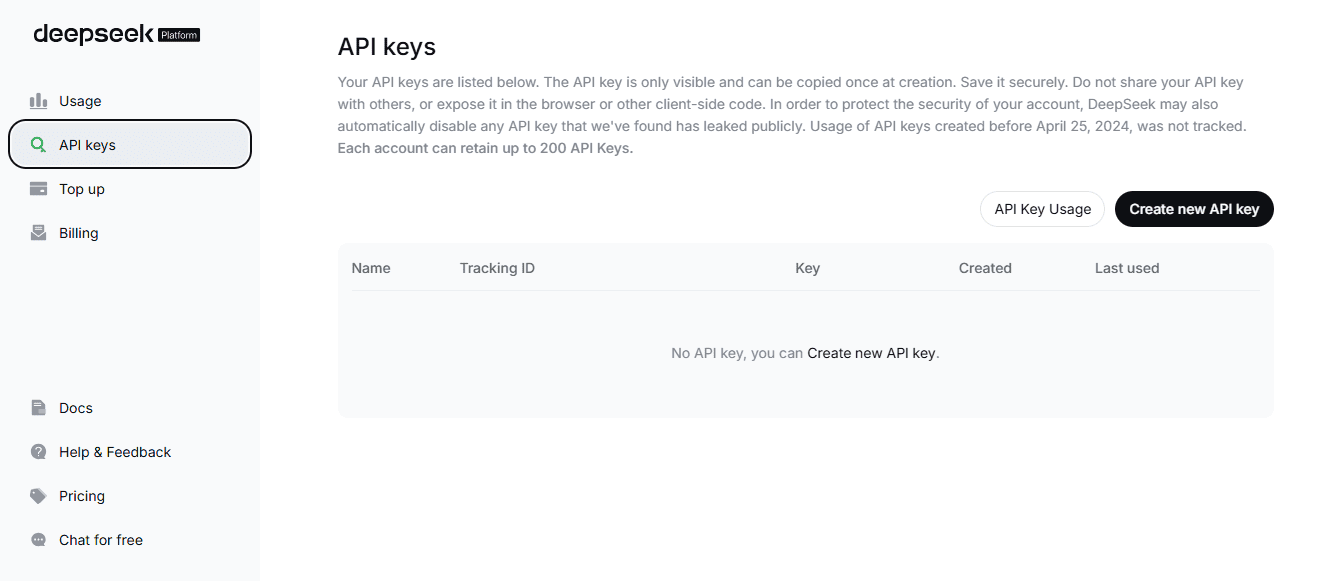
- Create an API key. Use the platform’s API Keys section, linked from the official authentication documentation. Keep the credential private.
- Check your available balance. Review billing before running requests. DeepSeek documents HTTP 402 for insufficient balance. Do not assume that creating a key includes free credits.
The examples use the OpenAI client libraries as a way to call DeepSeek’s compatible interface. You supply a DeepSeek key and send requests to DeepSeek; an OpenAI account or API key is not required for this setup. This configuration follows the DeepSeek quickstart.
For the terminal commands below, use Bash on macOS, Linux, or Windows through WSL. Run this in the same terminal where you will execute the examples, then enter your key at the hidden prompt:
read -r -s -p "DeepSeek API key: " DEEPSEEK_API_KEY
printf '\n'
export DEEPSEEK_API_KEY
The scripts read DEEPSEEK_API_KEY from the environment. They do not automatically load a .env file. Set the variable again in a new terminal, or configure it through your deployment’s secret-management system.
Do not put the key in a browser bundle, public repository, page source, or screenshot. The JavaScript SDK’s security guidance explains why exposing provider credentials in browser code is dangerous. Run these requests locally or on a server you control.
Send your first DeepSeek API request
Choose one of the following implementations; you do not need to run all three. Each execution sends its own request. All use the same prompt, model, and non-thinking setting, with a deliberately small max_tokens allowance of 512 for a one-sentence answer. That allowance is an example setting, not the model’s maximum capacity.
cURL: inspect the HTTP request directly
Use cURL 7.76.0 or newer. The --fail-with-body option keeps the error response body visible while returning a failure exit code for HTTP errors. This command prints the full response JSON:
curl --silent --show-error --fail-with-body --max-time 120 \
  https://api.deepseek.com/chat/completions \
  -H "Authorization: Bearer ${DEEPSEEK_API_KEY:?Set DEEPSEEK_API_KEY first}" \
  -H "Content-Type: application/json" \
  --data '{
    "model": "deepseek-flash",
    "messages": [
      {"role": "system", "content": "Give a brief, clear answer."},
      {"role": "user", "content": "Explain an API in one sentence."}
    ],
    "thinking": {"type": "disabled"},
    "max_tokens": 512,
    "stream": false
  }'
The messages array supplies instructions and user input. The thinking setting explicitly disables reasoning mode, and stream: false requests a complete response rather than incremental events. DeepSeek documents these controls in its thinking guide and request reference.
Python: return an answer and report usage
Use Python 3.10 or newer, as required by the current OpenAI Python SDK. In your project directory, create an environment and install the package:
python3 -m venv .venv
source .venv/bin/activate
python -m pip install --upgrade openai
Save this as deepseek_quickstart.py. It checks for a missing key, handles SDK errors, and supports an optional --stream flag:
import argparse
import os
import sys

from openai import APIError, OpenAI


def main() -> int:
    parser = argparse.ArgumentParser()
    parser.add_argument("--stream", action="store_true")
    args = parser.parse_args()

    api_key = os.environ.get("DEEPSEEK_API_KEY", "").strip()
    if not api_key:
        print("Set DEEPSEEK_API_KEY before running this script.", file=sys.stderr)
        return 2

    try:
        with OpenAI(
            api_key=api_key,
            base_url="https://api.deepseek.com",
            timeout=120.0,
            max_retries=0,
        ) as client:
            result = client.chat.completions.create(
                model="deepseek-flash",
                messages=[
                    {"role": "system", "content": "Give a brief, clear answer."},
                    {"role": "user", "content": "Explain an API in one sentence."},
                ],
                max_tokens=512,
                stream=args.stream,
                extra_body={"thinking": {"type": "disabled"}},
            )

            usage = None
            finish_reason = None
            has_text = False

            if args.stream:
                with result as stream:
                    for chunk in stream:
                        if chunk.usage is not None:
                            usage = chunk.usage
                        if not chunk.choices:
                            continue
                        choice = chunk.choices[0]
                        text = choice.delta.content or ""
                        if text:
                            print(text, end="", flush=True)
                            has_text = True
                        if choice.finish_reason is not None:
                            finish_reason = choice.finish_reason
                print()
            else:
                usage = result.usage
                if result.choices:
                    choice = result.choices[0]
                    text = choice.message.content or ""
                    finish_reason = choice.finish_reason
                    has_text = bool(text)
                    if text:
                        print(text)

            if usage is not None:
                print("Usage:", usage.model_dump_json(), file=sys.stderr)

            if not has_text or finish_reason != "stop":
                print(
                    f"No complete text answer; finish_reason={finish_reason!r}.",
                    file=sys.stderr,
                )
                return 1

    except APIError as exc:
        status = getattr(exc, "status_code", None)
        label = f"HTTP {status}" if status is not None else type(exc).__name__
        print(f"Request failed: {label}. See troubleshooting.", file=sys.stderr)
        return 1

    return 0


if __name__ == "__main__":
    raise SystemExit(main())
Run the non-streaming example:
python deepseek_quickstart.pyThe answer goes to standard output; usage and errors go to standard error. The client has explicit timeout settings and disables automatic retries for straightforward debugging. These are local example settings, not a DeepSeek response-time guarantee. The SDK documents retry configuration separately from provider limits.
JavaScript: call the API from Node.js
Use Node.js 22 or 24 LTS, matching the current SDK requirements. Install the package in your project directory:
npm install openaiSave the following as deepseek_quickstart.mjs. The .mjs extension enables the module syntax used here without requiring a separate module setting in package.json.
import OpenAI from "openai";

async function main() {
  const apiKey = process.env.DEEPSEEK_API_KEY?.trim();
  if (!apiKey) {
    console.error("Set DEEPSEEK_API_KEY before running this script.");
    process.exitCode = 2;
    return;
  }

  const client = new OpenAI({
    apiKey,
    baseURL: "https://api.deepseek.com",
    timeout: 120000,
    maxRetries: 0,
  });

  const response = await client.chat.completions.create({
    model: "deepseek-flash",
    messages: [
      { role: "system", content: "Give a brief, clear answer." },
      { role: "user", content: "Explain an API in one sentence." },
    ],
    max_tokens: 512,
    thinking: { type: "disabled" },
    stream: false,
  });

  const choice = response.choices?.[0];
  if (response.usage) console.error("Usage:", JSON.stringify(response.usage));

  if (!choice?.message?.content || choice.finish_reason !== "stop") {
    console.error(`No complete text answer; finish_reason=${choice?.finish_reason}.`);
    process.exitCode = 1;
    return;
  }
  console.log(choice.message.content);
}

main().catch((error) => {
  const label = error instanceof OpenAI.APIError
    ? (error.status ? `HTTP ${error.status}` : error.name)
    : "Unexpected application error";
  console.error(`Request failed: ${label}. See troubleshooting.`);
  process.exitCode = 1;
});
Run it from the terminal containing your environment variable:
node deepseek_quickstart.mjsNotice the language-specific configuration: Python uses base_url and places DeepSeek’s thinking object inside extra_body. The official JavaScript example uses baseURL and sends thinking directly in the request object. Do not copy Python’s wrapper into JavaScript.
Read the answer, usage, and streaming events
For a non-streaming Chat Completions response, the final answer is in choices[0].message.content. The usage object reports token consumption. Check choices[0].finish_reason as well: stop indicates a normal stopping point, while length means the generation reached its limit, according to the response reference.
A successful HTTP status is therefore not enough to establish that the answer is complete. The scripts flag missing text or an unexpected finish reason for this simple text-only request. An application using tools needs different handling for a valid tool-call response.
To stream the same Python example, run:
python deepseek_quickstart.py --streamThe script prints delta.content as it arrives, tolerates chunks without text, and checks that choices exist before indexing them. It collects usage when present and verifies a finish reason instead of treating a closed connection as proof of completion.
DeepSeek’s current Chat Completions streaming schema places usage on the final content chunk, before the data: [DONE] marker. Do not assume a separate usage-only chunk. The SDK handles the SSE transport; a custom HTTP parser must handle it itself.
Keep incomplete streamed text separate from a completed result in your application. For example, do not save partially received JSON as a valid business record simply because some text appeared.
Control thinking and keep conversation context
DeepSeek’s thinking documentation says reasoning is enabled by default at high effort. The quickstart above disables it deliberately. To enable it in Python, set extra_body={"thinking": {"type": "enabled"}} and choose a documented reasoning_effort, such as low, high, or max.
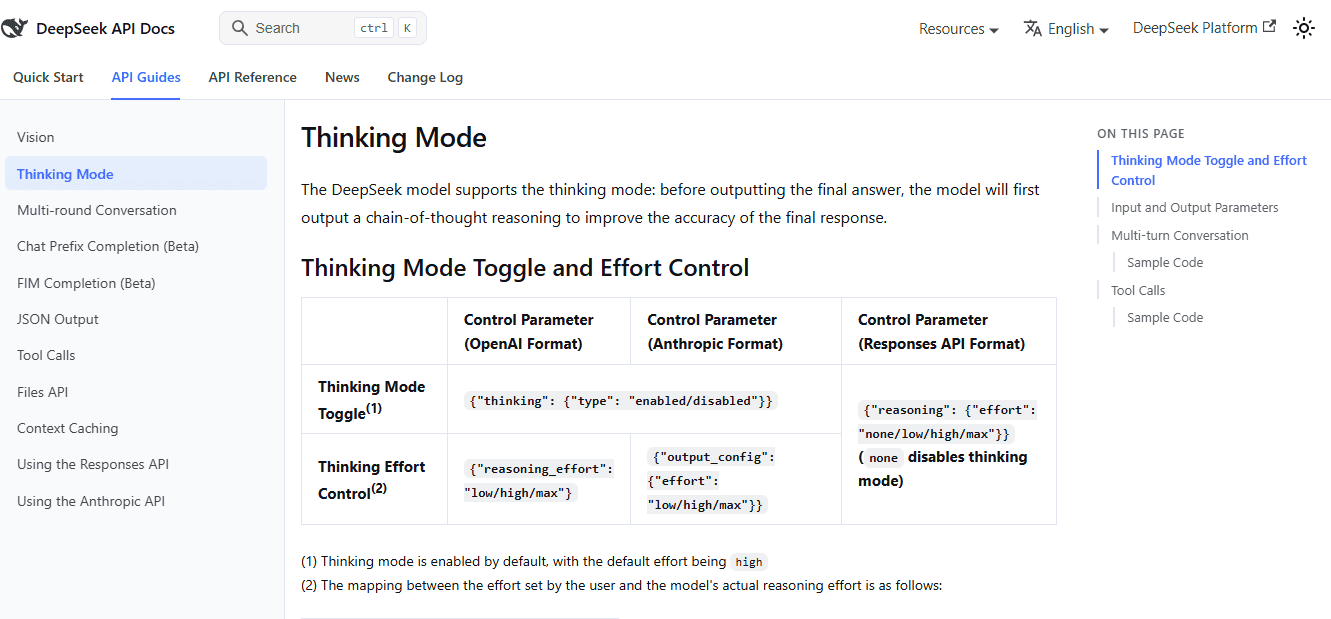
Reasoning content is returned separately in reasoning_content; the final answer remains in content. The same guide states that temperature has no effect in thinking mode. Do not assume every familiar generation parameter works identically across modes.
When testing substantial reasoning tasks, choose an appropriate output budget rather than leaving the one-sentence example’s limit unchanged. Inspect completion status and reported usage before deciding that a configuration is suitable.
For follow-up questions, send the conversation history again: previous user messages, assistant replies, and the new user message. The multi-round conversation guide explains that Chat Completions is stateless. Sending only “Explain that further” does not supply the earlier answer.
There is an important thinking-mode distinction: without a tools parameter, earlier reasoning content need not be resent. With tools, DeepSeek requires previous reasoning_content to be preserved, including turns without a tool call. Follow the documented history rules rather than stripping those fields indiscriminately.
A custom function call is a request for your application to execute a function; the model does not execute that function itself. Validate arguments, allow only approved functions, return the result with the matching call identifier, and bound the number of tool-loop iterations.
Match the API format to your integration
Chat Completions is the format used throughout the code above. Keep its request fields and response parser together. Compatibility with another provider’s API does not mean every endpoint, parameter, or hosted tool behaves identically.
Responses API is also supported. DeepSeek’s Responses reference uses POST /responses, and its integration guide shows client.responses.create(...) with input and the SDK’s response.output_text helper. Use that format when it matches your existing integration; do not apply the Chat Completions parser to its response.
DeepSeek’s Responses interface is stateless: send conversation history in input rather than relying on previous_response_id. Its stream ends with a semantic completion, incomplete, or failure event—not data: [DONE]. The compatibility tables document server-side web_search for deepseek-v4-pro: the server searches, adds the results to context, and continues the response. That tool is ignored with deepseek-flash. Other built-in types, including file_search, code_interpreter, computer_use, and mcp, remain ignored, so check the model and tool type rather than assuming full compatibility.
Anthropic-compatible integrations use the base URL https://api.deepseek.com/anthropic. Follow DeepSeek’s Anthropic-format guide for that request schema instead of mixing its fields into the examples above.
Structured output and image input
For Chat Completions JSON Output, use response_format={"type": "json_object"}, explicitly request JSON in the prompt, and describe the desired structure. Allow enough output tokens to avoid truncation. Valid JSON does not prove that required business fields, types, or values are correct; validate the parsed object in your application.
For images, the vision guide documents deepseek-flash image input alongside text. The Files API supports uploading images for later reference. Do not interpret this as a promise that every model or endpoint accepts arbitrary PDFs, office documents, audio, or video. Check the specific input schema before building an upload workflow.
DeepSeek API pricing and context caching
API usage is metered, not an unlimited free extension of the chatbot. The Open Platform terms describe balance-based paid services and make any free quota subject to the platform’s published conditions. Check your own account rather than relying on an old promotional offer.
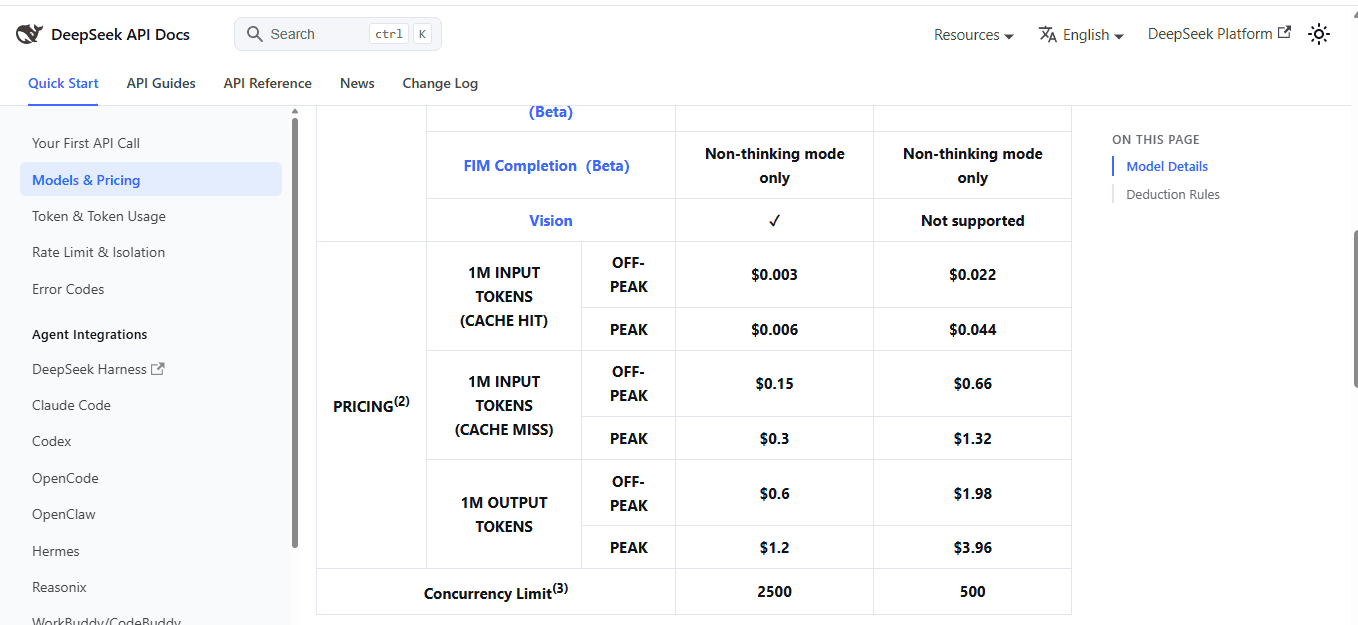
The following official off-peak rates were checked on October 3, 2026. All amounts are USD per one million tokens:
| Model | Cached input | Uncached input | Output |
|---|---|---|---|
deepseek-flash | $0.003 | $0.15 | $0.60 |
deepseek-v4-pro | $0.022 | $0.66 | $1.98 |
Peak rates are double these values. Peak hours are 01:00–04:00 and 06:00–10:00 UTC, Monday through Friday, excluding Chinese public holidays. All other hours are off-peak, including weekends and Chinese public holidays. Recheck the rate card before budgeting recurring workloads.
For a hypothetical off-peak Flash workload with 1,000,000 uncached input tokens and 100,000 output tokens, token charges would be $0.15 + $0.06 = $0.21. This is an arithmetic example, not a measured cost for the sample prompt.
With cached input, calculate each component separately: cached input at its rate, uncached input at its rate, and output at its rate. Cached tokens are part of the input total, not additional tokens to charge a second time.
Do not estimate reasoning costs from final-answer length alone. For example, the Responses usage schema reports reasoning tokens as a breakdown of output tokens, and its output budget includes reasoning. Use the usage fields for the API format you actually call rather than counting displayed characters.
What context caching actually reuses
DeepSeek’s context caching is enabled automatically. It reuses processing for matching, persisted input prefixes—not simply a previously written answer. A cache hit requires a complete match to an available cached prefix unit; a vaguely similar prompt is not enough.
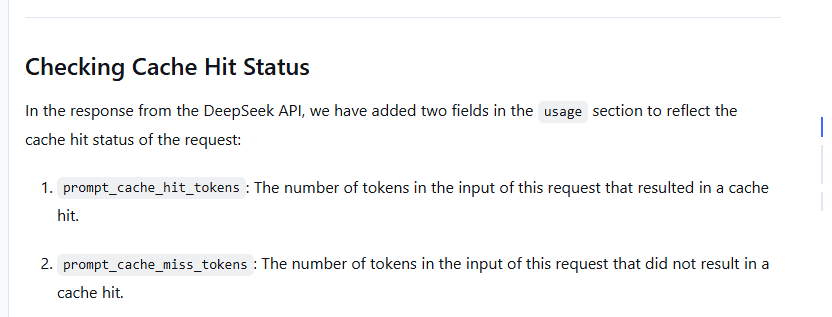
Keep reusable instructions and shared context consistent at the beginning of requests, then check actual results. Chat Completions exposes usage.prompt_cache_hit_tokens and usage.prompt_cache_miss_tokens. Measure these fields rather than assuming repeated content will always receive the cached rate.
For a realistic budget, use your application’s typical input length, output length, thinking configuration, and measured cache-hit pattern. A one-sentence smoke test does not predict the cost of long-document analysis or an agent that makes multiple requests.
Rate limits and common API errors
The published account-level concurrency limits are 2,500 for deepseek-flash and 500 for deepseek-v4-pro, unless you have an approved capacity adjustment. A request occupies a concurrent connection until its response completes. Creating additional keys under the same account does not create separate account quotas.
Concurrency is not the same as requests per minute, tokens per minute, context length, or output length. Apply a queue and an application-level concurrency cap instead of assuming the API is unlimited. Your own infrastructure may need a much lower cap than the provider permits.
Use DeepSeek’s error-code reference to distinguish configuration problems from temporary failures:
| Error | Meaning | What to check or change |
|---|---|---|
400 | Invalid request format | Check the JSON body, endpoint format, and conversation structure. |
401 | Authentication failed | Check the DeepSeek key and Bearer header; do not substitute another provider’s key. |
402 | Insufficient balance | Review billing and available balance before retrying. |
422 | Invalid parameters | Read the returned error and correct unsupported or invalid values. |
429 | Rate or concurrency limit reached | Reduce in-flight requests and use a bounded retry policy. |
500 | Server error | Retry cautiously after a delay; investigate persistent failures. |
503 | Server overloaded | Back off rather than launching more simultaneous requests. |
A missing environment variable is a local setup problem, not an HTTP error. If the key is set but the request still fails, check the base URL and model ID before changing unrelated parameters. Inspect error details locally, but redact credentials and sensitive content before sharing logs.
For temporary failures, use bounded exponential backoff with jitter and a total retry budget. Do not retry invalid credentials, insufficient balance, or malformed requests unchanged. Account for any SDK-level retries before adding an application retry loop, or attempts can multiply unexpectedly.
Check the official service status when failures persist. DeepSeek also documents keep-alive blank lines and SSE comments while requests wait. A custom parser should tolerate those signals, but they are not the model’s final answer.
Before connecting real users
- Protect the paid backend. Keep the provider key server-side, authenticate your own users, and enforce your own request and spending controls. Hiding a key does not make an unrestricted public proxy safe.
- Plan for credential exposure. Follow a secret-management and rotation process. Revoke an exposed key, replace it in affected deployments, and avoid recording secrets in logs.
- Review data handling and regression tests. Read the applicable Open Platform terms before processing user data. Stateless conversation handling is not a complete data-retention policy. Pin the SDK version you have tested and rerun representative tasks when the SDK or model mapping changes.