

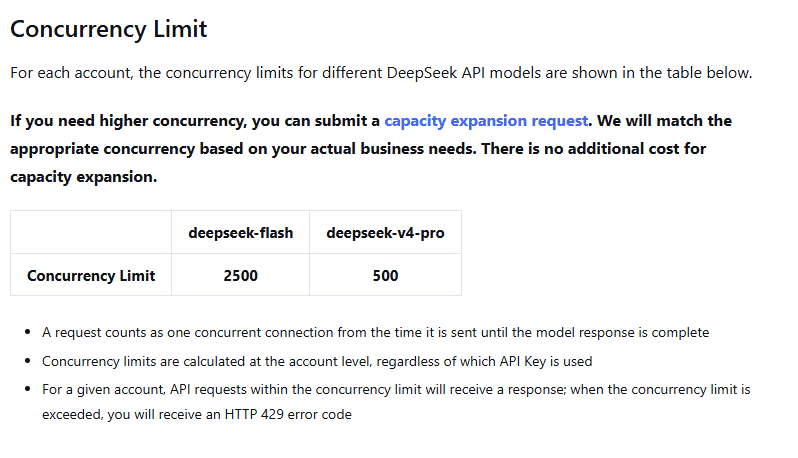
DeepSeek API rate limits are currently documented mainly as account-level concurrency limits, not as a simple “requests per minute per API key” table. The official Rate Limit & Isolation documentation lists deepseek-flash at 2,500 concurrent connections per account and deepseek-v4-pro at 500 concurrent connections per account.
The concurrency figures above apply to model-generation requests. Standalone Search and Fetch use different controls: the independent account-level limits are 100 requests per second for Search and 25 for Fetch, explained below.
A model-generation request counts as one concurrent connection from the time it is sent until the model response is complete. The limit is calculated at the account level, regardless of how many API keys exist under that account. Creating more keys under the same account does not create separate capacity pools.
Model concurrency documentation checked: October 4, 2026. Search and Fetch fees and limits rechecked: October 19, 2026. This guide is based on public DeepSeek documentation; no private traffic logs or live account tests were used.
Quick reference: DeepSeek’s current public concurrency limits
| Model | Current public account-level concurrency limit | What the limit means |
|---|---|---|
deepseek-flash | 2,500 concurrent connections per account | Up to 2,500 in-flight requests can be active under the account before the documented concurrency limit is exceeded. |
deepseek-v4-pro | 500 concurrent connections per account | Up to 500 in-flight requests can be active under the account before the documented concurrency limit is exceeded. |
These are not per-key quotas. If one application uses five different API keys created under the same DeepSeek account, those requests still count toward that account’s total concurrency. This matters for production systems, background jobs, subagents, and multi-user applications that share one billing account.
What “rate limit” means in DeepSeek’s API
For model-generation requests, DeepSeek’s public documentation emphasizes concurrent connections. The standalone Search and Fetch APIs instead publish QPS limits: the number of requests started per second. A concurrency semaphore alone does not enforce that request-start rate.
Standalone Search and Fetch use request-rate limits. DeepSeek’s Search & Fetch documentation, checked October 19, 2026, specifies these limits separately from model-generation concurrency:
| Service | Account-level limit | Counting scope |
|---|---|---|
POST /v1/tools/search | 100 requests per second (100 QPS) | Shared across all API keys under the account |
POST /v1/tools/fetch | 25 requests per second (25 QPS) | Shared across all API keys under the account |
Search and Fetch have independent quotas: Search traffic does not consume Fetch’s quota, or vice versa. Fetch also has a separate per-domain QPS limit; the guide does not publish a numeric value for that additional limit. Exceeding an applicable limit returns HTTP 429. Pace Search and Fetch separately and reduce Fetch pressure on the target domain when needed.
Each service costs $0.75 per 1,000 billable requests, independently of model-token charges. A billable request must return HTTP 200 and produce non-empty Search results or Fetch page content. Failed requests, empty Search results, and timeouts are not billed. The Search count parameter does not change the per-request fee. Server-side Search and Fetch tool calls through DeepSeek Harness, Claude Code, or Codex are currently free of request charges; per-request billing starts at 00:00 Beijing time on November 1, 2026. This notice does not waive model-token charges or establish free direct standalone Search or Fetch usage.
Keep these concepts separate:
| Concept | What it means | DeepSeek-specific note |
|---|---|---|
| Account-level concurrency | How many model requests can be active at the same time. | This is the main public limit documented for deepseek-flash and deepseek-v4-pro. |
| Search and Fetch QPS | How many requests start per second for each standalone service. | Search: 100 QPS per account. Fetch: 25 QPS per account, independently, plus an additional per-domain Fetch limit. |
| Requests per minute | How many requests are started during a time window. | Do not invent an RPM number if DeepSeek has not published one for your account. |
| Tokens per minute | How many input/output tokens are processed during a time window. | Do not assume a TPM quota from another provider applies to DeepSeek. |
| Context length | How much input context a model can accept in one request. | This is not the same as a rate limit. |
| Maximum output | How much text or reasoning the model may generate in one response. | A long output can keep a request active for longer. |
| Account balance | Whether the account has usable API funds. | Insufficient balance is a 402 issue, not a rate-limit issue. |
| Server overload | The provider is under high traffic or server pressure. | This is handled separately from ordinary client-side pacing. |
For model requests, too many simultaneous calls can cause HTTP 429 even if average requests per minute looks low. For standalone Search or Fetch, too many request starts per second can cause 429 even when only a few model requests are active. Check which endpoint rejected the request before changing its limiter.
Why DeepSeek returns HTTP 429
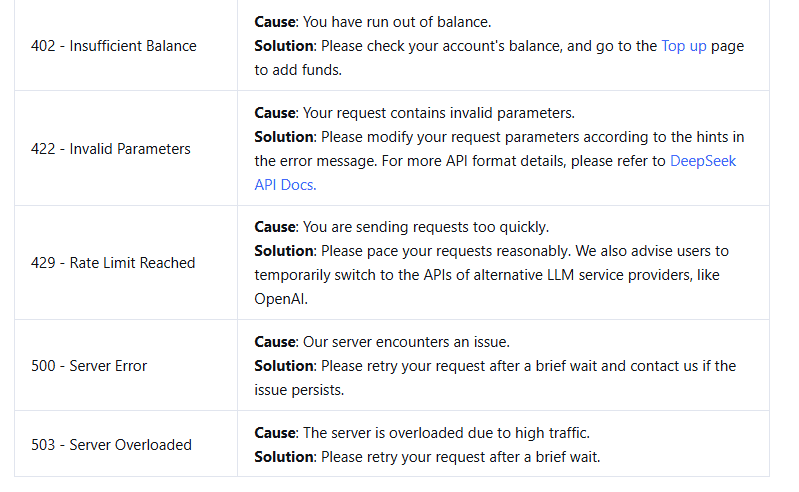
DeepSeek’s official Error Codes page defines 429 - Rate Limit Reached as a sign that requests are being sent too quickly. The solution is to pace requests reasonably rather than retrying aggressively.
Do not treat all API errors the same way:
| Status | Meaning | Should you retry unchanged? |
|---|---|---|
401 | Authentication failed because the API key is wrong or not sent correctly. | No. Fix the key or authentication header first. |
402 | The account has insufficient balance. | No. Check account balance and billing first. |
422 | The request contains invalid parameters. | No. Correct the request body. |
429 | The workload exceeded applicable pacing or concurrency limits. | Possibly, but only with queueing, backoff, and a bounded retry budget. |
500 | DeepSeek server error. | Possibly, after a brief wait and with bounded retries. |
503 | Server overloaded due to high traffic. | Possibly, after backing off. |
If you retry 401, 402, or 422 unchanged, you are usually repeating a request that cannot succeed. If you retry 429 without reducing pressure, you can create a retry storm that makes the problem worse.
How account-level concurrency works
Think of each active DeepSeek request as occupying one slot. That slot is held until the model response is complete. A short request may release the slot quickly; a long reasoning task, large-context request, streaming response, or slow client can hold the slot for longer.
For example, if an application sends 600 long-running deepseek-v4-pro requests at once while the documented account-level Pro limit is 500, the excess pressure can produce 429 responses. The exact order in which requests are accepted or rejected is an implementation detail, but the production lesson is clear: your application needs its own concurrency control before requests reach the provider limit.
Longer response time reduces practical throughput. Even if your application starts the same number of requests per minute, requests that remain open longer keep concurrency higher. This is why large prompts, long outputs, deep reasoning, tool loops, and slow stream consumers can all affect rate-limit behavior.
More API keys do not increase account capacity
DeepSeek’s public rate-limit documentation states that concurrency is calculated at the account level regardless of which API key is used. Multiple keys may help you organize applications, environments, or access control, but they should not be treated as a way to bypass concurrency limits.
If your production traffic is growing, the durable fix is not to create many keys and spray traffic across them. Use application-level queues, worker pools, backpressure, per-user controls, and capacity planning. If the workload genuinely needs more concurrency, prepare evidence and follow DeepSeek’s official capacity-expansion path rather than relying on undocumented workarounds.
How user_id affects isolation and limits
DeepSeek’s API supports a user_id parameter for identifying end users on the application side. The current documentation describes it as useful for content-safety review, KVCache isolation, and scheduling isolation.
However, user_id is not a way to create a full new account quota for each end user. For regular API users, all user_id values still fall under the account-level concurrency limit. For users with increased concurrency quotas, DeepSeek also imposes per-user_id concurrency limits; the current documented per-user_id limits match the model limits: 2,500 for deepseek-flash and 500 for deepseek-v4-pro.
DeepSeek also documents a format requirement for user_id: use a string matching [a-zA-Z0-9\-_]+, with a maximum length of 512 characters. Do not include private or personally identifying information in this value. Use an internal stable identifier instead of an email address, phone number, or real name.
Where to pass user_id
The shape depends on the API format you use. Keep the examples scoped to the correct interface.
{
  "model": "deepseek-flash",
  "messages": [
    {
      "role": "user",
      "content": "Summarize this support ticket."
    }
  ],
  "user_id": "tenant_123_user_456"
}
If you use an OpenAI-compatible SDK that does not expose user_id directly, DeepSeek’s examples show provider-specific fields through extension mechanisms such as extra_body. Anthropic-compatible requests use metadata-style fields. Check the API format you are actually using before copying a snippet.
Keep-alive lines, streaming, and the 10-minute server close
DeepSeek’s rate-limit documentation also describes keep-alive behavior for requests that are waiting before inference begins. This matters for clients that parse raw responses.
- Non-streaming requests may return empty lines as keep-alive signals.
- Streaming requests may return Server-Sent Events comments such as
: keep-alive. - Keep-alive data is not final model output and should not be parsed as JSON content.
- If a request has not started inference after 10 minutes, the server closes the connection.
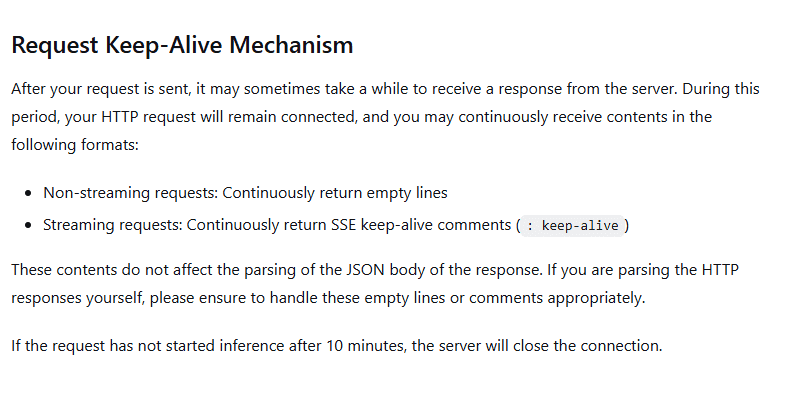
A custom streaming parser should ignore SSE comment lines and wait for the documented completion signal for the API format being used. A client timeout and DeepSeek’s server-side waiting behavior are different controls; configure both deliberately.
Streaming can improve perceived latency because the user can see output earlier. It does not mean the request stops counting as concurrent before the stream completes. A slow client that consumes the stream slowly can keep a connection open longer.
How to prevent 429 in production
The best fix for rate limits is not “retry harder.” Build traffic control into the application before requests hit the DeepSeek account limit.
- Use a queue. Accept work into an internal queue and release it at a controlled pace.
- Use a worker pool. Limit how many API calls can be active at once for each model.
- Separate Flash and Pro traffic. Keep independent counters because the documented concurrency limits differ.
- Apply per-user throttling. Prevent one tenant or user from consuming all shared account capacity.
- Use backpressure in the UI. Show “queued” or “busy” states rather than launching unbounded parallel calls.
- Bound agent loops. Coding agents and tool-calling workflows can produce many model requests from one user task.
- Separate interactive and background workloads. Do not let a batch job starve real-time users.
Set your own application cap below the official limit so you have room for retries, temporary latency spikes, background jobs, and other services sharing the same account. There is no universal safe cap; tune it using your own request duration, error rate, traffic pattern, and account capacity.
A bounded concurrency pattern
The following is pseudocode showing the shape of a bounded async worker pattern. It does not make real DeepSeek requests. Replace call_deepseek_once(job) with your own API client call.
import asyncio
import random


RETRYABLE_STATUS = {429, 500, 503}
DO_NOT_RETRY_UNCHANGED = {401, 402, 422}


class DeepSeekHTTPError(Exception):
    def __init__(self, status_code: int):
        self.status_code = status_code
        super().__init__(f"HTTP {status_code}")


async def call_deepseek_once(job):
    """
    Replace this with your own DeepSeek API call.
    Do not print API keys or private prompts in real logs.
    """
    raise NotImplementedError


async def call_with_backoff(job, *, max_attempts=4, base_delay=0.5):
    for attempt in range(max_attempts):
        try:
            return await call_deepseek_once(job)

        except DeepSeekHTTPError as exc:
            status = exc.status_code

            if status in DO_NOT_RETRY_UNCHANGED:
                raise

            if status not in RETRYABLE_STATUS:
                raise

            if attempt == max_attempts - 1:
                raise

            delay = base_delay * (2 ** attempt)
            jitter = random.uniform(0, delay * 0.25)
            await asyncio.sleep(delay + jitter)


async def worker(name, queue, semaphore):
    while True:
        job = await queue.get()

        if job is None:
            queue.task_done()
            return

        try:
            async with semaphore:
                await call_with_backoff(job)
        except Exception as exc:
            # Record a safe failure label, then continue with the next job.
            status = getattr(exc, "status_code", None)
            error_label = (
                f"HTTP {status}" if status is not None else type(exc).__name__
            )
            print(f"{name}: job failed ({error_label})")
        finally:
            queue.task_done()


async def run_jobs(jobs):
    # Application cap, not an official DeepSeek recommendation.
    app_concurrency_cap = 100

    queue = asyncio.Queue()
    semaphore = asyncio.Semaphore(app_concurrency_cap)

    workers = [
        asyncio.create_task(worker(f"worker-{i}", queue, semaphore))
        for i in range(app_concurrency_cap)
    ]

    for job in jobs:
        await queue.put(job)

    await queue.join()

    for _ in workers:
        await queue.put(None)

    await asyncio.gather(*workers)
This pattern is useful because it limits in-flight calls, avoids infinite retry loops, does not retry authentication or balance failures unchanged, and adds jitter so every worker does not retry at the same instant. If a job still fails, the worker logs only a status or exception type and continues with the next job. A completed queue does not mean every job succeeded; record failed jobs in your application’s result tracking and review them before treating the batch as successful. This example controls model-generation concurrency. Add separate time-based pacing for standalone Search and Fetch requests; do not reuse the model semaphore as their QPS limiter.
How to retry 429 safely
A 429 response means you should reduce pressure. Retrying immediately without changing traffic behavior usually repeats the problem.
- Retry only retryable failures. Consider retries for
429,500, and503; do not retry401,402, or422unchanged. - Use exponential backoff with jitter. Randomness helps avoid many workers retrying together.
- Set a maximum number of attempts. Do not keep retrying forever.
- Use a total time budget. Stop when the request is no longer useful to the user or job.
- Do not sleep after the final failed attempt. Return or log the failure instead.
- Check SDK retries. Avoid stacking your own retry loop on top of hidden library retries unless you account for both.
- Be careful with side effects. A timeout does not prove the server did nothing, and a repeated agent action may duplicate external work.
If a Retry-After header is present and valid, respect it. Do not assume DeepSeek always sends one unless the current official documentation says so for your endpoint.
Batch jobs, agents, and background workers
Batch jobs and agent systems are common sources of unexpected 429 responses because one user action can fan out into many model calls.
- Do not launch thousands of promises or tasks at once.
- Use separate queues for interactive and background work.
- Limit each agent loop to a maximum number of model/tool rounds.
- Track subagent requests separately from primary user requests.
- Throttle long-context or long-output jobs more conservatively than short classification jobs.
- Pause or drain queues gradually after a 429 spike instead of replaying all failed jobs at once.
A framework error is not automatically a DeepSeek API problem. Confirm the provider, endpoint, model, credentials, concurrency level, and retry settings before assigning the cause.
What to monitor
If you run DeepSeek in production, monitor both application-side behavior and API results. Useful metrics include:
- in-flight requests by model;
- 429 count and rate;
- 500 and 503 counts separately from 429;
- request duration;
- time spent waiting in your queue;
- retry attempts per request;
- successful completions;
- active tool or agent loops;
- per-user or per-tenant pressure;
- model name and API format;
- account balance separately from rate-limit errors.
Use redacted logs. Do not log API keys, private prompts, confidential documents, customer data, or full request bodies containing secrets. If DeepSeek exposes a request identifier in a specific response, log that safely; do not invent a header name or rely on one that is not documented.
When to request more capacity
If your workload still needs more throughput after implementing queueing, worker caps, backoff, and per-user controls, check the official Rate Limit & Isolation page and DeepSeek Platform for the current capacity-expansion process.
Before requesting more capacity, gather evidence:
- the model used;
- observed in-flight concurrency;
- 429 timestamps and frequency;
- request duration distribution;
- interactive versus background traffic mix;
- per-user or per-tenant distribution;
- business reason for higher concurrency;
- client-side controls already implemented.
Do not assume approval, timing, or an SLA unless DeepSeek states it for your account. Even with higher capacity, your application should still keep its own pacing and backpressure controls.
Third-party DeepSeek endpoints can have different limits
This guide is scoped to the official DeepSeek API. A model called “DeepSeek” may also be served by a gateway, cloud provider, local inference server, or open-weight deployment. Those routes can have different endpoints, authentication, model names, queues, rate limits, and error semantics.
If you receive a 429 through a third-party provider, check that provider’s documentation first. Do not transfer DeepSeek’s official account-level concurrency numbers to OpenRouter, NVIDIA-hosted routes, local servers, or another gateway unless that provider explicitly uses the same limits.
DeepSeek API rate limit checklist
- Use the current official Rate Limit & Isolation documentation as the source of truth.
- Treat the public limits as account-level concurrency limits, not per-key pools.
- Track
deepseek-flashanddeepseek-v4-proseparately. - Do not create more API keys to bypass rate limits.
- Use
user_idfor isolation, not as a way to multiply normal account quota. - Do not include private information in
user_id. - Ignore keep-alive lines or SSE comments as keep-alive, not final output.
- Use queues and worker pools before requests reach DeepSeek.
- Retry
429,500, and503only with bounded backoff and jitter. - Do not retry
401,402, or422unchanged. - Separate rate-limit monitoring from balance, authentication, and invalid-request monitoring.
- Request higher capacity only after proving the workload needs it and your client already controls traffic responsibly.
FAQ
Are DeepSeek API limits per API key?
No. DeepSeek’s public documentation says concurrency is calculated at the account level regardless of which API key is used. Multiple keys under the same account do not create independent concurrency pools.
What causes HTTP 429 in DeepSeek?
DeepSeek defines 429 - Rate Limit Reached as a sign that applicable limits have been exceeded. For model-generation requests, check active concurrency, request duration, queues, retries, and per-user pressure. For standalone Search and Fetch, check the independent account limits of 100 QPS for Search and 25 QPS for Fetch and Fetch’s additional per-domain limit.
Is 402 a rate-limit error?
No. 402 means insufficient balance. It is a billing/account issue, not a rate-limit issue. Retrying the same request will not fix the missing balance.
Do streaming requests count against concurrency?
A request counts until the model response is complete. Streaming changes how output is delivered to the client, but it does not automatically release the concurrency slot before the stream finishes.
Does user_id give every user a separate full quota?
No. For regular accounts, user_id does not create separate full account-level concurrency for each user. It is used for isolation and scheduling behavior, and for expanded-capacity accounts DeepSeek can also apply per-user_id concurrency limits.