

DeepSeek Thinking Mode makes the model generate reasoning before its final answer. In the current DeepSeek API, thinking is enabled by default at high effort, and you can switch it off or choose low, high, or max reasoning effort depending on the task.
The important detail is that Thinking Mode is no longer a separate “reasoner” model you need to select. Current models such as deepseek-flash and deepseek-v4-pro support both thinking and non-thinking behavior. The API also separates the reasoning trace from the final user-facing answer, so applications need to handle the two correctly.
Documentation checked: October 3, 2026. Code examples below were syntax-checked; no authenticated or billable DeepSeek API request was run.
Thinking Mode vs non-thinking mode
The simplest way to choose a mode is by task complexity. DeepSeek’s Thinking Mode documentation exposes reasoning as a configurable behavior rather than a separate product.
| Mode | What happens | Good starting point for |
|---|---|---|
| Non-thinking | The model produces the final answer without returning a separate reasoning trace. | Rewriting, extraction, simple formatting, short classifications, and other straightforward tasks. |
| Low | Thinking is enabled with lighter reasoning effort. | Tasks that benefit from some reasoning but do not justify deeper inference. |
| High | Thinking is enabled at DeepSeek’s current default effort. | General coding, debugging, planning, and everyday agent workflows. |
| Max | The model uses the highest native reasoning-effort setting. | Difficult multi-step problems where deeper reasoning is worth additional time and token usage. |
DeepSeek itself describes low as suitable for simpler work, high for ordinary agent tasks, and max for more complex scenarios in its current API change log. These are practical starting points rather than guarantees that one setting will always produce a better answer.
More reasoning is not automatically useful. If the task is merely converting CSV fields, rewriting a sentence, or extracting a known value, a deeper reasoning pass may add work without materially improving the result.
Which DeepSeek models support Thinking Mode now?
As of October 2026, DeepSeek’s official model table lists two main API model IDs:
| API model ID | Current model version | Thinking support |
|---|---|---|
deepseek-flash | DeepSeek-V4.1-Flash-1017 | Thinking and non-thinking |
deepseek-v4-pro | DeepSeek-V4-Pro-0813 | Thinking and non-thinking |
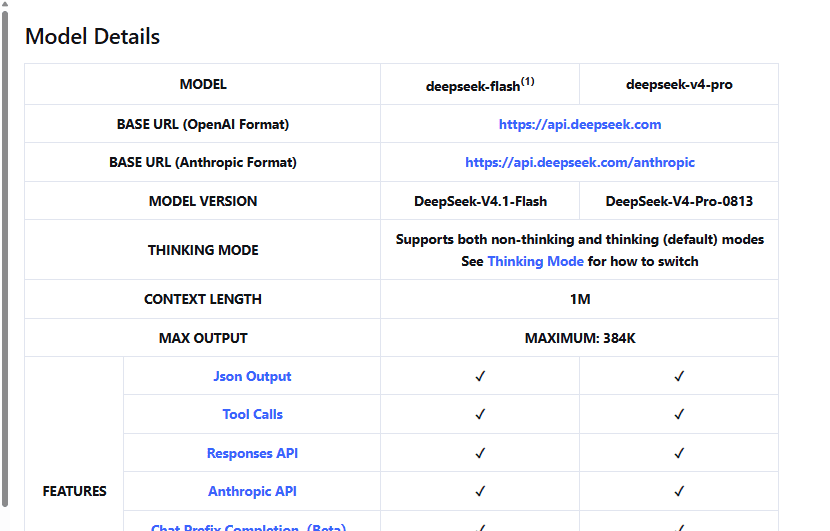
This is important because many older tutorials still tell developers to use deepseek-chat for ordinary responses and deepseek-reasoner for reasoning. DeepSeek’s V4 release documentation announced that those legacy model names would be discontinued on July 24, 2026. Current integrations should use the model IDs listed in the live API reference instead of building new code around the older split.
How to enable or disable DeepSeek Thinking Mode
With the OpenAI-compatible Chat Completions API, DeepSeek exposes two related controls:
thinking.typeswitches thinking betweenenabledanddisabled.reasoning_effortcontrols how much reasoning the model performs when thinking is enabled.
Thinking is currently enabled by default, and the default reasoning effort is high, according to the official Thinking Mode guide.
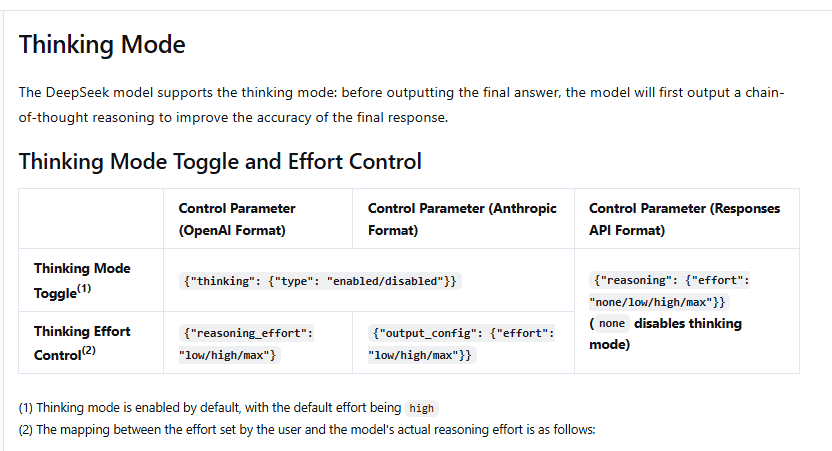
When using the OpenAI Python SDK, DeepSeek instructs developers to send its provider-specific thinking object through extra_body. The native reasoning_effort value can be supplied alongside it.
Python example: enable thinking and read both outputs
Install the OpenAI client library if it is not already available:
python -m pip install openaiStore your DeepSeek key in the DEEPSEEK_API_KEY environment variable or an appropriate server-side secret manager, then use:
import os
from openai import OpenAI

client = OpenAI(
    api_key=os.environ["DEEPSEEK_API_KEY"],
    base_url="https://api.deepseek.com",
)

response = client.chat.completions.create(
    model="deepseek-flash",
    messages=[
        {
            "role": "user",
            "content": "Compare two migration strategies and explain the main trade-offs.",
        }
    ],
    reasoning_effort="high",
    max_tokens=4096,
    extra_body={"thinking": {"type": "enabled"}},
)

message = response.choices[0].message

print("Reasoning:")
print(message.reasoning_content or "")

print("\nFinal answer:")
print(message.content or "")
The key distinction is message.reasoning_content versus message.content. The first contains the reasoning generated before the answer; the second is the final answer your application would normally present to the user.
To turn Thinking Mode off in Chat Completions, use the documented disabled setting:
extra_body={"thinking": {"type": "disabled"}}The Chat Completions reference also documents reasoning_effort="none" as a way to disable reasoning. Avoid sending contradictory controls—for example, explicitly enabling thinking while separately requesting no reasoning.
What do low, high, and max reasoning effort mean?
reasoning_effort changes how much inference effort DeepSeek allocates to the reasoning stage. It does not represent a fixed number of reasoning tokens or a guaranteed percentage improvement in accuracy.
The native DeepSeek levels are:
- Low: lighter reasoning for simpler tasks.
- High: the current default and the general-purpose starting point.
- Max: the highest native effort level for especially difficult problems.
DeepSeek also accepts some compatibility labels. Its Thinking Mode documentation currently maps minimal to low, while medium and xhigh map to high. The same guide lists ultra as mapping to max. If you control the integration directly, using DeepSeek’s native low, high, and max labels is clearer.
Do not assume that max is automatically the right production default. Evaluate the final answer quality, completion time, and token usage on the tasks your application actually performs.
What is reasoning_content?
In Chat Completions, DeepSeek returns the reasoning trace in reasoning_content and the final response in content. They are separate fields in the assistant message, as documented in the response schema.
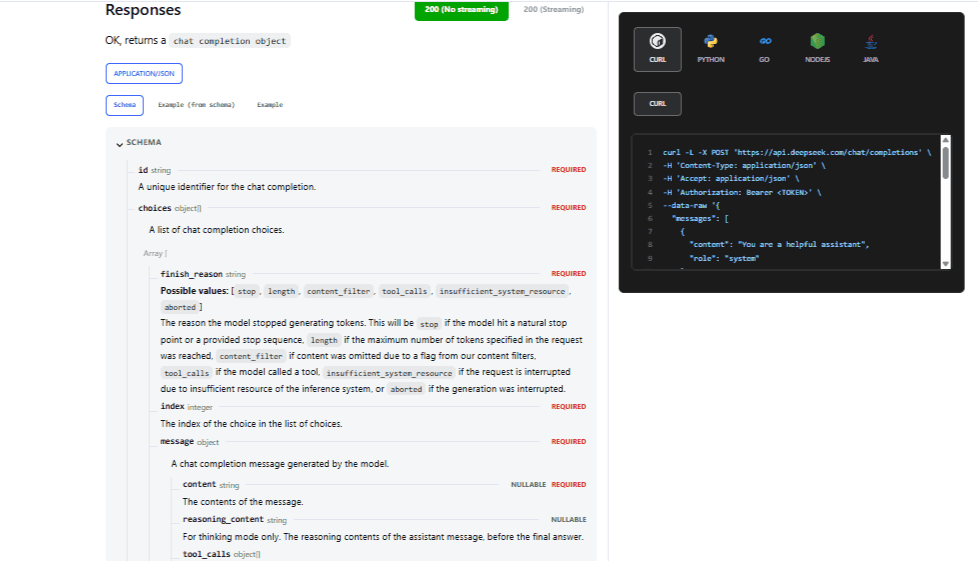
That separation matters for three reasons:
- Your application should normally treat
contentas the final user-facing answer. - Streaming clients need to keep reasoning fragments separate from final-answer fragments.
- Conversation-history rules for
reasoning_contentchange when tools are involved.
Visible reasoning should not be treated as proof that the final answer is correct. A long or persuasive reasoning trace can still lead to a factual, mathematical, or programming error. Verify important outputs independently.
Do you send reasoning_content back on the next turn?
Usually not for an ordinary conversation without tools. DeepSeek’s current multi-turn rule says that when the request does not carry a tools parameter, previous reasoning_content does not need to be sent back. If it is included, the API ignores it for context construction.
You still need to send the relevant conversational messages because Chat Completions does not magically reconstruct the conversation from your local application state. The important distinction is that the previous final answer belongs in the conversation history, while old reasoning does not need to become part of the next normal reasoning context.
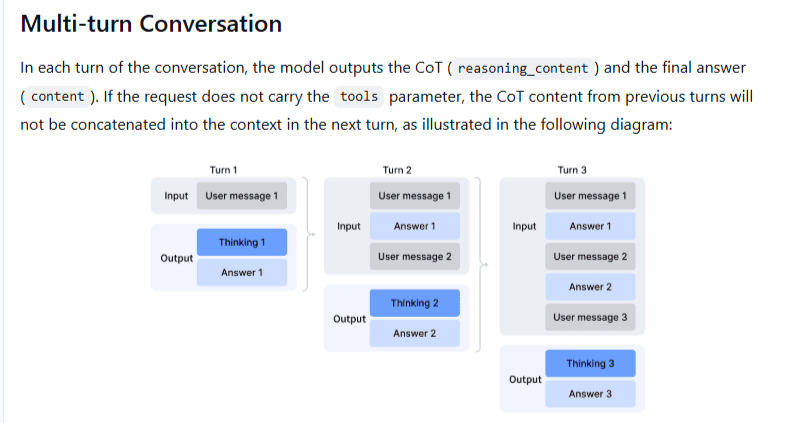
Do not confuse this protocol behavior with a privacy statement. A field being ignored for the next model context does not establish how service data is stored or processed.
Thinking Mode with tool calls has a different rule
When a request includes tools, DeepSeek requires a stricter conversation history. Its Thinking Mode guide says that the previous reasoning_content must be passed back in subsequent tool-enabled requests, including prior turns where no tool was called. If your application drops it, the API can return HTTP 400.
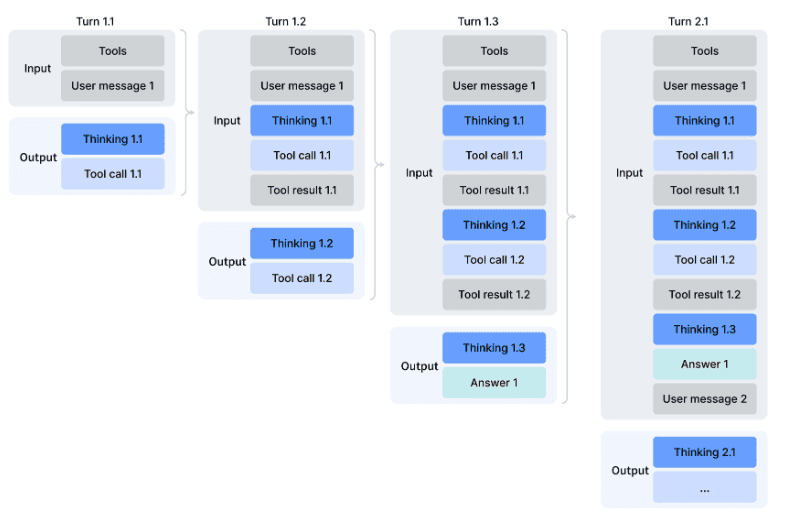
A thinking-mode tool loop typically looks like this:
- The user asks for a task.
- The model generates reasoning and may return a tool call.
- Your application executes the requested function.
- Your application sends the tool result back with the matching
tool_call_id. - The model can reason again, call another tool, or produce the final answer.
The model does not execute your external function simply because it returned a tool call. Your application is responsible for validating the arguments, executing an approved function, and returning the result. DeepSeek’s Tool Calls guide documents this division of responsibility.
The safest pattern is to preserve the assistant message returned by the API—including its reasoning_content, content, and tool_calls fields—rather than reconstructing a simplified assistant message that accidentally drops required state.
Some familiar generation parameters stop working in Thinking Mode
One of the easiest mistakes is trying to tune reasoning with parameters that DeepSeek ignores while Thinking Mode is active.
| Parameter | Current Thinking Mode behavior |
|---|---|
temperature | No effect in Thinking Mode. |
presence_penalty | No effect in Thinking Mode. |
frequency_penalty | No effect in Thinking Mode. |
top_p — deepseek-flash | Takes effect in Thinking Mode within 0.95–1.0. Values below 0.95 are treated as 0.95. |
top_p — deepseek-v4-pro | Your supplied value is ignored in Thinking Mode. The value is fixed at 0.95 when the tools parameter is present, otherwise 1.0. |
The official guide says the ignored parameters are accepted for compatibility instead of producing an error. That means an application can appear to accept a temperature or penalty setting even though changing it does nothing to the reasoning behavior.
In non-thinking mode, deepseek-flash fixes top_p at 1.0 and ignores your supplied value, while deepseek-v4-pro applies your supplied top_p value. If your goal is to control how deeply the model reasons, use the reasoning controls rather than sampling parameters that do not affect that mode.
Context length, max_tokens, and reasoning effort are different limits
Current DeepSeek V4-family API models have a 1 million-token context window and a maximum server-accepted output of 384K tokens, according to the current model specification. That does not mean every request should ask for 384K output.
For Chat Completions, the current API reference documents these defaults when max_tokens is omitted:
| Mode | Default output allowance |
|---|---|
| Non-thinking | 8K tokens |
| Thinking: low/high | 64K tokens |
| Thinking: max | 128K tokens |
The context window, output allowance, and reasoning effort describe different things. The context window limits the combined information the model can work with; max_tokens limits generation; reasoning effort changes how much reasoning the model attempts.
In DeepSeek’s Responses API, max_output_tokens explicitly includes both visible output and reasoning tokens. A very small output limit can therefore stop a thinking request before it reaches a complete final answer.
Check the completion status rather than treating HTTP 200 as proof that a full answer was produced.
How streaming changes with Thinking Mode
In a streaming Chat Completions response, DeepSeek exposes separate delta fields for reasoning and final text: delta.reasoning_content and delta.content.
A streaming client should accumulate those fields independently instead of assuming every chunk contains user-facing text. It should also tolerate chunks that contain tool-call fragments or no answer text.
The distinction becomes even more important if you switch API formats. DeepSeek’s Responses API uses semantic streaming events and ends with response.completed, response.incomplete, or response.failed. It does not use the same terminal convention as Chat Completions.
Thinking Mode in Chat Completions, Responses API, and Anthropic format
DeepSeek supports several API protocols, but their parameter shapes are not interchangeable.
| Interface | Thinking control | Reasoning output |
|---|---|---|
| OpenAI-compatible Chat Completions | thinking plus reasoning_effort | reasoning_content beside final content |
| Responses API | reasoning.effort: none, low, high, or max | A separate reasoning output item before the final message |
| Anthropic-compatible API | Anthropic-style thinking plus supported effort controls | Anthropic-compatible thinking content |
The Anthropic compatibility guide states that the thinking field is supported but budget_tokens is ignored, while the effort portion of output_config is supported. Do not copy the Chat Completions Python parameters into an Anthropic request and expect identical behavior.
Likewise, DeepSeek’s Responses API guide documents a stateless interface. Parameters such as previous_response_id and conversation are not supported, so an application must send the conversation state required for later turns.
Does Thinking Mode cost more?
There is no fixed “Thinking Mode surcharge.” DeepSeek bills API use by tokens according to the selected model, input cache status, output usage, and its current peak/off-peak price schedule.
The Chat Completions usage object reports reasoning_tokens as part of the completion-token breakdown. DeepSeek’s pricing page bills output tokens, so a request that generates substantially more reasoning can consume more output-token budget than an otherwise similar direct response.
The actual difference depends on the task and the model. Do not estimate a workload by assuming that high always uses a fixed multiple of low, or that max always generates the same amount of reasoning.
Is Thinking Mode slower?
Thinking happens before or alongside preparation of the final answer, so more reasoning can increase the time before a complete response is available. DeepSeek positions lower effort for simpler work and higher effort for more difficult tasks, but it does not publish a universal latency multiplier that applies to every prompt.
For a production system, measure your own representative workloads. A difficult debugging prompt, a short extraction task, and a multi-tool agent can have very different reasoning lengths even when they use the same effort label.
Does Thinking Mode make DeepSeek more accurate?
Thinking Mode is designed to let the model reason before answering, and DeepSeek describes it as a way to improve final-response accuracy. That does not mean every thinking response is correct or that deeper effort will improve every prompt.
Use the mode where reasoning genuinely helps, then verify outputs according to the risk of the task. Recalculate important numerical results, execute generated code in an appropriate environment, confirm citations, and independently review high-stakes conclusions.
When you should turn Thinking Mode off
Non-thinking mode is worth testing when the task is simple enough that an extended reasoning stage is unlikely to add useful value. Examples include:
- Reformatting already structured text.
- Extracting a small set of explicit fields.
- Simple rewriting or tone changes.
- Short classifications with clear labels.
- Latency-sensitive interactions where deeper reasoning is unnecessary.
Thinking Mode is more compelling when the model must combine multiple constraints, debug a difficult issue, plan several dependent steps, reason through mathematics, or coordinate tools.
The best choice is empirical: test both modes on representative inputs and compare the final result, token usage, and response time rather than choosing solely from the name of the mode.
DeepThink in the web app is not the same control surface as the API
You may encounter the name DeepThink in older DeepSeek tutorials and screenshots. DeepSeek’s V3.1 announcement from August 2025 explicitly described a DeepThink button for switching between Think and Non-Think behavior in the chat interface.
That historical UI should not be treated as documentation for the current API. The developer interface now exposes explicit controls such as thinking.type and reasoning_effort. Consumer web and mobile labels can change independently and may not expose the same fine-grained effort settings.
If you are following an old tutorial that tells you to select deepseek-reasoner or parse <think> tags manually, verify whether it was written for an older model, self-hosted inference stack, or a different provider. The current official hosted Chat Completions API exposes reasoning through the structured reasoning_content field.
A practical default for choosing DeepSeek reasoning effort
If you need a simple starting policy, use non-thinking or low effort for straightforward work, keep high for normal tasks that genuinely require reasoning, and reserve max for the difficult prompts where additional inference is worth the operational cost.
Then measure the outcome. Check the final answer rather than judging the model by the length of its reasoning trace, monitor reported reasoning and completion tokens, and preserve reasoning_content correctly when tool-enabled conversations require it. Those details matter more than simply switching Thinking Mode on.