

DeepSeek Harness is an official, open-source agent harness from DeepSeek. It is not a new AI model by itself. It is a workspace and runtime layer that lets an AI agent work with files, code, tools, plugins, automation, and longer multi-step tasks. Use DeepSeek Chat for simple conversations, the DeepSeek API Platform for direct model calls, and DeepSeek Harness when you need an agent-style environment that can inspect files, use tools, manage sessions, run plugins, and work through more complex tasks.
DeepSeek’s official Harness page describes it as being in public preview worldwide and open source, with composable plugins that extend what agents can do. The official GitHub repository also says DeepSeek Harness, or dsh, is an open-source agent harness built on an “everything is a plugin” architecture. It is also marked as a developer preview, so you should expect rapid changes and possible compatibility-breaking updates.
Documentation checked: October 11, 2026. DeepSeek Harness is evolving quickly. Before installing, building plugins, connecting custom models, or using it with real files, verify current details on the official DeepSeek Harness page, GitHub repository, developer docs, Privacy Policy, and Terms of Use.
What is DeepSeek Harness?
DeepSeek Harness is best understood as the layer around a model that turns model output into useful action. A model can answer text. A harness can connect that model to files, plugins, terminals, tools, scheduled tasks, and a workspace.
That distinction matters. DeepSeek Harness is not deepseek-flash, not deepseek-v4-pro, not DeepSeek Chat, and not the API itself. It can use model services, but it is the agent workspace and tool runtime around them.
| Meaning | What it means | Best use | Main caution |
|---|---|---|---|
| Product / workspace | A DeepSeek agent workspace for documents, data, coding, research, automation, and plugins. | Multi-step tasks that need tools or files. | Do not treat it as a normal chatbot. |
| Open-source project | The deepseek-ai/deepseek-harness repository and the dsh command. | Developers, plugin builders, and local Web UI users. | The project is in developer preview. |
| Desktop route | Official downloads are linked from the Harness page for macOS Apple silicon and Windows 64-bit. | Users who want a ready desktop route. | Check the current official page before downloading. |
| Local Web UI route | The GitHub README documents npx @deepseek-ai/dsh web, which starts a local Web UI. | Developers who prefer local launch from Node.js. | Requires Node.js and may change as the preview evolves. |
| Plugin ecosystem | Plugins extend tools, skills, UI, scheduled tasks, voice input, terminal, subagents, and more where available. | Custom workflows and agent extension. | Only install trusted plugins. |
| Model-calling medium | Harness can use official model services or custom model services depending on setup. | Teams that want a model-plus-tools workspace. | Custom providers have their own data and billing rules. |
DeepSeek Harness vs DeepSeek Chat vs DeepSeek API
Most confusion around DeepSeek Harness comes from mixing it with other DeepSeek routes. Each route has a different job.
| DeepSeek route | What it is | Best for | What it cannot replace | Main risk |
|---|---|---|---|---|
| DeepSeek Chat | The official chat route for direct conversation. | Quick questions, writing, learning, simple coding help, and general chat. | It does not replace a file-aware agent workspace. | Users may paste sensitive data into chat without thinking. |
| DeepSeek app | The official mobile/app route linked from the DeepSeek download page. | Mobile AI assistant use. | It does not replace API integration or Harness automation. | Use official download routes, not mirrors. |
| DeepSeek Harness | An agent harness/workspace for tools, files, plugins, traces, and longer tasks. | Documents, spreadsheets, coding, research, background work, plugins, and automation. | It is not the underlying model itself. | Plugins, commands, local files, and model providers need careful review. |
| DeepSeek API | A developer platform for direct model calls. | Apps, backends, agents, structured output, and production integration. | It does not provide the Harness workspace layer. | API calls can cost money and require key security. |
| Open-weight DeepSeek models | Model resources published through official Hugging Face and GitHub organizations. | Research, local/self-hosted experiments, and model evaluation. | They do not provide the hosted chat or Harness product by themselves. | Local deployment requires infrastructure and security controls. |
| Third-party wrappers | External tools that may use DeepSeek models or branding. | Convenience workflows where the provider is trusted. | They are not automatically official DeepSeek services. | Separate privacy, billing, model, and support rules. |
Quick decision table: which DeepSeek route should you use?
| Need | Best route | Why | What to verify | Main caution |
|---|---|---|---|---|
| Quick chat | DeepSeek Chat | Fastest route for simple questions and conversation. | Use the official chat URL. | Do not paste confidential data. |
| Everyday writing | DeepSeek Chat or Harness | Chat is enough for short writing; Harness helps when files and tools are involved. | Whether you need file access or only text. | Review factual claims before publishing. |
| Document or file work | DeepSeek Harness | Harness is designed for working with documents, spreadsheets, code files, and workspace tasks. | Current file behavior and local permissions. | Use only files you are allowed to process. |
| Spreadsheet or data analysis | DeepSeek Harness | The official page shows spreadsheet and data-analysis workflows. | Supported file route and tool behavior. | Verify calculations manually for important reports. |
| Coding and repo work | DeepSeek Harness or API | Harness can work with local code and tools; API works for custom coding agents. | Repo privacy and tool permissions. | Run tests and review all changes. |
| Research with sources | DeepSeek Harness or Chat with search where supported | Harness is useful when research becomes a multi-step task with files and source verification. | Source quality and citation behavior. | Open sources yourself before relying on them. |
| Background tasks | DeepSeek Harness | Harness is built for longer tasks and background workflows. | Current plugin support and task behavior. | Do not leave sensitive or destructive tasks unattended. |
| Scheduled tasks | DeepSeek Harness | The official page shows scheduled-task workflows. | Plugin availability and schedule settings. | Review recurring tasks regularly. |
| Plugin development | DeepSeek Harness GitHub and developer docs | The project is plugin-based and open source. | Current API and compatibility changes. | Preview-stage APIs may break. |
| Custom model provider use | DeepSeek Harness custom model services | Harness can act as an interaction medium for models you configure yourself. | Provider terms, billing, and privacy policy. | DeepSeek cannot guarantee third-party model behavior. |
| Backend integration | DeepSeek API | Direct API calls are better for production applications. | Model ID, pricing, limits, and API keys. | Harness is not a backend API replacement. |
| Local/open-source experimentation | DeepSeek Harness GitHub route | The repository documents npm and source routes. | Node.js, build steps, and current docs. | Developer preview means change risk. |
| Privacy-sensitive files | Approved workflow only | Harness can touch local files, tools, and model providers. | Data flow, model route, plugin permissions, and company policy. | Do not process regulated or confidential files without approval. |
Official ways to start DeepSeek Harness
DeepSeek currently presents more than one official route for Harness. Choose the route that matches your skill level and risk tolerance.
1. Desktop download
The official DeepSeek Harness page links to Desktop downloads for macOS Apple silicon and Windows 64-bit. Use this route if you want the product experience rather than a developer checkout.
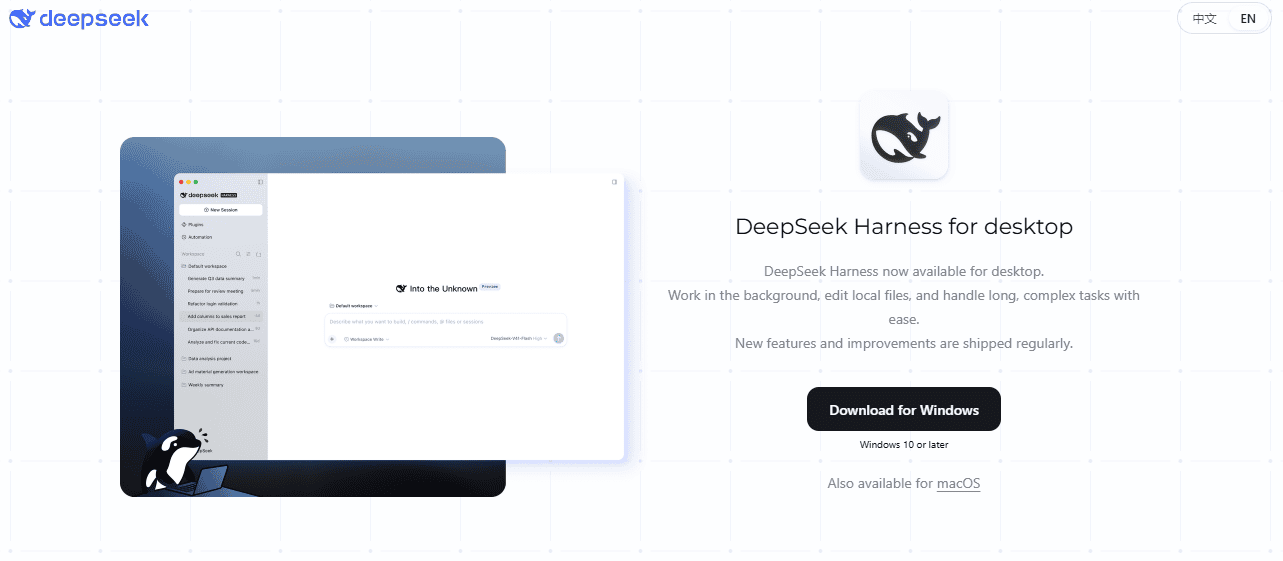
Download only from official DeepSeek links. Avoid unofficial mirrors, repackaged installers, or “DeepSeek desktop” tools that are not linked from official DeepSeek pages.
2. Local Web UI with npm
The official GitHub README says you can install Node.js and launch the Web UI with this command:
npx @deepseek-ai/dsh webAccording to the GitHub README, this starts the Web UI at http://127.0.0.1:3080 by default and opens it in the default browser for a local launch.
This command is useful for developers and technical users. It is not the same as logging into DeepSeek Chat, and running it may involve local files, plugins, tools, and model-provider configuration.
3. Source install from GitHub
The GitHub README also documents a source route for users who want to work from the repository checkout:
git clone https://github.com/deepseek-ai/deepseek-harness.git
cd deepseek-harness
pnpm install
pnpm run build
pnpm dsh web
Use this route only if you are comfortable with Node.js tooling, source builds, and preview-stage software. For development details, start from the official DeepSeek Harness developer docs and the GitHub repository.
What can DeepSeek Harness do?
The official DeepSeek Harness page presents it as a tool for everyday work, coding, research, background tasks, and plugins. The practical advantage over ordinary chat is that Harness can work inside a workspace and use tools across multiple steps.
| Use case | How Harness helps | What to provide | What to verify |
|---|---|---|---|
| Organizing documents | It can help inspect and organize workspace files. | The relevant folder or files. | Whether those files are safe and approved for AI processing. |
| Analyzing spreadsheets | It can help read and reason about spreadsheet-style data. | A clean spreadsheet and a clear analysis question. | Calculations, formulas, totals, and assumptions. |
| Drafting documents | It can turn notes, files, or research into drafts. | Audience, goal, source material, and format. | Facts, citations, and tone. |
| Creating slides | The official page shows slide-style workflows such as summary decks. | Source notes, report goal, and desired slide outline. | Visual accuracy and final formatting. |
| Writing code | Harness can inspect files, propose edits, and work through code tasks. | Repo context, error messages, requirements, and test commands. | Run tests and review every patch. |
| Research | It can help gather information, verify facts, and summarize sources. | Research question and source requirements. | Open sources yourself before relying on output. |
| Background tasks | It can run longer tasks and track progress. | Clear task boundaries and allowed tools. | Cost, file changes, and task side effects. |
| Plugin workflows | Plugins can extend tools, skills, UI, or workflows. | Trusted plugin source and configuration. | Plugin permissions and code behavior. |
Plugins: why “everything is a plugin” matters
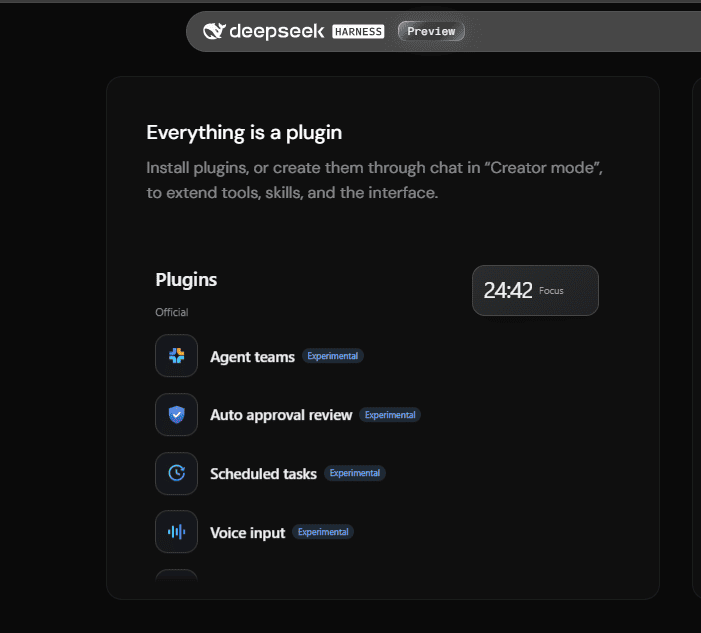
One of the most important ideas in DeepSeek Harness is its plugin architecture. The official Harness page says users can install plugins or create them through chat in Creator mode. The GitHub README says the project is built on an “everything-is-a-plugin” architecture and powered by Cordis.
That plugin model is powerful because it lets Harness extend beyond a fixed chat UI. Plugins can add tools, skills, UI components, scheduled tasks, terminal behavior, subagents, and other workflow pieces where supported.
It also increases responsibility. A plugin that can read files, run commands, call networks, or touch credentials should be treated like software, not like a harmless prompt.
Plugin safety checklist
- Install plugins only from trusted sources.
- Prefer official or clearly maintained repositories when possible.
- Review the plugin’s purpose before granting file, shell, browser, or network access.
- Do not install unknown plugins inside sensitive workspaces.
- Do not give a plugin access to secrets, API keys, private repositories, or customer data unless your workflow is approved.
- Remove plugins you no longer need.
Automation and scheduled tasks
The official Harness page shows a Scheduled tasks plugin example, including a recurring weekly report. That makes Harness useful when a task is not just “answer this question,” but “keep doing this work on a schedule.”
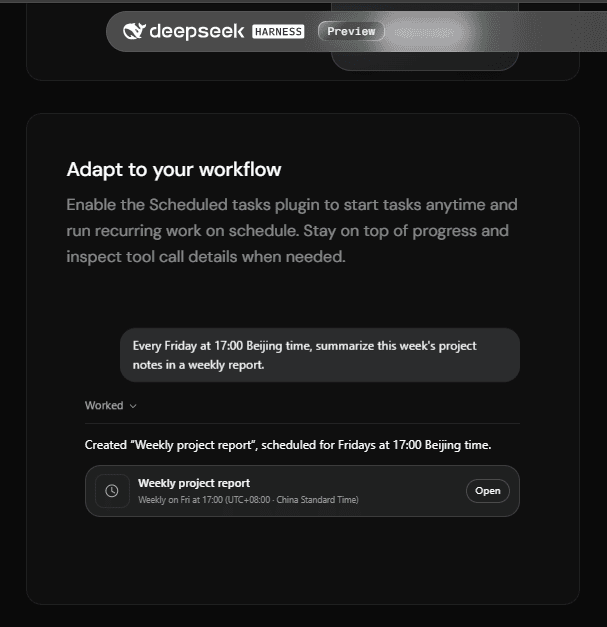
Good examples include weekly project summaries, recurring note cleanup, periodic report drafts, local file processing, and background research. But scheduled AI work should be supervised, especially when files can be modified or external tools can be called.
- Do not schedule tasks that modify important files without backups.
- Do not schedule tasks over confidential folders unless approved.
- Monitor tool calls and model-provider costs.
- Review recurring tasks when the project changes.
- Disable tasks that are no longer useful.
Developer tools, traces, and troubleshooting
DeepSeek Harness is not only a user-facing workspace. The official page shows developer-oriented trace and runtime inspection features. These matter because tool-using agents can fail in ways that ordinary chat does not: wrong file, wrong command, failed plugin, incomplete tool call, or a bad sequence of steps.
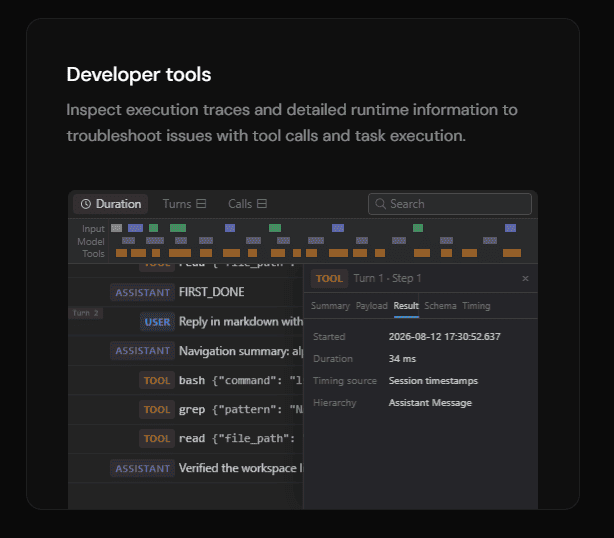
Use traces and tool-call details to answer questions such as:
- Which tool did the agent call?
- Which files did it read or edit?
- Did a command run successfully?
- Did a plugin fail?
- Did the model misunderstand the task or did the tool fail?
- Did the task use a custom model provider that may have separate limits or costs?
For bugs, development questions, or contribution work, use the official GitHub repository, developer docs, and GitHub Discussions rather than relying only on community tutorials.
Official model services vs custom model services
This is one of the most important privacy and billing distinctions in DeepSeek Harness.
The DeepSeek Harness Privacy Policy says Harness offers two categories of services: official model services and custom model services. When you use custom model services, you obtain and configure the API of other large models yourself. In that custom-model scenario, DeepSeek Harness provides the interaction medium, local interface, supporting tools, and communication technologies.
The policy says that, for custom model services, your input is sent directly to the relevant model provider and the output is returned by that provider; DeepSeek Harness does not store or process the input and output on the server side in that scenario. The policy also says that the relevant model provider’s own policies govern that provider’s processing.
The DeepSeek Harness Terms of Use also say that, when using custom model services, you are responsible for obtaining and configuring the model API yourself, complying with that provider’s rules, and bearing costs such as token consumption or subscription fees.
| Route | What it means | Data flow | Cost responsibility | Main caution |
|---|---|---|---|---|
| Official model services | DeepSeek default model services after registration and login. | Handled under DeepSeek’s Harness privacy and terms. | May require DeepSeek Open Platform prepayment or billing where applicable. | Check DeepSeek’s current account, billing, and privacy terms. |
| Custom model services | You configure another model provider’s API yourself. | Input and output go directly to that model provider in the described custom-model route. | You bear costs charged by the custom model provider. | Read the third-party provider’s terms and privacy policy. |
Privacy and local-file safety
Harness is useful because it can work with tools, files, sessions, plugins, and model providers. Those same features create risk if you use it carelessly.
The DeepSeek Harness Privacy Policy says session log data can include user inputs, uploaded and authorized content such as text, images, files, and voice, model outputs and tool invocation information, plugin configuration information, and conversation data. It also says DeepSeek Harness is not designed or intended to process sensitive personal data.
The Terms of Use warn that Harness can access systems, execute model-generated code and commands, load third-party plugins, and access networks, processes, credentials, and files made available to it. Treat those capabilities seriously.
Do not use Harness with these unless approved
- passwords or recovery codes;
- API keys, private keys, tokens, or credentials;
- customer records or regulated data;
- medical, legal, financial, or identity documents;
- confidential company documents;
- private repositories or proprietary source code;
- production logs containing secrets or user data;
- unreleased business plans or contracts;
- files you do not have permission to process.
Costs and billing cautions
DeepSeek Harness being open source does not mean every use is free. Open-source software and model inference are different things.
Costs can come from several places:
- official DeepSeek model services;
- custom model provider API calls;
- third-party model subscriptions;
- tool or plugin services you configure;
- long-running agent loops that consume many tokens;
- external APIs called by plugins or scripts;
- local compute, hosting, and storage if you self-host.
Before running recurring tasks, custom models, or long coding agents, set practical limits and monitor usage in the relevant provider dashboard. Do not assume an agent will stop before creating cost.
Limitations and preview caveats
DeepSeek Harness is official and open source, but it is still preview-stage software. The official page calls it public preview worldwide. The GitHub README calls it developer preview and warns that compatibility-breaking changes will occur.
That means you should not treat every workflow as production-stable. Plugins, APIs, install routes, desktop behavior, and model-provider integrations may change. Use Harness carefully for real work, and keep backups of important files before allowing any AI agent to edit them.
| Limitation | What it means | Practical response |
|---|---|---|
| Preview status | Features and compatibility may change. | Read current docs before relying on it. |
| AI output risk | Outputs can contain errors or omissions. | Review and verify important results. |
| Tool execution risk | Commands, code, and plugins can affect local systems. | Limit permissions and use backups. |
| Plugin risk | Community or third-party plugins may behave differently from official plugins. | Install only trusted plugins. |
| Custom model risk | Data and costs depend on the model provider you configure. | Read provider terms and monitor usage. |
| Local file risk | Harness may work with files you make available to it. | Do not expose sensitive folders casually. |
Common misconceptions about DeepSeek Harness
| Myth | More accurate answer | What to check |
|---|---|---|
| “DeepSeek Harness is a new model.” | No. It is an agent harness and workspace layer around model calls, tools, plugins, and tasks. | Official Harness page and GitHub README. |
| “Harness replaces the DeepSeek API.” | No. Use the API for backend model calls. Use Harness for agent-style workspace tasks. | Whether you need a product workspace or direct API integration. |
| “Harness is just DeepSeek Chat in a desktop wrapper.” | No. It has plugins, files, tools, traces, automation, and developer routes. | Harness official page and docs. |
| “All desktop downloads using DeepSeek branding are official.” | No. Trust only official DeepSeek links. | Source URL and publisher. |
| “Open source means model calls are free.” | No. Software licensing and model/API billing are separate. | Provider billing page and model settings. |
| “Custom model services keep everything inside DeepSeek.” | No. Custom model input/output goes to the provider you configure, according to the Harness privacy policy. | Model provider policy. |
| “Plugins are always safe.” | No. Plugins can extend powerful tools and may touch files, networks, or commands. | Plugin source, code, and permissions. |
| “Scheduled tasks can run without supervision.” | They can be useful, but recurring agent tasks should be reviewed. | Task scope, cost, and file access. |
| “Harness is production-stable because it is official.” | The official project is still in preview. | Current GitHub README and release notes. |
| “Every file type and workflow is supported everywhere.” | Capabilities depend on route, plugin, model, and current docs. | Current product page and developer docs. |
Who should use DeepSeek Harness?
- Users who need an AI agent to work across files, documents, spreadsheets, and code.
- Developers who want to inspect traces, tool calls, and plugin behavior.
- Researchers or knowledge workers with multi-step workflows.
- Coding-agent users who need repo-aware work rather than one-off snippets.
- Teams evaluating open-source agent harness infrastructure.
- Plugin builders who want to extend tools, skills, and interface behavior.
- Power users who understand file permissions, model-provider costs, and preview-stage risks.
When should you use DeepSeek Chat instead?
Use DeepSeek Chat instead of Harness when you only need a simple answer, a rewrite, a summary, a learning explanation, or quick coding help. Chat is simpler and carries fewer local-file and plugin risks.
- You do not need local file access.
- You do not need plugins.
- You do not need scheduled tasks.
- You do not need tool traces.
- You do not want an agent to run commands or edit files.
When should you use the DeepSeek API instead?
Use the DeepSeek API when you are building an application, backend, agent service, automation pipeline, or structured-output workflow. Harness is a workspace and runtime; the API is the model service interface developers call directly.
- Use the API for production backends.
- Use the API for your own app’s authentication and data layer.
- Use the API when you need predictable request/response integration.
- Use the API for custom tool-calling systems you control.
- Use Harness when you want a ready agent workspace with files, tools, plugins, and traces.
Who should avoid or delay using DeepSeek Harness?
- Users who cannot review file, command, or plugin permissions.
- Teams that need production-stable enterprise guarantees before adopting preview software.
- Users working with regulated data without an approved workflow.
- People who do not understand the costs of custom model providers.
- Users who only need simple chat answers.
- Anyone planning to install unknown plugins in a sensitive workspace.
Official DeepSeek Harness resources
Use these official resources before installing or building on Harness:
- DeepSeek Harness official page
- DeepSeek Harness GitHub repository
- DeepSeek Harness developer docs
- DeepSeek Harness Privacy Policy
- DeepSeek Harness Terms of Use
- Official DeepSeek website
- DeepSeek Chat
- DeepSeek API Platform
- DeepSeek API Docs
Final recommendation
Use DeepSeek Harness when your work needs more than a chat box: files, tools, plugins, traces, automation, local workspace context, scheduled tasks, or longer multi-step agent workflows. It is especially useful for coding, research, documents, spreadsheets, and custom plugin-based workflows.
Use DeepSeek Chat when you only need quick conversation, writing, learning, or simple coding help. Use the DeepSeek API when you are building your own application or backend. Use custom model services in Harness only when you understand the third-party model provider’s privacy terms, billing, and data flow.
The most important rule is simple: Harness is powerful because it can act. Treat it like software that may read files, use tools, run plugins, call models, and perform work—not like a harmless text box.
FAQ
What is DeepSeek Harness?
DeepSeek Harness is an official open-source agent harness from DeepSeek. It provides a workspace and runtime layer for using models with tools, files, plugins, automation, and longer tasks.
Is DeepSeek Harness official?
Yes. It is linked from DeepSeek’s official website and maintained under the official deepseek-ai/deepseek-harness GitHub repository.
Is DeepSeek Harness open source?
Yes. The official page calls it open source, and the GitHub repository lists an MIT license. Third-party dependencies may have their own licenses, so review the repository notices for development or redistribution.
Is DeepSeek Harness a model?
No. Harness is not a model. It is the agent workspace and tool runtime around model services. The model can be an official DeepSeek model or a custom model provider depending on configuration.
How is DeepSeek Harness different from DeepSeek Chat?
DeepSeek Chat is for direct conversation. DeepSeek Harness is for agent-style work with files, tools, plugins, traces, scheduled tasks, and longer workflows.
How is DeepSeek Harness different from the DeepSeek API?
The DeepSeek API is for direct model calls in applications. DeepSeek Harness is a workspace and runtime that can use model services, tools, plugins, and local context to complete tasks.
Does DeepSeek Harness have a desktop app?
The official Harness page currently links to Desktop downloads for macOS Apple silicon and Windows 64-bit. Always use the official DeepSeek Harness page rather than unofficial mirrors.
Can I run DeepSeek Harness from npm?
Yes. The official GitHub README documents npx @deepseek-ai/dsh web as the npm route for starting the local Web UI.
What is dsh?
dsh is the command name used by DeepSeek Harness in the official GitHub repository. The README describes DeepSeek Harness, or dsh, as an open-source agent harness developed by DeepSeek AI.
What are DeepSeek Harness plugins?
Plugins extend Harness with tools, skills, interface features, scheduled tasks, terminal behavior, subagents, and other workflow capabilities where supported. Use trusted plugins and review permissions before installing them.
Can DeepSeek Harness run scheduled tasks?
The official Harness page shows scheduled-task workflows. Use them carefully: recurring agent work should be monitored, especially if it can access files, run commands, or call paid model providers.
What are official model services and custom model services?
Official model services use DeepSeek’s default model services. Custom model services let you configure another model provider’s API yourself. In the custom-model route described by DeepSeek’s policy, the model provider processes the input and output under its own terms.
Does DeepSeek store my custom-model prompts?
DeepSeek’s Harness Privacy Policy says that, for custom model services, input is sent directly to the relevant model provider and output is returned by that provider, and that DeepSeek Harness does not store or process that input/output on the server side in that scenario. The third-party model provider’s own policy still applies.
Is DeepSeek Harness safe for work files?
It depends on the file, model route, plugins, permissions, and organization policy. Do not use Harness with confidential, regulated, customer, legal, medical, financial, or proprietary files unless the workflow is approved and secured.
Should developers use Harness or the API?
Use Harness when you need an agent workspace with files, tools, plugins, and traces. Use the API when you need direct model calls inside your own application or backend.
Can I use third-party models in DeepSeek Harness?
Yes, through custom model services where configured. You are responsible for the third-party provider’s API key, costs, terms, privacy rules, and output behavior.
What should I not give to DeepSeek Harness?
Do not give Harness passwords, API keys, private keys, confidential files, customer data, regulated records, production secrets, private repositories, legal documents, medical files, or financial records unless you have an approved and secured workflow.