


DeepSeek file upload can mean more than one thing. In the consumer chat interface, file or document upload depends on the current official UI and File Upload Service status. In the official DeepSeek API, the Files API currently uploads image files—JPEG, PNG, GIF, and WebP—so they can be referenced later by file_id in image-capable requests. That API behavior is not the same as a general PDF, Word, Excel, or document-search API.
The most important distinction is this: DeepSeek Chat upload and DeepSeek API file upload are different surfaces. The chat interface may expose user-facing upload features that can change over time. The official API docs, however, define a specific image-file upload endpoint. If you are building with the API, treat the Files API as an image reuse mechanism unless current official documentation expands it.
Documentation checked: October 7, 2026. DeepSeek UI behavior, supported file types, service status, and API limits can change, so verify critical details on the official pages before publishing instructions or building production workflows.
What “DeepSeek file upload” can mean
The phrase “DeepSeek file upload” is often used loosely. To avoid confusion, separate these meanings first:
| Upload type | Where it appears | Best for | What official docs support | Main caution |
|---|---|---|---|---|
| DeepSeek Chat / web app file upload | The consumer chat interface at chat.deepseek.com, where the current UI exposes upload features. | Ordinary users who want to ask questions about a file or document. | Use the current official interface and service status as the source of truth. | Do not invent supported document types or limits from old screenshots. |
| File Upload Service status | The official DeepSeek Status page. | Checking whether uploads are affected by a service incident. | The status page tracks File Upload Service separately. | Status does not explain file types, UI steps, or API request format. |
| Official API Upload File endpoint | POST /files in the DeepSeek API docs. | Uploading image files once and reusing them by file_id. | JPEG, PNG, GIF, WebP image files; max 64 MiB; purpose=user_data. | It is not a general document-ingestion endpoint. |
API image input via file_id | Chat Completions or Responses API image-capable requests. | Referencing a previously uploaded image without resending the image data. | file_id can be used as an image source where image input is supported. | Do not assume file_id works for PDFs, Word files, CSVs, or text files. |
| Responses API image input | Responses API. | Sending images through input_image using image_url or file_id. | image_url and file_id are mutually exclusive; images are processed by deepseek-flash. | File inputs are not supported as general document content. |
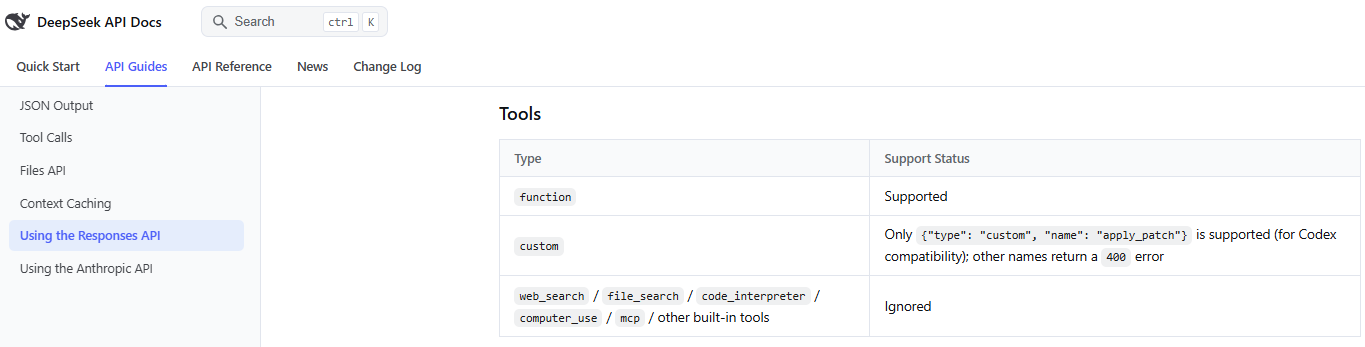
| File Search / document retrieval | Often expected by developers familiar with other APIs. | Indexing and retrieving chunks from documents. | The current Responses API compatibility table lists built-in file_search tools as ignored. | Do not describe Files API as RAG, vector storage, or document search. |
| DeepSeek Harness or local file workflows | Desktop or local workflows where supported by the product/tool. | Local tasks, coding, documents, plugins, and longer workflows. | Different surface from API Files API. | File permissions and data handling depend on the exact product/workflow. |
| Third-party upload tools | Browser extensions, gateways, workflow platforms, RAG tools, or local apps. | Provider-specific document or file workflows. | Not official DeepSeek behavior unless documented by DeepSeek. | Privacy, retention, file limits, and parsing behavior depend on the provider. |
Can you upload files in DeepSeek Chat?
DeepSeek Chat is the consumer route for ordinary users. If the current DeepSeek interface shows an upload option, use it only for non-sensitive files and follow the limits shown by that interface. Because consumer UI behavior can change, this article does not invent exact button names, drag-and-drop behavior, document formats, or upload limits.
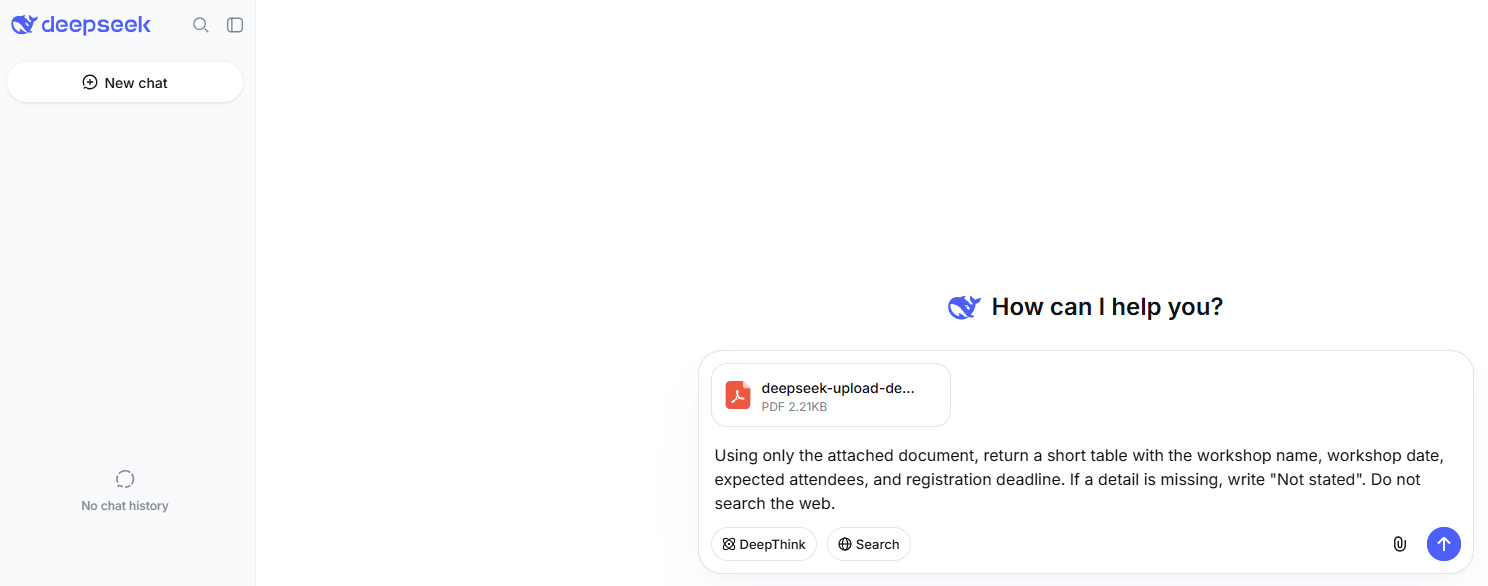
If upload is unavailable in the web chat, first check the official DeepSeek Status page. DeepSeek tracks File Upload Service as a separate component. At the time this article was checked, the status page said everything was running smoothly and showed File Upload Service as operational. A normal status page still does not prove that every account, region, browser, file type, or third-party wrapper can upload every file.
Use the official chat route rather than mirror sites or unofficial wrappers. If a third-party tool says it supports DeepSeek file upload, check that tool’s publisher, privacy policy, permissions, retention rules, and upload limits separately.
What the official DeepSeek Files API supports
The official DeepSeek Upload File endpoint is POST /files. It uploads an image file that can later be referenced by its file_id in image-capable requests.
| API detail | Current official behavior |
|---|---|
| Endpoint | POST /files |
| Request type | multipart/form-data |
| File field | file |
| Purpose field | purpose must be user_data |
| Supported formats | JPEG, PNG, GIF, WebP |
| Format detection | Detected from file content, not just filename |
| Maximum single file size | 64 MiB |
| Returned identifier | A file object with an ID like file-api-... |
| Expiration | Optional expires_after[anchor]=created_at and expires_after[seconds]; seconds can be between 3600 and 2592000. Omitting both expiration fields keeps the file permanently, according to current docs. |
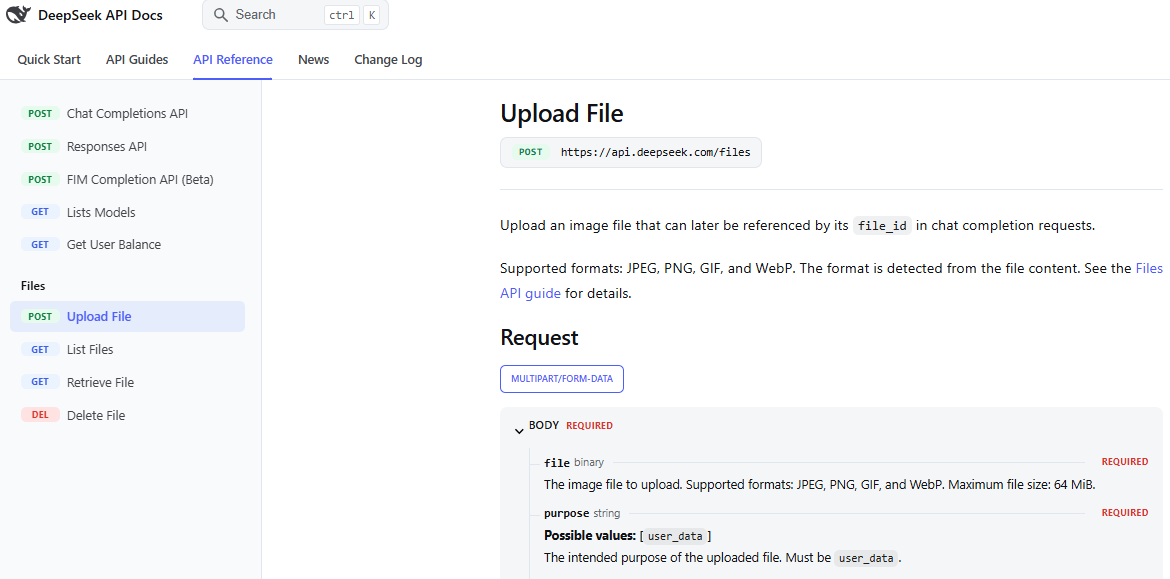
This matters because many users search “DeepSeek file upload” expecting PDF, Word, Excel, CSV, or code-file analysis. The official API Upload File endpoint should not be described as a general document upload API when the current docs define it as image-file upload.
How file_id works
After you upload an image through the Files API, DeepSeek returns a file object. The important field is id, such as file-api-0a1b2c3d.... You can use that value later as a file_id in image-capable requests.
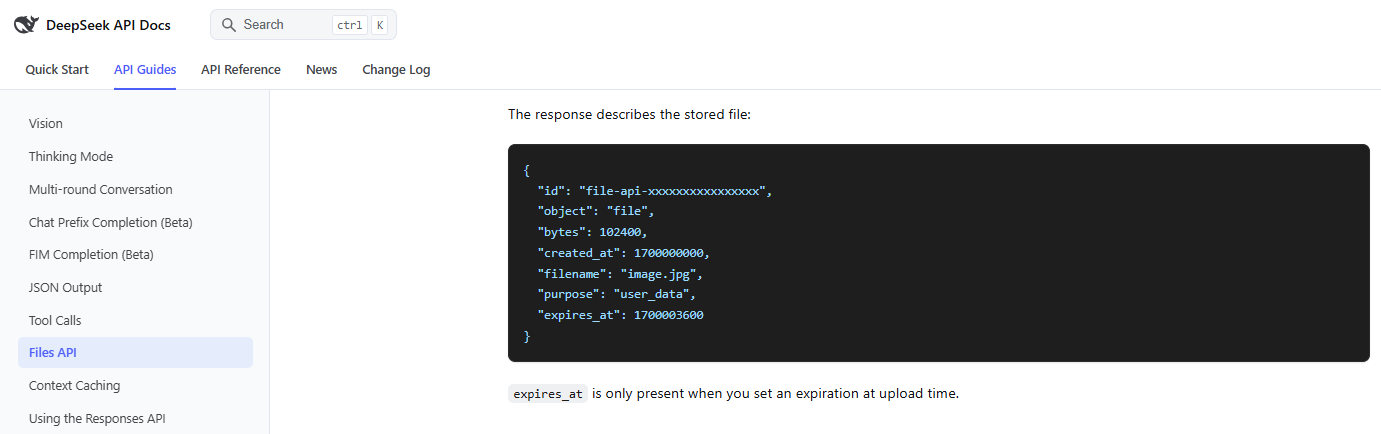
file_idis a reference to an uploaded image file, not a public URL.- Use
file_idwhen you want to reuse the same image without resending the image bytes or URL. - Expiration settings affect whether the uploaded file remains available.
- Do not expose
file_idunnecessarily to clients if it references user-provided data. - Do not assume
file_idworks for PDF, Word, Excel, CSV, Markdown, code, or text documents unless current official docs explicitly support that.
Image input through Chat Completions and Responses API
DeepSeek supports image input through supported API paths, especially with deepseek-flash. Current Responses API docs say image input can be supplied through an input_image content part using either an image_url or a file_id.
| Image source | What it means | Notes |
|---|---|---|
image_url | An HTTP(S) URL or base64 data URL. | Supported formats include JPEG, PNG, GIF, and WebP. Current docs list a URL length limit and image limits that should be checked before production use. |
file_id | The ID of an image uploaded through the Files API. | It has the form file-api-.... Use it when reusing the same uploaded image. |
detail | Controls image detail for URL/base64 image input where supported. | For Responses API, current docs list low, high, original, and auto. detail is ignored when file_id is set. |
Important API rule: image_url and file_id are mutually exclusive in the same input_image part. Passing neither can return a 400 error, and passing both can return a 400 error. Current Responses API docs also say file inputs are not supported as general input items, and built-in file_search tools are ignored.
Do not confuse image understanding with image generation. Uploading an image lets the model understand or reason about visual content where supported. It does not mean the same API path generates or edits images.
What file types does DeepSeek support?
The safest answer depends on the surface.
| Surface | Supported file information | How to use it safely |
|---|---|---|
| Official API Files API | Current docs support JPEG, PNG, GIF, and WebP image files, up to 64 MiB per uploaded file. | Use it for image workflows and reusable image references. |
| Responses API image input | Current docs support image input through image_url or uploaded file_id. | Use deepseek-flash for supported image understanding workflows. |
| Consumer DeepSeek Chat | Public docs checked for this article do not establish an exhaustive list of current consumer chat document types. | Use only what the current official interface shows and follow any limits shown there. |
| PDF, Word, Excel, CSV, code files | Do not assume native API upload support from the official Files API when current docs describe image upload. | For API workflows, extract or retrieve the relevant non-sensitive text yourself, then send the necessary content to the model. |
| Third-party tools | Supported formats depend on the provider. | Check that tool’s documentation, privacy policy, storage rules, and limits. |
Can DeepSeek upload PDFs, Word files, spreadsheets, or code files?
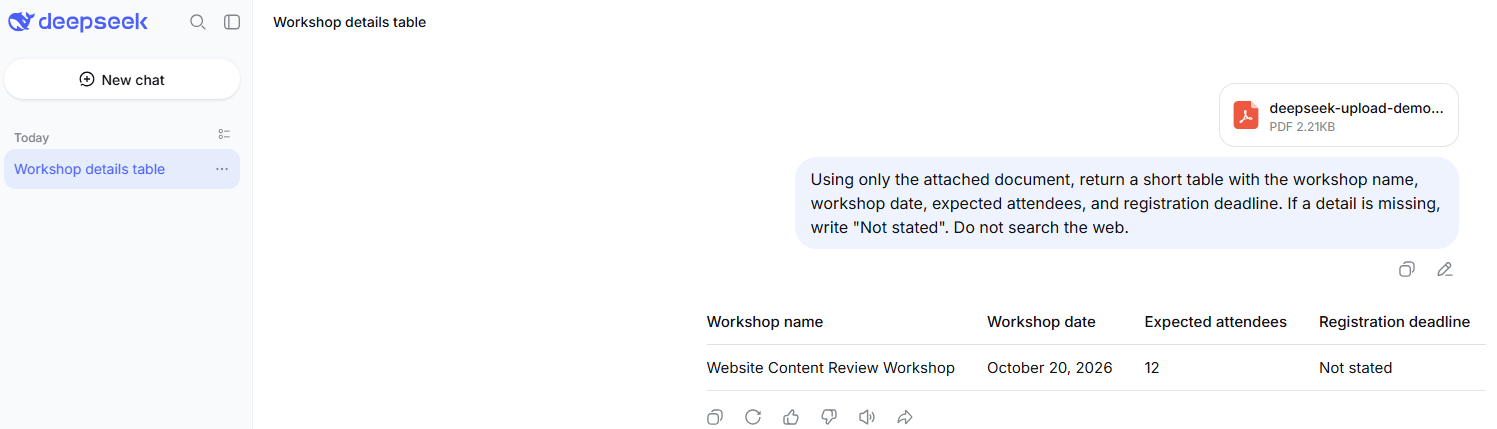
Many users searching this topic really mean document analysis. They want to upload a PDF, Word document, spreadsheet, CSV, Markdown file, or source-code file and ask questions about it.
For the official API, do not treat the Files API as a general document-upload or document-search system unless DeepSeek’s current documentation explicitly expands it. Current official Files API documentation describes image upload, not general PDF/Word/Excel ingestion.
For consumer chat, document upload may depend on the current interface and account behavior. If the official chat UI currently accepts a document, follow the UI’s displayed limits and avoid sensitive files. If the UI does not accept the file, do not force it through an unofficial wrapper or assume an old tutorial still applies.
For developer workflows involving documents, a safer architecture is usually:
- Extract text from the document in your own approved pipeline.
- Remove sensitive or irrelevant content.
- Chunk or retrieve only the relevant sections.
- Send the smallest useful non-sensitive context to DeepSeek.
- Validate the answer against the source document.
File upload vs file reference vs file search vs RAG
These terms are often mixed together, but they mean different things.
| Term | Meaning | DeepSeek API caution |
|---|---|---|
| File upload | Sending a file to a service. | DeepSeek’s current official API upload endpoint is image-focused. |
| File reference | Using an ID such as file_id to refer to a previously uploaded file. | Current docs describe using file_id for uploaded images. |
| File search | Indexing and retrieving relevant chunks from documents. | Current Responses API compatibility lists built-in file_search tools as ignored. |
| RAG | Retrieval-augmented generation: retrieving information from a store, then sending relevant context to the model. | If you need RAG, build or use a retrieval layer you control, then pass relevant text to DeepSeek. |
| Document parsing | Extracting text/tables from PDF, Word, spreadsheets, scans, or images. | Do not assume DeepSeek’s Files API performs document parsing unless official docs say so. |
DeepSeek File Upload Service status
The official DeepSeek Status page tracks File Upload Service separately. If upload is failing in the chat interface or another official DeepSeek surface, check that component first.
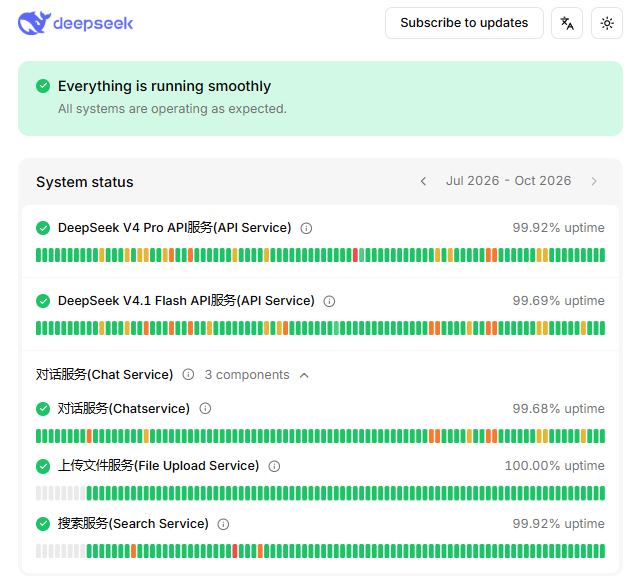
At the time this article was checked, DeepSeek Status said “Everything is running smoothly” and listed File Upload Service with 100.00% uptime. That status is a service-health signal, not a guarantee that your specific file type, browser, account, third-party wrapper, or API request is supported.
API example: upload an image file
The example below is documentation-based and not live-tested. Running it sends a real API request and may use your DeepSeek account resources. Replace the placeholder path with a non-sensitive image file.
curl https://api.deepseek.com/files \
  -H "Authorization: Bearer $DEEPSEEK_API_KEY" \
  -F "file=@./example-image.png" \
  -F "purpose=user_data"
To set an expiration window when current docs support it, include both expiration fields together:
curl https://api.deepseek.com/files \
  -H "Authorization: Bearer $DEEPSEEK_API_KEY" \
  -F "file=@./example-image.png" \
  -F "purpose=user_data" \
  -F "expires_after[anchor]=created_at" \
  -F "expires_after[seconds]=86400"
Use the returned id value as file_id in a later image-capable request. Do not paste a real API key into browser JavaScript, WordPress custom HTML, public repositories, screenshots, or support forums.
API example: use an uploaded image by file_id
The exact request shape depends on whether you use Chat Completions or Responses API. In the Responses API, current docs use input_image and allow either image_url or file_id.
curl https://api.deepseek.com/responses \
  -H "Authorization: Bearer $DEEPSEEK_API_KEY" \
  -H "Content-Type: application/json" \
  -d '{
    "model": "deepseek-flash",
    "input": [
      {
        "role": "user",
        "content": [
          { "type": "input_text", "text": "Describe this image and list any visible text." },
          { "type": "input_image", "file_id": "file-api-YOUR_UPLOADED_IMAGE_ID" }
        ]
      }
    ]
  }'
Use deepseek-flash for current image-capable API workflows unless the official model table changes. Do not copy image examples and simply switch the model to a text-only model.
When not to use DeepSeek file upload
Do not upload a file just because the interface allows it. Avoid file upload when:
- the file is confidential and your organization has not approved the workflow;
- the file contains sensitive personal data;
- you do not know whether you are using official DeepSeek, a third-party wrapper, or a gateway;
- the file type is unsupported;
- you only need a short excerpt and can paste a redacted passage instead;
- you need guaranteed legal, medical, financial, or compliance accuracy;
- you are testing during a suspected File Upload Service incident.
Safer alternatives include redacting the file, summarizing the relevant non-sensitive section yourself, extracting text in your own approved system, or using a local/internal document workflow your organization controls.
Privacy and safety before uploading files
DeepSeek’s Privacy Policy describes user inputs as including prompts, uploaded files, photos, feedback, and chat history. The policy also says DeepSeek’s services are not designed or intended to process sensitive personal data and that users should not provide sensitive personal data to the services.
Do not upload the following unless your workflow is authorized, secure, and compliant with your obligations:
- passports, IDs, driver’s licenses, or identity documents;
- medical records or health information;
- legal files, contracts, disputes, or privileged material;
- financial records, tax files, invoices, bank statements, or payment data;
- customer data or employee records;
- private business plans, strategy documents, or internal dashboards;
- proprietary source code or private repositories;
- passwords, API keys, private keys, tokens, or connection strings;
- children’s data or regulated data;
- files you are not authorized to share with a hosted AI service.
Also remember that model output can be wrong. Use uploaded-file analysis as assistance, not as a final authority for legal, medical, financial, compliance, or safety-critical decisions.
Troubleshooting DeepSeek file upload problems
| Symptom | Likely cause | What to check | Safe next step |
|---|---|---|---|
| Upload option is not visible in chat | The current UI may not expose upload for your account, region, browser, or product surface. | Official chat route, current UI, and File Upload Service status. | Use the current interface; do not rely on old screenshots or unofficial wrappers. |
| Upload is stuck | File Upload Service issue, network problem, file issue, or browser extension conflict. | Status page, browser/network, file size/type shown by UI, and extensions. | Try a non-sensitive smaller file only if the service appears operational. |
| API upload returns 400 | Bad multipart request, missing purpose, unsupported file content, or malformed parameters. | purpose=user_data, supported image format, file field name, and expiration fields. | Fix the request; do not retry unchanged. |
| API upload fails because the file is too large | The official Files API max single image size is 64 MiB. | Actual file size and image format. | Use a smaller image or compress/resize it before upload. |
| Image upload works but PDF does not | The API Files API is image-focused in current docs. | Official Upload File endpoint and supported formats. | Extract the relevant text yourself or use a document workflow that supports PDFs. |
file_id is not accepted | Wrong ID, expired/deleted file, wrong field, unsupported model, or wrong API surface. | File ID format, expiration, delete status, model, and request shape. | Retrieve/list files if appropriate, then send a valid image-capable request. |
Responses API error says input_image needs image_url or file_id | The image content part has neither valid image source. | input_image object shape. | Add exactly one valid image_url or file_id. |
| Responses API error says both fields are present | image_url and file_id are mutually exclusive. | The input_image object. | Remove one field and send only the intended source. |
| Image input fails with a text-only model | The chosen model may not support images. | Current model table and Vision docs. | Use deepseek-flash for current image-capable API workflows. |
Built-in file_search does not work | Current Responses API compatibility lists built-in file_search tools as ignored. | Responses API compatibility section. | Build your own retrieval layer or use an approved document-search system. |
| Third-party upload tool fails | The issue may belong to the wrapper, gateway, extension, or provider. | Tool docs, privacy policy, file limits, and provider status. | Test the official DeepSeek surface separately before blaming DeepSeek. |
| Upload works but the answer is poor | The prompt may be vague, the image may be unclear, or the model may not have enough context. | Prompt, image quality, task wording, and expected output. | Ask a narrower question and verify important observations manually. |
API errors to understand
For file-upload and image-input workflows, avoid retrying blindly. Match the fix to the error category.
| Error type | Likely meaning | What to do |
|---|---|---|
| 400 invalid request | Malformed request, unsupported field combination, unsupported file type, missing required field, or invalid image input shape. | Fix the request body before retrying. |
| 401 authentication failure | API key is missing, wrong, or not sent correctly. | Check Authorization: Bearer ... and the correct DeepSeek account. |
| 402 insufficient balance | The API account does not have usable balance for the request. | Check DeepSeek Platform balance and billing. |
| 429 rate limit | Too many requests or concurrency pressure. | Use pacing, queues, and bounded backoff. |
| 500 or 503 | Server-side error or overload. | Check the status page and retry later with bounded retries. |
Do not retry unchanged requests for authentication, balance, or malformed request errors. Fix the cause first.
Third-party file upload tools
Some tools may advertise DeepSeek file upload even when the upload and parsing are handled by the tool itself. This can include browser extensions, workflow automation platforms, RAG tools, local apps, IDE plugins, or cloud gateways.
Those tools may extract text from your file, store it, send it to another server, summarize it with DeepSeek, or use a completely different provider before sending results to DeepSeek. Their file limits, privacy rules, retention, pricing, and security controls are separate from the official DeepSeek API. Treat third-party file upload as a separate product decision, not as official DeepSeek file upload.
Best practices before uploading anything
- Identify the surface: official chat, official API, Harness, local app, or third-party tool.
- Check the official docs or current UI for supported file types and limits.
- Use the official status page if uploads fail.
- Upload only the smallest non-sensitive file needed for the task.
- For API image workflows, use
file_idwhen the same image will be reused. - For documents, extract and send only relevant non-sensitive text unless the interface clearly supports the file type.
- Delete uploaded files when appropriate, if the official API/workflow supports deletion.
- Do not use sensitive files as test data.
- Verify output against the source file before relying on it.
Bottom line
DeepSeek file upload is useful, but the exact meaning depends on the product surface. For ordinary users, upload behavior depends on the current DeepSeek Chat interface and File Upload Service status. For developers, the official Files API currently uploads image files—JPEG, PNG, GIF, and WebP—up to 64 MiB, then lets supported image workflows reference those uploads by file_id.
Do not describe DeepSeek’s Files API as a general PDF, Word, spreadsheet, file-search, vector-store, or document-ingestion system unless the official docs explicitly expand it. For sensitive documents, use an approved secure workflow, redact aggressively, and verify model output before using it.
FAQ
Can I upload files to DeepSeek?
Yes, but the answer depends on the surface. The consumer chat interface may expose upload features depending on the current UI and service status. The official API Files API currently uploads image files that can later be referenced by file_id.
What file types does the DeepSeek API support for upload?
The official Upload File endpoint currently supports JPEG, PNG, GIF, and WebP image files, with a maximum single file size of 64 MiB. It requires purpose=user_data.
Can DeepSeek upload PDFs?
Do not assume official API PDF upload support from the current Files API docs. The API Upload File endpoint is image-focused. The consumer chat interface may behave differently, so check the current official UI before uploading PDFs.
Can DeepSeek upload Word, Excel, CSV, or code files?
The current official API Files API should not be described as supporting those document types unless DeepSeek updates its docs. For developer workflows, extract or retrieve the relevant text yourself and send only the necessary non-sensitive content to the model.
What is file_id in DeepSeek?
file_id is the identifier returned after uploading an image through the Files API. It has the form file-api-... and can be used in supported image-capable requests instead of resending the image data.
Is file_id a public URL?
No. It is an API file identifier, not a public URL. Treat it as a reference to user-provided data and avoid exposing it unnecessarily.
Can I use both image_url and file_id together?
No. In the Responses API input_image object, image_url and file_id are mutually exclusive. Use exactly one image source.
Does DeepSeek API support file_search?
Current Responses API compatibility docs list built-in file_search tools as ignored. Do not describe Files API as file search or RAG. If you need document retrieval, use a separate retrieval layer and pass relevant text to DeepSeek.
Why is DeepSeek file upload not working?
Possible causes include File Upload Service issues, unsupported file type, file too large, malformed API request, invalid file_id, using a text-only model for image input, local browser problems, or a third-party wrapper issue. Check the official status page and the exact surface you are using.
Is DeepSeek file upload safe?
It depends on what you upload and which surface you use. DeepSeek’s Privacy Policy describes uploaded files and photos as part of user input and says the service is not designed to process sensitive personal data. Do not upload confidential, regulated, personal, legal, medical, financial, customer, or proprietary files unless the workflow is approved and secured.
Can I delete uploaded files?
The DeepSeek API docs include file management endpoints such as list, retrieve, and delete files. For API-uploaded images, use the official file-management endpoints where appropriate. For consumer chat uploads, follow the current interface and account controls.