

To diagnose a DeepSeek API error, capture the HTTP status and the accompanying error message before changing your code. Then identify whether the failure comes from credentials, billing, the request itself, service capacity, the network, or response handling. Repeatedly sending the same request is not a useful fix for every category.
This guide covers the official DeepSeek API. When another provider hosts a DeepSeek model, start with that provider’s endpoint, credentials, and error documentation instead.
Documentation checked: October 3, 2026. The diagnostic script was syntax-checked and exercised against local mock responses. No requests were sent to the DeepSeek API.
Find the fix that matches your error
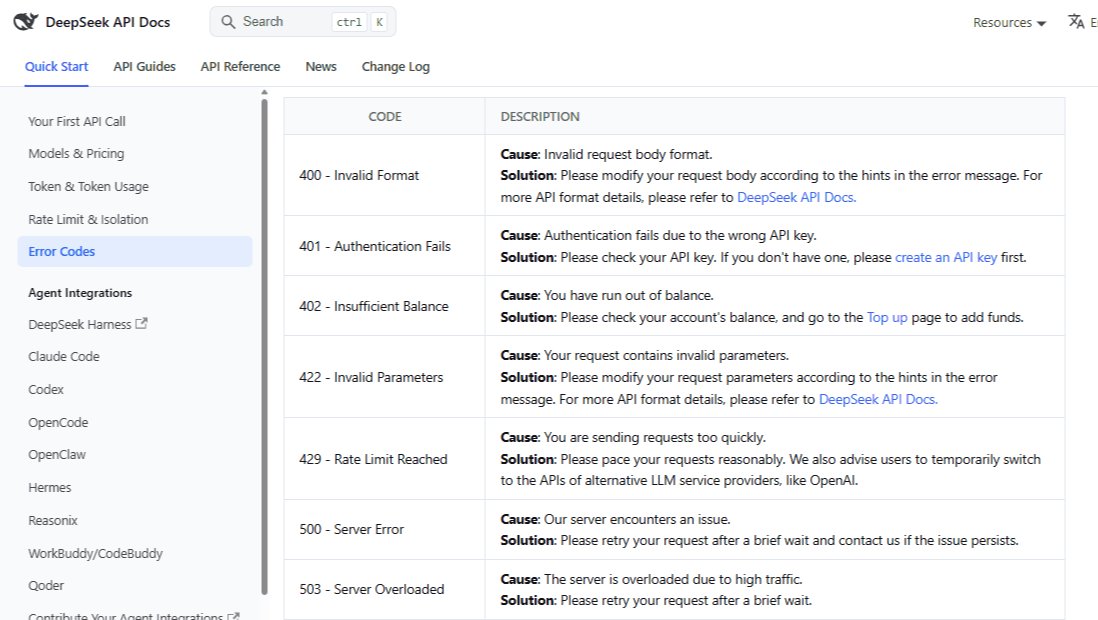
The HTTP meanings below follow DeepSeek’s official error-code reference. Use the error body to narrow the problem; a status code alone rarely identifies the exact field or configuration that needs changing.
| What you see | What it indicates | Where to start |
|---|---|---|
400 | Invalid request format | Inspect the body and conversation history. |
401 | Authentication failed | Check the active API key. |
402 | Insufficient balance | Check the API account’s balance. |
422 | Invalid parameters | Correct the rejected parameter. |
429 | Rate limit reached | Reduce request pressure. |
500 or 503 | Server error or overload | Check status and retry selectively. |
| No HTTP response | Local, connection, or timeout failure | Identify the failing network or runtime layer. |
| HTTP succeeds, but output fails | Generation, streaming, or parsing problem | Inspect completion state and output fields. |
Check the destination, not just the exception name. DeepSeek supports using OpenAI client libraries with its own endpoint, as shown in its official quickstart. An exception named openai.AuthenticationError therefore does not establish that the request went to OpenAI.
Before investigating, note the provider host, API format, model ID, and failure stage. A request rejected immediately calls for a different investigation from a conversation that breaks only after an assistant calls a tool.
Run one minimal request to isolate the failure
For the official Chat Completions interface, the SDK base URL is https://api.deepseek.com; the complete HTTP endpoint is https://api.deepseek.com/chat/completions. Do not give an SDK the complete endpoint if its method already appends /chat/completions. These settings come from the DeepSeek quickstart.
The following test uses the current deepseek-flash model, one short message, no tools, and no streaming. Thinking is explicitly disabled to keep the test small. Running it sends a real API request and may incur usage charges. Use a DeepSeek-issued key only; do not substitute a gateway’s key.
Save it as deepseek_diagnostic.sh and run it in Bash on Linux, macOS, or Windows through WSL, with cURL 7.76.0 or newer. It uses DEEPSEEK_API_KEY from the environment or prompts for a hidden entry. It does not load a .env file.
#!/usr/bin/env bash
set +x
set -u

if [[ -z "${DEEPSEEK_API_KEY:-}" ]]; then
  read -r -s -p "DeepSeek API key: " DEEPSEEK_API_KEY || exit 2
  printf '\n'
fi

if [[ -z "$DEEPSEEK_API_KEY" || "$DEEPSEEK_API_KEY" == *$'\r'* || "$DEEPSEEK_API_KEY" == *$'\n'* ]]; then
  printf 'Missing key or unexpected line break in the key.\n' >&2
  exit 2
fi

curl_exit=0
curl --disable --silent --show-error --fail-with-body \
  --connect-timeout 15 --max-time 120 \
  --header @- \
  --header 'Content-Type: application/json' \
  --write-out '\nHTTP status: %{http_code}\n' \
  --data '{
    "model": "deepseek-flash",
    "messages": [{"role": "user", "content": "Reply with OK."}],
    "thinking": {"type": "disabled"},
    "max_tokens": 128,
    "stream": false
  }' \
  'https://api.deepseek.com/chat/completions' <<HEADERS || curl_exit=$?
Authorization: Bearer ${DEEPSEEK_API_KEY}
HEADERS

printf 'curl exit code: %s\n' "$curl_exit"
exit "$curl_exit"
Run the saved script:
bash deepseek_diagnostic.shThe --fail-with-body option preserves the response body while returning cURL exit code 22 for HTTP errors. The script also prints the HTTP status, so an HTML error page is not hidden behind a failed JSON parser. The 15-second connection timeout, 120-second total timeout, and 128-token output allowance are diagnostic choices, not DeepSeek service guarantees.
Keep the output private. Review and redact it before sharing. The script disables shell tracing, reads the authorization header through standard input, and does not write diagnostic files or enable verbose header logging.
If this request succeeds but your application fails, compare them in the same runtime, account, model, and API format where possible. Restore history, tools, structured output, and streaming individually. Success narrows the investigation; it does not prove the entire provider is healthy or that your framework is necessarily at fault. If the test fails, follow its status or connection error below.
Fix 401 authentication and 402 balance errors
401: check the key used by the running application
DeepSeek’s authentication reference specifies HTTP Bearer authentication. For Chat Completions, verify that the request supplies Authorization: Bearer … using the key issued for the DeepSeek account you intend to use.
Inspect how the application obtains its secret: the variable name, deployment configuration, stored automation credential, and any code-level override. Confirm that a value is present without printing it. Remove accidentally included quotation marks or line breaks, and make sure the running process has received any secret update.
Then retry one small request from that runtime. If it works locally but fails after deployment, compare the deployed configuration rather than repeatedly generating keys. A browser login, password reset, or cleared browser cache does not test the API credential your server is actually sending.
402: check API billing, not the prompt
Check the balance in the official developer platform for the account that owns the key. DeepSeek’s deduction rules charge API usage against topped-up or granted balance; do not assume an account includes promotional credits.
When insufficient balance is confirmed, address that account’s billing and rerun one request. If the platform shows usable funds but the same request still returns 402, keep the redacted response and escalate. Rewriting the prompt or repeatedly rotating keys does not investigate that discrepancy.
Fix 400 and 422 request errors
Start with the field or message identified in the error body. Valid JSON is only the first check: a request can parse correctly but still use the wrong schema, an unsupported option, or inconsistent conversation history.
Compare the actual serialized payload—not only the object you intended to send—with the reference for your endpoint. For Chat Completions, check model, the messages array, message roles, and optional fields. Validate locally; do not upload secret-bearing requests to public JSON validators.
Two conflicts documented in the Chat Completions reference: stream_options requires stream: true; forced tool_choice values—required or a named function—are rejected in thinking mode. Remove the incompatible setting or deliberately change modes, then repeat the failing test.
Check old model names and mixed API formats
Older snippets may reference deepseek-chat or deepseek-reasoner, whose discontinuation was scheduled for July 24, 2026. The official change log also identifies older V4 Flash names as compatibility routes to V4.1-Flash. Check current model IDs rather than treating an old alias as a pinned model version.
Do not mix interface schemas. DeepSeek’s Responses interface uses input and is stateless: supply history rather than relying on previous_response_id. Anthropic-compatible requests use the separate base URL https://api.deepseek.com/anthropic and their own message format. A framework’s compatibility setting must match the endpoint it calls.
Fix reasoning_content errors after a tool call
When a first turn works but a later request fails, inspect what changed in the conversation. For thinking-mode requests carrying tools, DeepSeek’s thinking guide requires previous reasoning_content to be passed back; failing to preserve it can produce HTTP 400.
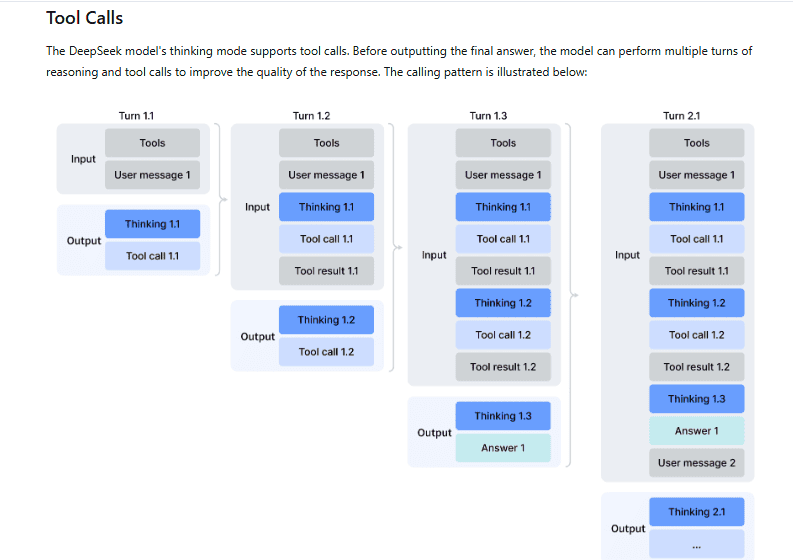
Check the assistant message before it is stored and again before the next request is serialized. Preserve the actual returned reasoning field and tool-call information instead of rebuilding history from role and content alone. Do not invent replacement reasoning or dummy identifiers.
Also verify that each tool result uses the corresponding tool_call_id and follows its assistant tool request, as illustrated in the official tool-call workflow. Retest a conversation that completes the tool cycle, not just a one-message greeting.
For a coding assistant or automation adapter, check its installed version and maintainer’s compatibility notes. Temporarily disabling thinking can help isolate the issue, but changes the behavior you are testing; it is not proof that the history-handling problem is fixed.
Investigate context and attachment failures
For a context-length complaint, inspect the whole conversation, instructions, tool definitions, and attachments, together with the requested output allowance. Compare them with the current model limits. Reducing only the last user message may leave most of the request unchanged.
Remove optional material from a diagnostic copy and add it back gradually. For image requests, verify the selected model and input representation against the vision documentation; do not assume a consumer app’s upload feature establishes API support.
Fix 429 by reducing request pressure
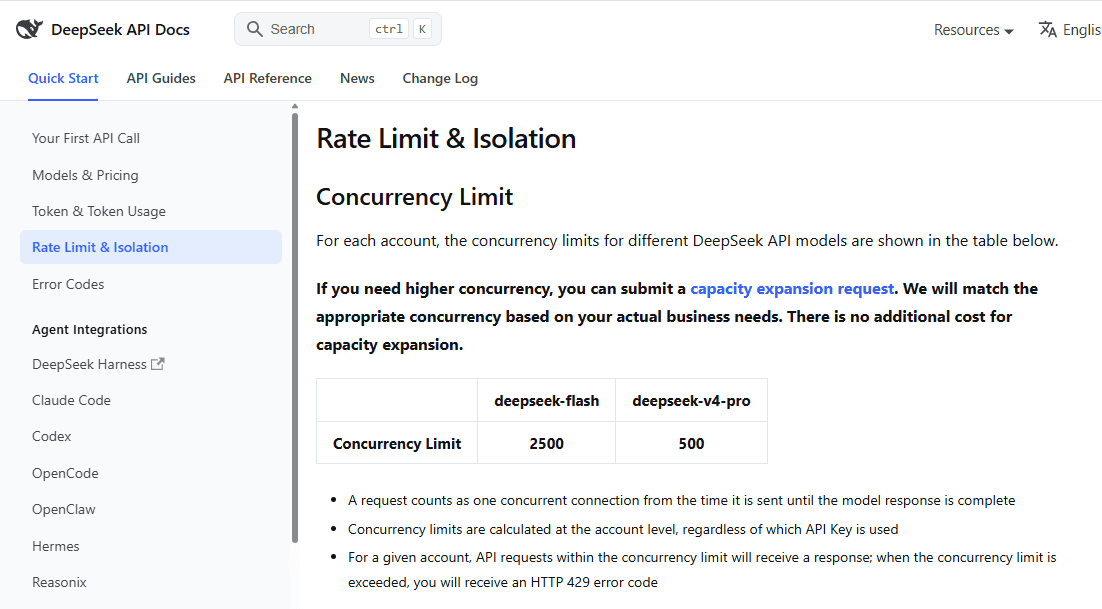
DeepSeek’s rate-limit documentation counts concurrency at account level: an in-flight request occupies capacity until its response completes. Additional API keys do not create independent account quotas.
At the review date, the published baseline concurrency limits are 2,500 for deepseek-flash and 500 for deepseek-v4-pro. Expanded-capacity accounts can also have documented per-user_id constraints. These are concurrency limits, not requests-per-minute allowances.
Inspect active requests across workers and services sharing the account. Pause a failing batch, reduce worker concurrency, and queue new work instead of immediately replaying every rejected request. Then test at a controlled lower load. If 429 persists while your measured usage appears below the applicable limit, collect timestamps and account-wide concurrency evidence rather than assuming more keys will solve it.
Diagnose connection errors and timeouts without an HTTP response
In the OpenAI Python SDK, connection failures raise APIConnectionError subclasses; timeouts use APITimeoutError. A rejected HTTP request instead raises an APIStatusError subclass with status_code and response properties. Inspect that distinction before assigning a provider error code.
Test from the environment that fails. Check name resolution, the destination hostname, approved proxy configuration, and certificate trust. A successful laptop request does not establish connectivity from a container or hosted worker. If TLS verification fails, correct the trust configuration with your administrator; do not disable certificate checks.
For cURL, exit codes such as 6, 7, and 28 identify name-resolution, connection, and timeout failures, respectively, in the cURL manual. An HTTP display of 000 is not a status returned by DeepSeek.
Identify which deadline expires: connection setup, waiting for data, the overall request, a reverse proxy, or the job’s execution limit. Increasing one client timeout cannot extend a shorter deadline imposed elsewhere. Compare a small request with the failing workload before increasing timeouts indiscriminately.
DeepSeek documents blank-line and SSE-comment keep-alives while waiting. They are not generated answer text. Its documented ten-minute cutoff applies when inference has not started; it is not a universal ten-minute generation allowance or a promise that your infrastructure will wait that long.
Handle 500, 503, and retries without multiplying failures
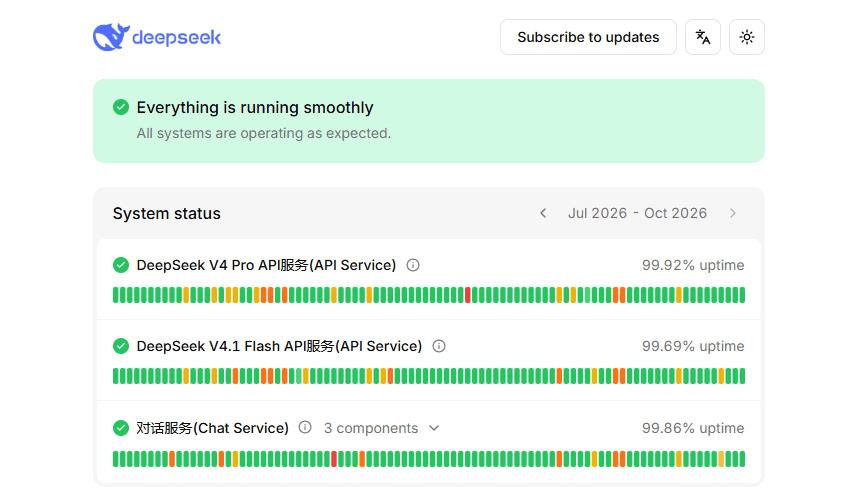
For persistent server errors, check the official status page and the affected component’s incident times. An old outage does not explain a current request, and an operational indicator does not rule out an isolated account or route problem. A server error alone also does not reveal its internal cause.
Use a limited recovery policy for potentially temporary failures, consistent with backoff guidance. Retry selected transient failures after a delay; fix credential, billing, and validation errors before sending the same request again.
Give retries both an attempt limit and an overall deadline. Increase delays between attempts and add randomness, known as jitter, so workers do not all retry together. Respect cancellation, stop after the final allowed attempt, and preserve the original error when recovery fails. Do not let a retry delay consume time needed for the next request.
Check for stacked retry loops. The Python SDK retries selected failures twice by default, and max_retries=0 disables that behavior. If your application owns retry policy, account for or disable library retries so one visible attempt does not become several hidden calls.
When a valid Retry-After header is present, handle it according to HTTP semantics: it may contain seconds or an HTTP date. Do not assume DeepSeek always supplies it. If the wait exceeds your remaining budget, stop or defer the operation rather than retrying earlier.
A timeout does not establish whether the server processed the request or whether charges apply. Before replaying, consider duplicate output and application-side actions. Never blindly rerun a tool that sends a message, modifies a record, or performs another side effect simply because the model connection failed.
Fix empty responses, broken streams, and JSON parsing errors
HTTP success is not proof of a usable final answer. First distinguish the API response object from the generated content inside it. An HTML gateway page, incomplete transport body, and malformed JSON generated by the model require different investigations.
Check the final-answer field and finish reason
In Chat Completions, final text is in choices[0].message.content. Check the documented finish reason before saving the result.
stop marks a normal stopping point; length indicates a limit. tool_calls requests tool handling, not another text retry. content_filter signals filtering; insufficient_system_resource and aborted indicate interrupted generation. Treat these outcomes differently rather than accepting every response as complete.
For the Responses format, use its output items or the SDK’s output_text helper instead of a Chat Completions choices parser. If the response is present but your code raises a missing-field error, check this format mismatch before changing credentials.
Separate transport JSON from generated JSON
Before parsing the response, check whether a complete body arrived and whether its content type matches what you expected. Keep a redacted sample of unexpected HTML or text rather than discarding the evidence in a generic JSON exception.
For JSON generated inside a successful Chat Completions response, follow DeepSeek’s JSON Output instructions: set response_format to {"type":"json_object"}, explicitly request JSON, give the desired structure, and allow enough output tokens. The guide also acknowledges occasional empty content. Retest a clear, small prompt and validate the resulting fields and values; syntactic JSON validity is not business-rule validation.
Handle streaming completion explicitly
A Chat Completions stream delivers delta fields and ends with data: [DONE]. Ignore keep-alive comments and tolerate chunks without answer text. Use an SSE-aware client: each network read is not necessarily a complete event or JSON object.
A Responses stream instead ends with response.completed, response.incomplete, or response.failed. Waiting for [DONE] on that interface is the wrong completion test.
If the connection closes before a valid terminal state, mark the result incomplete. Do not append a fresh generation to partially displayed text as though it were the original stream. Retest the same small task with streaming disabled to help distinguish event-handling problems from request or generation failures.
Escalate with a useful, redacted diagnostic record
When a minimal request still fails after the relevant checks, collect enough evidence to reproduce the pattern without exposing the credential:
- Request context: timestamp and timezone, provider host, endpoint format, model ID, SDK or integration version, and whether streaming or tools were enabled.
- Observed failure: HTTP status or exception class, redacted error text, available request identifier, and the stage where execution stopped.
- Reproduction: a minimal sanitized payload, the result from the affected runtime, retry count, and which individual changes affected the outcome.
Include a request identifier only when the response actually provides one. Follow OWASP’s logging guidance: exclude API keys, authorization headers, cookies, confidential prompts, and personal records. Avoid full environment dumps or unrestricted traces.
DeepSeek lists [email protected] in its official support reference. For third-party hosting, contact that provider; when only an adapter fails, send its maintainer the sanitized comparison. After a fix, rerun the original failing scenario—including its follow-up turn, tool cycle, or stream—before restoring normal traffic.