

DeepSeek currently supports image understanding through the deepseek-flash API model. You can send text together with JPEG, PNG, GIF, or WebP images and ask the model to describe a picture, read visible text, inspect a screenshot, analyze a chart, or answer questions about visual content.
For new integrations, use deepseek-flash. The older deepseek-v4-flash-vision-exp name is still accepted for compatibility, but DeepSeek has retired that underlying model and routes the alias to the current Flash model. The current deepseek-v4-pro model does not support vision, according to DeepSeek’s current model table.
Vision means image understanding, not image generation. The API accepts images plus text as input and returns text output. Sending a photo to the Vision API does not ask the same endpoint to create a new image.
Documentation checked: October 3, 2026. The Python example below was syntax-checked locally. No authenticated or billable DeepSeek API request was run.
Which DeepSeek model supports image input?
| API model name | Current model | Image input | Use for new code? |
|---|---|---|---|
deepseek-flash | DeepSeek-V4.1-Flash-1017 | Supported | Yes |
deepseek-v4-pro | DeepSeek-V4-Pro-0813 | Not supported | Text workloads only |
deepseek-v4-flash-vision-exp | Legacy alias routed to the latest Flash model | Accepted through the alias | No; use deepseek-flash |
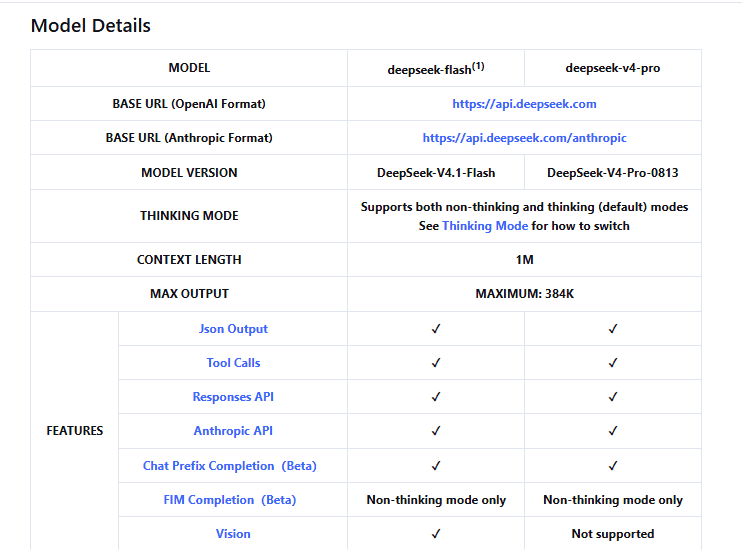
DeepSeek introduced the experimental Vision Exp model in August 2026, but the September 10 change log says both V4 Flash and V4 Flash Vision Exp were retired when DeepSeek-V4.1-Flash launched with native multimodal visual understanding.
This is why older examples can be misleading even when their request structure still looks familiar. The model name in a tutorial can become outdated independently of the rest of the code.
What can you use the DeepSeek Vision API for?
Useful image-understanding tasks include:
- Screenshot analysis: identify visible UI elements, dialogs, labels, or error messages.
- Visual question answering: ask a specific question about a photo or diagram.
- Text extraction: ask the model to transcribe visible text from screenshots or photographed pages.
- Chart interpretation: describe trends, labels, or relationships visible in a chart.
- Image comparison: provide multiple images and ask the model to compare visible differences.
- Structured visual extraction: ask for selected visible fields in a specified text or JSON-like format.
These capabilities should not be treated as guaranteed OCR or measurement accuracy. Small text, handwriting, dense documents, ambiguous charts, unusual diagrams, and visually subtle details can still be misread. Verify important extracted values against the original image.
Three ways to send an image to DeepSeek
The current DeepSeek Vision guide documents three main image-input methods: an inline Base64 data URL, an external HTTP(S) URL, or an uploaded file referenced by file_id.
| Method | Best for | Main consideration |
|---|---|---|
| Base64 data URL | Local one-off images | Image data increases the JSON request size. |
| External URL | Images already available through a reachable HTTP(S) URL | DeepSeek must be able to download the URL. |
Files API + file_id | Reusing an image or sending larger files | Requires an upload step before inference. |
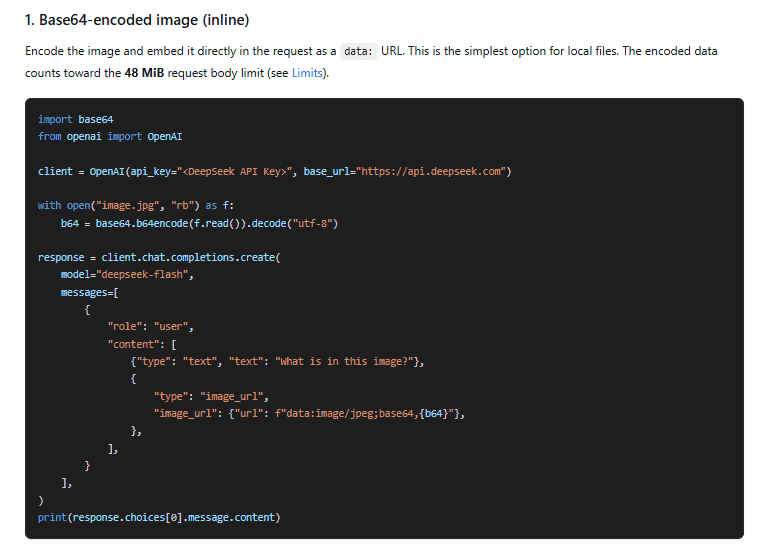
1. Base64 data URL
For a local image, encode its bytes as Base64 and place them in a data: URL inside an image_url content block. This avoids making the image publicly reachable.
Base64 is only an encoding. It is not encryption and should not be treated as a privacy mechanism.
2. Public HTTP(S) image URL
If the image is already hosted, you can send its URL instead of embedding its bytes. The current limit is 8,192 characters for the URL, the image itself can be up to 32 MiB, and DeepSeek requires the download to complete within 60 seconds.
The URL must be reachable by DeepSeek’s servers. A path such as C:\images\photo.jpg, file:///..., localhost, or a private intranet URL is not equivalent to a public HTTP(S) image URL.
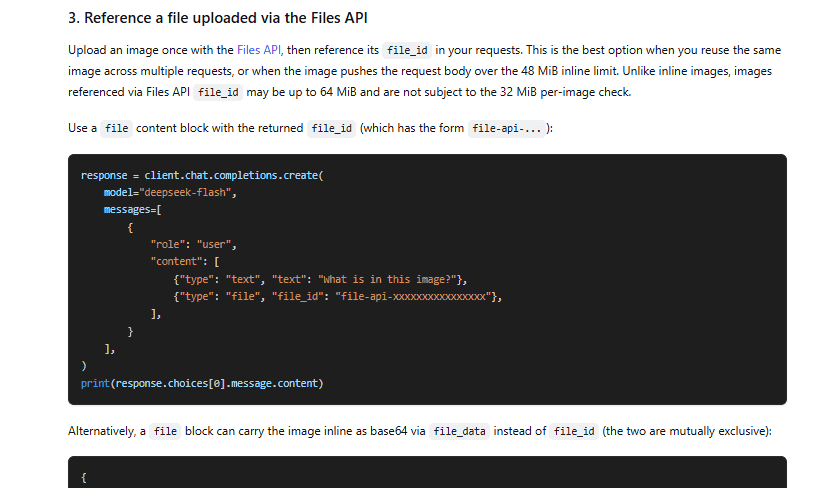
3. Files API and file_id
The Files API lets you upload an image once and reuse its returned file_id in later requests. DeepSeek recommends this approach when you reuse the same image or when inline request-size limits become inconvenient.
A Files API upload is not itself a vision request. Uploading stores the image and returns a reference; a later model request performs the actual image analysis.
Python example: send a local image with Base64
The following example uses the current OpenAI-compatible Chat Completions API and deepseek-flash. It detects whether the local file contains JPEG, PNG, GIF, or WebP bytes before constructing the data URL.
Install the current OpenAI Python client:
python -m pip install openaiSet your DeepSeek API key in the DEEPSEEK_API_KEY environment variable, place a supported image at image.jpg, and save the following as deepseek_vision.py:
import base64
import os
from pathlib import Path

from openai import OpenAI


def detect_image_mime(data: bytes) -> str:
    if data.startswith(b"\xff\xd8\xff"):
        return "image/jpeg"

    if data.startswith(b"\x89PNG\r\n\x1a\n"):
        return "image/png"

    if data.startswith((b"GIF87a", b"GIF89a")):
        return "image/gif"

    if (
        len(data) >= 12
        and data[:4] == b"RIFF"
        and data[8:12] == b"WEBP"
    ):
        return "image/webp"

    raise ValueError(
        "Unsupported image format. Use JPEG, PNG, GIF, or WebP."
    )


api_key = os.environ.get("DEEPSEEK_API_KEY")

if not api_key:
    raise RuntimeError(
        "Set DEEPSEEK_API_KEY before running this script."
    )

image_path = Path("image.jpg")

if not image_path.is_file():
    raise FileNotFoundError(
        f"Image not found: {image_path}"
    )

image_bytes = image_path.read_bytes()
mime_type = detect_image_mime(image_bytes)

encoded = base64.b64encode(
    image_bytes
).decode("ascii")

data_url = (
    f"data:{mime_type};base64,{encoded}"
)

client = OpenAI(
    api_key=api_key,
    base_url="https://api.deepseek.com",
)

response = client.chat.completions.create(
    model="deepseek-flash",
    messages=[
        {
            "role": "user",
            "content": [
                {
                    "type": "text",
                    "text": (
                        "Describe the main visible "
                        "elements in this image."
                    ),
                },
                {
                    "type": "image_url",
                    "image_url": {
                        "url": data_url,
                        "detail": "original",
                    },
                },
            ],
        }
    ],
    max_tokens=1024,
)

print(
    response.choices[0].message.content or ""
)
Running this script sends a real API request and can consume paid API balance. The example has been statically syntax-checked, but no live DeepSeek request was made here.
The content array contains two separate parts: a text instruction and the image. The final text answer is returned in response.choices[0].message.content.
Supported image formats and current limits
DeepSeek currently accepts JPEG, PNG, GIF, and WebP. The documentation says the service detects the format from the actual file content rather than trusting the filename or declared MIME type.
Renaming an unsupported file to .jpg therefore does not turn it into a JPEG.
| Limit | Current value |
|---|---|
| Supported formats | JPEG, PNG, GIF, WebP |
| External URL length | 8,192 characters |
| Inline request body | 48 MiB |
| Single Base64 or external-URL image | 32 MiB |
Single Files API file_id image | 64 MiB |
| Maximum images per request | 600 |
Total image bytes without file_id images | 64 MiB |
Total image bytes when file_id images are included | Up to 200 MiB |
| Maximum image dimension | 8,192 px per side |
| Maximum dimension with 15 or more images | 4,096 px per side |
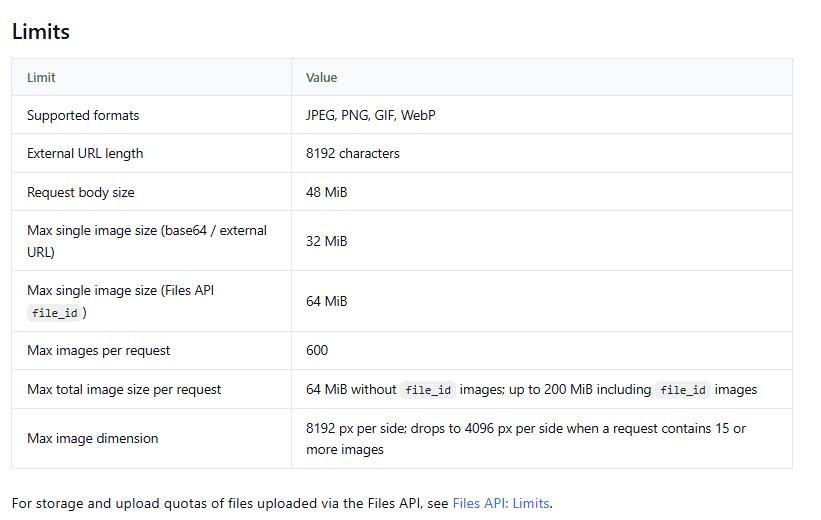
These limits are current as of the documentation-check date and can change independently of older Vision Exp tutorials.
Although GIF is an accepted file format, the Vision documentation does not promise video-style temporal understanding of animated GIF sequences. Do not treat format acceptance as a guarantee about every frame or animation behavior.
What does the detail setting do?
For image_url inputs, DeepSeek currently supports four values for detail:
| detail | Current behavior |
|---|---|
low | Downscales the image to 512×512 before inference. |
high | Keeps the original image; currently equivalent to original. |
original | Keeps the original image. |
auto | Currently keeps the original image and behaves like original. |
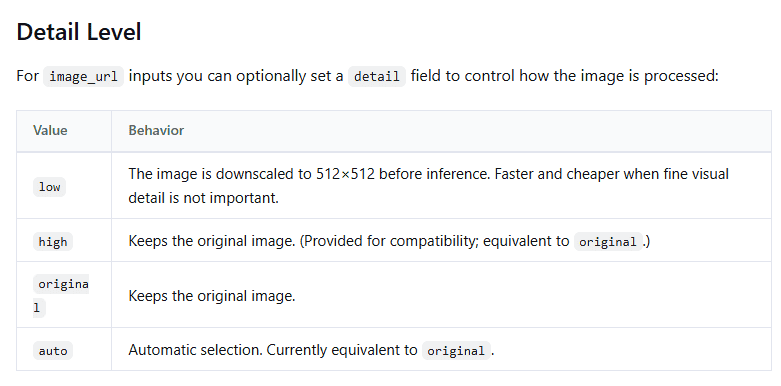
Use low when small visual details are unimportant and reducing visual processing is acceptable. Avoid it for tasks that depend on tiny labels, dense screenshots, or fine chart details because information lost during downscaling cannot be recovered later by asking the model to reason harder.
Visual detail and Thinking Mode’s reasoning effort are different controls. Higher reasoning effort does not restore pixels discarded by image resizing.
How DeepSeek converts images into input tokens
Images are converted into tokens based on their dimensions, and those image tokens are billed together with text input tokens.
Before inference, DeepSeek currently resizes images automatically:
- Images below roughly the pixel count of 544×544 are scaled up while preserving aspect ratio.
- Larger images are scaled down while preserving aspect ratio until the resulting total pixel count is roughly equivalent to a 1300×1300 image.
The current Vision guide gives an upper bound of 1,024 tokens per image after resizing. This is a maximum, not the token charge for every image. Two very large images such as 2000×2000 and 5000×5000 can end up with the same image-token count because both are resized before inference.
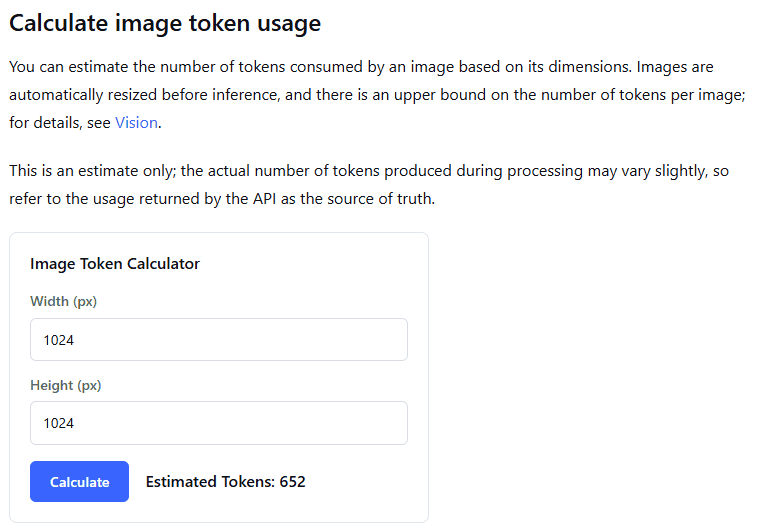
When you send multiple images, each is tokenized independently under the same rule. There is no separate multi-image formula that makes one combined visual token count from all files.
How much does DeepSeek Vision cost?
DeepSeek does not currently list a separate per-image Vision surcharge. Image tokens are input tokens for deepseek-flash and are billed alongside the text in the request.
The official pricing page currently lists these Flash rates in USD per one million tokens:
| Token category | Off-peak | Peak |
|---|---|---|
| Input, cache hit | $0.003 | $0.006 |
| Input, cache miss | $0.15 | $0.30 |
| Output | $0.60 | $1.20 |
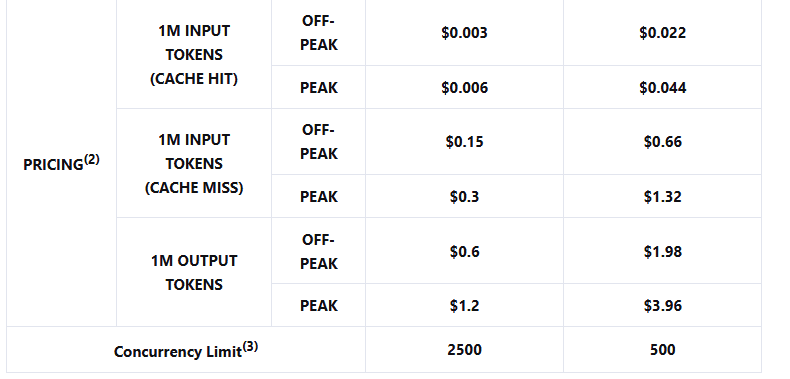
Peak periods are currently 01:00–04:00 UTC and 06:00–10:00 UTC, Monday through Friday, excluding Chinese public holidays. Other periods are off-peak.
Do not turn this table into a claim that “one image costs X.” The actual input cost depends on the image-token count, accompanying text, cache behavior where applicable, and the current pricing period. Recheck the live rate card before estimating production costs.
When to use the Files API
Use the Files API when you want to reuse an image across requests or when the image does not fit comfortably inside the inline request constraints.
Upload an image with purpose="user_data":
from openai import OpenAI

client = OpenAI(
    api_key=os.environ["DEEPSEEK_API_KEY"],
    base_url="https://api.deepseek.com",
)

with open("image.png", "rb") as image_file:
    uploaded = client.files.create(
        file=image_file,
        purpose="user_data",
    )

print(uploaded.id)
The returned ID has a form such as file-api-.... Reference it in Chat Completions with a file content block:
{
    "type": "file",
    "file_id": "file-api-..."
}
The OpenAI-compatible Files API currently allows one uploaded image up to 64 MiB. An upload must complete within 10 minutes.
File expiration and deletion
You can optionally set an expiration from one hour to 30 days when uploading a file. The current API requires expires_after[anchor]="created_at" together with the lifetime in seconds.
If you omit both expiration fields, DeepSeek currently documents the uploaded file as permanent rather than assigning an automatic expiry. That makes explicit cleanup important for applications that do not need long-term file reuse.
The Files API provides list, retrieve, and delete operations. Delete an uploaded image when your application no longer needs it rather than assuming every upload disappears automatically.
Current Files API quotas include a maximum of 25 GiB of stored files per user and up to 10,000 stored files.
These file-storage settings describe the Files API lifecycle. They should not be interpreted as a complete statement about all personal-data or API-input retention across DeepSeek’s services.
Can DeepSeek analyze more than one image?
Yes. Add multiple image content parts to the same request, subject to the current size, count, and dimension limits.
[
    {
        "type": "text",
        "text": (
            "Compare Image 1 and Image 2. "
            "List the main visible differences."
        )
    },
    {
        "type": "image_url",
        "image_url": {
            "url": "https://example.com/image-1.png"
        }
    },
    {
        "type": "image_url",
        "image_url": {
            "url": "https://example.com/image-2.png"
        }
    }
]
Make the prompt explicit about the image order when the distinction matters. The model cannot infer your application’s private labels unless you communicate them in the request.
Can you send PDFs or videos to DeepSeek Vision?
The current Vision and Files API documentation lists JPEG, PNG, GIF, and WebP as supported visual file formats. It does not list PDF documents or video files as native Vision inputs.
An application can preprocess other media—for example, render PDF pages to images or extract selected frames from a video—and send those resulting supported images to DeepSeek. That preprocessing is performed by your application or another tool; it is not the same as native PDF or video support in the Vision API.
Chat Completions vs Responses API for images
DeepSeek supports images through both interfaces, but their content blocks use different shapes.
| Concept | Chat Completions | Responses API |
|---|---|---|
| Main input container | messages | input |
| Text block | type: "text" | type: "input_text" |
| Image URL/Base64 block | type: "image_url" | type: "input_image" |
| Uploaded image reference | type: "file" + file_id | input_image + file_id |
| Convenient final text | choices[0].message.content | response.output_text in the supported SDK |
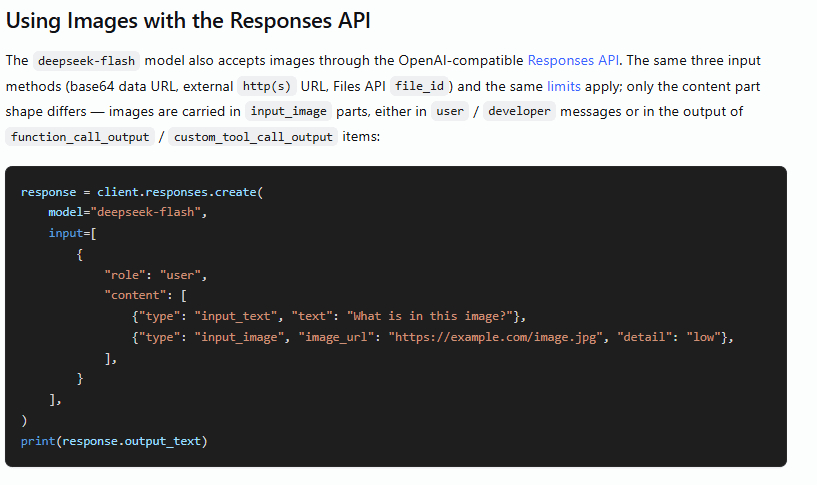
In the Responses API, input_image accepts either image_url or file_id, but not both. Supplying neither or supplying both produces HTTP 400.
The same detail values are available for Responses image URLs. DeepSeek currently ignores detail when a Responses image is provided through file_id.
Where images are allowed depends on the API format
For Chat Completions, the current Vision guide allows images in user messages only. Images placed in system or assistant messages are rejected with HTTP 400.
The Responses API is broader. Current documentation allows input_image in user and developer message items and as content returned through function_call_output or custom_tool_call_output. Images in system or assistant messages remain invalid.
This is useful for multimodal agents. For example, a screenshot-taking tool can return an image to a Responses workflow, after which deepseek-flash can inspect the screenshot. Do not copy this tool-output pattern into Chat Completions unless that interface explicitly supports the same message shape.
Using images with DeepSeek’s Anthropic-compatible API
DeepSeek also accepts vision input through its Anthropic-compatible /messages interface at the base URL https://api.deepseek.com/anthropic.
Instead of an OpenAI-style image_url content block, the Anthropic format uses an image block with a source. The documented source types currently include:
base64for embedded image bytes;urlfor external images;filefor a Files API reference.
When using Base64 through the Anthropic format, provide a supported media_type. Referencing a DeepSeek file through the Anthropic endpoint additionally requires the current anthropic-beta: files-api-2025-04-14 header.
Vision detail is not the same as Thinking Mode
deepseek-flash also supports reasoning controls, but visual resolution and reasoning effort solve different problems.
For example, detail="low" reduces the visual information supplied to the model by resizing the image to 512×512. Increasing reasoning effort later cannot reconstruct tiny text or details that disappeared during that resize.
Choose visual detail based on what must remain visible, and choose Thinking Mode settings based on how much reasoning the task requires.
Common DeepSeek Vision API errors
| Symptom | What to check |
|---|---|
Image request fails with deepseek-v4-pro | Use a currently vision-capable model such as deepseek-flash. The current Pro model does not support Vision. |
| An old Vision Exp example behaves differently | Replace the legacy deepseek-v4-flash-vision-exp model name with deepseek-flash for new code. |
| HTTP 400 after adding an image to Chat Completions | Confirm that the image is inside a user message, not a system or assistant message. |
| Base64 input is rejected | Check that the bytes are a supported image format, the data URL is correctly formed, and the inline size limits are not exceeded. |
| External image URL cannot be processed | Confirm it is a reachable HTTP(S) URL, no more than 8,192 characters, and the image can be downloaded within the documented limit. |
| Files API reference fails | Verify the file_id belongs to your API key, has not been deleted or expired, and references a supported image. |
Responses request gives a 400 for input_image | Provide exactly one of image_url or file_id. |
| Image is too large | Check single-image, total-request, and dimension limits; consider the Files API where appropriate. |
| Small labels disappear | Check whether detail="low" is downscaling the image to 512×512. |
| PDF upload is rejected as Vision input | PDF is not one of the currently documented image formats. Convert relevant pages to supported images before sending them. |
| Code parses the wrong response structure | Do not mix Chat Completions choices parsing with Responses API output objects. |
Privacy and uploaded images
Images can contain much more sensitive information than an ordinary text prompt: customer data, private dashboards, IDs, medical information, proprietary designs, or credentials visible in screenshots.
DeepSeek’s Open Platform Terms make developers responsible for having the rights and permissions required to submit their inputs. The terms also distinguish the developer’s downstream handling of end-user personal information from DeepSeek’s consumer-service privacy policy.
Do not assume Base64 makes sensitive image content private; the decoded image still becomes input to the API. Likewise, a Files API expiration setting describes the lifecycle of that uploaded file reference and should not be treated as a complete statement about every category of service data retention.
For confidential visual material, follow your organization’s approved data-handling rules and the current DeepSeek platform terms and privacy documentation before sending the image.
Practical checklist before using DeepSeek Vision in an application
- Use
deepseek-flashfor current official Vision requests. Do not build new integrations around the retired Vision Exp identifier. - Confirm that the task is image understanding. Do not confuse the Vision API with image generation.
- Choose the right transport. Use Base64 for convenient local images, a reachable URL for hosted images, or Files API when reuse or larger files justify an upload.
- Validate actual image content. DeepSeek supports JPEG, PNG, GIF, and WebP; changing a filename extension does not change the underlying file format.
- Watch request limits. Check byte size, image count, dimensions, and total image payload before sending large multimodal requests.
- Choose
detaildeliberately. Use low detail only when 512×512 processing retains enough information for the task. - Measure real usage. Image token count depends on processed dimensions; do not estimate cost solely from the file’s size in megabytes.
- Keep API schemas separate. Chat Completions uses
image_urlandfilecontent blocks, while Responses usesinput_image. - Clean up uploaded files. Set an appropriate expiration or delete files that should not remain available indefinitely.
- Verify important visual results. Image understanding can make mistakes, especially with small text, dense layouts, ambiguous diagrams, or high-stakes content.
- Recheck current documentation before deployment. Model aliases, image limits, pricing, and API-format behavior can change independently of older tutorials.