

You can use DeepSeek as the model backend for Claude Code without replacing the Claude Code terminal workflow. DeepSeek provides an official Anthropic-compatible API endpoint specifically supported by Claude Code: configure Claude Code to send its model requests to https://api.deepseek.com/anthropic, authenticate with a DeepSeek API key, and set the DeepSeek model routing variables.
Claude Code remains the coding-agent client that reads your project, manages local tools, edits files, runs approved commands, and coordinates subagents. DeepSeek supplies the model inference behind those interactions.
Setup documentation checked: October 3, 2026. Search and Fetch fees and limits rechecked: October 19, 2026. The setup below is based on DeepSeek and Anthropic documentation; no DeepSeek credentials or live Claude Code session were available for authenticated testing.
What you need
- Claude Code installed on macOS, Linux, WSL, or Windows.
- A DeepSeek API account and API key from the DeepSeek Platform.
- Available DeepSeek API balance for the model calls Claude Code generates.
- A terminal opened in the repository you want Claude Code to work with.
You do not need an Anthropic API key for the official DeepSeek route. The model requests are authenticated against DeepSeek with your DeepSeek API key and billed to that DeepSeek API account. A Claude subscription does not pay for DeepSeek API usage.
Step 1: Install or verify Claude Code
If Claude Code is already installed, check it first:
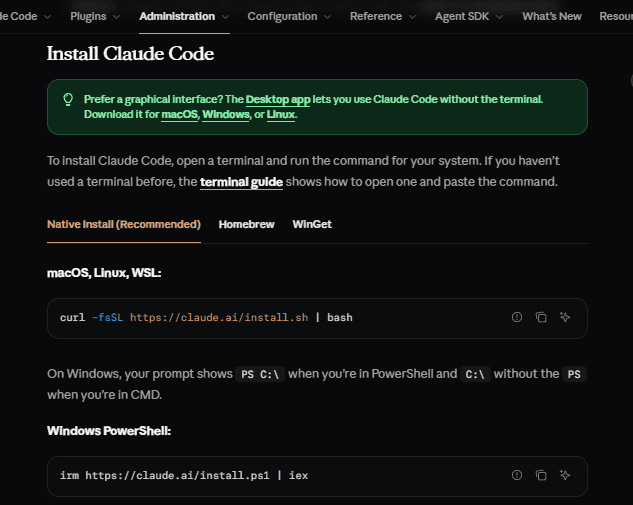
claude --versionIf you need to install it, use a current method documented by Anthropic rather than relying on an older DeepSeek tutorial. Anthropic currently lists the following options.
macOS, Linux, or WSL
curl -fsSL https://claude.ai/install.sh | bashWindows PowerShell
irm https://claude.ai/install.ps1 | iexOther supported installation methods
Anthropic also currently documents Homebrew, WinGet, and npm:
# macOS with Homebrew
brew install --cask claude-code

# Windows with WinGet
winget install Anthropic.ClaudeCode

# npm alternative, Node.js 22+
npm install -g @anthropic-ai/claude-code
Anthropic recommends avoiding sudo with the npm installation. After installing, open a fresh terminal if necessary and run claude --version again. See Anthropic’s current Claude Code setup guide for installation details.
Step 2: Configure Claude Code to use DeepSeek
DeepSeek’s official Claude Code integration guide currently recommends the following configuration.
macOS, Linux, and WSL
export ANTHROPIC_BASE_URL="https://api.deepseek.com/anthropic"
export ANTHROPIC_AUTH_TOKEN="YOUR_DEEPSEEK_API_KEY"
export ANTHROPIC_MODEL="deepseek-flash[1m]"
export ANTHROPIC_DEFAULT_OPUS_MODEL="deepseek-flash[1m]"
export ANTHROPIC_DEFAULT_SONNET_MODEL="deepseek-flash[1m]"
export ANTHROPIC_DEFAULT_HAIKU_MODEL="deepseek-flash"
export CLAUDE_CODE_SUBAGENT_MODEL="deepseek-flash"
export CLAUDE_CODE_EFFORT_LEVEL="max"
export CLAUDE_CODE_AUTO_COMPACT_WINDOW="786432"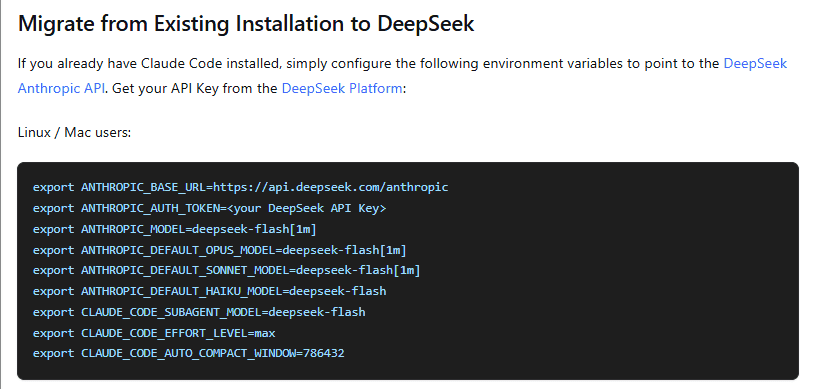
Windows PowerShell
$env:ANTHROPIC_BASE_URL="https://api.deepseek.com/anthropic"
$env:ANTHROPIC_AUTH_TOKEN="YOUR_DEEPSEEK_API_KEY"
$env:ANTHROPIC_MODEL="deepseek-flash[1m]"
$env:ANTHROPIC_DEFAULT_OPUS_MODEL="deepseek-flash[1m]"
$env:ANTHROPIC_DEFAULT_SONNET_MODEL="deepseek-flash[1m]"
$env:ANTHROPIC_DEFAULT_HAIKU_MODEL="deepseek-flash"
$env:CLAUDE_CODE_SUBAGENT_MODEL="deepseek-flash"
$env:CLAUDE_CODE_EFFORT_LEVEL="max"
$env:CLAUDE_CODE_AUTO_COMPACT_WINDOW="786432"
Replace YOUR_DEEPSEEK_API_KEY with your actual key in your own terminal. Do not paste a real API key into source code, documentation, screenshots, or a repository.
What each environment variable does
| Variable | Purpose in the DeepSeek setup |
|---|---|
ANTHROPIC_BASE_URL | Redirects Anthropic-format model requests to DeepSeek’s Anthropic-compatible endpoint. |
ANTHROPIC_AUTH_TOKEN | Supplies your DeepSeek API key as the Bearer token Claude Code uses for the custom backend. |
ANTHROPIC_MODEL | Sets the primary model Claude Code should request. |
ANTHROPIC_DEFAULT_OPUS_MODEL | Overrides the model used where Claude Code would otherwise select an Opus-class model. |
ANTHROPIC_DEFAULT_SONNET_MODEL | Overrides the Sonnet-class default. |
ANTHROPIC_DEFAULT_HAIKU_MODEL | Overrides the lighter Haiku-class default. |
CLAUDE_CODE_SUBAGENT_MODEL | Sets the model used for Claude Code subagents where the current client supports this override. |
CLAUDE_CODE_EFFORT_LEVEL | Controls reasoning effort; DeepSeek currently recommends max for this integration. |
CLAUDE_CODE_AUTO_COMPACT_WINDOW | Sets the Claude Code compaction threshold used by DeepSeek’s recommended 1M-context configuration. |
The environment variables above are session variables when set directly in a terminal. Opening a new terminal normally requires setting them again unless you intentionally persist them.
Why Claude Code uses DeepSeek’s Anthropic endpoint
DeepSeek provides two main API compatibility families. The ordinary OpenAI-compatible base URL is https://api.deepseek.com; the Anthropic-compatible base URL is https://api.deepseek.com/anthropic.
Claude Code communicates using Anthropic-style Messages and tool structures, so the official integration points Claude Code to the Anthropic-compatible DeepSeek endpoint. Do not substitute the ordinary OpenAI-compatible base URL in this configuration.
DeepSeek documents the Anthropic compatibility layer in its Anthropic API guide.
Why DeepSeek uses ANTHROPIC_AUTH_TOKEN instead of ANTHROPIC_API_KEY here
This is easy to confuse because a direct Anthropic SDK example and the Claude Code integration use different recommended environment variables.
For Claude Code, DeepSeek’s official configuration currently sets your DeepSeek API key as ANTHROPIC_AUTH_TOKEN. Follow that integration-specific configuration rather than replacing it with ANTHROPIC_API_KEY because an unrelated Anthropic SDK example uses the latter.
This also matters if you have previously used Anthropic’s own API. Anthropic’s current Claude Code documentation notes that environment credentials such as ANTHROPIC_API_KEY, ANTHROPIC_AUTH_TOKEN, and a custom ANTHROPIC_BASE_URL can override or bypass the normal /login authentication path.
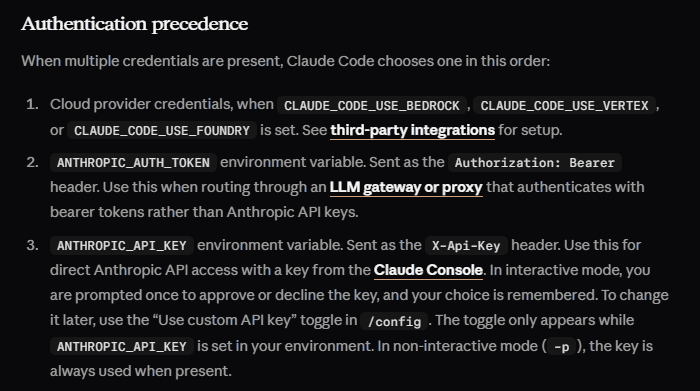
If you already have an ANTHROPIC_API_KEY set for another workflow, remove it from the test shell while validating the DeepSeek route rather than allowing two credential sources to compete.
# Bash / zsh
unset ANTHROPIC_API_KEY

# PowerShell
Remove-Item Env:ANTHROPIC_API_KEY -ErrorAction SilentlyContinue
Do not print the full value of either credential to debug authentication.
Step 3: Start Claude Code in your project
Move into the repository you want Claude Code to work with and start the CLI:
cd /path/to/my-project
claude
On PowerShell, use the appropriate Windows project path:
Set-Location "C:\path\to\my-project"
claude
For the first request, use a read-only task so you can verify the setup without immediately modifying the repository. For example:
Inspect this repository without editing anything. Summarize the main directories, identify the likely application entry point, and list the files you would read next to understand the architecture.
How to confirm Claude Code is really using DeepSeek
Do not treat “Claude Code opened successfully” as sufficient proof that every request is using the intended backend.
- Run
/statusinside Claude Code. Anthropic currently documents this command as showing the account/authentication context, model, working directory, and version. Check that the configuration is consistent with the custom API route. - Check
/model. Confirm the current session has not been manually switched away from the model configuration you intended. - Inspect the non-secret environment values. Confirm
ANTHROPIC_BASE_URLpoints to DeepSeek and that the expected model variables are present. Do not print the authentication token. - Check your DeepSeek Platform activity. API usage or balance activity after a real Claude Code request is stronger evidence that inference traffic reached your DeepSeek account.
The model name displayed by a client does not always reveal every provider-side mapping decision, so use more than one signal when you need to verify billing or routing.
What does deepseek-flash[1m] mean?
DeepSeek’s official Claude Code configuration uses deepseek-flash[1m] for the primary model and the Opus/Sonnet default slots. The [1m] suffix follows Claude Code’s extended-context model-selection convention: Anthropic also uses names such as claude-sonnet-4-6[1m] to select a 1M-context variant.
Do not confuse that Claude Code selector with a separate DeepSeek API model called “Flash 1M.” DeepSeek’s current API model is deepseek-flash, which runs DeepSeek-V4.1-Flash-1017 and has a documented 1 million-token context window.
The CLAUDE_CODE_AUTO_COMPACT_WINDOW=786432 value in DeepSeek’s recommended setup is a Claude Code client-side compaction threshold. It does not enlarge DeepSeek’s actual model context window. It tells the harness to compact conversation context before the model’s 1M limit becomes the immediate constraint.
DeepSeek model routing inside Claude Code
There are two distinct routing mechanisms, and confusing them can lead to unexpected model usage.
1. Explicit DeepSeek model overrides
The recommended DeepSeek configuration explicitly sets:
ANTHROPIC_MODEL=deepseek-flash[1m]
ANTHROPIC_DEFAULT_OPUS_MODEL=deepseek-flash[1m]
ANTHROPIC_DEFAULT_SONNET_MODEL=deepseek-flash[1m]
ANTHROPIC_DEFAULT_HAIKU_MODEL=deepseek-flash
CLAUDE_CODE_SUBAGENT_MODEL=deepseek-flash
This intentionally routes the normal primary, Opus-class, Sonnet-class, Haiku-class, and subagent roles to Flash in the standard recommended setup.
2. Claude-name mapping at the DeepSeek API
If a Claude-prefixed model name reaches DeepSeek’s Anthropic-compatible API, DeepSeek currently maps it as follows:
| Model name sent to DeepSeek | Current DeepSeek mapping |
|---|---|
claude-opus... | deepseek-v4-pro |
claude-sonnet... | deepseek-flash |
claude-haiku... | deepseek-flash |
| Unsupported/unrecognized model name | Currently falls back to deepseek-flash |
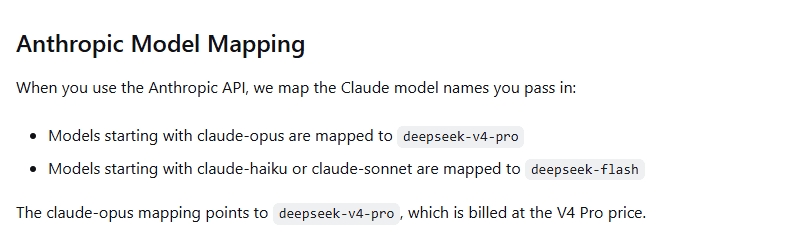
That means the statement “selecting Opus in Claude Code always uses V4 Pro” is too broad. Under DeepSeek’s recommended explicit configuration, Opus-class defaults are pinned to deepseek-flash[1m]. If you override that configuration and a claude-opus... name actually reaches DeepSeek, the provider maps it to deepseek-v4-pro.
Because V4 Pro is billed at its own higher rate, model switching is not merely a display preference.
Be careful with /model
Anthropic’s current Claude Code documentation says /model can change the active model immediately within a session. You can use /status to see the current selection.
When Claude Code is connected to DeepSeek, remember that a Claude-prefixed model selected through /model can be mapped by the DeepSeek backend. An Opus-prefixed model currently maps to V4 Pro; Sonnet and Haiku names map to Flash.
If predictable routing and billing are more important than interactive model switching, keep the explicit DeepSeek model overrides and verify the session after changing /model.
Flash vs V4 Pro in this integration
DeepSeek’s current model documentation lists both deepseek-flash and deepseek-v4-pro with 1M context, Thinking Mode, Tool Calls, and Anthropic API support. The recommended Claude Code configuration nevertheless uses Flash for its primary slots.
| Characteristic | deepseek-flash | deepseek-v4-pro |
|---|---|---|
| Current model version | DeepSeek-V4.1-Flash-1017 | DeepSeek-V4-Pro-0813 |
| Context length | 1M | 1M |
| Thinking Mode | Supported | Supported |
| Tool Calls | Supported | Supported |
| Anthropic API | Supported | Supported |
| Vision | Supported | Not supported |
Do not assume V4 Pro is automatically the right model for every coding task simply because it is the Pro tier. Evaluate your own workload, and remember that explicitly selecting an Opus-prefixed model can change the DeepSeek model and its billing.
Thinking Mode and Claude Code effort
DeepSeek’s Anthropic-compatible API supports Anthropic’s thinking structure, while the budget_tokens field is currently ignored. DeepSeek also supports the effort portion of Anthropic’s output_config.
The official Claude Code integration currently sets:
CLAUDE_CODE_EFFORT_LEVEL=maxThis affects reasoning effort. It does not select V4 Pro and does not increase the context window. Higher reasoning effort can increase the amount of model computation and generated reasoning, so max should not be interpreted as automatically optimal for every routine coding task simply because it is DeepSeek’s recommended default for this integration.
Do Claude Code tools work with DeepSeek?
Yes, the parts of Claude Code that rely on ordinary Anthropic tool-use messages are supported by DeepSeek’s current Anthropic compatibility layer. Tool definitions, tool_use content, and tool_result content are supported.
The architecture is important:
- Claude Code manages the local coding-agent workflow and executes approved local tools.
- DeepSeek provides the model inference that decides what to do and produces the model responses.
DeepSeek does not gain arbitrary direct access to your terminal merely because its model can return a tool-use request. Claude Code remains the harness that controls tool execution and permissions.
Web Search works, but it can add token usage
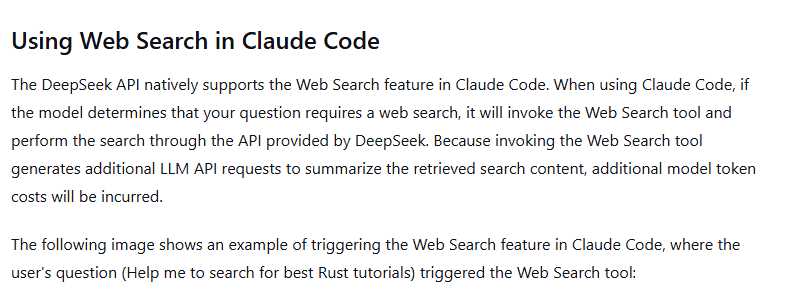
DeepSeek’s official Claude Code guide says Claude Code’s Web Search feature is supported through the DeepSeek API. If the model determines that a task requires search, it can invoke Web Search through the integration.
DeepSeek also warns that Web Search can generate additional LLM requests to summarize retrieved content, so search activity can increase token usage and API cost. Account for those model tokens separately from Search or Fetch request fees.
Search and Fetch request fees are separate from model tokens. The Search & Fetch documentation, checked October 19, 2026, lists Search at $0.75 per 1,000 billable requests. If your workflow separately calls Fetch to retrieve page content, Fetch has its own $0.75 per 1,000 billable requests fee. Budget for the endpoints actually used; a Search action does not by itself establish that a separate Fetch request occurred.
A request is billable only if HTTP 200 returns non-empty Search results or Fetch page content. Failed requests, empty searches, and timeouts are not billed. Search’s count changes the number of results, not the per-request fee.
Search and Fetch request-fee notice: Server-side tool calls that use Search and Fetch through DeepSeek Harness, Claude Code, or Codex are currently free of request charges. Per-request billing starts at 00:00 Beijing time on November 1, 2026. This notice does not waive model-token charges or establish free direct standalone Search or Fetch usage.
Search and Fetch have independent account limits of 100 requests per second for Search and 25 for Fetch, shared across that account’s API keys and separate from model concurrency. Fetch also has a per-domain QPS limit. A Search or Fetch 429 therefore needs request pacing for that service, even when model-generation concurrency is low.
What about MCP?
Claude Code has its own MCP client functionality—the /mcp command currently manages MCP server connections and authentication. That should be distinguished from Anthropic API-level MCP fields.
DeepSeek’s current Anthropic API compatibility table marks the top-level mcp_servers field as ignored and mcp_tool_use/mcp_tool_result content blocks as unsupported.
This does not automatically mean that Claude Code cannot use an MCP server while DeepSeek is the model backend. Claude Code can coordinate client-side tools itself. It does mean you should not assume DeepSeek implements Anthropic’s provider-side MCP API fields.
DeepSeek’s Anthropic compatibility is broad, not identical
DeepSeek supports the Anthropic API format well enough for the official Claude Code integration, but it does not implement every Anthropic field identically.
| Capability | Current DeepSeek Anthropic compatibility |
|---|---|
| Text and system messages | Supported |
| Streaming | Supported |
| Thinking | Supported; budget_tokens is ignored |
| Effort | Supported through the relevant output_config field |
| Tool definitions / tool use / tool results | Supported |
| Images | Supported with deepseek-flash |
| Web-search server tool content | Supported |
mcp_servers | Ignored |
| MCP tool content blocks | Not supported at the provider API layer |
| Document content blocks | Not supported |
| Citations | Ignored |
cache_control | Ignored; DeepSeek manages its own context caching |
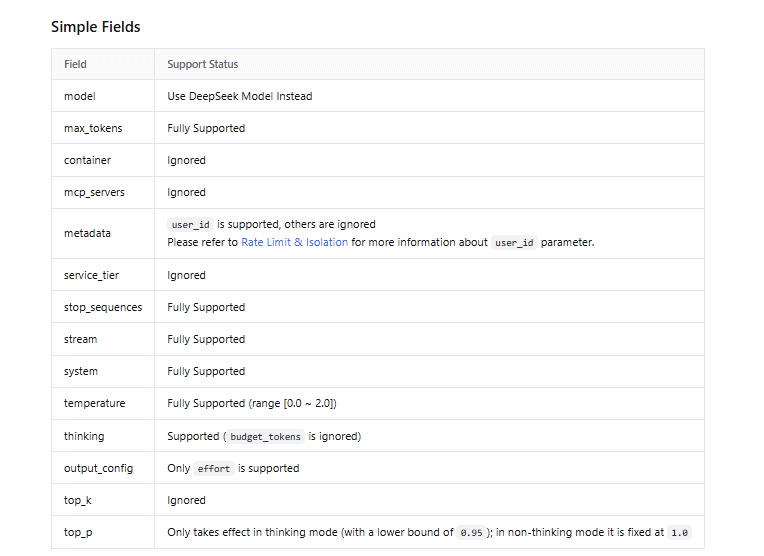
Check the current DeepSeek Anthropic compatibility table before depending on a less common Claude Code feature or a third-party extension.
Subagents can use a separate DeepSeek model setting
The current DeepSeek configuration sets:
CLAUDE_CODE_SUBAGENT_MODEL=deepseek-flashThis keeps Claude Code subagent work routed to Flash under the official recommended configuration. Subagent activity is not free: additional agent work can generate additional model requests and token usage on the DeepSeek account.
How DeepSeek billing works inside Claude Code
Using DeepSeek as the backend does not make Claude Code model usage free. DeepSeek charges the API account according to the model and token usage. The token table below excludes separate Search and Fetch request fees; apply the Search and Fetch request-fee notice above only when it covers your requests.
DeepSeek’s current prices, in USD per one million tokens, are:
| Model | Period | Cached input | Uncached input | Output |
|---|---|---|---|---|
deepseek-flash | Off-peak | $0.003 | $0.15 | $0.60 |
deepseek-flash | Peak | $0.006 | $0.30 | $1.20 |
deepseek-v4-pro | Off-peak | $0.022 | $0.66 | $1.98 |
deepseek-v4-pro | Peak | $0.044 | $1.32 | $3.96 |
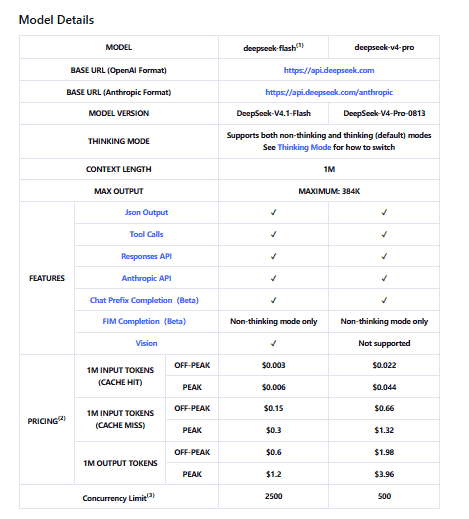
Peak hours are currently 01:00–04:00 UTC and 06:00–10:00 UTC, Monday through Friday, excluding Chinese public holidays. Other hours are off-peak. DeepSeek can change API pricing, so recheck its current pricing page before budgeting ongoing Claude Code use.
If a model selection results in a Claude Opus-prefixed name reaching DeepSeek, the provider currently maps it to V4 Pro, so the higher V4 Pro price applies.
How to persist the configuration safely
The commands above configure the current terminal session. If you want the non-secret DeepSeek routing settings available in future sessions, you can persist them in your user shell profile or Claude Code’s user-level settings.
Anthropic currently supports an env block in Claude Code settings, including the user-level file ~/.claude/settings.json. For example, non-secret routing values could be stored there:
{
  "env": {
    "ANTHROPIC_BASE_URL": "https://api.deepseek.com/anthropic",
    "ANTHROPIC_MODEL": "deepseek-flash[1m]",
    "ANTHROPIC_DEFAULT_OPUS_MODEL": "deepseek-flash[1m]",
    "ANTHROPIC_DEFAULT_SONNET_MODEL": "deepseek-flash[1m]",
    "ANTHROPIC_DEFAULT_HAIKU_MODEL": "deepseek-flash",
    "CLAUDE_CODE_SUBAGENT_MODEL": "deepseek-flash",
    "CLAUDE_CODE_EFFORT_LEVEL": "max",
    "CLAUDE_CODE_AUTO_COMPACT_WINDOW": "786432"
  }
}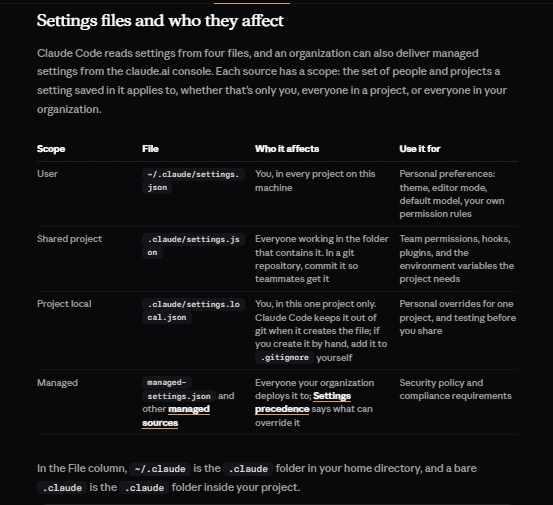
Keep the DeepSeek API key out of shared project configuration. A project-level .claude/settings.json can be committed to Git, so storing a secret there creates an obvious credential risk. Prefer a user-level environment variable or an appropriate secret-management mechanism for ANTHROPIC_AUTH_TOKEN.
Common DeepSeek + Claude Code problems
| Symptom | What to check |
|---|---|
claude: command not found | Open a fresh terminal and confirm the Claude Code binary directory is on PATH. Re-run claude --version. Anthropic’s native installer normally places the binary under the user’s local bin directory. |
| Claude Code still asks you to log in | Confirm the DeepSeek variables were exported in the same environment that launches claude. Check ANTHROPIC_BASE_URL and that ANTHROPIC_AUTH_TOKEN exists without printing its value. |
| HTTP 401 | Check that the credential is a valid DeepSeek API key, that it is set as ANTHROPIC_AUTH_TOKEN for this integration, and that the base URL points to DeepSeek’s Anthropic endpoint. |
| Requests unexpectedly use Anthropic credentials | Look for stale ANTHROPIC_API_KEY, CLAUDE_CODE_OAUTH_TOKEN, apiKeyHelper, provider flags, or values stored in Claude Code settings. |
| Unexpected V4 Pro charges | Check whether /model or another override caused a claude-opus... model name to reach DeepSeek, which currently maps Opus names to deepseek-v4-pro. |
| Wrong model appears in the session | Run /model and /status, then inspect ANTHROPIC_MODEL and the default model variables. |
| Subagents use a different model | Check CLAUDE_CODE_SUBAGENT_MODEL separately from the primary model variables. |
| Very long sessions compact earlier than expected | Check CLAUDE_CODE_AUTO_COMPACT_WINDOW. The compaction threshold is not the same as the underlying 1M model context limit. |
| An Anthropic feature does nothing | Check DeepSeek’s current Anthropic compatibility table. Some fields are ignored or unsupported even though ordinary Messages and tool use work. |
| MCP configuration seems inconsistent | Separate Claude Code’s client-side MCP servers from the provider API’s mcp_servers field, which DeepSeek currently ignores. |
| Web Search increases spend | Separate extra model-token charges from Search and Fetch request fees. Apply the notice above for covered tool calls; per-request billing starts at 00:00 Beijing time on November 1, 2026. Include Fetch fees only when the workflow actually calls Fetch. |
Search or Fetch returns HTTP 429 | Check the independent account limits across API keys: 100 QPS for Search and 25 QPS for Fetch. Fetch also has a per-domain limit. Reduce request starts for the affected service; spare model-concurrency slots do not remove these limits. |
How to switch Claude Code back to Anthropic
If you set the DeepSeek configuration only in the current terminal, remove those overrides or open a clean terminal without them.
Bash / zsh
unset ANTHROPIC_BASE_URL
unset ANTHROPIC_AUTH_TOKEN
unset ANTHROPIC_MODEL
unset ANTHROPIC_DEFAULT_OPUS_MODEL
unset ANTHROPIC_DEFAULT_SONNET_MODEL
unset ANTHROPIC_DEFAULT_HAIKU_MODEL
unset CLAUDE_CODE_SUBAGENT_MODEL
unset CLAUDE_CODE_EFFORT_LEVEL
unset CLAUDE_CODE_AUTO_COMPACT_WINDOW
PowerShell
Remove-Item Env:ANTHROPIC_BASE_URL -ErrorAction SilentlyContinue
Remove-Item Env:ANTHROPIC_AUTH_TOKEN -ErrorAction SilentlyContinue
Remove-Item Env:ANTHROPIC_MODEL -ErrorAction SilentlyContinue
Remove-Item Env:ANTHROPIC_DEFAULT_OPUS_MODEL -ErrorAction SilentlyContinue
Remove-Item Env:ANTHROPIC_DEFAULT_SONNET_MODEL -ErrorAction SilentlyContinue
Remove-Item Env:ANTHROPIC_DEFAULT_HAIKU_MODEL -ErrorAction SilentlyContinue
Remove-Item Env:CLAUDE_CODE_SUBAGENT_MODEL -ErrorAction SilentlyContinue
Remove-Item Env:CLAUDE_CODE_EFFORT_LEVEL -ErrorAction SilentlyContinue
Remove-Item Env:CLAUDE_CODE_AUTO_COMPACT_WINDOW -ErrorAction SilentlyContinue
If you persisted the variables in a shell profile or Claude Code settings file, remove the DeepSeek-specific entries there as well and open a fresh terminal. Do not delete unrelated Claude Code configuration.
Then start Claude Code and use /login if you want to authenticate with an Anthropic account again. Run /status afterward to confirm the active authentication context.
Quick verification checklist
claude --versionworks.ANTHROPIC_BASE_URLishttps://api.deepseek.com/anthropic.- Your DeepSeek key is supplied through
ANTHROPIC_AUTH_TOKEN. - No unintended
ANTHROPIC_API_KEYor other provider override conflicts with the session. - The primary model is
deepseek-flash[1m]under DeepSeek’s recommended configuration. - Haiku-class and subagent work is configured for
deepseek-flash. /statusand/modelshow the session configuration you expect.- A safe read-only repository task completes successfully.
- DeepSeek Platform activity confirms that model traffic is reaching the DeepSeek account.
- You understand that selecting an Opus-prefixed model can currently route to V4 Pro and change API cost.