

A DeepSeek API key is the credential used to authenticate requests to the official DeepSeek API. You create it in the DeepSeek Platform API Keys page, keep it secret, and send it to the API as a Bearer token in the Authorization header.
A DeepSeek API key is not the same as a normal chat login, a DeepSeek mobile app session, an OpenAI API key, an Anthropic API key, or a key from a third-party gateway. It belongs to your DeepSeek Platform account and is used for developer API requests.
Documentation checked: October 3, 2026. The examples below are documentation-based and were not run against the live DeepSeek API because no private API key was supplied.
Quick answer: where to create and use a DeepSeek API key
| Need | Use this | Important note |
|---|---|---|
| Create a key | DeepSeek Platform API Keys | Sign in to the official DeepSeek Platform first. |
| OpenAI-compatible API base URL | https://api.deepseek.com | Use this for normal cURL and OpenAI SDK examples. |
| Anthropic-compatible API base URL | https://api.deepseek.com/anthropic | Use this only for Anthropic-format clients such as Claude Code integrations. |
| Recommended environment variable for examples | DEEPSEEK_API_KEY | A convenient local name; some third-party tools use their own variable names. |
| Authentication header | Authorization: Bearer YOUR_DEEPSEEK_API_KEY | Do not put the key in the URL or browser code. |
| First model to test | deepseek-flash | Current docs list deepseek-flash as the Flash API model. |
Step 1: Create your key on the official DeepSeek Platform
Open the official DeepSeek API Keys page and sign in with the DeepSeek account you want to use for API billing. Create a new key and copy it securely when it is shown.
The current DeepSeek error-code documentation links users without a key to the same official API key page. Use the official platform rather than copying a key from a forum, an extension page, or a third-party proxy.
Do not rely on an old tutorial for the exact button names or key format. The platform UI can change. The safe current process is: sign in to the official platform, open the API Keys area, create a key, copy it securely, and store it somewhere appropriate for your environment.
Step 2: Store the key as an environment variable
For local development, a common pattern is to store the key in an environment variable named DEEPSEEK_API_KEY. This keeps the key out of the code file you share or commit.
These commands set the variable only for the current terminal session.
macOS, Linux, or WSL
export DEEPSEEK_API_KEY="YOUR_DEEPSEEK_API_KEY"Windows PowerShell
$env:DEEPSEEK_API_KEY="YOUR_DEEPSEEK_API_KEY"Replace YOUR_DEEPSEEK_API_KEY with your real key in your own terminal. Do not paste the real key into source code, screenshots, support forums, a WordPress page, or a public repository.
Environment variables are convenient, but they are not magic protection. Anyone who can inspect your shell, process environment, deployment settings, logs, or machine may still be able to access the secret. For production, use your platform’s secret-management system or a suitable server-side secret store.
Step 3: Use the key in the Authorization header
DeepSeek API authentication uses HTTP Bearer authentication. The request header should look like this:
Authorization: Bearer YOUR_DEEPSEEK_API_KEYDo not use X-API-Key, Basic authentication, cookies from chat.deepseek.com, or a query string such as ?api_key=.... A consumer chat session is not an API key.
Step 4: Test the key with a minimal cURL request
The following cURL example is for Bash or zsh on macOS, Linux, or WSL. It uses the OpenAI-compatible Chat Completions endpoint documented by DeepSeek.
curl --silent --show-error --fail-with-body \
  https://api.deepseek.com/chat/completions \
  -H "Authorization: Bearer ${DEEPSEEK_API_KEY:?Set DEEPSEEK_API_KEY first}" \
  -H "Content-Type: application/json" \
  --data '{
    "model": "deepseek-flash",
    "messages": [
      {
        "role": "user",
        "content": "Reply with one short sentence explaining what an API key does."
      }
    ],
    "thinking": {
      "type": "disabled"
    },
    "max_tokens": 128,
    "stream": false
  }'
This request can consume API balance if you run it. The example does not show a fake response because no live request was made here.
PowerShell uses different quoting and line-continuation rules. If you are on Windows and the cURL command fails because of shell quoting, test the same key with the Python example below or adapt the JSON quoting carefully for PowerShell.
Step 5: Use the key in Python
Install the OpenAI Python client if you do not already have it:
python -m pip install openaiThen save this as deepseek_key_test.py:
import os
import sys

from openai import APIError, OpenAI


def main() -> int:
    api_key = os.environ.get("DEEPSEEK_API_KEY", "").strip()

    if not api_key:
        print("Set DEEPSEEK_API_KEY before running this script.", file=sys.stderr)
        return 2

    client = OpenAI(
        api_key=api_key,
        base_url="https://api.deepseek.com",
        timeout=120.0,
        max_retries=0,
    )

    try:
        response = client.chat.completions.create(
            model="deepseek-flash",
            messages=[
                {
                    "role": "user",
                    "content": "Reply with one short sentence explaining what an API key does.",
                }
            ],
            max_tokens=128,
            extra_body={
                "thinking": {
                    "type": "disabled"
                }
            },
        )
    except APIError as exc:
        status = getattr(exc, "status_code", None)
        if status is not None:
            print(f"DeepSeek request failed with HTTP {status}.", file=sys.stderr)
        else:
            print(f"DeepSeek request failed: {type(exc).__name__}", file=sys.stderr)
        return 1

    if not response.choices:
        print("No choices returned.", file=sys.stderr)
        return 1

    print(response.choices[0].message.content or "")
    return 0


if __name__ == "__main__":
    raise SystemExit(main())
Run it from the same terminal where DEEPSEEK_API_KEY is set:
python deepseek_key_test.pyThis script reads the key from the environment, uses the correct DeepSeek OpenAI-compatible base URL, and avoids printing the secret. It also disables automatic SDK retries so the first authentication or balance failure remains easier to diagnose.
Which base URL should you use?
The correct base URL depends on the client or integration format.
| Use case | Base URL | Typical credential field |
|---|---|---|
| Normal OpenAI-compatible cURL, Python, or Node examples | https://api.deepseek.com | DEEPSEEK_API_KEY or SDK api_key |
| Raw Chat Completions HTTP request | https://api.deepseek.com/chat/completions | Authorization: Bearer ... |
| Anthropic-compatible clients | https://api.deepseek.com/anthropic | Depends on the client; for Claude Code, DeepSeek documents ANTHROPIC_AUTH_TOKEN |
| Third-party gateways | The gateway’s own endpoint | Usually the gateway’s own key, not a DeepSeek Platform key |
Do not use the Anthropic-compatible endpoint in a normal OpenAI SDK quickstart. Do not use the OpenAI-compatible endpoint for Claude Code unless current official documentation explicitly supports that route.
Is a DeepSeek API key free?
Creating or owning an API key is not the same as having usable API balance. DeepSeek’s official pricing page says API expenses are deducted from topped-up or granted balance, with granted balance used first when both are available.
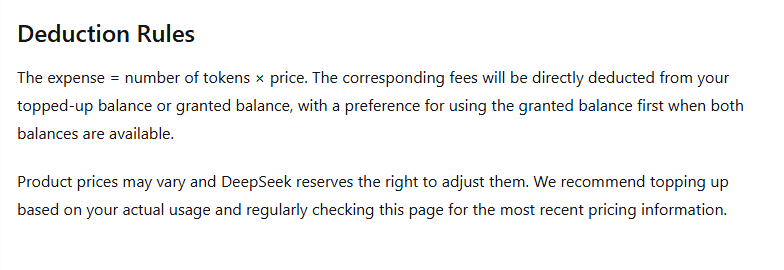
The same page says product prices may vary and recommends checking the pricing page regularly. Therefore, do not assume an API key includes free credits or unlimited usage unless your current DeepSeek account page explicitly shows available balance or an applicable grant.
Consumer chat access and developer API billing are separate. A free or accessible chat experience does not mean every API request is free.
401 vs 402: the two key-related errors to understand
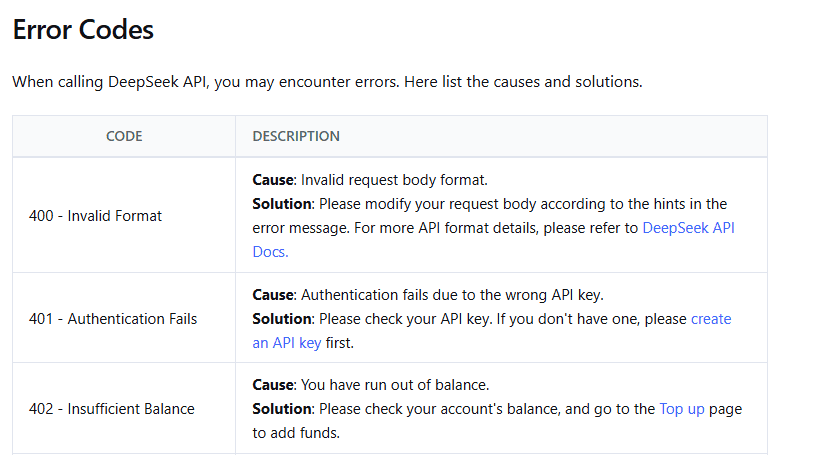
The official DeepSeek error-code page distinguishes authentication problems from balance problems.
| Error | Meaning | What to check first |
|---|---|---|
401 Authentication Fails | The API key is wrong or not being sent correctly. | Header name, Bearer prefix, environment variable, endpoint, and provider key. |
402 Insufficient Balance | The account has run out of balance. | DeepSeek Platform balance and the account that owns the key. |
Do not regenerate keys repeatedly when the real issue is insufficient balance. Likewise, do not top up before confirming that the request is actually reaching the intended DeepSeek account and not a third-party provider or stale environment configuration.
If you get 401
- Confirm the header is exactly
Authorization, notAuthenticationorX-API-Key. - Confirm the value begins with
Bearer, including the space afterBearer. - Check that the running process can actually read
DEEPSEEK_API_KEY. - Make sure you did not copy quotation marks, line breaks, or spaces into the key value.
- Confirm that you are using a DeepSeek Platform key, not an OpenAI, Anthropic, OpenRouter, NVIDIA, or other provider key.
- Check that the request is going to the correct DeepSeek endpoint for the client format you are using.
- Restart the application after changing environment variables; many tools read credentials only at startup.
If you get 402
- Open the official DeepSeek Platform and check the balance for the account that owns the key.
- Verify that the key belongs to the account you expected.
- Check whether the request is being sent through DeepSeek directly or through another provider with its own billing system.
- Review the official pricing page before estimating how far a balance will go.
Do not put your DeepSeek API key in frontend code
A DeepSeek API key should be treated like a password for paid API access. If you put it into browser JavaScript, a public WordPress page, a mobile app binary, a GitHub repository, a screenshot, a URL, or a shared document, someone else may be able to use it.
For a public web app, do not call DeepSeek directly from the browser with the user-visible API key. Use a server-side backend that holds the key, authenticates your users, validates requests, applies rate limits, and then calls DeepSeek.
For local development, an environment variable is acceptable for many simple projects. For production, prefer platform-managed secrets, CI/CD secrets, or a cloud secret manager appropriate to your deployment.
Using a DeepSeek key in third-party tools
Different tools expect credentials in different places. Read the tool’s own documentation before pasting your key.
- Official DeepSeek / OpenAI-compatible clients: often use
DEEPSEEK_API_KEY, an SDKapi_keyfield, or anAuthorization: Bearerheader. - Claude Code: DeepSeek’s official integration uses the Anthropic-compatible endpoint and a DeepSeek key in
ANTHROPIC_AUTH_TOKEN, not the normalDEEPSEEK_API_KEYexample pattern. - OpenAI-compatible adapters: some ask for an “OpenAI API key” field plus a custom base URL. Use that pattern only if the tool’s documentation confirms it supports compatible providers.
- Third-party gateways: a gateway usually requires its own key and base URL. A DeepSeek Platform key may not work there.
If a tool rejects your key while cURL succeeds, the issue may be the tool’s provider configuration, base URL, model name, or credential field—not the key itself.
What to do if your key is exposed
If you accidentally publish or share a DeepSeek API key, treat it as compromised.
- Revoke or delete the exposed key in the official DeepSeek Platform if the platform currently provides that action.
- Create a replacement key for the application or environment that still needs API access.
- Update environment variables and secret stores where the application runs.
- Restart processes that may still hold the old key in memory.
- Check recent usage and account balance for unexpected activity.
- Remove the exposed secret from visible files and public history where possible. Remember that removing it from the latest commit does not guarantee nobody saw or copied it.
Do not ask strangers to “test” your exposed key, and do not post the key in a support thread to prove that it fails.
Common questions about DeepSeek API keys
Can I use my DeepSeek chat login as an API key?
No. A chat login lets you access the consumer chat service. API requests need an API key created in the official DeepSeek Platform.
Can I use an OpenAI API key with DeepSeek?
No. You can use OpenAI-compatible client libraries with DeepSeek by changing the base URL and supplying a DeepSeek API key. An OpenAI key authenticates with OpenAI, not DeepSeek.
Can I use a DeepSeek API key with OpenAI?
No. A DeepSeek Platform key authenticates requests to DeepSeek. It does not grant access to OpenAI’s API.
Should I store the key in a .env file?
A local .env file can be convenient during development if your project loads it intentionally, but it must be excluded from Git and protected like any other secret. Do not assume a .env file loads automatically unless your code or framework explicitly does that.
Why does the key work in cURL but not in my editor or framework?
Check the framework’s provider, base URL, model name, and credential field. Many tools cache environment variables on startup, so restart the tool after changing the key. If the tool uses a third-party gateway, it may require that gateway’s own key rather than a DeepSeek Platform key.
DeepSeek API key checklist
- Create the key only from the official DeepSeek Platform API Keys page.
- Store the key in a server-side environment variable or secret store, not in public code.
- Use
Authorization: Bearer ...for raw HTTP requests. - Use
https://api.deepseek.comfor normal OpenAI-compatible API calls. - Use
https://api.deepseek.com/anthropiconly for Anthropic-compatible clients. - Test with a small request before connecting a larger application.
- Treat
401as an authentication issue and402as a balance issue. - Do not put the key in frontend JavaScript, screenshots, Git history, URLs, or public support threads.
- Rotate or revoke the key immediately if it is exposed.
- Recheck the official DeepSeek API docs before relying on old examples, model names, or pricing information.