
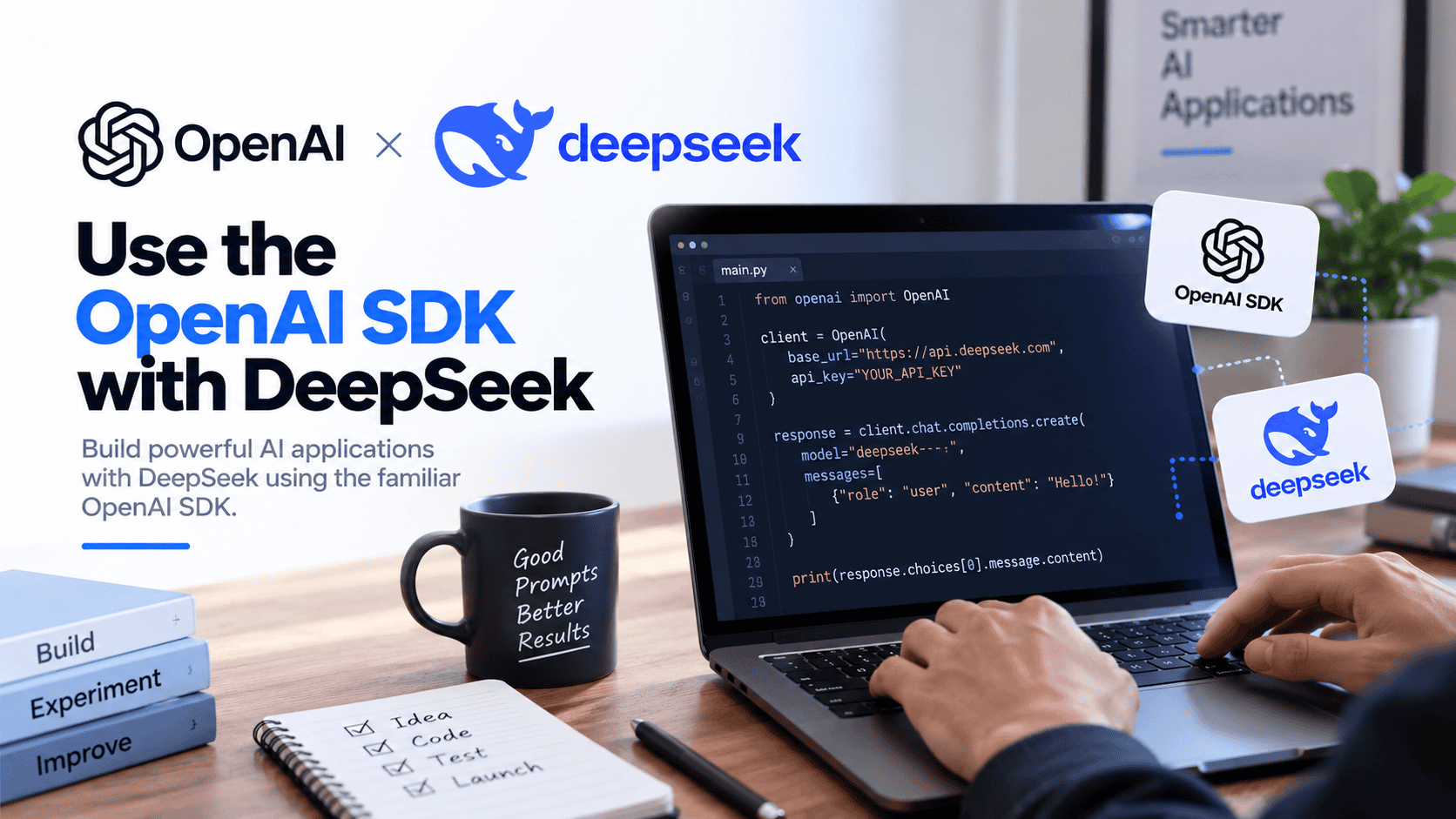

Yes, you can use the OpenAI SDK with DeepSeek. Configure the OpenAI client to use DeepSeek’s official OpenAI-compatible base URL, supply a DeepSeek API key, and use a DeepSeek model ID such as deepseek-flash.
The OpenAI SDK is only the client library in this setup. The request is sent to DeepSeek when you set the base URL to https://api.deepseek.com and authenticate with a DeepSeek API key. You do not need an OpenAI API key to call DeepSeek through the OpenAI SDK.
Documentation checked: October 4, 2026. The code examples below are documentation-based and were not run against the live DeepSeek API because no private API key was supplied.
Quick configuration summary
DeepSeek’s official API quickstart says its API format is compatible with OpenAI and Anthropic. For the OpenAI-compatible path, the key settings are:
| Setting | Use this for DeepSeek | Important detail |
|---|---|---|
| SDK base URL | https://api.deepseek.com | Use this in base_url for Python or baseURL for Node.js. |
| Raw Chat Completions endpoint | https://api.deepseek.com/chat/completions | Use the full endpoint only for raw HTTP or cURL, not as the SDK base URL. |
| API key | A key from the DeepSeek Platform API Keys page | Do not use an OpenAI key. |
| Environment variable in examples | DEEPSEEK_API_KEY | A convenient app-level name; pass it explicitly to the SDK. |
| Example model | deepseek-flash | Current DeepSeek docs list deepseek-flash and deepseek-v4-pro. |
The most common mistake is setting the SDK base URL to the full endpoint path. Do not set base_url or baseURL to https://api.deepseek.com/chat/completions. The SDK method adds the endpoint path for you.
The mental model: what changes from an OpenAI setup?
A simple way to understand the setup is:
OpenAI SDK
+ DeepSeek base URL
+ DeepSeek API key
+ DeepSeek model ID
= requests sent to DeepSeek through an OpenAI-compatible client
What changes from ordinary OpenAI code:
api_keyorapiKeyshould use a DeepSeek API key.base_urlorbaseURLshould point tohttps://api.deepseek.com.modelshould be a DeepSeek model ID, such asdeepseek-flash.- Feature support should be checked against DeepSeek’s documentation, not assumed from OpenAI’s hosted API.
What usually does not change for basic chat examples:
- The SDK package name and import pattern.
- The basic Chat Completions method call.
- The ordinary
messagesformat for compatible chat requests.
This does not mean DeepSeek is identical to OpenAI in every feature. It means the compatible surface lets the same SDK call a different provider when configured correctly.
Python: use OpenAI SDK with DeepSeek Chat Completions
DeepSeek’s official Python sample uses the OpenAI Python SDK with base_url="https://api.deepseek.com", DEEPSEEK_API_KEY, and client.chat.completions.create.
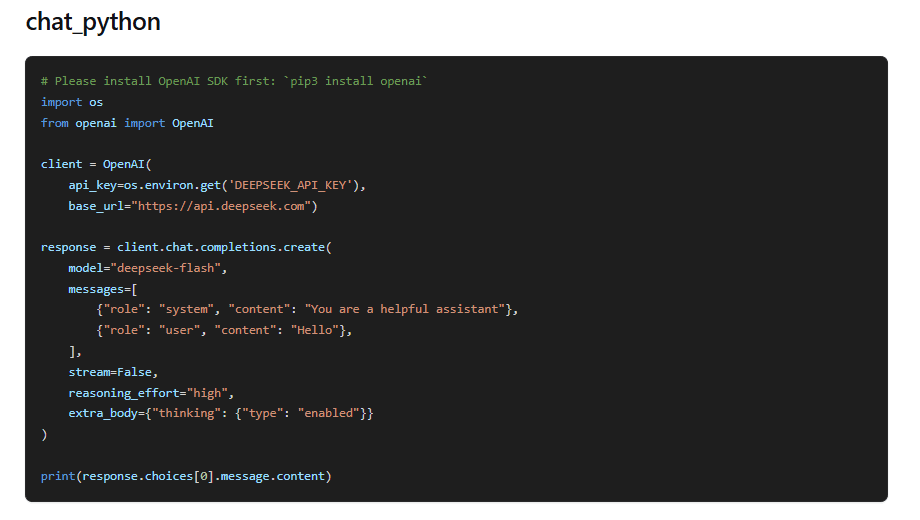
Install the current OpenAI Python package:
python -m pip install openaiSet your DeepSeek key in the current terminal session:
# macOS, Linux, or WSL
export DEEPSEEK_API_KEY="YOUR_DEEPSEEK_API_KEY"
Save this as deepseek_openai_sdk.py:
import os
import sys

from openai import APIError, OpenAI


def main() -> int:
    api_key = os.environ.get("DEEPSEEK_API_KEY", "").strip()

    if not api_key:
        print("Set DEEPSEEK_API_KEY before running this script.", file=sys.stderr)
        return 2

    client = OpenAI(
        api_key=api_key,
        base_url="https://api.deepseek.com",
        timeout=120.0,
        max_retries=0,
    )

    try:
        response = client.chat.completions.create(
            model="deepseek-flash",
            messages=[
                {
                    "role": "system",
                    "content": "Give brief, practical answers.",
                },
                {
                    "role": "user",
                    "content": "Explain what an API client library does in one sentence.",
                },
            ],
            max_tokens=256,
            stream=False,
            extra_body={
                "thinking": {
                    "type": "disabled"
                }
            },
        )
    except APIError as exc:
        status = getattr(exc, "status_code", None)
        label = f"HTTP {status}" if status is not None else type(exc).__name__
        print(f"DeepSeek request failed: {label}", file=sys.stderr)
        return 1

    if not response.choices:
        print("No choices returned.", file=sys.stderr)
        return 1

    print(response.choices[0].message.content or "")
    return 0


if __name__ == "__main__":
    raise SystemExit(main())
Run it from the same terminal where DEEPSEEK_API_KEY is set:
python deepseek_openai_sdk.pyRunning the script sends a real DeepSeek API request and can consume DeepSeek API balance. The example does not print a fake response because no authenticated request was run while writing this guide.
Node.js: use the OpenAI npm package with DeepSeek
The official OpenAI Node SDK currently supports Node.js 22 and 24 LTS, with Node.js 22 as the minimum supported version. It also documents that web browser support is disabled by default to avoid exposing secret API credentials.
Install the package:
npm install openaiSet your DeepSeek key in the current terminal session:
# macOS, Linux, or WSL
export DEEPSEEK_API_KEY="YOUR_DEEPSEEK_API_KEY"
Save this as deepseek-openai-sdk.mjs. The .mjs extension lets you use ESM imports without changing package.json.
import OpenAI from "openai";

async function main() {
  const apiKey = process.env.DEEPSEEK_API_KEY?.trim();

  if (!apiKey) {
    console.error("Set DEEPSEEK_API_KEY before running this script.");
    process.exitCode = 2;
    return;
  }

  const client = new OpenAI({
    apiKey,
    baseURL: "https://api.deepseek.com",
    timeout: 120000,
    maxRetries: 0,
  });

  try {
    const response = await client.chat.completions.create({
      model: "deepseek-flash",
      messages: [
        {
          role: "system",
          content: "Give brief, practical answers.",
        },
        {
          role: "user",
          content: "Explain what an API client library does in one sentence.",
        },
      ],
      max_tokens: 256,
      stream: false,
      thinking: {
        type: "disabled",
      },
    });

    console.log(response.choices?.[0]?.message?.content ?? "");
  } catch (error) {
    if (error instanceof OpenAI.APIError) {
      console.error(
        `DeepSeek request failed: HTTP ${error.status ?? "unknown"}`
      );
    } else {
      console.error("Unexpected application error:", error);
    }
    process.exitCode = 1;
  }
}

main();
Run it with:
node deepseek-openai-sdk.mjsDo not put this secret-bearing code in browser JavaScript. A public frontend bundle would expose your DeepSeek API key to users. For a public app, call DeepSeek from a server you control.
Chat Completions or Responses API?
OpenAI’s current SDK documentation emphasizes the Responses API, while many DeepSeek examples still use Chat Completions. DeepSeek documents both Chat Completions and Responses API compatibility. Choose the format intentionally.
| Choice | Input shape | Typical output path | Use it when |
|---|---|---|---|
| Chat Completions | messages | choices[0].message.content | You are following DeepSeek’s basic examples or migrating existing chat.completions code. |
| Responses API | input | response.output_text or output items in supported SDKs | Your codebase already uses client.responses.create or you need Responses-specific structured output patterns. |
Do not mix them. If your request uses messages, parse a Chat Completions response. If your request uses input, parse a Responses API response. Copying the request body from one format and the response parser from the other is a common migration bug.
A compact Responses API example
If your project uses the OpenAI SDK’s Responses API style, keep the same DeepSeek base URL and DeepSeek key, but use the Responses request shape.
import os
from openai import OpenAI

client = OpenAI(
    api_key=os.environ["DEEPSEEK_API_KEY"],
    base_url="https://api.deepseek.com",
)

response = client.responses.create(
    model="deepseek-flash",
    input="Explain the difference between an SDK and an API in one paragraph.",
    max_output_tokens=512,
)

print(response.output_text)
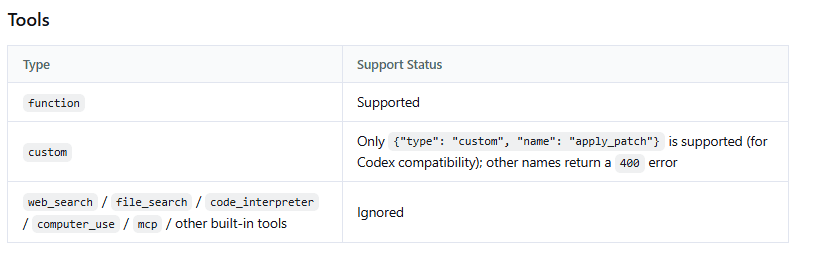
DeepSeek’s Responses compatibility does not mean every OpenAI-hosted tool or every OpenAI-specific parameter works identically. Check the current DeepSeek Responses documentation before using advanced features such as hosted tools, previous response state, special streaming events, or structured-output options.
Credentials: use a DeepSeek key, not an OpenAI key
Use an API key from the official DeepSeek Platform. A DeepSeek key authenticates requests to DeepSeek. An OpenAI key authenticates requests to OpenAI. They are not interchangeable.
Some generic OpenAI SDK examples read OPENAI_API_KEY automatically. For DeepSeek, either pass the key explicitly as shown above or map your application’s secret store into DEEPSEEK_API_KEY and then pass it to the SDK client.
Do not put the key in a URL, browser script, mobile binary, GitHub repository, screenshot, support ticket, or WordPress custom HTML block. Treat it as a paid API credential.
Which DeepSeek model should you use?
DeepSeek’s current quickstart lists deepseek-flash and deepseek-v4-pro. For a first SDK test, deepseek-flash is the simplest current model to use because DeepSeek’s own quickstart examples use it.
Do not copy older snippets that use retired or legacy model names without checking the current DeepSeek change log. DeepSeek’s docs currently say legacy names such as deepseek-v4-flash and deepseek-v4-flash-vision-exp are still accepted, but the underlying retired models are served by the current DeepSeek-V4.1-Flash-1017 model and billed at the Flash price.
Feature compatibility: what works through the SDK?
The SDK can express many request parameters, but DeepSeek decides what the provider actually supports. Check DeepSeek’s documentation for provider behavior.
| Feature | DeepSeek support through OpenAI-compatible APIs | What to verify |
|---|---|---|
| Chat Completions | Supported | Use messages and parse choices[0].message.content. |
| Responses API | Supported with documented compatibility | Use input and parse Responses output correctly. |
| Streaming | Supported | Parse the correct stream shape for the chosen API format. |
| JSON Output | Supported | Use response_format for Chat Completions or text.format for Responses. |
| Tool Calls | Supported where documented | Your application executes the tool; validate arguments first. |
| Vision | Supported by deepseek-flash | Do not assume deepseek-v4-pro supports images. |
| Thinking Mode | Supported | Use DeepSeek’s documented thinking and reasoning_effort behavior. |
| OpenAI hosted tools | Do not assume support | Check DeepSeek’s Responses compatibility guide before using hosted tools. |
Compatibility is practical, not magical. A parameter existing in the OpenAI SDK does not prove DeepSeek honors it. Use DeepSeek API docs as the source of truth for provider features.
JSON Output with the OpenAI SDK and DeepSeek
DeepSeek’s JSON Output guide says Chat Completions JSON mode uses response_format={"type":"json_object"}. You must also instruct the model to produce JSON in the prompt.
response = client.chat.completions.create(
    model="deepseek-flash",
    messages=[
        {
            "role": "system",
            "content": "Return only valid json. Do not use Markdown.",
        },
        {
            "role": "user",
            "content": "Extract a JSON object with keys: topic and difficulty. Text: This is a beginner guide to APIs.",
        },
    ],
    response_format={"type": "json_object"},
    max_tokens=256,
)
Valid JSON still needs application validation. Parse it with a JSON parser and check required fields, types, enum values, and business rules before using it downstream.
Tool Calls with the OpenAI SDK and DeepSeek
The OpenAI SDK can send tool definitions in compatible request formats, and DeepSeek can return Tool Calls where supported. The model does not execute your functions. It returns a structured request; your application validates the name and arguments, executes an allowlisted function, and sends the result back.
DeepSeek’s Tool Calls documentation should be checked before building an agent loop, especially when combining Tool Calls with Thinking Mode. Do not execute generated arguments blindly.
Vision input with the OpenAI SDK and DeepSeek
DeepSeek’s Vision guide says deepseek-flash accepts image input alongside text. In Chat Completions, image content uses image_url or file content blocks. In Responses API, image input uses input_image.
Do not assume all DeepSeek models accept images. The current model table lists Vision support for deepseek-flash, not for deepseek-v4-pro. Also, image understanding is not image generation.
Streaming with the SDK
For Chat Completions streaming, read content deltas as they arrive and handle chunks that do not contain text. A minimal pattern is:
stream = client.chat.completions.create(
    model="deepseek-flash",
    messages=[
        {"role": "user", "content": "Give three concise API design tips."}
    ],
    stream=True,
    max_tokens=512,
)

for chunk in stream:
    if not chunk.choices:
        continue

    text = chunk.choices[0].delta.content or ""
    if text:
        print(text, end="", flush=True)

print()
Do not reuse this parser unchanged for Responses API streaming. Responses streams have their own event structure and terminal states. Use the current DeepSeek Responses guide for that format.
Common errors when using OpenAI SDK with DeepSeek
| Problem | Likely cause | Fix |
|---|---|---|
401 authentication failure | The request is using the wrong key, no key, or the key is not sent as a Bearer token. | Use a DeepSeek Platform key and pass it explicitly as api_key or apiKey. |
402 insufficient balance | The DeepSeek account does not have usable API balance. | Check the DeepSeek Platform account and official pricing/billing information. |
| Request goes to OpenAI instead of DeepSeek | The client is using the default OpenAI base URL. | Set base_url or baseURL to https://api.deepseek.com. |
| 404 or path-related failure | The SDK base URL was set to a full endpoint path. | Use https://api.deepseek.com as the SDK base URL, not /chat/completions. |
| Model not found or unexpected behavior | The code uses an old or wrong model name. | Use current DeepSeek model IDs such as deepseek-flash or deepseek-v4-pro. |
| Node import fails | The project mixes CommonJS and ESM. | Use a .mjs file, set "type": "module", or adapt imports to your project format. |
| Node runtime unsupported | The installed Node.js version is older than the SDK supports. | Use a currently supported Node.js runtime such as Node 22 or 24 LTS. |
| Code works locally but not in a framework | The framework overrides keys, base URL, model names, or parser settings. | Inspect the framework’s provider configuration and check whether it truly supports OpenAI-compatible providers. |
| JSON parsing fails | The app expected JSON but did not enable JSON mode or validate output. | Use DeepSeek JSON Output and parse/validate the result. |
| Browser app exposes the key | The SDK is running in client-side code. | Move the DeepSeek call to a server-side endpoint. |
Migration checklist from OpenAI SDK code to DeepSeek
For simple chat applications, the migration may be small. For production tools, agents, streaming, JSON, vision, and Responses API workflows, verify each feature carefully.
- Replace the key: use a DeepSeek API key, not an OpenAI key.
- Set the base URL: use
https://api.deepseek.comfor the OpenAI-compatible route. - Change the model: use a current DeepSeek model ID, such as
deepseek-flash. - Check the API format: keep Chat Completions and Responses API code paths separate.
- Review advanced features: verify JSON Output, Tool Calls, Vision, Thinking Mode, and hosted-tool behavior against DeepSeek docs.
- Review retries and errors: handle
401,402,429,500, and503according to DeepSeek’s error documentation. - Keep credentials server-side: do not move the key into a browser just because the SDK package can be imported there.
- Check billing: when the base URL points to DeepSeek, API usage is billed by DeepSeek, not OpenAI.
FAQ
Can I use the OpenAI SDK with DeepSeek?
Yes. Configure the OpenAI SDK with https://api.deepseek.com as the base URL, use a DeepSeek API key, and set the model to a DeepSeek model such as deepseek-flash.
Do I need an OpenAI API key?
No. You need a DeepSeek API key from the DeepSeek Platform. The SDK package can be the OpenAI SDK, but the provider receiving the request is DeepSeek.
Should I use Chat Completions or Responses API?
Use Chat Completions if you are following DeepSeek’s basic examples or migrating existing chat.completions code. Use Responses API if your application already uses client.responses.create and you are following DeepSeek’s Responses compatibility documentation.
Can I use this in browser JavaScript?
Do not put a DeepSeek API key in browser-side JavaScript. The OpenAI Node SDK warns that browser support is disabled by default because client-side code exposes secret credentials. Use a server-side backend for public apps.
Is DeepSeek fully OpenAI-compatible?
DeepSeek supports OpenAI-compatible API formats for practical integration, but not every OpenAI-hosted feature, parameter, or tool should be assumed to work identically. Verify advanced features in DeepSeek’s current documentation.