

Yes, you can use DeepSeek in English. The official DeepSeek website includes an EN option, the official DeepSeek app is presented as an AI assistant, and the chat/API can answer in English when the prompt is clear. But using DeepSeek in English is not only about the website language: you also need to control the conversation context and the response instruction.
If DeepSeek replies in Chinese, start a clean chat, ask in English, put “Reply in English only” at the beginning of the prompt, remove mixed-language context, and avoid relying on old screenshots or unverified language-setting paths. For API users, enforce English with a system or instruction message and validate the output language in your application when consistency matters.
Documentation checked: October 7, 2026. This guide uses official DeepSeek pages where possible. GitHub issues and community reports are treated as user-reported symptoms, not as official product documentation.
The three language layers: UI, conversation, and output
Most “DeepSeek in English” problems come from mixing three different things:
| Layer | What it controls | What it does not guarantee |
|---|---|---|
| Interface language | The website or app labels, navigation, buttons, and visible menus. | An English interface does not guarantee every model response will be in English. |
| Conversation language | The language of your current chat history, source text, and examples. | Asking in English usually helps, but old Chinese context can still influence the next answer. |
| Output instruction | The explicit instruction you give the model, such as “Reply in English only.” | No prompt is a perfect guarantee; important workflows should still validate the result. |
For ordinary users, the practical goal is simple: keep the interface route official, keep the conversation context mostly English, and state the final answer language clearly. For developers, language control should be part of the prompt design and application validation logic.
Official ways to access DeepSeek in English
Use official DeepSeek routes first, especially when troubleshooting language behavior. Unofficial wrappers, extensions, cloned apps, and third-party gateways may add their own prompts, settings, model routes, or translation layers.
- Official DeepSeek website: the homepage includes a Chinese/EN switch and links to DeepSeek Web, API Platform, API Docs, downloads, and service status.
- DeepSeek Web Chat: the official chat route for browser use.
- DeepSeek downloads: the official page for the DeepSeek app and DeepSeek Harness desktop product.
- DeepSeek API Docs: the official documentation for developers using the API.
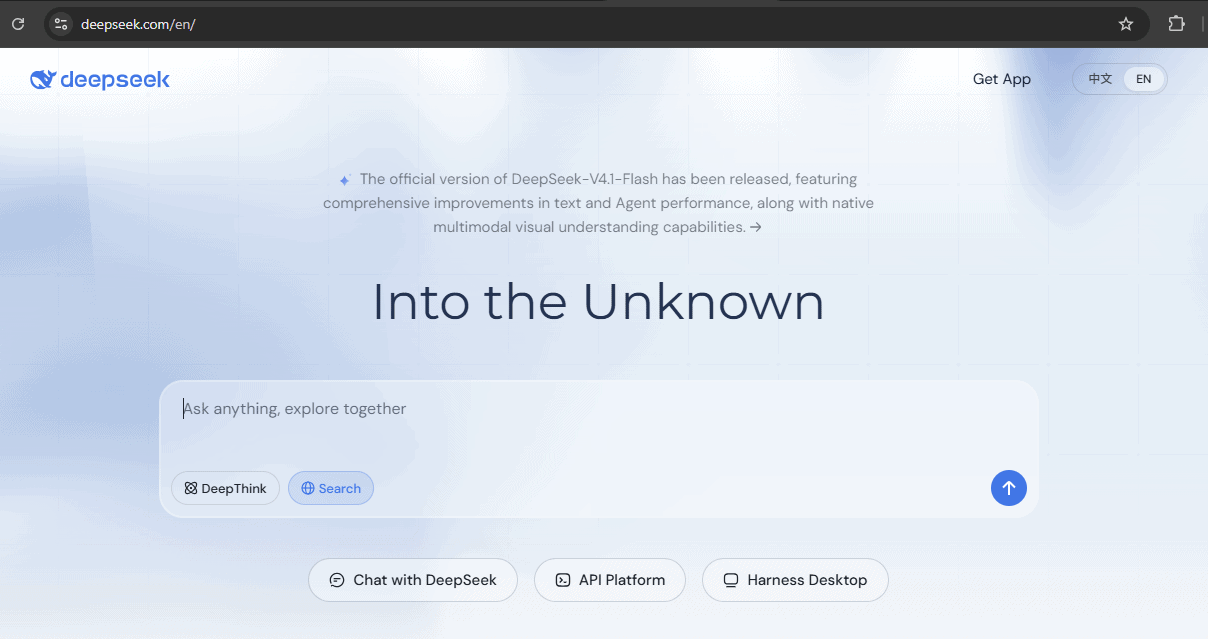
The EN option changes the official website’s language; it does not guarantee English-only chat responses.Do not assume that a third-party “DeepSeek English” app, browser extension, or mirror uses the same settings as official DeepSeek. If language behavior differs in a third-party tool, test the same prompt in the official chat or API before blaming the model itself.
How to make DeepSeek reply in English
For most users, these steps fix the common problem of DeepSeek replying in the wrong language.
- Start a new chat. This removes old Chinese or mixed-language context from the conversation.
- Ask in English. Keep the first message simple and clearly written.
- Put the language instruction first. Start with “Reply in English only” before the task itself.
- Avoid mixed-language examples unless translation is the goal. If you paste Chinese source text, tell DeepSeek what to do with it in English.
- Correct the model once if it switches. Ask it to rewrite the same answer in English only.
- Start over if the chat keeps switching languages. Create a clean chat and paste only the necessary English context.
- Check the official EN route if the interface is the issue. Do not rely on old screenshots or unverified settings paths.
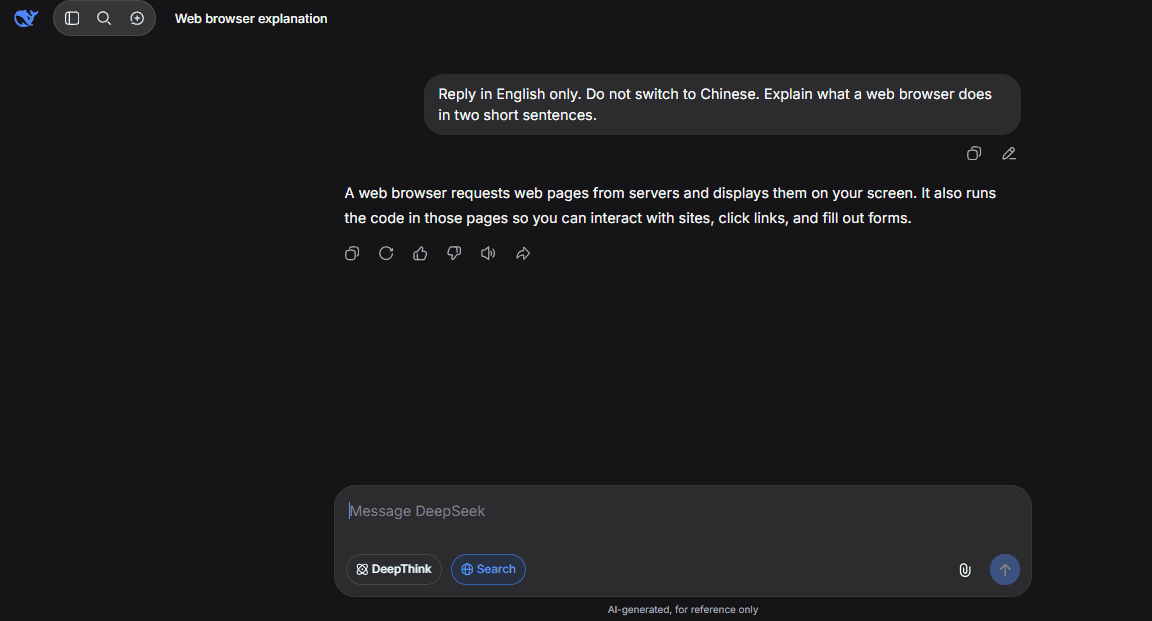
Start a fresh chat and place the English-only instruction before your question.Copy-and-use English prompt templates
Use these templates at the beginning of a chat or as part of your API instructions. Adjust the task after the language instruction.
Reply in English only. Do not switch to Chinese. Answer this question: [your question]Use English for the final answer. Keep all headings, explanations, examples, and summaries in English.The source text may contain Chinese. Translate, explain, or summarize it in English. Do not answer in Chinese.If you need to mention Chinese terms, translate them and explain them in English.For coding help, write all explanations, code comments, variable explanations, and summaries in English.These prompts improve consistency, but they are not a perfect guarantee. If English-only output is critical, especially in an API workflow, validate the output before using it downstream.
Troubleshooting: DeepSeek replies in Chinese
Chinese output is not always caused by the same issue. Use the symptom to choose the fix.
| Symptom | Likely cause | What to check | Fix |
|---|---|---|---|
| The whole answer is in Chinese | The model inferred Chinese from context, source text, or an ambiguous instruction. | Check whether earlier turns, pasted text, or examples contain Chinese. | Start a new chat and begin with “Reply in English only.” |
| The answer starts in English, then switches to Chinese | The conversation may contain mixed-language instructions or source material. | Look for old translation tasks or bilingual examples in the same chat. | Ask: “Rewrite the entire answer in English only,” then use a clean chat if needed. |
| The final answer is English, but visible reasoning appears in another language | Some reasoning surfaces may show intermediate reasoning differently from the final answer. | Check whether the final answer is usable in English. | Ask for the final answer to remain in English; do not rely on controlling internal reasoning language. |
| A translation task makes later answers stay Chinese | The model may be following recent translation context. | Check the last few turns. | Start a new chat or explicitly say: “The translation task is finished. Continue in English only.” |
| The UI is English but the response is Chinese | Interface language and output language are different layers. | Confirm that your prompt itself requests English output. | Add “Reply in English only” and remove mixed-language context. |
| API responses switch languages | The system instruction may be missing, weak, or overridden by user content. | Check the system/developer message and prompt examples. | Use a clear English-only instruction and validate output language in code. |
| A third-party tool returns Chinese output | The wrapper may add its own system prompt or use a different model route. | Check the tool’s provider settings, system prompt, and model name. | Test the same prompt in official DeepSeek; adjust the wrapper settings if needed. |
There have been user-reported GitHub issues describing cases where DeepSeek responses appeared in Chinese even when the conversation was in English. Treat those as reported symptoms, not as official documentation that every DeepSeek surface behaves that way.
Why language mixing can happen
DeepSeek models are multilingual, and language can be influenced by more than the latest sentence you typed. Language mixing may happen because of mixed-language training data, bilingual source text, earlier chat turns, ambiguous instructions, translation tasks, third-party wrappers, or behavior of a specific model version.
DeepSeek’s own model history shows why this topic is real but should be scoped carefully. The DeepSeek-R1 model card describes language mixing as one of the issues observed in DeepSeek-R1-Zero, a historical model-specific note. Later, DeepSeek-V3.1-Terminus release notes and model card mention improved language consistency and fewer mixed Chinese-English outputs. Those facts do not mean the current hosted chat will always switch languages; they show that language consistency has been a real model-quality concern in the DeepSeek ecosystem.
Do not assume that a Chinese answer means data leakage, account compromise, or a regional setting. Usually, the first fixes are simpler: clean context, clearer prompt, official route, and stronger English-only instruction.
What about “thinking” in Chinese?
For most users, the practical requirement is the language of the final answer. Some reasoning or thinking surfaces may expose intermediate reasoning or reasoning summaries differently from the final response. Do not assume that the language of visible reasoning is always controllable, and do not treat it as more important than the final answer unless your workflow depends on it.
Use a safe instruction like this:
Keep the final answer in English. If any reasoning or reasoning summary is shown, summarize it in English rather than switching languages.Do not ask for hidden chain-of-thought. Ask for a concise English explanation or reasoning summary if you need the model to show its logic.
How to force English output in the DeepSeek API
For developers, language control should be explicit. The DeepSeek Responses API supports a system-level instructions field, and its input items can include roles such as system, developer, and user. In Chat Completions-style workflows, use a system message when your client supports it.
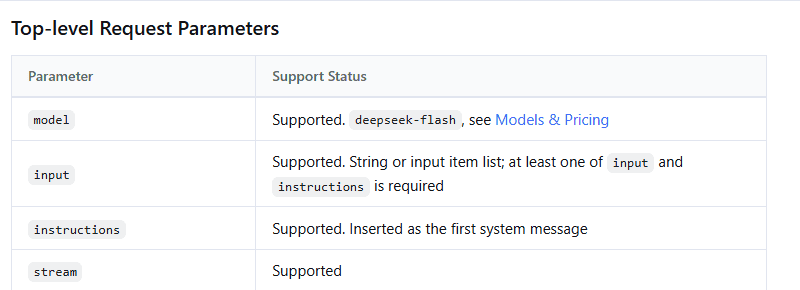
The Responses API accepts system-level instructions through the instructions field.Use an instruction like this for general English-only behavior:
You are an English-language assistant. Reply in English only unless the user explicitly asks for another language.For non-English source text:
The source text may contain Chinese. Translate, explain, or summarize it in English. Do not answer in Chinese.For coding workflows:
Write all explanations, code comments, variable explanations, and summaries in English. Keep any original-language source strings unchanged only when they are part of the code or data.For JSON output:
Return valid JSON. All string values must be in English unless a field explicitly contains original-language source text.When English output is mission-critical, validate it in your application. For example, reject or retry a response that contains mostly non-English text, but keep retries bounded and do not assume a prompt alone is a formal guarantee.
Chat Completions vs Responses API language instructions
The exact request shape depends on which DeepSeek-compatible API format you use. Keep the language instruction close to the highest-priority instruction field supported by your client.
| API format | Where to put the English instruction | What to avoid |
|---|---|---|
| Chat Completions | Use a system message such as “Reply in English only unless asked otherwise.” | Do not rely only on the user’s last message if the conversation history is mixed-language. |
| Responses API | Use the instructions field or a system/developer message item when your client supports it. | Do not parse Responses output as if it were Chat Completions output. |
| Third-party SDK or wrapper | Check the wrapper’s system prompt, model route, provider settings, and language options. | Do not assume the wrapper uses official DeepSeek behavior unchanged. |
Does browser or app language affect DeepSeek?
Browser or app language can affect how some websites display interface text, but it is not the same as controlling model output. Use the official EN option on the DeepSeek website when available. Inside chat or app interfaces, language controls can vary by version, so do not rely on old screenshots or unverified menu paths.
Changing your browser language may help with interface language in some cases, but the stronger control is still your prompt: ask in English and explicitly request an English answer. For API workflows, use a system or instruction message rather than depending on a browser or device language setting.
Using DeepSeek for translation into English
DeepSeek can be used for translation-like tasks, including Chinese-to-English summaries or explanations. For important translations, be specific about the target language, tone, and what should be preserved.
Translate the following text into clear natural English. Preserve names, dates, numbers, and technical terms. If a phrase is ambiguous, add a short note in English.For legal, medical, financial, technical, or business-critical translation, use a qualified human reviewer. DeepSeek can draft or explain, but it is not a certified translator.
English in third-party DeepSeek tools
DeepSeek may be available through official chat, the official app, the official API, local open-weight deployments, gateways, IDE tools, browser extensions, and workflow automation platforms. Each wrapper can change the behavior.
If a third-party DeepSeek tool keeps returning Chinese output:
- check whether it is using official DeepSeek or a gateway;
- check the selected model and provider route;
- look for a hidden or editable system prompt;
- check whether the wrapper has its own language setting;
- test the same prompt in the official DeepSeek chat or API;
- do not assume the problem is DeepSeek itself until the wrapper is ruled out.
What not to do
- Do not rely on old screenshots for language settings.
- Do not install unofficial apps just because they advertise English support.
- Do not keep a long mixed-language chat if you need English-only output.
- Do not paste confidential documents just to test translation or language behavior.
- Do not assume a third-party wrapper uses official DeepSeek settings.
- Do not repeatedly spam the same prompt if the model gives the wrong language.
- Do not assume every Chinese character means the answer is wrong; names, source text, citations, or quoted material may still contain Chinese.
Quick checklist for using DeepSeek in English
- Use the official DeepSeek website, chat, app, or API docs.
- Choose the EN option on the official site when available.
- Start a new chat for English-only work.
- Put “Reply in English only” at the beginning of the prompt.
- Remove old Chinese or mixed-language context unless translation is the task.
- For API use, place the English instruction in the system/instructions layer.
- For JSON or automation, validate that returned string values are in the expected language.
- If the model switches language, correct it once, then restart the chat if the problem continues.
- If a third-party tool behaves differently, test the same prompt through official DeepSeek.
FAQ
Can I use DeepSeek in English?
Yes. The official DeepSeek website includes an EN option, and DeepSeek chat/API workflows can answer in English when prompted clearly. For best results, ask in English and explicitly request an English-only final answer.
Is DeepSeek only in Chinese?
No. DeepSeek has official English-facing pages and can respond in English. However, because the models are multilingual, response language can still be influenced by context, source text, prompt wording, and third-party wrappers.
How do I change DeepSeek to English?
Use the EN option on the official DeepSeek website when available. For the response language, start a clean chat and begin your prompt with “Reply in English only.” Do not rely on an unverified settings path unless it is visible in your current app or web interface.
Why does DeepSeek answer in Chinese?
Common causes include mixed-language context, source text in Chinese, a previous translation task, an unclear prompt, a third-party wrapper, or model-level language consistency behavior. It is not always a global bug or account problem.
What prompt should I use for English answers?
Use: “Reply in English only. Do not switch to Chinese.” Put that instruction before the task. For source text in Chinese, add: “Translate, explain, or summarize the source text in English.”
How do I force English in the DeepSeek API?
Use a system or instruction message such as: “You are an English-language assistant. Reply in English only unless the user explicitly asks for another language.” If English-only output is critical, validate the response language in your application.
Does browser language affect DeepSeek?
Browser language may affect some interface behavior, but it does not reliably control model output. Explicit prompt instructions are more important for response language.
Can DeepSeek translate Chinese to English?
Yes, it can be used for translation-like tasks. For important translations, specify the target language, preserve names and numbers, ask it to flag ambiguous phrases, and have a qualified human review the result.