

DeepSeek supports images in more than one way, but “DeepSeek images” does not mean one single feature. The official DeepSeek API supports image understanding through deepseek-flash: you can send images with text and ask the model to describe pictures, read screenshots, analyze charts, or inspect visual content. Image generation is a separate topic: DeepSeek’s Janus and Janus-Pro open-weight models support multimodal understanding and text-to-image generation, but that is not the same as saying the main DeepSeek Chat or standard DeepSeek API generates images.
The key distinction is simple: Vision is image understanding; Janus-Pro is the DeepSeek-related image-generation route; Files API is image upload and reuse; third-party tools are separate products. If you mix these together, you may choose the wrong model, send the wrong request shape, or expect image editing or image generation from a feature that only understands images.
Documentation checked: October 7, 2026. DeepSeek model names, API limits, UI behavior, and open-weight model pages can change, so verify critical implementation details on the official documentation before building or publishing.
What “DeepSeek images” can mean
People use the phrase “DeepSeek images” for several different tasks. The correct answer depends on which task you mean.
| Meaning | What it means | Correct DeepSeek route | Main caution |
|---|---|---|---|
| Image understanding | Send an image and ask questions about what is visible. | deepseek-flash through the official Vision API. | This is not image generation or editing. |
| Image upload | Provide an image by base64, URL, or uploaded file_id. | Vision API and Files API. | Files API currently supports image files, not general document upload. |
| Screenshot analysis | Ask DeepSeek to read visible text, inspect UI problems, or analyze an error screenshot. | deepseek-flash image input. | Text logs and source data are often more reliable than screenshots. |
| Chart or diagram analysis | Ask the model to explain axes, labels, trends, or visible structure. | deepseek-flash image understanding. | Verify important numbers against the original data. |
| Image generation | Create a new image from a text prompt. | Janus / Janus-Pro open-weight model route. | Do not claim the standard DeepSeek API generates images unless official docs support that exact feature. |
| Image editing | Modify an existing image, such as inpainting, outpainting, or style transfer. | No standard official DeepSeek image-editing route is established by the API docs checked here. | Use a dedicated image-editing tool unless DeepSeek documents editing support. |
| Third-party image tools | Websites, Spaces, gateways, wrappers, or local apps using DeepSeek or Janus models. | Depends on the provider. | Not automatically official DeepSeek behavior. |
Quick answer: which route should you use?
| Image task | Best DeepSeek route | What it can do | What it cannot do | What to verify |
|---|---|---|---|---|
| Describe an image | deepseek-flash Vision API | Describe visible objects, layout, text, or scene details. | It does not generate a new image. | Supported image format and request limits. |
| Read a screenshot | deepseek-flash with image input | Read visible text and explain what appears on screen. | It is not guaranteed OCR. | Whether the screenshot contains private information. |
| Analyze a chart | deepseek-flash Vision API | Explain visible axes, labels, trends, and possible interpretation. | It cannot replace the underlying dataset. | Numbers, labels, and chart source. |
| Send many images | Vision API with image limits checked | Accept multiple supported image inputs in one request. | It does not make every large batch cheap or accurate. | Image count, total size, and dimensions. |
| Reuse the same image | Files API file_id | Upload once and reference the image later. | It is not a public URL and not a document store. | File expiration, storage limits, and deletion. |
| Generate an image from text | Janus-Pro / Janus open-weight route | Use DeepSeek’s multimodal generation model family where available. | This is not the same as deepseek-flash Vision. | Model card, license, local/provider route, and output quality limits. |
| Edit an existing image | Dedicated image-editing model/tool unless official DeepSeek docs say otherwise | Depends on the external tool. | Do not assume DeepSeek supports inpainting or editing. | Tool provider, privacy, permissions, and image rights. |
| Analyze documents as images | Vision API only for image-like pages/screenshots | Can inspect visible content in an image. | It is not a general PDF/Word/spreadsheet parser. | Use text extraction or document workflows for real document analysis. |
DeepSeek image understanding through deepseek-flash
The official DeepSeek Vision guide says deepseek-flash accepts images alongside text. That means you can ask the model to describe a picture, read text from a screenshot, analyze a chart, inspect a UI state, compare visible details, or answer a question about visual content.
This is best understood as image understanding. DeepSeek is interpreting the image and producing text. It is not creating a new image, editing the uploaded image, or guaranteeing OCR-level accuracy.
- Good fit: screenshots, UI errors, charts, diagrams, forms, visible text, product photos, and visual question answering.
- Use caution: small text, blurry screenshots, dense tables, medical images, legal records, identity documents, private faces, and charts where exact values matter.
- Better alternative: use source logs, source data, extracted text, or original files when exact technical or numerical accuracy matters.
Which DeepSeek model supports images?
DeepSeek’s current model table lists deepseek-flash as DeepSeek-V4.1-Flash-1017 and shows Vision support for it. The same table lists deepseek-v4-pro as DeepSeek-V4-Pro-0813 and marks Vision as not supported for Pro.
| Model ID | Current model version | Image support | Best image-related use |
|---|---|---|---|
deepseek-flash | DeepSeek-V4.1-Flash-1017 | Vision supported | Image understanding, screenshots, charts, and multimodal workflows. |
deepseek-v4-pro | DeepSeek-V4-Pro-0813 | Vision not supported in the current model table | Text, reasoning, coding, and agent tasks where image input is not required. |
| Janus / Janus-Pro | Open-weight multimodal model family | Multimodal understanding and image generation in the Janus route | DeepSeek-related text-to-image generation and research/local workflows. |
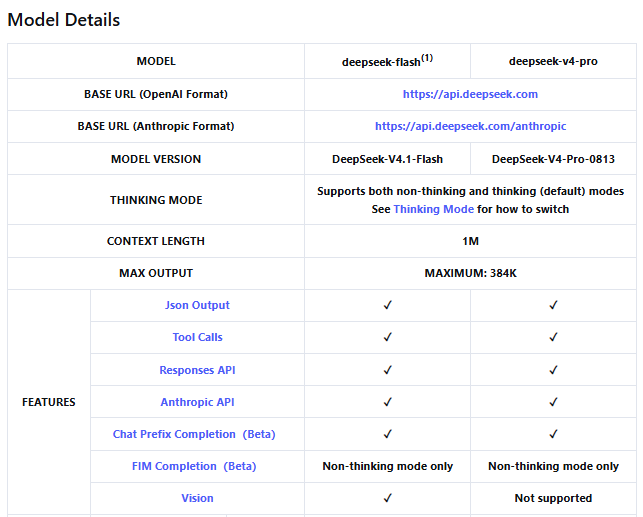
Do not copy a Vision example and simply change the model to deepseek-v4-pro. Use deepseek-flash for the official API image-understanding path unless DeepSeek’s model table changes.
Three ways to send images to DeepSeek
DeepSeek documents three main ways to provide images to the model through the official API.
1. Base64 image data
Use base64 when the image is local and you want to include it directly in one request. This is convenient for a one-off upload, but the encoded data counts toward the request body size limit.
{
  "type": "image_url",
  "image_url": {
    "url": "data:image/jpeg;base64,<BASE64_DATA>"
  }
}
2. External image URL
Use an external URL when the image is publicly reachable and you do not want to embed image data in the request. Make sure the URL is direct, accessible, and not a private or expiring link unless your workflow is approved.
{
  "type": "image_url",
  "image_url": {
    "url": "https://example.com/image.jpg",
    "detail": "low"
  }
}
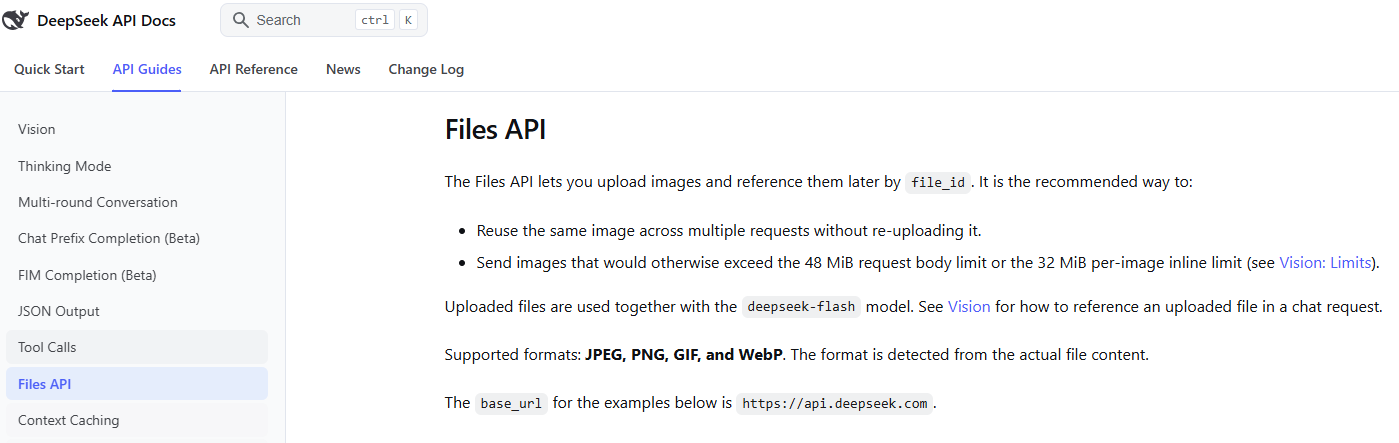
3. Files API file_id
Use the Files API when you want to upload an image once and reuse it later. The Upload File endpoint returns an ID like file-api-..., which you can reference in later image-capable requests.
{
  "type": "input_image",
  "file_id": "file-api-YOUR_UPLOADED_IMAGE_ID"
}
The Files API is not a public image URL, and it is not a general PDF or document upload system. Treat file_id as an API-side reference to an uploaded image.
Supported formats and image limits
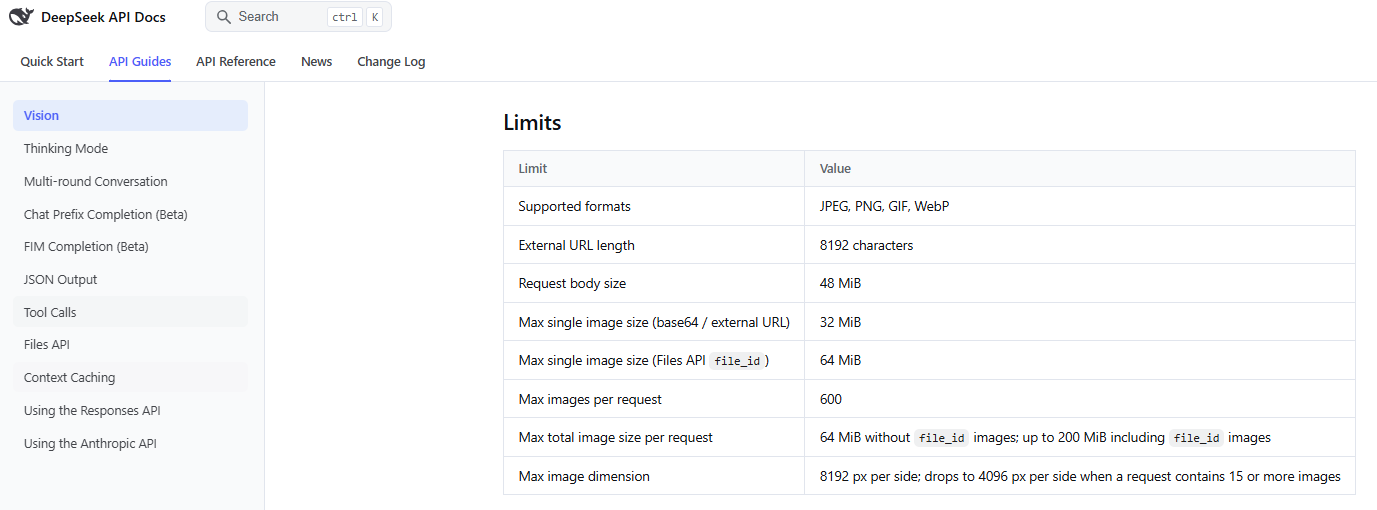
DeepSeek’s Vision documentation currently lists the following official limits for image input. Recheck the Vision guide before production use because limits may change.
| Limit | Current value |
|---|---|
| Supported image formats | JPEG, PNG, GIF, WebP |
| External URL length | 8192 characters |
| Request body size | 48 MiB |
| Max single image size for base64 or external URL | 32 MiB |
Max single image size via Files API file_id | 64 MiB |
| Max images per request | 600 |
| Max total image size per request | 64 MiB without file_id images; up to 200 MiB including file_id images |
| Max image dimension | 8192 px per side; 4096 px per side when a request contains 15 or more images |
Format detection is based on the actual file content, not only the filename or declared MIME type. Do not rename an unsupported file and expect it to work.
Image detail and token usage
Image input is billed with text tokens. DeepSeek converts images into tokens based on image dimensions after automatic resizing. The Vision guide currently says there is an upper bound of 1024 tokens per image after resizing, and each image in a multi-image request is counted independently.
The detail field can affect how an image is processed when the image is supplied by URL or base64 data URL:
| Detail value | Meaning | When to use |
|---|---|---|
low | Downscales the image to 512×512 before inference. | Use when fine visual detail is not important and you want a faster or cheaper image pass. |
high | Keeps the original image; currently equivalent to original. | Use when detail matters. |
original | Keeps the original image. | Use for screenshots, charts, or dense visual information. |
auto | Automatic selection; currently equivalent to original. | Use when you want default high-detail behavior. |
When the image is provided by file_id, DeepSeek’s docs say detail is ignored. Do not assume that lowering detail changes the cost or behavior of a file_id image.
Chat Completions vs Responses API image input
DeepSeek supports image input in both the OpenAI-compatible Chat Completions style and the Responses API style, but the request shapes are different.
| API format | Image content shape | Important rule |
|---|---|---|
| Chat Completions | Image blocks inside a messages[].content array, such as image_url or file. | Images are supported in user messages. Do not put images in unsupported roles. |
| Responses API | input_image content parts inside supported message or tool-output items. | image_url and file_id are mutually exclusive. |
| Anthropic-compatible API | image block with a source object. | File references require the relevant Anthropic beta header documented by DeepSeek. |
For the Responses API, DeepSeek’s docs say images can appear in user or developer message items and in tool-output items, while images in system or assistant messages return a 400 error. The same docs also say file inputs are not supported as general input items. That means image input is not the same as general file upload or file search.
Does DeepSeek generate images?
The official DeepSeek Vision API is for image understanding, not image generation. If your goal is to create a new image from a text prompt, the relevant DeepSeek-related route is the Janus / Janus-Pro model family, not deepseek-flash Vision.
The Janus-Pro-7B model card describes Janus-Pro as a unified multimodal understanding and generation model. It decouples visual encoding for understanding and generation, uses a vision encoder for multimodal understanding, and uses a visual tokenizer for image generation. The official Janus GitHub repository says Janus-Pro was released as an advanced version of Janus with improvements in multimodal understanding and visual generation.
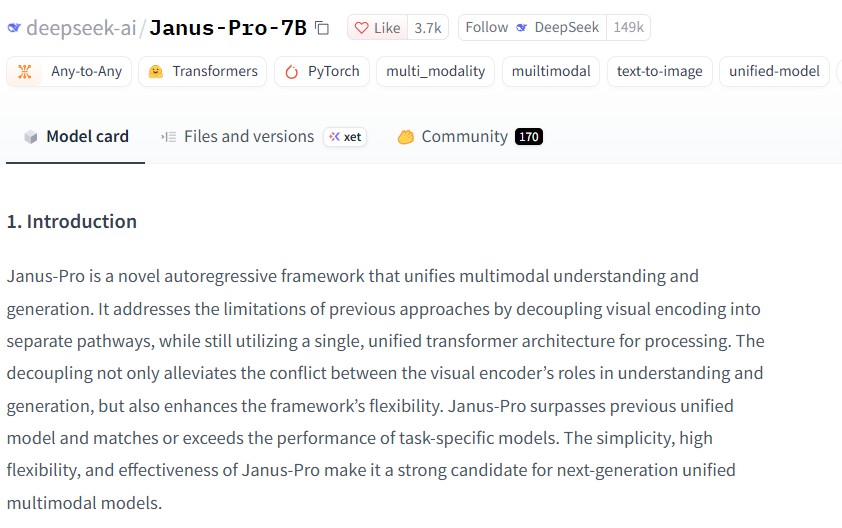
That does not mean DeepSeek Chat or the standard DeepSeek API has a DALL·E-style image-generation endpoint. Janus-Pro is an open-weight/model-card route. You may use it through a local setup, a Hugging Face workflow, a demo, or a third-party provider, but those routes have their own limits, privacy terms, hardware requirements, and output quality.
DeepSeek Vision vs Janus-Pro
| Question | deepseek-flash Vision | Janus-Pro |
|---|---|---|
| Main purpose | Understand images and answer in text. | Unified multimodal understanding and image generation. |
| Hosted API route | Official DeepSeek API through deepseek-flash. | Not the same as the standard hosted Vision API. |
| Typical input | Text plus image. | Text/image for understanding; text prompt for generation workflows. |
| Typical output | Text answer. | Text answer or generated image, depending on the workflow. |
| Best for | Screenshots, charts, visual Q&A, UI inspection, image description. | Research and text-to-image generation with Janus-Pro resources. |
| What not to assume | Do not assume it creates or edits images. | Do not assume a third-party Janus demo is official DeepSeek Chat. |
Can DeepSeek edit images?
Do not assume image editing is supported. Image understanding, text-to-image generation, and image editing are different capabilities.
- Image understanding: the model reads or reasons about an image and returns text.
- Text-to-image generation: a generation model creates a new image from a prompt.
- Image editing: a tool modifies an existing image, such as changing objects, extending a scene, removing a background, or applying a style.
The official DeepSeek Vision route should not be described as image editing. If you need editing, use a dedicated image-editing tool unless DeepSeek documents an official editing feature for the surface you are using.
Prompt templates for DeepSeek image understanding
These prompts are for image understanding, not image generation.
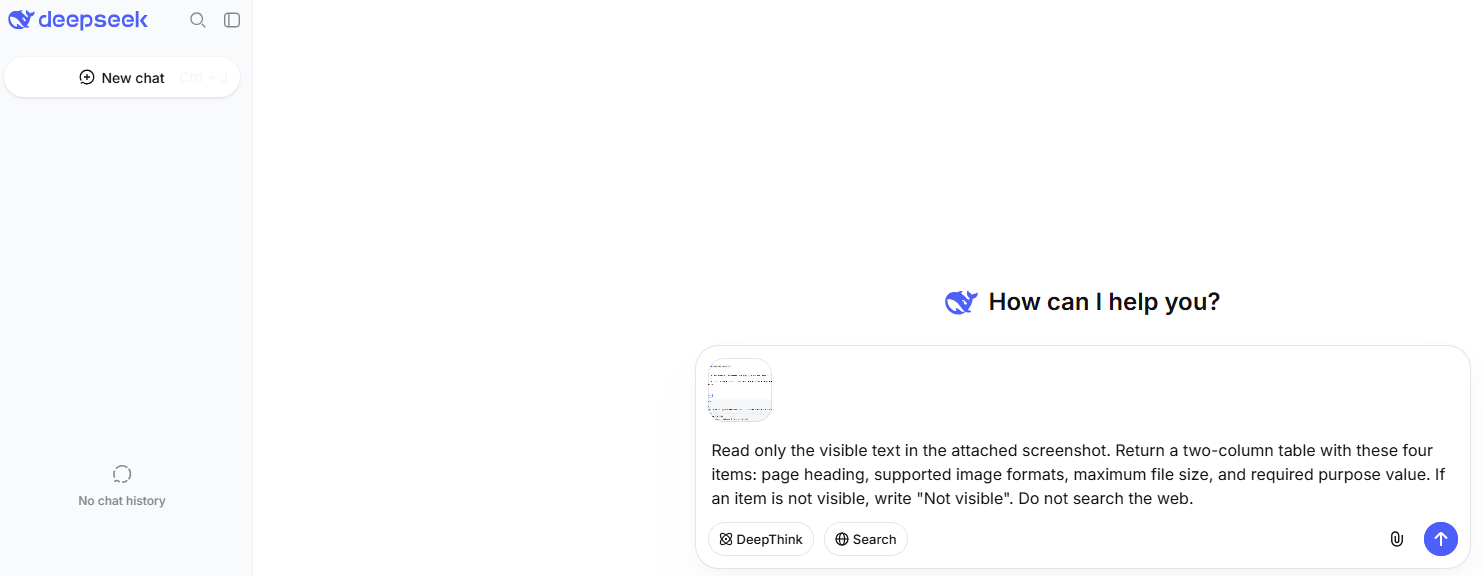
Describe an image
Describe this image in plain English. Separate visible facts from interpretation, and flag anything uncertain.Read text from a screenshot
Read the visible text in this screenshot. Preserve line breaks where possible and mark uncertain words with [unclear].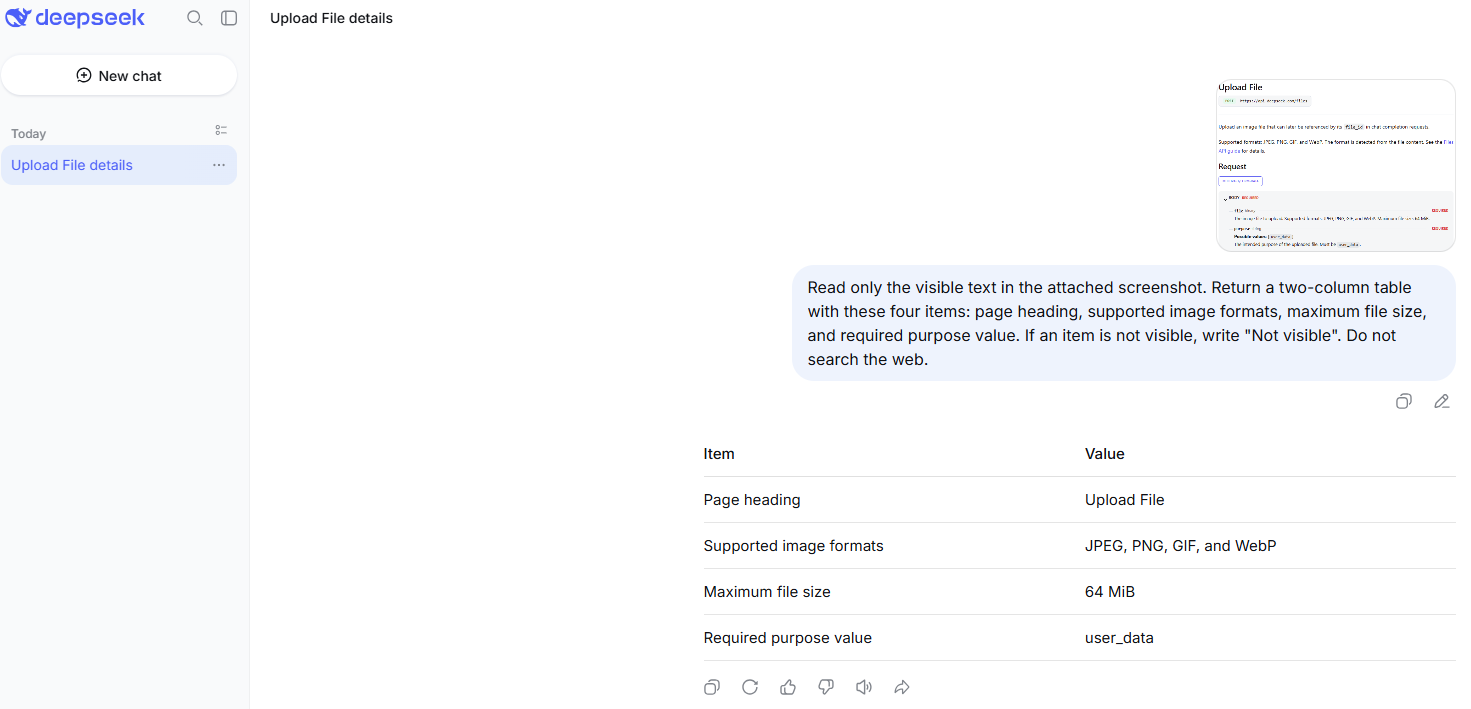
Analyze a chart
Analyze this chart. Identify the axes, labels, trend, outliers, and what the chart does not prove. Do not invent exact numbers if they are not readable.Inspect a UI bug
Inspect this UI screenshot. List the visible problem, likely causes, and the next debugging step. Do not infer private data that is not visible.Compare two images
Compare these two images. List similarities, differences, and observations that are uncertain or require manual verification.For charts, screenshots, forms, and documents, ask DeepSeek to separate what is visible from what is inferred. For OCR-like tasks, manually verify the extracted text before using it.
Prompt guidance for Janus-Pro image generation
If you are using a Janus-Pro text-to-image route, write prompts for generation rather than analysis. Describe the subject, setting, composition, lighting, style, and constraints. Keep expectations scoped to the model and provider you are using.
Create an image of [subject] in [setting], with [composition], [lighting], and [style]. Avoid adding text, logos, or extra people unless specified.Do not use DeepSeek Vision prompts and expect image output. Do not assume Janus-Pro supports image editing or image-to-image transformation in the same way as dedicated editing systems unless your specific model route documents that behavior.
What images should you avoid uploading?
DeepSeek’s Privacy Policy describes user input as including prompts, uploaded files, photos, and chat history. It also says the services are not designed or intended to process sensitive personal data. Treat images and screenshots as potentially sensitive before you upload them.
Do not upload the following unless you are authorized and using an approved workflow:
- identity documents, passports, driver’s licenses, or IDs;
- faces of private people without consent;
- children’s images or school records;
- medical images, prescriptions, lab reports, or health records;
- legal documents, contracts, disputes, or privileged material;
- financial records, bank statements, tax files, or invoices;
- customer data, employee data, or regulated data;
- workplace screenshots, internal dashboards, tickets, or admin panels;
- screenshots containing API keys, passwords, tokens, emails, private URLs, or account names;
- proprietary code screenshots or private repository content.
Screenshots often contain hidden risk: visible browser tabs, URLs, filenames, account names, customer IDs, tokens, logs, and private messages. Crop or redact before upload, and do not use sensitive images as test data.
Troubleshooting DeepSeek image issues
| Problem | Likely cause | What to check | Safe next step |
|---|---|---|---|
| Image upload option is not visible in chat | Current consumer UI may not expose image upload for your account or route. | Official interface and current product notices. | Use API documentation for developer workflows; do not rely on old screenshots. |
| API says unsupported image format | The file is not JPEG, PNG, GIF, or WebP, or content does not match the extension. | Actual file content, not only filename. | Convert the image to a supported format. |
| Image is too large | Image exceeds URL/base64, request body, or Files API limits. | File size, request body size, and whether you are using URL/base64 or file_id. | Resize/compress the image or use Files API where appropriate. |
| External URL fails | URL is too long, inaccessible, private, blocked, expired, or slow to download. | Direct URL length, public access, and download behavior. | Use base64 or Files API for approved images. |
file_id is not accepted | Wrong ID, deleted/expired file, wrong field, or unsupported request shape. | File ID format, expiration, and API family. | List/retrieve the file if appropriate, then send a valid image request. |
Responses API error mentions image_url and file_id | The input_image part has both fields or neither field. | Request body. | Use exactly one image source. |
Image input fails with deepseek-v4-pro | V4 Pro is not listed as Vision-capable in the current model table. | Model ID and official pricing/model table. | Use deepseek-flash for image understanding. |
| Output ignores the image | Wrong request shape, unsupported role, or unsupported model. | Message role, content block type, and model. | Use the documented image block shape and supported roles. |
| OCR is inaccurate | Text is small, blurry, cropped, rotated, or visually dense. | Image quality and source text availability. | Provide the original text or a clearer crop and verify manually. |
| Chart answer is wrong | Chart labels or values are hard to read, or model infers beyond the image. | Axes, legend, data labels, and source data. | Ask for visible facts only or provide the underlying dataset. |
| Image generation is not available | You may be using Vision, not Janus-Pro generation. | Which model route you are using. | Use a documented Janus-Pro generation route or a dedicated image generator. |
| Third-party image tool gives poor results | Provider, model version, settings, or wrapper behavior may differ. | Provider docs, model name, privacy terms, and generation settings. | Do not treat third-party output as official DeepSeek behavior. |
Third-party DeepSeek image tools
You may find Hugging Face Spaces, browser extensions, Replicate-style deployments, workflow templates, local apps, ComfyUI workflows, or API gateways that claim to use DeepSeek or Janus for images. These may be useful, but they are separate from official DeepSeek Chat and the official DeepSeek API unless DeepSeek explicitly documents them.
Before using a third-party DeepSeek image tool, check:
- which model it actually uses;
- whether it uses Janus-Pro,
deepseek-flash, another model, or a fine-tune; - whether uploaded images are stored;
- whether prompts and images are sent to a third-party server;
- whether the provider has its own pricing and limits;
- whether the license and usage rights fit your use case;
- whether the tool is appropriate for private or commercial images.
Common misconceptions about DeepSeek images
| Myth | More accurate answer | What to check |
|---|---|---|
| “DeepSeek images means DeepSeek Chat can generate images.” | Not established by the official API docs checked here. The main hosted Vision route is image understanding. | Official DeepSeek Chat docs or current UI before claiming generation. |
| “DeepSeek Vision is the same as image generation.” | Vision reads or understands images and returns text. | Vision guide vs Janus-Pro model card. |
| “All DeepSeek models support images.” | The current model table lists Vision for deepseek-flash, not for deepseek-v4-pro. | Models & Pricing page. |
| “Files API supports any file.” | Current Files API documentation is image-focused. | Upload File endpoint and Files API guide. |
| “Screenshot OCR is guaranteed.” | Image understanding can read visible text, but it can misread small or blurry content. | Manual verification. |
“Janus-Pro is the same as deepseek-flash.” | Janus-Pro is an open-weight multimodal understanding and generation model route; deepseek-flash is the official API Vision model. | Janus model card and DeepSeek Vision docs. |
| “Third-party Janus demos are official DeepSeek Chat.” | They may use DeepSeek-related models, but provider, privacy, and behavior are separate. | Publisher and privacy policy. |
| “Image tokens are free.” | Images are converted into tokens and billed with text tokens in API workflows. | Vision guide and pricing page. |
| “If the model can see an image, it can edit it.” | Image understanding does not imply editing support. | Official docs for the exact surface. |
Best practices for using DeepSeek with images
- Decide whether you need image understanding, image upload/reuse, image generation, or image editing.
- Use
deepseek-flashfor official API image understanding. - Use Files API
file_idwhen you need to reuse the same image or avoid inline-size limits. - Use Janus-Pro only when your goal is DeepSeek-related multimodal generation or research workflows.
- Do not use
deepseek-v4-profor image input unless DeepSeek’s model table changes. - Check file format, size, total request size, and image count before sending large batches.
- Ask the model to separate visible facts from interpretation.
- Manually verify OCR, chart values, and important visual claims.
- Redact screenshots before uploading them.
- Do not use private, regulated, or sensitive images as test data.
Bottom line
DeepSeek can work with images, but you need the right route. For official API image understanding, use deepseek-flash. To reuse uploaded images, use the Files API and file_id. For DeepSeek-related image generation, look at Janus and Janus-Pro open-weight resources. Do not confuse Vision with generation, Files API with document upload, or third-party demos with official DeepSeek services.
The safest rule is: use Vision for understanding images, Janus-Pro for generation workflows, and a dedicated image-editing tool for editing unless DeepSeek officially documents editing support in the surface you are using.
FAQ
Can DeepSeek work with images?
Yes. The official API supports image understanding through deepseek-flash. You can send supported image formats with text and ask the model to describe, read, compare, or analyze visual content.
Can DeepSeek analyze screenshots?
Yes, through image understanding. It can inspect visible UI, read visible text, and explain a screenshot. For coding or debugging, text logs and source code are usually more reliable than screenshots when available.
Which DeepSeek model supports images?
Use deepseek-flash for official API image understanding. The current model table lists Vision support for deepseek-flash and not for deepseek-v4-pro.
What image formats does DeepSeek support?
The official Vision and Files API documentation currently lists JPEG, PNG, GIF, and WebP. The actual file content matters, not only the filename extension.
How do I upload an image to the DeepSeek API?
You can send an image as a base64 data URL, provide an external image URL, or upload the image through the Files API and reference it later by file_id.
What is file_id for images?
file_id is the identifier returned after uploading an image through the Files API. It has the form file-api-... and lets you reuse that uploaded image in later image-capable requests.
Can DeepSeek generate images?
DeepSeek’s standard Vision API is for image understanding, not image generation. DeepSeek’s Janus and Janus-Pro open-weight model family is the DeepSeek-related route for multimodal understanding and text-to-image generation.
Is Janus-Pro the same as DeepSeek Vision?
No. Janus-Pro is an open-weight multimodal understanding and generation model family. DeepSeek Vision through deepseek-flash is the official API route for sending images and receiving text answers.
Can DeepSeek edit images?
Do not assume image editing support. Image understanding and image generation are not the same as editing. Use a dedicated image-editing model or tool unless official DeepSeek docs document editing support for your chosen surface.
Is DeepSeek image upload safe?
It depends on what you upload and which surface you use. Avoid identity documents, private faces, children’s images, medical/legal/financial images, workplace screenshots, customer data, proprietary code, and screenshots containing API keys or passwords unless the workflow is approved and secured.