

Last reviewed: October 11, 2026
Quick answer: To use DeepSeek with OpenRouter, create an OpenRouter API key, choose a current DeepSeek model slug from OpenRouter, send requests to https://openrouter.ai/api/v1/chat/completions, and use your OpenRouter key instead of a DeepSeek API key. You can call the API directly with cURL, use JavaScript fetch, or point the OpenAI SDK to OpenRouter’s base URL.
This guide is based on OpenRouter’s official documentation, current DeepSeek model pages on OpenRouter, and DeepSeek’s official API documentation. No live API request was performed for this article, so the examples are documentation-based and should be tested in your own account before production use.
What using DeepSeek with OpenRouter means
OpenRouter is a model gateway. Instead of creating separate API integrations for each model provider, you call one OpenAI-compatible endpoint and choose the model you want by its OpenRouter model slug.
When you use DeepSeek through OpenRouter, you are not calling the official DeepSeek API directly. You are calling OpenRouter, and OpenRouter routes your request to an available provider endpoint for the DeepSeek model you selected.
| Item | OpenRouter DeepSeek setup | Direct DeepSeek API setup |
|---|---|---|
| API key | OpenRouter API key | DeepSeek API key |
| Base URL | https://openrouter.ai/api/v1 | https://api.deepseek.com |
| Chat endpoint | /chat/completions | /chat/completions |
| Model names | OpenRouter slugs such as deepseek/deepseek-v3.2 | DeepSeek model IDs such as deepseek-flash |
| Billing | OpenRouter pricing and account credits | DeepSeek direct API pricing |
| Routing | OpenRouter can route across eligible providers and apply fallbacks | Direct request to DeepSeek’s own API |
The most common mistake is using a DeepSeek model name where OpenRouter expects an OpenRouter model slug. For example, deepseek-flash is a DeepSeek direct API model name, while deepseek/deepseek-v3.2 is an OpenRouter-style model slug. Always copy the slug from the current OpenRouter model page before deploying.
What you need before you start
- An OpenRouter account.
- An OpenRouter API key.
- A current DeepSeek model slug from OpenRouter.
- A tool for sending requests, such as cURL, Python, Node.js, or the OpenAI SDK.
- Credits or free-model allowance if the model you choose requires it.
- A safe place to store your API key, such as environment variables or backend secrets.
You do not need a DeepSeek API key when you are calling DeepSeek through OpenRouter. You only need a DeepSeek API key if you decide to use DeepSeek’s official API directly.
Step 1: Create an OpenRouter API key
Sign in to OpenRouter, open the API keys section, and create a new key for your app or project. Give the key a clear label so you can revoke or limit it later if needed.
Do not paste this key into public frontend code, a public GitHub repository, a shared screenshot, or a WordPress post. In production, store it in a backend environment variable such as OPENROUTER_API_KEY.
# macOS/Linux example
export OPENROUTER_API_KEY="your_openrouter_key_here"
Step 2: Choose the right DeepSeek model slug
OpenRouter model slugs can change as new DeepSeek models are added. The safest method is to open the current OpenRouter DeepSeek model collection and copy the slug from the model page you want to use.
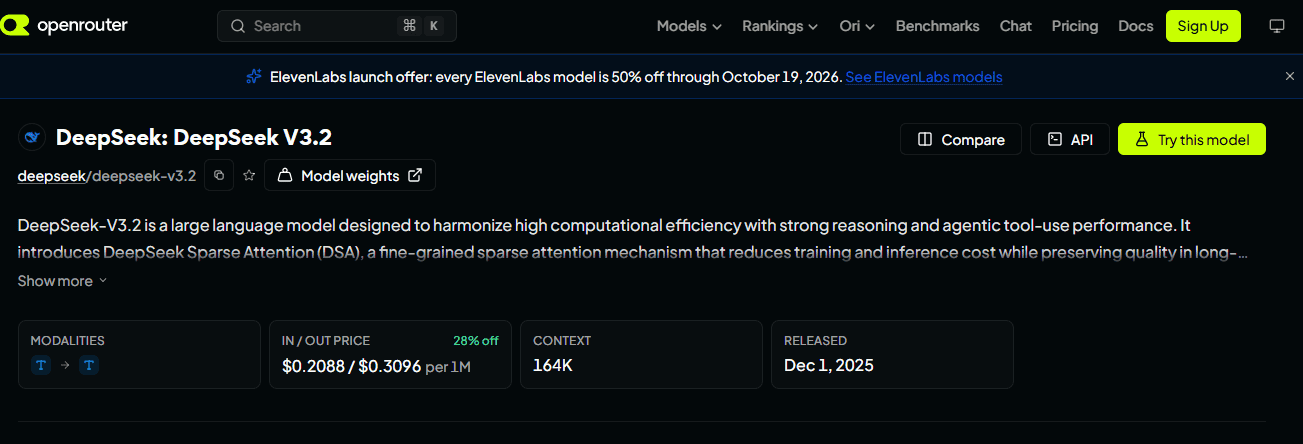
At the review date, deepseek/deepseek-v3.2 is a verified OpenRouter slug shown on OpenRouter’s DeepSeek V3.2 model page. That page lists DeepSeek V3.2 with a 164K context window and per-token pricing that may change over time. Use it as a practical example, not as a permanent recommendation.
| Need | Good starting point | What to check first |
|---|---|---|
| General DeepSeek API testing | deepseek/deepseek-v3.2 | Current price, context, provider availability, supported parameters |
| Latest DeepSeek Flash family | ~deepseek/deepseek-v4-flash-latest | Which model the alias currently routes to and the final request price |
| Lower-cost or free testing | Only a model OpenRouter currently labels free or low-cost | Daily free-model limits, credits, context length, and provider restrictions |
| Production use | A stable slug with providers that meet your latency, privacy, and budget needs | Provider routing, uptime, data policy, fallback behavior, and spend limits |
If you want to list available models programmatically, OpenRouter’s quickstart points to the model catalog and the GET /api/v1/models endpoint. For a production app, build model selection from live OpenRouter data instead of relying on a copied list from an old tutorial.
curl https://openrouter.ai/api/v1/modelsStep 3: Make your first DeepSeek request with cURL
The most direct way to use DeepSeek with OpenRouter is a standard HTTP request to OpenRouter’s chat completions endpoint.
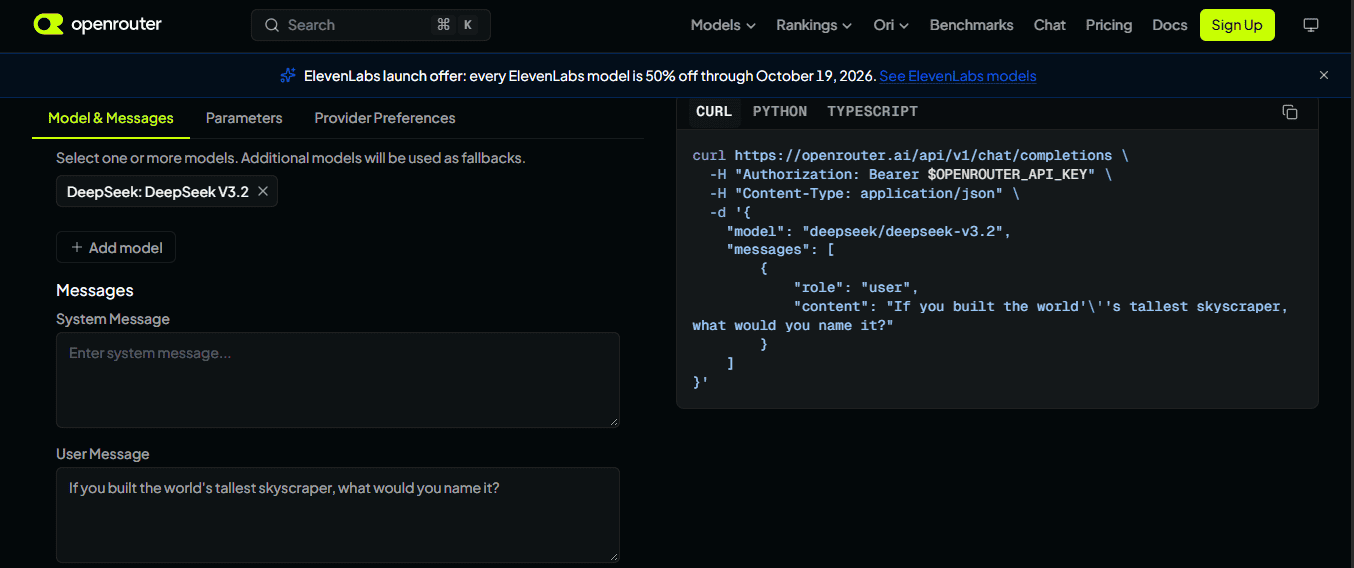
curl https://openrouter.ai/api/v1/chat/completions \
  -H "Content-Type: application/json" \
  -H "Authorization: Bearer $OPENROUTER_API_KEY" \
  -H "HTTP-Referer: https://example.com" \
  -H "X-OpenRouter-Title: Example App" \
  -d '{
    "model": "deepseek/deepseek-v3.2",
    "messages": [
      {
        "role": "system",
        "content": "You are a concise technical assistant."
      },
      {
        "role": "user",
        "content": "Explain how OpenRouter routes DeepSeek requests in simple terms."
      }
    ],
    "max_tokens": 500
  }'
The HTTP-Referer and X-OpenRouter-Title headers are optional. They are useful if you want your app attribution to appear correctly on OpenRouter, but they are not required for a basic request.
Step 4: Use DeepSeek with OpenRouter in Python
If you already use the OpenAI Python SDK, you can point it to OpenRouter by changing the base URL and API key. Keep the API key in an environment variable.
pip install openaiimport os
from openai import OpenAI
client = OpenAI(
base_url="https://openrouter.ai/api/v1",
api_key=os.environ["OPENROUTER_API_KEY"],
)
completion = client.chat.completions.create(
model="deepseek/deepseek-v3.2",
extra_headers={
"HTTP-Referer": "https://example.com",
"X-OpenRouter-Title": "Example App",
},
messages=[
{"role": "system", "content": "You are a helpful AI coding assistant."},
{"role": "user", "content": "Write a short Python function that validates an email-like string."},
],
max_tokens=600,
)
print(completion.choices[0].message.content)Replace deepseek/deepseek-v3.2 with the current DeepSeek slug you choose from OpenRouter. Do not replace it with a direct DeepSeek API model ID unless OpenRouter lists that exact slug.
Step 5: Use DeepSeek with OpenRouter in JavaScript or Node.js
For a simple Node.js integration, you can use fetch. Keep the API key on the server side, not in public browser code.
const response = await fetch("https://openrouter.ai/api/v1/chat/completions", {
  method: "POST",
  headers: {
    "Authorization": `Bearer ${process.env.OPENROUTER_API_KEY}`,
    "Content-Type": "application/json",
    "HTTP-Referer": "https://example.com",
    "X-OpenRouter-Title": "Example App"
  },
  body: JSON.stringify({
    model: "deepseek/deepseek-v3.2",
    messages: [
      {
        role: "system",
        content: "You are a practical technical assistant."
      },
      {
        role: "user",
        content: "Give me a short checklist for testing an LLM API integration."
      }
    ],
    max_tokens: 500
  })
});

if (!response.ok) {
  const error = await response.json().catch(() => ({}));
  throw new Error(`OpenRouter error ${response.status}: ${JSON.stringify(error)}`);
}

const data = await response.json();
console.log(data.choices[0].message.content);
If you are using a frontend framework, call your own backend route first, then let the backend call OpenRouter. Putting an OpenRouter key directly in client-side JavaScript can expose your account to abuse.
Step 6: Use the OpenAI SDK with OpenRouter
OpenRouter’s documentation shows that the OpenAI SDK can be used as a drop-in style integration when you set the base URL to OpenRouter. This is useful if your existing app already uses client.chat.completions.create().
import OpenAI from "openai";

const openai = new OpenAI({
  baseURL: "https://openrouter.ai/api/v1",
  apiKey: process.env.OPENROUTER_API_KEY,
  defaultHeaders: {
    "HTTP-Referer": "https://example.com",
    "X-OpenRouter-Title": "Example App"
  }
});

async function main() {
  const completion = await openai.chat.completions.create({
    model: "deepseek/deepseek-v3.2",
    messages: [
      {
        role: "user",
        content: "Summarize the difference between OpenRouter and the direct DeepSeek API."
      }
    ],
    max_tokens: 500
  });

  console.log(completion.choices[0].message.content);
}

main();
Step 7: Enable streaming when you need faster perceived responses
OpenRouter supports streaming. Use it when you want to show tokens as they arrive instead of waiting for the full answer. Streaming is useful for chat interfaces, coding assistants, and long responses, but it requires handling server-sent events correctly.
const response = await fetch("https://openrouter.ai/api/v1/chat/completions", {
  method: "POST",
  headers: {
    "Authorization": `Bearer ${process.env.OPENROUTER_API_KEY}`,
    "Content-Type": "application/json"
  },
  body: JSON.stringify({
    model: "deepseek/deepseek-v3.2",
    stream: true,
    messages: [
      {
        role: "user",
        content: "Explain provider routing in three bullet points."
      }
    ]
  })
});

// Parse the streamed SSE response in your application.
// Do not treat it like a normal JSON response.
If your app expects normal JSON, keep stream unset or set it to false. A common bug is turning streaming on and then trying to parse the response with response.json().
Provider routing: how OpenRouter chooses where your DeepSeek request goes
OpenRouter may route a model request across eligible providers unless you customize routing. This can improve availability, but it also means price, latency, privacy policy, and supported parameters can vary by provider endpoint.
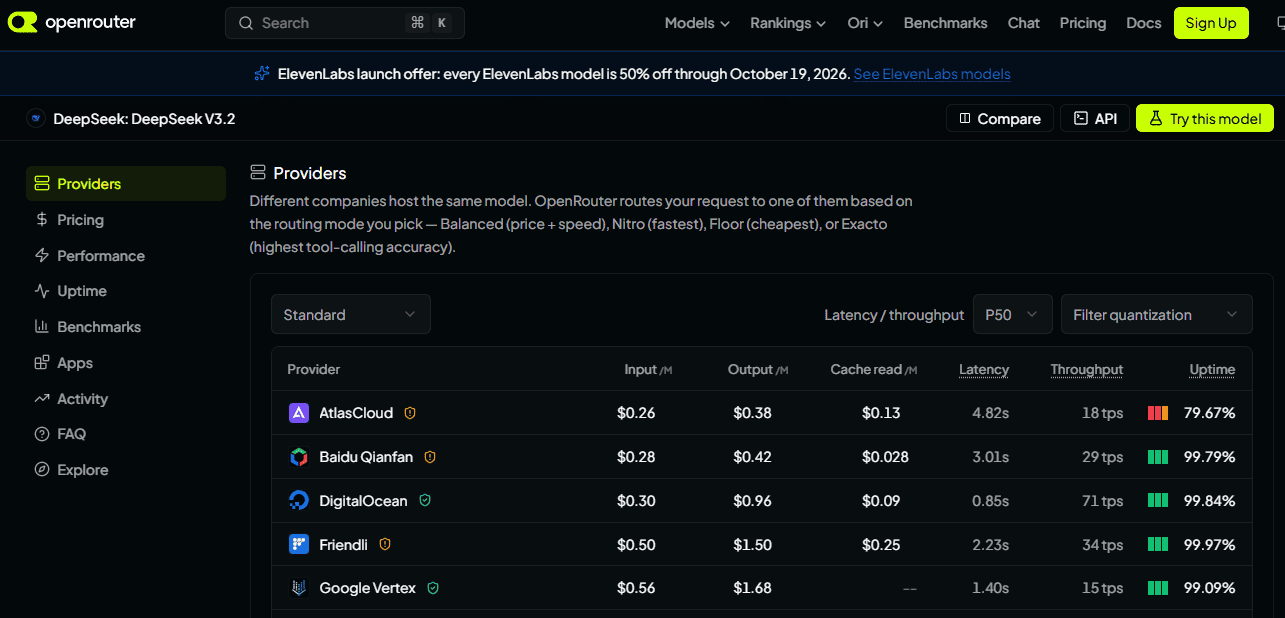
You can use the provider object to influence routing. For example, you can prefer lower price, require providers to support all requested parameters, or restrict routing based on data policy. Be careful: strict filters may cause “no provider available” errors if no endpoint meets your requirements.
{
  "model": "deepseek/deepseek-v3.2",
  "messages": [
    {
      "role": "user",
      "content": "Summarize this text in one paragraph."
    }
  ],
  "provider": {
    "sort": "price",
    "require_parameters": true,
    "data_collection": "deny"
  }
}
For privacy-sensitive work, OpenRouter also documents Zero Data Retention controls. ZDR means eligible providers do not store prompts and responses, but ZDR enforcement applies to provider inference routing and does not automatically cover every plugin, tool, or third-party service you enable.
{
  "model": "deepseek/deepseek-v3.2",
  "messages": [
    {
      "role": "user",
      "content": "Classify this support ticket."
    }
  ],
  "provider": {
    "zdr": true,
    "data_collection": "deny"
  }
}
Use these privacy filters only after checking that the DeepSeek model and providers you want still have eligible endpoints. Otherwise, OpenRouter may reject the request because no endpoint satisfies your routing rules.
Pricing: is OpenRouter cheaper than using DeepSeek directly?
Not always. OpenRouter pricing is not the same thing as DeepSeek’s official API pricing. OpenRouter shows prices per model and often per provider endpoint, while DeepSeek’s direct API has its own model names, pricing rules, and billing setup.
OpenRouter can be more convenient if you want one API key, model switching, fallback routing, and access to many models from one place. DeepSeek’s direct API may be better if you want direct billing with DeepSeek, direct DeepSeek model names, or fewer routing layers.
| Question | What to do |
|---|---|
| How much will this request cost? | Check the current OpenRouter model page and provider endpoint pricing. |
| Is a model free? | Only trust the current OpenRouter label. Do not assume free models are unlimited. |
| Why did I get a 402 error? | Check account credits, key limits, in-flight spending budget, and free-model daily allowance. |
| How do I check key limits? | Call GET https://openrouter.ai/api/v1/key with your API key. |
| Can routing change the cost? | Yes. A model can have multiple providers with different price, latency, and availability. |
curl https://openrouter.ai/api/v1/key \
  -H "Authorization: Bearer $OPENROUTER_API_KEY"
OpenRouter vs direct DeepSeek API: which should you use?
| Choose OpenRouter if… | Choose DeepSeek direct API if… |
|---|---|
| You want one API key for many AI models. | You only want DeepSeek and prefer direct provider billing. |
| You want easier model switching and fallbacks. | You want the simplest route between your app and DeepSeek. |
| You want to compare DeepSeek with other models using one interface. | You want to use DeepSeek’s official model IDs and docs directly. |
| You need OpenRouter’s provider routing controls. | You do not want a gateway layer between your app and DeepSeek. |
| You are building a tool that may support many models later. | You are building a DeepSeek-only integration. |
For most beginners, OpenRouter is convenient because the first request is simple and the same endpoint can later call other models. For production teams, the decision should include cost, privacy, uptime, provider routing, billing controls, and support requirements.
Common errors and how to fix them
| Error or symptom | Likely cause | How to fix it |
|---|---|---|
401 Unauthorized | Missing, invalid, disabled, or revoked API key. | Check the Authorization: Bearer header, create a new key, and confirm you are using an OpenRouter key. |
402 Payment Required | Insufficient credits, key spending cap, or in-flight budget issue. | Add credits, reduce max_tokens, check GET /api/v1/key, or wait if the error metadata points to in-flight budget. |
403 Forbidden | Permission issue, guardrail block, budget limit, or moderation block. | Review the error metadata, workspace limits, guardrails, and content policy response. |
404 or model not found | Wrong model slug or outdated tutorial. | Copy the current slug from the OpenRouter model page. Do not use a DeepSeek direct model ID unless OpenRouter lists it. |
429 Rate limited | Too many requests or token usage too quickly. | Respect Retry-After when present, use exponential backoff, reduce concurrency, or switch model/provider if appropriate. |
| No provider available | Your routing filters are too strict. | Relax zdr, data_collection, require_parameters, provider allowlist, or latency filters. |
| Unsupported parameter | The chosen provider endpoint does not support a field you sent. | Use require_parameters: true or remove unsupported fields such as tools, structured output, or reasoning options. |
| Truncated answer | max_tokens too low or context too large. | Increase output limit, shorten the prompt, or choose a model with a larger context/output limit. |
| Streaming response fails to parse | Your app treats streamed SSE as normal JSON. | Use an SSE parser or disable stream. |
Security checklist before deploying
- Store
OPENROUTER_API_KEYin backend environment variables or a secrets manager. - Never expose the API key in browser JavaScript, WordPress pages, screenshots, or public GitHub repositories.
- Set per-key spending limits where possible.
- Monitor usage with
GET /api/v1/key. - Log request IDs and errors, but avoid logging sensitive user prompts unless your privacy policy allows it.
- Use provider routing controls for privacy-sensitive workloads.
- Review OpenRouter, the underlying provider, and any plugin/tool data policies before processing confidential data.
- Add retries with backoff for transient errors, but do not blindly retry payment or policy errors.
Production checklist
- Pick a stable model slug from the current OpenRouter model page.
- Test the model on real prompts, not only a “Hello” request.
- Measure cost per successful answer, including retries and long outputs.
- Check provider availability, latency, throughput, and fallback behavior.
- Set spend limits on keys or workspaces.
- Decide whether to allow fallbacks or pin providers for consistency.
- Document privacy settings, especially ZDR and data collection restrictions.
- Handle errors explicitly, including 401, 402, 403, 429, and provider failures.
- Use monitoring for usage, cost, latency, and failed requests.
- Keep model slugs updated because OpenRouter’s catalog changes over time.
FAQ
Do I need a DeepSeek API key to use DeepSeek with OpenRouter?
No. When using DeepSeek through OpenRouter, you use an OpenRouter API key. You only need a DeepSeek API key if you use DeepSeek’s official API directly.
What is the OpenRouter base URL?
The OpenRouter base URL for OpenAI-compatible SDK usage is https://openrouter.ai/api/v1. The chat completions endpoint is https://openrouter.ai/api/v1/chat/completions.
Which DeepSeek model should I use on OpenRouter?
For a simple starting point, use a current DeepSeek model slug from the OpenRouter DeepSeek collection. At the review date, deepseek/deepseek-v3.2 is a verified example. Always check the model page before deploying because slugs, providers, prices, and supported parameters can change.
Can I use DeepSeek for free on OpenRouter?
Only if OpenRouter currently lists a DeepSeek model variant as free and your account is within the applicable free usage limits. Do not assume free access is unlimited or permanent.
Is OpenRouter cheaper than DeepSeek’s official API?
Not necessarily. OpenRouter pricing depends on the model and provider endpoint. DeepSeek’s official API has its own pricing. Compare the exact model, endpoint, input tokens, output tokens, and cache behavior before deciding.
Can I use the OpenAI SDK with OpenRouter?
Yes. Set the OpenAI SDK base URL to https://openrouter.ai/api/v1, use your OpenRouter API key, and pass an OpenRouter model slug such as deepseek/deepseek-v3.2.
How do I stream DeepSeek responses through OpenRouter?
Add "stream": true to your chat completion request and parse the response as a stream. Do not parse a streamed response as normal JSON.
Why does my OpenRouter DeepSeek request fail?
The most common causes are an invalid API key, wrong model slug, insufficient credits, rate limits, unsupported parameters, or provider routing filters that leave no eligible endpoints. Check the HTTP status code and the error metadata before retrying.
Is it safe to use DeepSeek with OpenRouter for private data?
It depends on your data, settings, and provider routing. Review OpenRouter’s data collection, provider logging, and ZDR documentation. For confidential or regulated data, do not rely on default settings without legal, security, and compliance review.
When should I use DeepSeek directly instead of OpenRouter?
Use DeepSeek directly if you only need DeepSeek, want direct DeepSeek billing, prefer DeepSeek’s official model names and documentation, or do not want a gateway layer. Use OpenRouter if you want one API key for many models, easier switching, provider routing, and fallback options.
Sources checked
- OpenRouter Quickstart
- OpenRouter Chat Completions API Reference
- OpenRouter DeepSeek model collection
- OpenRouter DeepSeek V3.2 model page
- OpenRouter DeepSeek V4 Flash Latest model page
- OpenRouter Provider Routing documentation
- OpenRouter Zero Data Retention documentation
- OpenRouter Errors and Debugging documentation
- OpenRouter Credit Limits and Rate Limits documentation
- DeepSeek official API documentation