

Last reviewed: October 11, 2026
Quick answer: DeepSeek OCR is a research-driven document understanding model built around Contexts Optical Compression. DeepSeek OCR 2 is the newer version, built around Visual Causal Flow and DeepEncoder V2. Both can be used for OCR-style tasks such as extracting text from images or converting documents to Markdown, but they are not simple consumer OCR apps. They are vision-language models designed for developers, researchers, and document-processing teams.
If you want the more established release with broader examples and upstream vLLM support, start with DeepSeek-OCR. If you want to test the newer architecture focused on semantic visual token ordering, try DeepSeek-OCR 2. For production document extraction, test both against your own documents before relying on either one.
This guide is based on official GitHub repositories, Hugging Face model cards, arXiv papers, and public documentation available at the review date. No private benchmark or hands-on production test was performed for this article, so performance claims are limited to what official and reliable public sources support.
DeepSeek OCR and OCR 2 at a glance
| Area | DeepSeek-OCR | DeepSeek-OCR 2 |
|---|---|---|
| Official repository name | DeepSeek-OCR | DeepSeek-OCR-2 |
| Main research idea | Contexts Optical Compression | Visual Causal Flow |
| Core encoder | DeepEncoder | DeepEncoder V2 |
| Best understood as | A vision-language OCR/document model focused on visual-text compression | A newer visual encoding approach that reorders visual tokens according to image semantics |
| Official release/paper timing | Released in October 2025; arXiv paper submitted October 21, 2025 | Presented in January 2026; arXiv paper submitted January 28, 2026 |
| License checked | MIT license on the official GitHub repository and Hugging Face model card | Apache-2.0 license on the official GitHub repository |
| Official usage path | Transformers and vLLM examples are documented | Transformers and vLLM examples are documented |
| Example task | Free OCR or convert a document image to Markdown | Free OCR or convert a document image to Markdown with the newer architecture |
| Who should test it first? | Developers who want a more established open release | Developers and researchers who want to test the newer semantic visual encoding approach |
What is DeepSeek OCR?
DeepSeek-OCR is an AI model for OCR-style document understanding. It is not just a traditional character recognizer. The official paper describes it as an investigation into Contexts Optical Compression, where long textual context can be represented through optical 2D mapping and processed with fewer vision tokens.
In practical terms, DeepSeek-OCR tries to read visual documents efficiently. Instead of treating OCR as only “image in, text out,” it explores how visual encoders can compress document information so a language model can interpret it with fewer tokens.
The original DeepSeek-OCR paper says the model has two main components: DeepEncoder and DeepSeek3B-MoE-A570M as the decoder. DeepEncoder is described as the engine that keeps activations manageable under high-resolution input while using compression to reduce the number of visual tokens.
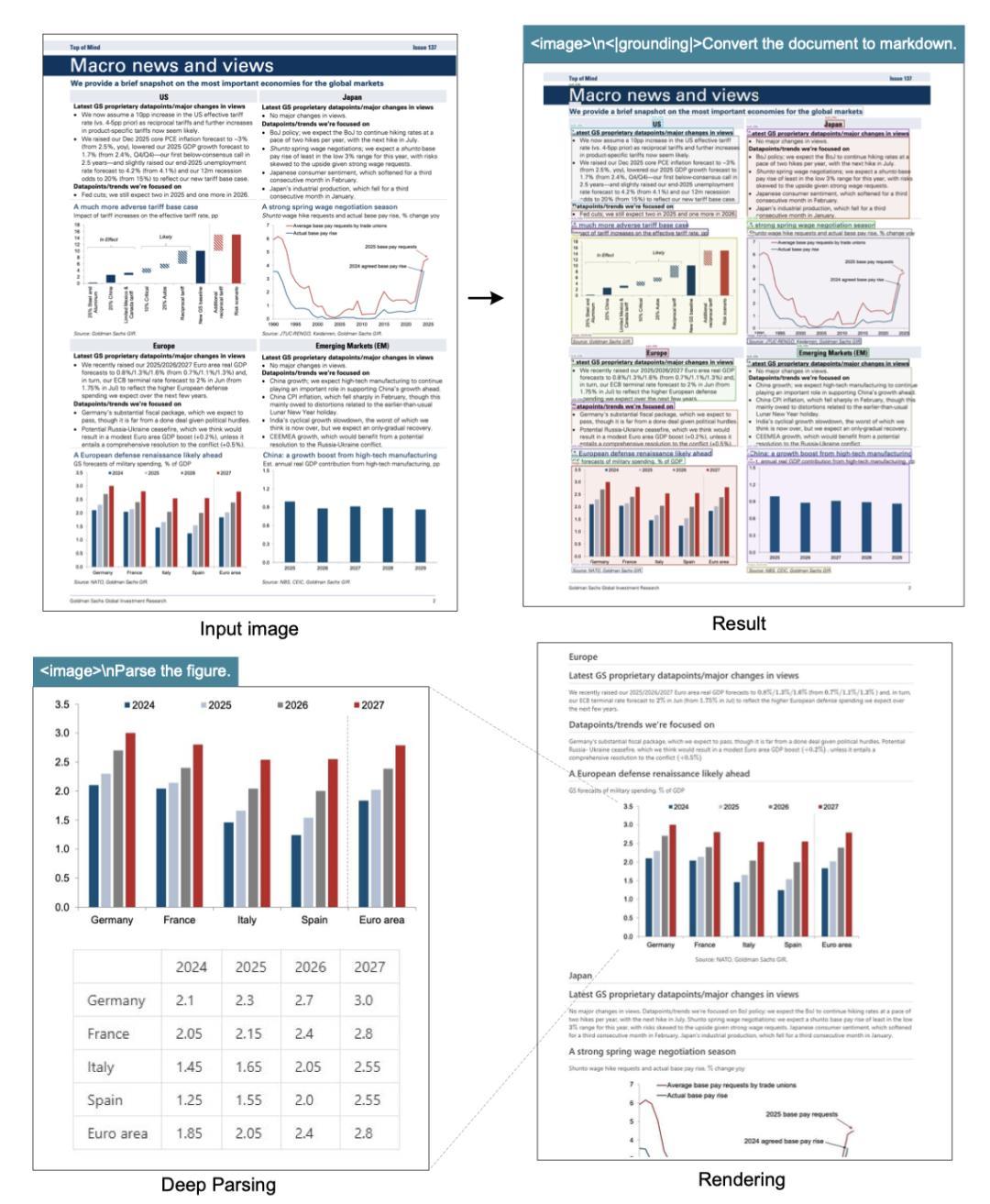
The official repository and model card show examples for tasks such as “Free OCR” and converting a document image to Markdown. The repository also includes image, PDF, and batch evaluation scripts, making it more developer-oriented than a simple online OCR converter.
What is DeepSeek OCR 2?
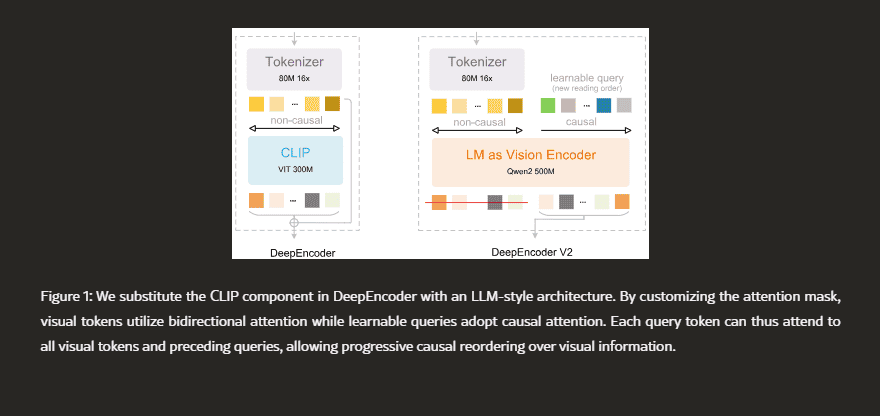
DeepSeek-OCR 2 is the newer version introduced with the paper DeepSeek-OCR 2: Visual Causal Flow. Its main idea is Visual Causal Flow, implemented through DeepEncoder V2.
The OCR 2 paper argues that conventional vision-language models usually pass visual tokens to the language model in a rigid raster-scan order, from top-left to bottom-right. That order may work for simple pages, but complex documents often have columns, tables, captions, formulas, diagrams, and visual relationships that do not follow one clean reading path.
DeepEncoder V2 is designed to dynamically reorder visual tokens based on image semantics before the language model interprets the content. In simpler words, OCR 2 tries to process the page more like a structured visual scene rather than a flat grid.
This makes DeepSeek-OCR 2 especially interesting for complex layouts, but it also means users should test it carefully. A newer architecture does not automatically mean better results on every private document collection.
Is DeepSeek OCR a normal OCR tool?
No. DeepSeek-OCR and DeepSeek-OCR 2 can perform OCR-style tasks, but they are better described as vision-language document models. A normal OCR tool usually focuses on recognizing printed or handwritten text from an image and returning text. DeepSeek-OCR goes further by connecting OCR with document understanding, layout interpretation, visual token compression, and language-model decoding.
| Type | What it usually does | Where DeepSeek-OCR fits |
|---|---|---|
| Traditional OCR | Extracts characters or words from scanned images | DeepSeek-OCR can do OCR-style extraction, but it is not limited to character recognition |
| Document parsing | Extracts text, tables, layout, sections, and structure | DeepSeek-OCR can be used for Markdown-style document conversion and layout-aware tasks |
| Vision-language model | Uses visual and text understanding together | DeepSeek-OCR is closer to this category than to a basic OCR engine |
| Optical compression research | Studies how visual representations can compress text/context | This is the core research angle of the original DeepSeek-OCR |
| Visual Causal Flow | Reorders visual tokens based on semantic structure | This is the core research angle of DeepSeek-OCR 2 |
DeepSeek-OCR vs DeepSeek-OCR 2: what changed?
The main change is the visual encoding strategy. DeepSeek-OCR introduced optical compression as the central idea. DeepSeek-OCR 2 builds on that direction by changing how visual tokens are ordered before interpretation.
| Question | DeepSeek-OCR | DeepSeek-OCR 2 |
|---|---|---|
| What is the main concept? | Contexts Optical Compression | Visual Causal Flow |
| What problem does it focus on? | Reducing visual token cost while preserving document information | Improving how visual tokens are ordered for complex 2D understanding |
| What encoder does it use? | DeepEncoder | DeepEncoder V2 |
| What is the practical goal? | Efficient OCR/document extraction and visual-text compression | More semantic, human-like visual encoding for complex layouts |
| Which one is safer to start with? | Better starting point if you want the more established release and examples | Better if you want to test the newer architecture |
| Does “2” mean it is always better? | No | No. It should be tested on your own documents |
What can DeepSeek OCR and OCR 2 do?
Based on the official repositories and model cards, the most relevant tasks are OCR-style extraction, document-to-Markdown conversion, image-based document understanding, and PDF or batch processing through repository scripts.
| Task | Useful for | Important caveat |
|---|---|---|
| Free OCR | Extracting text from document images | Accuracy depends on image quality, layout, language, and document type |
| Convert document to Markdown | Turning visual pages into structured text for editing or indexing | Markdown structure should be reviewed before publishing or automation |
| PDF processing | Running OCR/document parsing over PDF inputs through repository scripts | PDF support should be verified in the current repo before production use |
| Batch evaluation | Testing performance across a document set or benchmark | Benchmarks may not reflect private business documents |
| Layout-aware extraction | Documents with sections, tables, headings, figures, or mixed visual content | Complex layouts still need validation and error handling |
How to run DeepSeek-OCR or DeepSeek-OCR 2
The official examples are developer-focused. Both model pages document inference with Hugging Face Transformers on NVIDIA GPUs, and the GitHub repositories include vLLM-style inference paths. Do not assume CPU support or low-memory support unless the current official documentation explicitly confirms it.
The documented test environment for the official examples uses Python 3.12.9, CUDA 11.8, Torch 2.6.0, and FlashAttention. The exact package versions may change, so always check the current repository before installing.
Basic repository setup
git clone https://github.com/deepseek-ai/DeepSeek-OCR.git
cd DeepSeek-OCR

# Or for OCR 2:
git clone https://github.com/deepseek-ai/DeepSeek-OCR-2.git
cd DeepSeek-OCR-2
Official-style prompts
The official examples show two simple prompt patterns: one for plain OCR and one for document-to-Markdown conversion.
# Plain OCR
<image>
Free OCR.

# Document to Markdown
<image>
<|grounding|>Convert the document to markdown.
Transformers usage pattern
The model cards show usage through AutoModel and AutoTokenizer with trust_remote_code=True. This is common for custom model architectures, but it also means you should review the repository and run it in a controlled environment before using it on sensitive systems.
from transformers import AutoModel, AutoTokenizer
import torch
import os

os.environ["CUDA_VISIBLE_DEVICES"] = "0"

model_name = "deepseek-ai/DeepSeek-OCR-2"
tokenizer = AutoTokenizer.from_pretrained(model_name, trust_remote_code=True)

model = AutoModel.from_pretrained(
    model_name,
    _attn_implementation="flash_attention_2",
    trust_remote_code=True,
    use_safetensors=True
)

model = model.eval().cuda().to(torch.bfloat16)

prompt = "<image>\n<|grounding|>Convert the document to markdown."
image_file = "your_image.jpg"
output_path = "your/output/dir"

res = model.infer(
    tokenizer,
    prompt=prompt,
    image_file=image_file,
    output_path=output_path,
    base_size=1024,
    image_size=768,
    crop_mode=True,
    save_results=True
)
This example is adapted from the official OCR 2 usage pattern. For DeepSeek-OCR, use the original model name and the parameters shown in the original repository or model card.
vLLM and PDF scripts
The official GitHub repositories include vLLM inference sections and separate scripts for image, PDF, and batch evaluation workflows. For DeepSeek-OCR 2, the repository lists scripts such as run_dpsk_ocr2_image.py, run_dpsk_ocr2_pdf.py, and run_dpsk_ocr2_eval_batch.py. For the original DeepSeek-OCR, the repository lists corresponding OCR scripts for image, PDF, and batch evaluation.
For production, do not copy commands blindly. Check the latest repository, configure input/output paths, confirm your CUDA/Torch setup, and run a small sample before processing a large document set.
Benchmarks and accuracy: how to interpret the numbers
The original DeepSeek-OCR paper reports strong results in the context of optical compression. It states that when the number of text tokens is within 10 times the number of vision tokens, the model can reach 97% decoding/OCR precision; at a 20x compression ratio, the paper reports about 60% OCR accuracy.
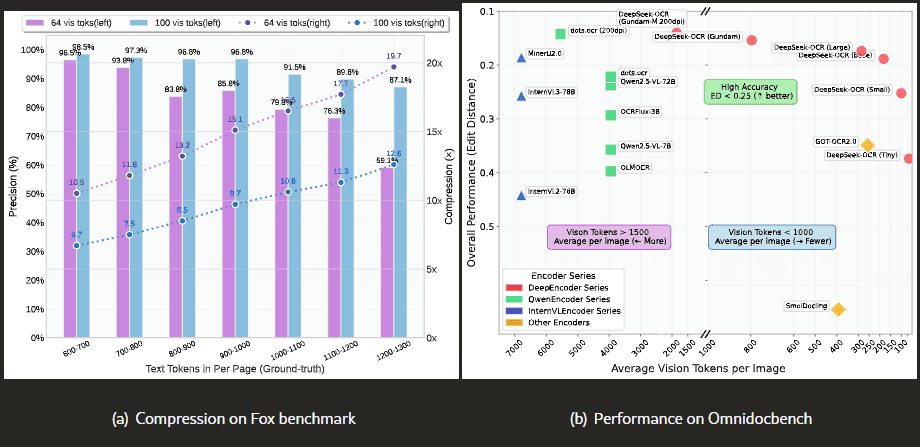
Those numbers are important, but they should not be treated as a universal guarantee. They are tied to the paper’s setup, compression ratio, datasets, evaluation method, and model configuration. A private dataset of invoices, receipts, legal scans, handwritten notes, scientific PDFs, or low-quality phone photos may behave differently.
The original paper also discusses OmniDocBench and comparisons with tools such as GOT-OCR2.0 and MinerU2.0. These results are useful for understanding the research claim, but you should still run your own evaluation before choosing a document-processing pipeline.
When DeepSeek-OCR is a good fit
DeepSeek-OCR is a good fit when you need an open, developer-oriented OCR/document model and you are comfortable running Python, CUDA, Transformers, or vLLM workflows.
- You want to experiment with visual-text compression.
- You need image-to-text or document-to-Markdown extraction.
- You can run NVIDIA GPU-based inference.
- You want a model with official examples and repository scripts.
- You want to compare OCR output against your own dataset.
- You need a local workflow instead of uploading private documents to random OCR websites.
When DeepSeek-OCR 2 is a good fit
DeepSeek-OCR 2 is a good fit when you specifically want to test the newer Visual Causal Flow approach and see whether semantic visual token ordering improves results on complex documents.
- You work with complex layouts, tables, figures, formulas, or multi-column pages.
- You want to compare DeepEncoder V2 against the original DeepEncoder.
- You are evaluating the latest document AI architectures.
- You can handle a newer repository and possible changes in setup or support.
- You care about research experimentation as much as immediate stability.
When a traditional OCR tool may still be better
DeepSeek-OCR is not always the simplest or best option. Traditional OCR engines and document parsing tools may be better when you need speed, predictable output, simple deployment, or established language support.
| Choose this instead | When it may be better |
|---|---|
| Tesseract OCR | You need a classic, lightweight, offline OCR engine and can tolerate manual tuning |
| PaddleOCR | You want a mature OCR ecosystem with many practical OCR tasks and deployment patterns |
| MinerU or document parsing tools | You need document conversion pipelines and structured extraction workflows |
| Cloud OCR APIs | You want managed infrastructure, SLAs, and simple API deployment |
| DeepSeek-OCR or OCR 2 | You want a vision-language OCR/document model and can evaluate it technically |
Privacy and safety for private documents
If you run DeepSeek-OCR locally on your own machine or server, you may avoid uploading documents to third-party OCR websites. That can be useful for private documents, but it does not automatically solve every privacy or security issue.
You should still check where model files are downloaded from, whether your environment logs inputs, who can access outputs, how temporary files are stored, and whether your documents contain regulated data. If you use a hosted demo, Hugging Face Space, third-party endpoint, or cloud wrapper, treat it as a third-party processor and review its data handling before uploading sensitive files.
For business use, build a simple rule: private documents should not be uploaded to unofficial demos unless the data policy is acceptable and approved by your organization.
Production readiness checklist
Before using DeepSeek-OCR or OCR 2 in production, test more than one clean demo page. Real document pipelines fail because of messy scans, rotations, stamps, handwriting, tables, compression artifacts, missing fonts, and mixed languages.
- Build a test set with your real document types: invoices, contracts, PDFs, scans, forms, tables, screenshots, or research papers.
- Measure exact extraction quality, not just whether the output looks readable.
- Check table and layout handling separately from plain paragraph OCR.
- Test low-quality inputs, including skewed scans, photos, shadows, and small text.
- Track hallucinated text, missing lines, merged columns, and broken Markdown structure.
- Measure latency and hardware cost for your expected document volume.
- Confirm memory requirements on your actual GPU instead of assuming support from examples.
- Review license terms for the exact model/repository you deploy.
- Separate local inference from hosted demos when evaluating privacy.
- Add human review for legal, financial, medical, or compliance-sensitive outputs.
Common mistakes to avoid
- Treating DeepSeek-OCR like a simple OCR website. It is a developer-oriented model release, not a one-click consumer app.
- Assuming OCR 2 is always better. OCR 2 is newer, but you still need to test it on your own documents.
- Copying benchmark numbers without context. Compression ratio, dataset, and evaluation setup matter.
- Confusing official repositories with community demos. A Hugging Face Space may be useful, but it is not automatically an official DeepSeek product.
- Ignoring GPU and dependency requirements. The official examples are built around NVIDIA GPU workflows, CUDA, Torch, FlashAttention, and custom code.
- Uploading private documents to unknown demos. Local inference and hosted demos have different privacy risks.
- Assuming PDF support means perfect PDF parsing. Always test complex PDFs, scanned PDFs, tables, and multi-column layouts.
Which one should you use?
| Your situation | Best starting point | Why |
|---|---|---|
| You want the more established DeepSeek OCR release | DeepSeek-OCR | It has the original paper, repository, examples, and wider public usage |
| You want to test the newest architecture | DeepSeek-OCR 2 | It introduces Visual Causal Flow and DeepEncoder V2 |
| You need simple offline text extraction | Traditional OCR first | A lighter OCR engine may be easier to deploy and maintain |
| You need document-to-Markdown conversion | Test both DeepSeek-OCR and OCR 2 | Both show prompts for converting documents to Markdown |
| You process confidential documents | Local setup, carefully reviewed | A local workflow can reduce exposure, but security controls still matter |
| You need enterprise reliability | Run a formal evaluation first | Production use requires monitoring, error handling, privacy review, and human QA |
For most technical readers, the right path is simple: start with DeepSeek-OCR if you want a more established baseline, then test DeepSeek-OCR 2 on the same documents to see whether Visual Causal Flow improves your specific workload.
FAQ
What is DeepSeek OCR?
DeepSeek OCR usually refers to DeepSeek-OCR, a vision-language OCR/document understanding model focused on Contexts Optical Compression. It can be used for OCR-style extraction and document-to-Markdown workflows, but it is not just a traditional OCR engine.
What is DeepSeek OCR 2?
DeepSeek OCR 2 refers to DeepSeek-OCR 2, the newer model/research release built around Visual Causal Flow and DeepEncoder V2. It explores dynamic visual token ordering based on image semantics.
Is DeepSeek OCR 2 official?
Yes. DeepSeek-OCR 2 has an official DeepSeek GitHub repository, a Hugging Face model card under the deepseek-ai organization, and an arXiv paper titled DeepSeek-OCR 2: Visual Causal Flow.
What is the difference between DeepSeek OCR and OCR 2?
DeepSeek-OCR focuses on Contexts Optical Compression with DeepEncoder. DeepSeek-OCR 2 introduces Visual Causal Flow and DeepEncoder V2, which reorders visual tokens based on image semantics before interpretation.
Can DeepSeek OCR convert PDFs to Markdown?
The official repositories include document-to-Markdown prompts and PDF inference scripts. However, you should verify the latest repository instructions and test your own PDFs before using it in production.
Can I run DeepSeek OCR locally?
Yes, the official examples show local inference with Transformers and vLLM-style workflows. The documented examples use NVIDIA GPU environments, CUDA 11.8, Torch 2.6.0, and FlashAttention, so local setup is technical.
Does DeepSeek OCR 2 need a GPU?
The official Hugging Face usage notes describe inference using Transformers on NVIDIA GPUs. Do not assume practical CPU support unless the current official documentation confirms it for your use case.
Is DeepSeek OCR open source?
The official GitHub repositories and model cards provide publicly accessible code and model weights. The original DeepSeek-OCR repository/model card shows an MIT license, while the DeepSeek-OCR-2 GitHub repository shows an Apache-2.0 license. Always check the current license before commercial use.
Is DeepSeek OCR better than Tesseract or PaddleOCR?
Not universally. DeepSeek-OCR is more like a vision-language document model, while Tesseract and PaddleOCR are established OCR tools. DeepSeek-OCR may be better for certain document understanding and Markdown conversion workflows, but traditional OCR may be simpler, faster, or easier to deploy for plain text extraction.
Is DeepSeek OCR safe for private documents?
Local inference can reduce the need to upload documents to third-party websites, but privacy still depends on your environment, logs, storage, access controls, and model source. Hosted demos and community Spaces should be treated as third-party services unless their data policy is acceptable.
Sources checked
- DeepSeek-OCR official GitHub repository
- DeepSeek-OCR-2 official GitHub repository
- DeepSeek-OCR Hugging Face model card
- DeepSeek-OCR-2 Hugging Face model card
- DeepSeek-OCR: Contexts Optical Compression on arXiv
- DeepSeek-OCR 2: Visual Causal Flow on arXiv
- vLLM documentation
- Hugging Face Transformers documentation