

DeepSeek JSON Output is the API feature that asks DeepSeek to return a valid JSON string instead of ordinary prose. In Chat Completions, you enable it with response_format={"type":"json_object"}. In the Responses API, you can use text.format={"type":"json_object"} for JSON mode or text.format={"type":"json_schema", ...} for schema-constrained structured output.
The most important distinction is this: valid JSON is not the same as schema-valid or business-valid data. A response can parse successfully as JSON but still be missing required fields, use the wrong type, contain an unexpected enum value, or violate your application rules. Always parse and validate before using the result in a database, workflow, or tool.
Documentation checked: October 4, 2026. The examples below are documentation-based; no authenticated DeepSeek API request was run.
When to use DeepSeek JSON Output
Use JSON Output when the model’s answer itself should be structured data that your code can parse. It is useful for extraction, classification, workflow automation, RAG metadata, normalized summaries, and backend services that need predictable keys.
| Use case | Good fit for JSON Output? | Why |
|---|---|---|
| Extract fields from a support email | Yes | You need predictable keys such as customer, issue, and priority. |
| Classify feedback into a fixed label | Yes | The application can validate the label against an allowed enum. |
| Return metadata for a RAG pipeline | Yes | Structured output can feed indexing, filtering, or storage. |
| Write a long explanation for a user | Usually no | Plain text is more natural unless another system must parse the answer. |
| Ask the model to call an external function | No; use Tool Calls | JSON Output formats the answer. It does not execute a function. |
If your application needs the model to request a function, database lookup, HTTP call, or other external operation, use DeepSeek Tool Calls instead. JSON Output and Tool Calls solve different problems.
Chat Completions: enable JSON mode correctly
DeepSeek’s official JSON Output guide says Chat Completions JSON mode requires more than just setting a parameter. To enable it correctly:
- Set
response_formatto{"type":"json_object"}. - Include the word json in the system or user prompt.
- Provide an example of the desired JSON structure.
- Set
max_tokenshigh enough so the JSON is not truncated midway. - Handle the documented possibility of occasional empty content.
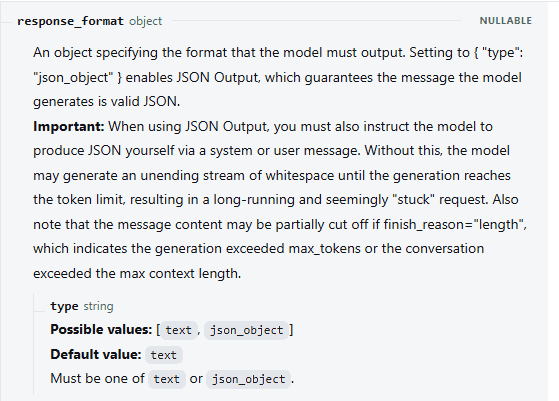
A weak prompt says, “Extract the fields.” A stronger prompt says, “Return a valid JSON object with exactly these keys,” then shows an example. The model still needs instructions about the structure you expect.
Python example: request, parse, and validate JSON
This example uses the OpenAI-compatible client pattern with DeepSeek’s official base URL. It reads the API key from DEEPSEEK_API_KEY, requests JSON mode, parses the final answer with json.loads, and performs basic validation before returning the data.
Install the client if needed:
python -m pip install openaiSave this as deepseek_json_output.py:
import json
import os
import sys
from typing import Any

from openai import APIError, OpenAI


ALLOWED_INTENTS = {"demo_request", "support", "pricing", "other"}
REQUIRED_KEYS = {"name", "email", "company", "intent"}


def validate_contact(data: Any) -> dict[str, Any]:
    if not isinstance(data, dict):
        raise ValueError("Expected a JSON object.")

    missing = REQUIRED_KEYS - data.keys()
    extra = data.keys() - REQUIRED_KEYS

    if missing:
        raise ValueError(f"Missing required keys: {sorted(missing)}")

    if extra:
        raise ValueError(f"Unexpected keys: {sorted(extra)}")

    for key in ("name", "email", "company"):
        value = data[key]
        if value is not None and not isinstance(value, str):
            raise ValueError(f"{key} must be a string or null.")

    intent = data["intent"]
    if not isinstance(intent, str):
        raise ValueError("intent must be a string.")
    if intent not in ALLOWED_INTENTS:
        raise ValueError(
            f"intent must be one of {sorted(ALLOWED_INTENTS)}."
        )

    return data


def main() -> int:
    api_key = os.environ.get("DEEPSEEK_API_KEY", "").strip()

    if not api_key:
        print("Set DEEPSEEK_API_KEY before running this script.", file=sys.stderr)
        return 2

    client = OpenAI(
        api_key=api_key,
        base_url="https://api.deepseek.com",
        timeout=120.0,
        max_retries=0,
    )

    system_prompt = """
You extract sales lead details.

Return only a valid json object with exactly these keys:
name, email, company, intent.

Rules:
- Values for name, email, and company must be strings or null.
- intent must be one of: demo_request, support, pricing, other.
- Do not wrap the JSON in Markdown.
- Do not include prose before or after the JSON.

Example JSON:
{
  "name": "Alex Chen",
  "email": "[email protected]",
  "company": "Example Co",
  "intent": "demo_request"
}
""".strip()

    user_text = """
Hi, I'm Maria from Northwind Labs.
Can someone send me pricing for the API?
My email is [email protected].
""".strip()

    try:
        response = client.chat.completions.create(
            model="deepseek-flash",
            messages=[
                {"role": "system", "content": system_prompt},
                {"role": "user", "content": user_text},
            ],
            response_format={"type": "json_object"},
            max_tokens=512,
        )
    except APIError as exc:
        status = getattr(exc, "status_code", None)
        label = f"HTTP {status}" if status is not None else type(exc).__name__
        print(f"DeepSeek request failed: {label}", file=sys.stderr)
        return 1

    content = response.choices[0].message.content

    if not content:
        print("DeepSeek returned empty content.", file=sys.stderr)
        return 1

    try:
        parsed = json.loads(content)
    except json.JSONDecodeError as exc:
        print(f"Response was not parseable JSON: {exc}", file=sys.stderr)
        return 1

    try:
        validated = validate_contact(parsed)
    except ValueError as exc:
        print(f"JSON parsed but failed validation: {exc}", file=sys.stderr)
        return 1

    print(json.dumps(validated, indent=2))
    return 0


if __name__ == "__main__":
    raise SystemExit(main())
Run it from a terminal where DEEPSEEK_API_KEY is set:
python deepseek_json_output.pyThis code does not assume the model output is safe simply because JSON mode is enabled. It checks that the content exists, parses it as JSON, then validates the shape and allowed values.
Valid JSON vs schema-valid data
Parsing and validation answer different questions.
| Step | Question it answers | Example problem it catches |
|---|---|---|
| Parsing | Is the output syntactically valid JSON? | A missing closing brace or a Markdown code fence around the object. |
| Schema validation | Does the JSON match the required structure? | "score": "high" when your app requires a number. |
| Business validation | Does the content make sense for your workflow? | A valid enum value that is not allowed for this user or state. |
For example, this parses as JSON:
{"priority": "urgent"}But it may still be invalid for your application if priority must be one of low, medium, or high. Treat JSON Output as a formatting aid, not as a replacement for validation.
Prevent truncated JSON
DeepSeek’s JSON Output guide recommends setting max_tokens reasonably to prevent the JSON string from being cut off midway. Truncated JSON may look like this:
{
  "items": [
    {"name": "A"},
    {"name": "B"}
That is not valid JSON because the array and object never close. Do not guess the missing content or append braces blindly.
Use these controls instead:
- Ask for only the fields your application needs.
- Use short, predictable keys.
- Avoid huge arrays unless the task genuinely requires them.
- Set an output budget appropriate to the largest expected object.
- Check completion or finish status where your API format exposes it.
- Reject incomplete JSON and retry only under a bounded policy.
Handle empty content
DeepSeek currently warns that JSON Output may occasionally return empty content and suggests modifying the prompt to mitigate the issue. Your application should treat empty content as a failed structured-output attempt rather than passing it downstream.
A practical response is:
- Detect that
message.contentis empty or missing. - Log a redacted diagnostic record: model, endpoint, prompt version, output budget, and request purpose.
- Improve the prompt by explicitly requiring a valid json object and showing the expected shape.
- Retry only when appropriate, with a small bounded retry limit.
- Return a controlled error to the calling workflow if JSON cannot be obtained safely.
Do not use an infinite retry loop. Empty content is a failure condition your application should handle deliberately.
Responses API: json_object vs json_schema
The DeepSeek Responses API reference supports a separate text.format configuration. It has three relevant output-format modes:
| Responses API format | What it requests | Use when |
|---|---|---|
{"type":"text"} | Plain text output. | You do not need machine-parseable JSON. |
{"type":"json_object"} | Valid JSON mode. | You need parseable JSON but will validate shape yourself. |
{"type":"json_schema", "name": ..., "schema": ...} | Structured output conforming to a provided JSON Schema. | You want the API to constrain output to a specific schema and still validate it in your application. |
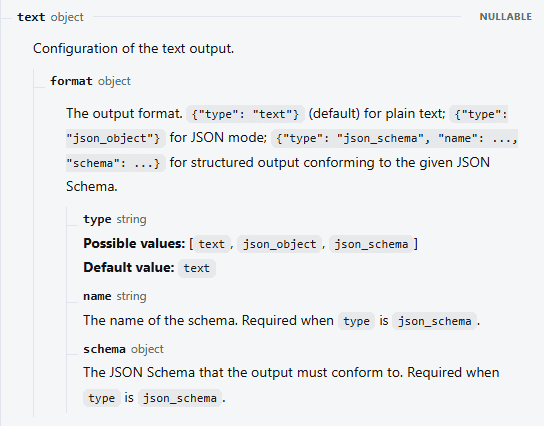
Do not mix API formats. Chat Completions uses response_format. Responses API uses text.format. The response objects are also different: Chat Completions returns final content under choices[0].message.content, while Responses API returns output items and supported SDK helpers such as response.output_text.
Responses API example with json_schema
Use a compact schema. The following request body shows the shape for a contact-lead extraction task. It is a request example, not a live response.
{
  "model": "deepseek-flash",
  "input": [
    {
      "role": "user",
      "content": [
        {
          "type": "input_text",
          "text": "Extract the lead details from this message: Maria from Northwind Labs wants API pricing. Email: [email protected]."
        }
      ]
    }
  ],
  "text": {
    "format": {
      "type": "json_schema",
      "name": "lead_intent",
      "schema": {
        "type": "object",
        "additionalProperties": false,
        "properties": {
          "name": {
            "type": ["string", "null"]
          },
          "email": {
            "type": ["string", "null"]
          },
          "company": {
            "type": ["string", "null"]
          },
          "intent": {
            "type": "string",
            "enum": ["demo_request", "support", "pricing", "other"]
          }
        },
        "required": ["name", "email", "company", "intent"]
      }
    }
  },
  "max_output_tokens": 512
}
Schema-constrained output is stronger than plain JSON mode, but it still does not remove the need for application-level checks. Validate the parsed result before writing to a database, sending it to another system, or triggering a workflow.
JSON Output vs Tool Calls
DeepSeek JSON Output and DeepSeek Tool Calls are often confused because both involve structured data. They are not interchangeable.
| Feature | What it does | Use it when |
|---|---|---|
| JSON Output | The model returns structured JSON as its answer. | You need extraction, classification, normalized metadata, or a parseable response. |
Responses json_schema | The model returns structured output constrained by a JSON Schema. | You need a stronger schema target than generic JSON mode. |
| Tool Calls | The model asks your application to execute a defined function. | You need to look up data, call an external API, run a workflow, or perform an application action. |
DeepSeek’s Tool Calls guide is clear that the application executes the function. The model only requests a function call and provides arguments. The Responses API reference also warns that generated function arguments may not always be valid JSON and may include parameters not defined in the schema, so they must be validated before execution.
Use JSON Output for structured answers. Use Tool Calls for external actions.
Thinking Mode and JSON Output
Thinking Mode can be useful for complex reasoning, but it should not distract from the final structured output. In the Responses API, max_output_tokens includes both visible output and reasoning tokens, so an output budget that is too low can prevent the model from reaching a complete final JSON object.
The same Responses API reference says temperature has no effect in Thinking Mode, and top_p has mode-specific behavior. Do not assume that changing a sampling parameter is the right way to fix a structured-output problem when the real issue is prompt clarity, output budget, schema choice, or validation.
If your application only needs a compact extraction object, do not include reasoning text inside the JSON unless you have a clear, safe reason to store it.
Streaming JSON: buffer before parsing
Streaming can deliver output fragments before the full response is complete. That is useful for user-facing text, but structured JSON should be parsed only after the complete JSON object has arrived.
Do not run json.loads on every partial chunk. Buffer the text fragments, wait for the documented terminal event or finish condition for the API format you are using, then parse and validate the completed string.
For Responses API streaming, the final event is semantic: response.completed, response.incomplete, or response.failed. It is not the same as the Chat Completions stream convention.
Common DeepSeek JSON Output problems and fixes
| Symptom | Likely issue | What to do |
|---|---|---|
| The model returns prose before the JSON | The prompt did not clearly require JSON only. | Say “Return only a valid json object” and provide the exact example shape. |
| The model wraps JSON in Markdown fences | The prompt allows presentation formatting. | Tell it not to use Markdown and reject fenced output in validation. |
json.loads fails | The output is not valid JSON or is incomplete. | Log a redacted diagnostic record, reject the response, and retry only under a bounded policy. |
| JSON is truncated | The output budget is too low or the requested object is too large. | Increase the output limit, reduce requested fields, or split the task. |
| Empty content | DeepSeek documents occasional empty content with JSON Output. | Improve the prompt and handle the empty response as a controlled failure. |
| Required field is missing | Valid JSON mode does not guarantee application schema completeness. | Validate required keys and either retry with clearer instructions or return a controlled error. |
| Wrong data type | The JSON parses but violates your schema. | Use schema validation or explicit application checks. |
| Unexpected extra fields | The prompt or schema did not constrain output tightly enough. | Reject extra fields, ask for exactly the allowed keys, or use Responses API json_schema. |
| Schema setting appears ignored | Chat Completions syntax may have been copied into Responses API, or the wrong field was used. | Use response_format for Chat Completions and text.format for Responses API. |
| Tool call arguments are treated as safe JSON | Tool Calls were confused with JSON Output. | Parse and validate tool arguments separately before executing any function. |
Validation checklist before using DeepSeek JSON in production
- Use the correct API format: Chat Completions
response_formator Responses APItext.format. - Include the word json and show the expected JSON shape in the prompt.
- Set a realistic output limit for the largest object you expect.
- Reject empty content instead of passing it downstream.
- Parse with a real JSON parser such as
json.loads, not regex. - Validate required fields, types, enums, array sizes, and numeric ranges.
- Apply business rules after schema validation.
- Do not silently coerce unsafe or ambiguous values.
- Use bounded retries for recoverable formatting failures.
- Keep raw invalid outputs out of logs if they contain user data or secrets.
- Use Tool Calls, not JSON Output, when an external function should be executed.
FAQ
Does DeepSeek JSON Output guarantee valid JSON?
DeepSeek describes JSON Output as a way to ensure the model outputs valid JSON strings, but its own guide also warns about occasional empty content and advises setting max_tokens reasonably to avoid truncation. Your application should still parse, validate, and handle failures.
Does valid JSON mean the data matches my schema?
No. Valid JSON only means the string can be parsed as JSON. It can still have missing fields, wrong types, invalid enum values, or unsafe content. Use schema and business validation after parsing.
Should I use json_object or json_schema?
Use json_object when you only need valid JSON and will validate the shape yourself. Use Responses API json_schema when you want the output constrained to a provided JSON Schema, then still validate the result in your application.
Is JSON Output the same as Tool Calls?
No. JSON Output formats the model’s answer as JSON. Tool Calls let the model request an application-defined function. The application must validate the arguments and execute the function itself.
Can I stream DeepSeek JSON Output?
You can stream output, but do not parse partial fragments as final JSON. Buffer the JSON text until the response is complete, then parse and validate the complete object.