

Use the official DeepSeek API if you need the fastest path to production, managed scaling, current hosted models, and usage-based billing. Consider local or self-hosted DeepSeek only if you need stronger infrastructure control, can operate model serving securely, and have the hardware, cloud capacity, or inference provider setup to run the exact open-weight model you choose.
Local DeepSeek is not automatically cheaper, faster, or safer. The API is not automatically the right fit for every sensitive workload. The best choice depends on your data sensitivity, workload shape, budget, engineering capacity, latency target, model requirements, and operational risk.
Documentation checked: October 7, 2026. This guide is based on official DeepSeek API documentation, DeepSeek model cards, and DeepSeek policy pages. No local deployment, benchmark, API request, or private cost model was performed.
What “local” and “API” mean in this comparison
Before comparing cost, privacy, and performance, define the route clearly. “DeepSeek Local vs API” can mean four different setups:
| Route | Meaning | Who operates it? |
|---|---|---|
| Official DeepSeek API | The hosted DeepSeek service accessed through the official DeepSeek Platform and API documentation. | DeepSeek operates the hosted endpoint. |
| Local / self-hosted DeepSeek | Running official DeepSeek open weights or a derivative on your own machine, server, GPU cluster, private cloud, or infrastructure you control. | You operate the inference environment. |
| Third-party hosted DeepSeek | Using a gateway, cloud provider, inference platform, IDE plugin, model hub, or agent framework that serves a DeepSeek model. | The third-party provider operates the route. |
| Hybrid | Using the official API for some tasks and local or third-party deployment for others. | Responsibility is split across routes. |
This article focuses on the official DeepSeek API and official open-weight model cards. Third-party providers may expose different model names, prices, limits, logging rules, and feature support.
Quick comparison: DeepSeek API vs local vs third-party vs hybrid
| Factor | Official DeepSeek API | Local / self-hosted | Third-party hosted | Hybrid |
|---|---|---|---|---|
| Setup speed | Usually fastest. Create an API key, set the base URL, choose a current model. | Slowest. Requires model selection, inference stack, hardware, security, and testing. | Depends on provider. Often easier than self-hosting. | More complex because routing and policy rules must be designed. |
| Upfront cost | Low infrastructure commitment. | Can be high because of GPUs, storage, serving, and engineering time. | Depends on provider pricing. | Mixed. |
| Variable cost | Token-based billing from API balance. | Depends on utilization, hardware/cloud rental, power/runtime, and operations. | Depends on provider pricing and billing unit. | Can optimize per workload if monitored carefully. |
| Privacy control | Prompts go to the hosted DeepSeek service under DeepSeek policy and terms. | Prompts can stay inside your infrastructure, but you must secure logs, access, and servers. | Depends on the provider’s terms and logging. | Can route sensitive preprocessing locally and non-sensitive tasks to API. |
| Scaling | Managed by DeepSeek, subject to account-level concurrency limits. | You must scale GPUs, queues, inference workers, and failover. | Provider-dependent. | Can help distribute load but increases system complexity. |
| Latency | Includes network latency and provider load, but no self-hosted infrastructure burden. | Can be faster or slower depending on hardware, quantization, batching, context length, and user concurrency. | Provider-dependent. | Depends on routing and fallback design. |
| Model freshness | Uses current hosted API models from DeepSeek’s model table. | You decide when to download, upgrade, quantize, or serve a model. | Depends on provider update schedule. | Risk of version drift across routes. |
| Engineering complexity | Lower for simple integrations. | Highest: serving, authentication, monitoring, security, updates, and cost control. | Medium: less infra, more provider-specific behavior. | High: requires routing, policy, evaluation, and monitoring. |
| Best fit | Fast launch, uncertain traffic, current API features, non-sensitive or approved hosted workloads. | Research, sensitive internal workflows, offline experiments, high steady utilization, exact open-weight needs. | Managed serving of a specific model or procurement/provider requirement. | Teams that need both hosted convenience and local control. |
Current official DeepSeek API facts
The official Models & Pricing page is the source of truth for hosted API model names, features, pricing, and concurrency limits. As of this documentation check, the two hosted API model IDs are deepseek-flash and deepseek-v4-pro.
| Official API item | deepseek-flash | deepseek-v4-pro |
|---|---|---|
| Model version | DeepSeek-V4.1-Flash-1017 | DeepSeek-V4-Pro-0813 |
| OpenAI-format base URL | https://api.deepseek.com | |
| Anthropic-format base URL | https://api.deepseek.com/anthropic | |
| Context length | 1M | 1M |
| Maximum output | 384K | 384K |
| Thinking Mode | Supported | Supported |
| JSON Output | Supported | Supported |
| Tool Calls | Supported | Supported |
| Responses API | Supported | Supported |
| Anthropic API | Supported | Supported |
| Vision | Supported | Not supported |
| Public concurrency limit | 2,500 concurrent connections per account | 500 concurrent connections per account |
Those details matter because local model names and API model IDs are not the same thing. For example, the hosted API uses deepseek-flash, while the open-weight model card is named deepseek-ai/DeepSeek-V4.1-Flash. Do not use a Hugging Face repository name as the official API model value unless DeepSeek’s API docs explicitly say to do so.
Current API pricing model
DeepSeek API billing is token-based. The official pricing page says the expense equals the number of tokens multiplied by the relevant price, deducted from topped-up or granted balance. Prices can change, so always check the official page before budgeting.
| API cost category | deepseek-flash off-peak / peak | deepseek-v4-pro off-peak / peak |
|---|---|---|
| Cached input, per 1M tokens | $0.003 / $0.006 | $0.022 / $0.044 |
| Uncached input, per 1M tokens | $0.15 / $0.30 | $0.66 / $1.32 |
| Output, per 1M tokens | $0.60 / $1.20 | $1.98 / $3.96 |
Peak hours are currently 01:00–04:00 and 06:00–10:00 UTC, Monday through Friday, excluding Chinese public holidays. All other hours are off-peak, including weekends and Chinese public holidays.
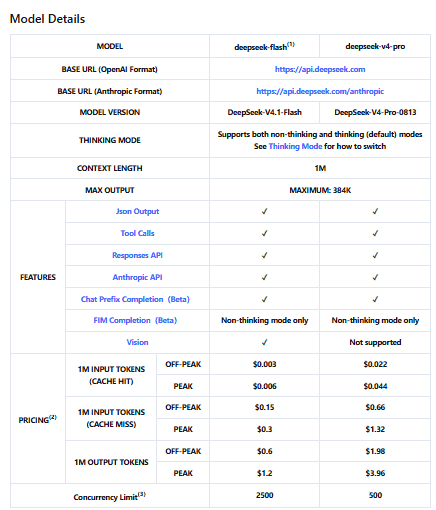
Official DeepSeek API model details and token pricing, including cached input, uncached input, and output costs during peak and off-peak hours.Do not convert these prices into a universal “cost per request.” The actual API cost depends on input tokens, output tokens, cache hits or misses, image tokens where used, reasoning behavior, tool loops, and traffic timing.
Local and open-weight DeepSeek facts
DeepSeek publishes official open-weight model repositories on Hugging Face and code or related resources on GitHub. Local deployment decisions should be based on the exact model card you plan to use, not on a generic claim that “DeepSeek can run locally.”
| Open-weight model card | What the card supports or documents | Local caution |
|---|---|---|
| DeepSeek-V4.1-Flash | MIT license; image-text-to-text model card; examples for Transformers, vLLM, SGLang, Docker Model Runner, local apps, and quantizations. | Open weights do not remove the need for substantial inference infrastructure and careful serving design. |
| DeepSeek-V4-Pro-0813 | MIT-licensed repository and weights; 1.7T-parameter model card; local deployment notes referencing inference resources, vLLM, and SGLang/DSpark guidance. | Full Pro deployment is operationally serious; do not assume consumer hardware is enough. |
| DeepSeek-R1 | Open-weight R1 and R1-Zero plus distilled dense checkpoints based on Qwen and Llama families. | Full R1 and distilled R1 variants are not the same. Distills may be easier to run but can behave differently and may involve base-model license considerations. |
| DeepSeek-V3.2 | Later V3-family open model resources and model-card guidance. | V3-family models are important historically and for open-weight work, but they are not the current hosted API default. |
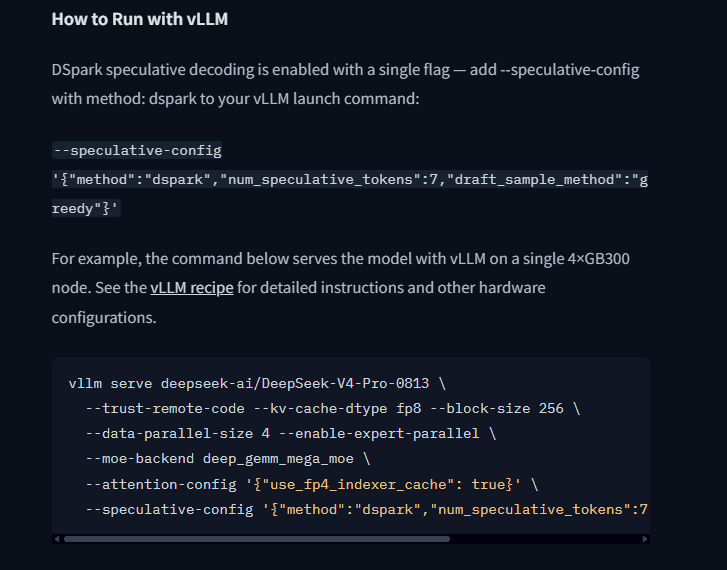
The official model card illustrates vLLM deployment on a 4×GB300 node. This is an example configuration, not a universal minimum requirement.Open weights are not the same as free production infrastructure. Local/self-hosted inference can involve GPU or cloud rental, storage, energy or runtime cost, inference-engine setup, batching, monitoring, scaling, failover, security, and engineering time.
Cost comparison: API vs local
The API and local deployment use different cost models. A fair comparison should include both direct and hidden costs.
| Cost driver | Official DeepSeek API | Local / self-hosted |
|---|---|---|
| Direct billing | Input and output tokens, with cache-hit and peak/off-peak rules where applicable. | Hardware purchase, cloud GPU rental, inference provider fees, storage, bandwidth, or power/runtime. |
| Idle capacity | You do not reserve GPUs directly; you pay for usage. | Underused GPUs or rented instances still cost money. |
| Engineering time | Lower for simple API integration. | Higher: inference server, deployment, scaling, monitoring, security, upgrades, incident response. |
| Scaling | Subject to account-level concurrency limits and provider availability. | You must provision capacity, queues, and failover. |
| Failure cost | Provider outage or rate-limit errors may affect users. | Your own server failures, model-serving bugs, dependency issues, and GPU failures become your responsibility. |
A simple planning formula is:
- API monthly cost ≈ input tokens × input price + output tokens × output price.
- Local monthly cost ≈ hardware or cloud GPU + storage + runtime/power + engineering + operations + downtime risk.
Local may become cheaper only when utilization is high enough and the inference stack performs well for your workload. The API may be cheaper when traffic is low, bursty, unpredictable, or when operations cost matters more than raw token price.
Privacy and data control
Privacy is one of the biggest reasons teams compare DeepSeek local vs API. The official DeepSeek Privacy Policy says the hosted services may collect user inputs, uploaded files, chat history, device/network data, IP address, approximate location, and other categories of personal data. It also says the personal data DeepSeek collects is directly collected, processed, and stored in the People’s Republic of China.
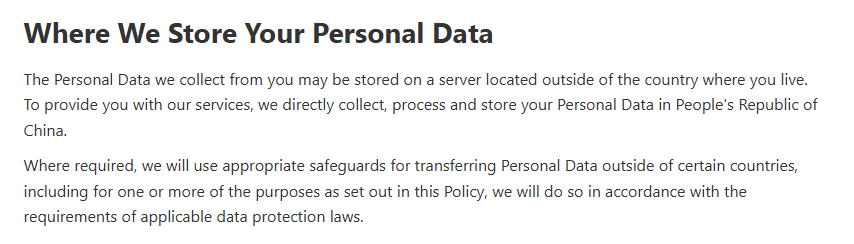
DeepSeek’s Privacy Policy states that the personal data it collects is processed and stored in the People’s Republic of China.| Route | Data-control advantage | Risk or responsibility |
|---|---|---|
| Official DeepSeek API or chat | Fast hosted access with official models and current API features. | Prompts and uploaded content go to a hosted provider under DeepSeek policy and terms. Sensitive or confidential data needs approval. |
| Local / self-hosted | Prompts can remain inside your own infrastructure. | You must secure servers, logs, network exposure, access control, retention, monitoring, and updates. |
| Third-party provider | May offer managed serving or procurement benefits. | Privacy depends on that provider’s terms, logging, data location, and model version. |
| Hybrid | Can keep sensitive preprocessing local while using the API for approved tasks. | Requires data-classification rules and careful routing. |
Local deployment can reduce third-party data transfer, but it does not automatically make a workflow safe. A poorly secured local inference server can leak prompts, outputs, credentials, or internal documents just as seriously as a hosted misuse.
Security responsibilities by route
The security model changes depending on how you access DeepSeek.
| Route | You are responsible for |
|---|---|
| Official API | Protecting API keys, keeping calls server-side, avoiding secret leakage in logs, managing account access and balance, validating model output, and following platform terms. |
| Local / self-hosted | Securing the model server, authentication, network boundaries, containers, dependencies, prompt/output logs, user access, monitoring, and abuse controls. |
| Third-party hosted | Reviewing provider terms, data policy, model route, reliability, key management, pricing, logging, and support. |
| Hybrid | Controlling data routing, preventing accidental leakage between routes, monitoring multiple systems, and handling version drift. |
Do not expose a local inference server publicly without authentication and network controls. Do not put DeepSeek API keys in frontend code, mobile binaries, browser JavaScript, public repositories, screenshots, or shared logs.
Performance, latency, and reliability
Performance depends on your workload. A model that performs well for short chat may behave differently for long-context repository analysis, tool-using agents, vision requests, JSON output, or batch jobs.
- Official API: easier to start, managed serving, current hosted models, predictable API surface, and official feature docs. It is still subject to network latency, account limits, service status, and provider changes.
- Local deployment: can reduce external network dependency in some setups, but throughput and latency depend on GPU capacity, quantization, batching, context length, cache behavior, inference framework, and concurrent users.
- Third-party hosting: performance depends on that provider’s infrastructure, model version, quantization, queueing, and limits.
Do not rely on generic benchmark claims. Test representative prompts, long context, streaming, concurrent users, tool loops, output quality, failure modes, and cost per successful task before choosing a route.
Feature differences: API vs local
Official API features come from DeepSeek API documentation. Local features come from the model card and your inference server. A local OpenAI-compatible server is not the same product as the official DeepSeek API.
| Feature | Official API | Local / self-hosted |
|---|---|---|
| Model names | Use API IDs such as deepseek-flash or deepseek-v4-pro. | Use repository names such as deepseek-ai/DeepSeek-V4.1-Flash or deepseek-ai/DeepSeek-V4-Pro-0813. |
| Vision | Supported by deepseek-flash; not supported by deepseek-v4-pro in the current official table. | Requires a vision-capable model and compatible inference stack. |
| Tool Calls | Supported in the current official table for both hosted models. | Requires template support and application-side orchestration. The model does not execute tools by itself. |
| JSON Output | Supported according to the current official model table. | Depends on the serving stack, prompt format, and parser. |
| Responses API | Supported according to official docs. | A local server may not implement the same request/response schema. |
| Anthropic API format | Official Anthropic-compatible base URL is documented. | Depends on local server or gateway support. |
| Thinking Mode | Supported through official controls. | Depends on the model card, template, and inference implementation. |
| Updates | DeepSeek updates hosted models and docs. | You control upgrades and must manage version drift. |
| Rate limits | Account-level concurrency limits apply. | Your limit is your infrastructure capacity and application queue design. |
Model naming: API IDs vs Hugging Face repositories
This is a common source of bugs. Hosted API model IDs and local repository names are different identifiers.
| Use case | Example name | Where it belongs |
|---|---|---|
| Official hosted API model | deepseek-flash | Use in the model field for official DeepSeek API calls. |
| Official hosted API model | deepseek-v4-pro | Use in the model field for official DeepSeek API calls. |
| Open-weight repository | deepseek-ai/DeepSeek-V4.1-Flash | Use for local or model-card workflows. |
| Open-weight repository | deepseek-ai/DeepSeek-V4-Pro-0813 | Use for local or model-card workflows. |
| Open-weight repository | deepseek-ai/DeepSeek-R1 | Use for R1 open-weight or local experiments, not as a current hosted API model ID unless docs say so. |
Third-party providers may expose their own model route names. Always check the provider you actually use.
When to choose the official DeepSeek API
Choose the official API when you value speed of implementation and managed serving more than infrastructure control.
- You need to launch quickly.
- Your traffic is uncertain, bursty, or early-stage.
- You do not have GPU infrastructure or model-serving engineers.
- You need current official hosted features such as Tool Calls, JSON Output, Responses API, or Anthropic API support.
- You need Vision through
deepseek-flash. - You prefer usage-based billing to hardware commitments.
- Your data is non-sensitive or approved for hosted processing.
- Your team can manage API keys, platform terms, retries, rate limits, and output validation.
The API is not risk-free. Hosted processing means data is sent to a provider. Usage requires balance and billing. Account-level concurrency limits apply. Outages or provider-side changes can affect your application. Model output still needs validation.
When to choose local or self-hosted DeepSeek
Choose local or self-hosted DeepSeek only when you have a strong reason and can handle the operational burden.
- You need sensitive workloads to stay inside approved infrastructure.
- You need offline or air-gapped experiments.
- You are researching open weights or model behavior.
- You require a specific open-weight version not exposed by the official hosted API.
- You expect high, steady utilization that may justify dedicated infrastructure.
- You need controlled internal tooling and can secure the deployment.
The caveats are serious: full models can be very large, quantized or distilled variants may behave differently, local serving may lack official API features, and model updates become your responsibility. Total cost includes engineering and operations, not just GPUs.
When to use third-party DeepSeek hosting
Third-party hosting can make sense when the official API does not fit your procurement, region, stack, or model-version needs. It can also help when you want managed deployment of a specific open-weight model without operating your own inference servers.
However, treat it as a separate provider choice. The third party may change the model version, quantization, safety settings, context length, price, privacy policy, logging behavior, support terms, and rate limits. Do not transfer official DeepSeek API facts to a gateway unless the provider explicitly documents the same behavior.
When a hybrid setup is better
A hybrid setup can be useful when no single route fits every task.
- Use the official API for production traffic and local models for research and evaluation.
- Use local preprocessing or redaction, then send approved non-sensitive prompts to the API.
- Use
deepseek-flashthrough the API for Vision tasks and local text-only models for internal batch jobs. - Use local models for non-urgent internal work and API fallback when local capacity is saturated.
- Evaluate open-weight models locally before deciding whether to integrate the hosted API.
Hybrid systems are not automatically simple. They require routing rules, data classification, monitoring, output evaluation, prompt alignment, and model-version governance.
Decision matrix
| Scenario | Choose API if… | Choose local if… | Consider hybrid if… |
|---|---|---|---|
| Prototype | You need speed and current official models. | You are specifically testing open weights. | You want to compare outputs before committing. |
| Production SaaS | You can approve hosted processing and need managed scaling. | You have infrastructure and data-control requirements. | You need API for spikes and local for controlled workloads. |
| Sensitive data | The data is approved for hosted processing. | The data cannot leave approved infrastructure. | You can locally redact or classify before hosted calls. |
| Vision / image understanding | You need current deepseek-flash Vision support. | You can run a vision-capable open-weight model with compatible serving. | Use API for Vision and local for text-only work. |
| High steady traffic | Token billing remains cheaper after ops are included. | Utilization is high enough to justify infrastructure. | Use local for predictable load and API for bursts. |
| Unpredictable traffic | You want usage-based cost and fewer idle resources. | You already have spare infrastructure. | Use local baseline capacity plus API overflow. |
| Small engineering team | You do not want to maintain inference servers. | The team’s goal is model operations research. | Keep the production route simple and local experiments separate. |
| Research / open weights | You only need hosted behavior comparison. | You need model-card weights, local inspection, or reproducible experiments. | Compare hosted and open-weight outputs with a fixed test set. |
Migration checklist: API to local
- Identify the exact hosted model you use and the exact local model you want to serve.
- Read the model card and license for the local model.
- Check model size, required inference route, and documented local serving options.
- Choose an inference engine such as vLLM, SGLang, Docker Model Runner, or another documented route where appropriate.
- Validate the chat template and request format.
- Run representative prompts and compare output quality.
- Test long context, streaming, concurrency, JSON output, tool-style workflows, and failure handling if you need them.
- Implement authentication, access control, network restrictions, and safe logging around the local server.
- Define monitoring, rollback, and an emergency path back to the API.
Do not expect identical outputs. A local model, quantized version, serving engine, or prompt template can change behavior.
Migration checklist: local to API
- Choose the current official API model ID.
- Create and secure a DeepSeek API key.
- Update the base URL to
https://api.deepseek.comfor OpenAI-format clients. - Update the model name to
deepseek-flashordeepseek-v4-proas appropriate. - Remove local-only parameters or template assumptions.
- Check Vision, Tool Calls, JSON Output, Responses API, and Thinking Mode differences.
- Implement 429 handling, bounded retries, and queueing.
- Review DeepSeek privacy and open platform terms for hosted processing.
- Track token usage, output lengths, and cost per successful task.
Common mistakes
| Mistake | Why it is wrong | What to do instead |
|---|---|---|
| Assuming local is free | Hardware, cloud GPUs, storage, power/runtime, monitoring, and engineering all cost money. | Compare total cost of ownership, not only token prices. |
| Assuming API is less secure by default | Security depends on data sensitivity, provider approval, key handling, and application design. | Compare the actual security controls of each route. |
Using deepseek-flash as a local model name | That is an official API model ID. | Use the relevant local repository name from Hugging Face. |
Using deepseek-ai/DeepSeek-V4.1-Flash in the official API | That is a model-card repository name, not the hosted API ID. | Use deepseek-flash for the official API. |
| Copying API feature support into local deployment | A local server may not implement the same tool calling, Responses API, Vision, or JSON behavior. | Check the model card and inference server docs. |
| Comparing API price to GPU rental only | It ignores engineering, monitoring, idle capacity, security, and downtime. | Build a workload-specific cost model. |
| Using obsolete R1 or V3 assumptions for current API work | Current hosted API model IDs and features are listed in the current model table. | Check the official Models & Pricing page and API changelog. |
| Logging sensitive prompts | Both hosted and local workflows can leak data through logs. | Redact, minimize, and control access to logs. |
Privacy and compliance checklist
Before choosing DeepSeek local or API for real workloads, ask:
- What data will be sent to the model?
- Is it personal, confidential, regulated, proprietary, or covered by contract?
- Is hosted processing allowed by policy and law?
- Where is data processed and stored?
- Are prompts and outputs logged?
- Who can access logs, prompts, outputs, and evaluation data?
- Which provider terms apply?
- Are outputs used for high-impact decisions?
- Is human review required?
- If local, is the inference server authenticated, patched, monitored, and restricted?
- If third-party hosting is involved, have you reviewed that provider’s terms and data practices?
Testing plan before deciding
Do not choose based only on model marketing, a single prompt, or a generic benchmark. Test your own workload.
- Prepare 20–50 representative prompts from your real use cases.
- Include short prompts, long-context prompts, and edge cases.
- Test expected maximum output size.
- Test streaming if your UI depends on it.
- Test concurrent users and background jobs.
- Test JSON output, tool calls, or Vision if your application needs them.
- Measure cost per successful task, not only cost per token.
- Perform human quality review on outputs.
- Record failures, retries, truncation, malformed output, hallucinations, and operational friction.
- Decide with both engineering and compliance stakeholders.
Bottom line
Choose the official DeepSeek API when you want the fastest practical route to current hosted models, managed serving, usage-based billing, and documented API features. Choose local or self-hosted DeepSeek when you have a strong need for infrastructure control, open-weight research, offline use, or sensitive internal processing—and you can handle the operational burden.
For many teams, the best answer is not purely local or purely API. A measured hybrid setup can use the API for current hosted capabilities and local models for controlled experiments, sensitive preprocessing, or internal batch jobs. The right decision is the one your workload, data policy, team capacity, and cost model can actually support.
FAQ
Should I use DeepSeek locally or through the API?
Use the API if you need quick integration, managed serving, current hosted models, and usage-based billing. Use local only if you need infrastructure control, can operate model serving securely, and have enough hardware or managed inference capacity for the exact model you choose.
Is local DeepSeek cheaper than the API?
Not automatically. Local costs include GPUs or cloud rental, storage, power/runtime, engineering, monitoring, scaling, security, and downtime. Local may be cheaper only at the right utilization and operational maturity.
Is local DeepSeek more private?
It can reduce third-party data transfer if deployed correctly, but it is not automatically private. You must secure the model server, logs, access control, network exposure, retention, and monitoring.
What is the current official DeepSeek API model?
The current official model table lists deepseek-flash and deepseek-v4-pro. Check the official Models & Pricing page before publishing code because model names and features can change.
Can I run DeepSeek V4.1 Flash locally?
The official DeepSeek-V4.1-Flash Hugging Face model card provides open-weight resources and example routes such as Transformers, vLLM, SGLang, Docker Model Runner, local apps, and quantizations. That does not mean every machine can run it well.
Can I run DeepSeek V4 Pro locally?
The DeepSeek-V4-Pro-0813 model card includes local deployment references and lists the repository and weights under MIT License. It is a very large model, so local use should be treated as a serious infrastructure project, not a simple desktop install.
Does local deployment support Tool Calls?
It depends on the model, chat template, inference server, and your application. In any route, the application executes the tool. Do not assume official API Tool Calls behavior automatically exists in every local server.
Does the API support Vision?
The current official table lists Vision support for deepseek-flash and not for deepseek-v4-pro. If your workload needs image understanding, start with deepseek-flash and the official Vision documentation.
What is the biggest hidden cost of local DeepSeek?
Engineering and operations are often the hidden costs: model serving, GPU utilization, monitoring, scaling, security, failover, updates, dependency management, and incident response.