

DeepSeek can be useful for coding, especially for explaining code, debugging small failures, refactoring, generating tests, reviewing snippets, and powering coding-agent workflows through the API. For serious engineering work, treat it as an assistant: verify output, run tests, review security, and avoid pasting private repositories, secrets, API keys, or confidential code unless your organization has approved the workflow.
You can use DeepSeek for coding through several routes: the official chat or app for quick help, DeepSeek Harness for local file-oriented agent work, the DeepSeek API for custom tools and coding agents, or official open-weight model resources for local experiments. The right workflow depends on task size, code sensitivity, review requirements, and whether you need API features such as Tool Calls, JSON Output, Responses API, or Vision.
Documentation checked: October 7, 2026. This article is based on official DeepSeek documentation and public model resources. No private codebase, API test, benchmark run, production deployment, or local model test was performed.
What “DeepSeek for coding” actually means
Using DeepSeek for coding can mean very different things. A beginner asking the chat to explain a function has a different risk profile from a team running a tool-using coding agent against a private repository.
| Coding task | How well DeepSeek fits | Best route | What to verify |
|---|---|---|---|
| Explain unfamiliar code | Good fit for learning and onboarding. | Chat, app, API, or local model. | Check the explanation against the actual code path and tests. |
| Debug a small error | Good fit when you provide the exact error, minimal code, and expected behavior. | Chat/app for simple cases; API or agent for repeatable workflows. | Run the suggested fix locally and add a regression test. |
| Refactor a function | Useful for readability and small behavior-preserving changes. | Chat, Harness, or coding agent. | Confirm public behavior, tests, types, and API compatibility. |
| Generate tests | Useful as a starting point for unit, edge-case, and regression tests. | Chat/app for snippets; API/agent for automation. | Make sure tests target intended behavior, not only the current implementation. |
| Write documentation | Strong fit for README drafts, comments, migration notes, and API examples. | Chat/app, Harness, or API. | Check names, commands, options, and unsupported claims. |
| Review a pull request snippet | Useful for second-pass review, but not a substitute for human review. | Chat, API, Harness, or coding agent. | Validate correctness, security, performance, and project conventions. |
| Design an API or architecture | Useful for trade-off exploration and checklists. | Chat/app or API. | Review constraints, scalability, security, and team context. |
| Inspect an error screenshot or UI bug | Possible when using a vision-capable route. | deepseek-flash through a supported Vision route. | Text logs and code are usually better than screenshots when available. |
| Run an agentic coding workflow | Useful for multi-step changes when tool execution is controlled. | Harness, Codex-style setup, Claude Code-style setup, or custom API agent. | Require approval for file edits, shell commands, migrations, and production changes. |
| Work with a private repository | Potentially useful, but higher risk. | Approved API, Harness, local/self-hosted, or internal agent route. | Follow company policy; remove secrets and protected data. |
Current DeepSeek model choice for coding
The current official DeepSeek Models & Pricing page lists two main API model IDs: deepseek-flash and deepseek-v4-pro. Both support Thinking Mode, JSON Output, Tool Calls, Responses API, and Anthropic API. Both list 1M context length and 384K maximum output. Vision support is listed for deepseek-flash, while deepseek-v4-pro is listed as not supporting Vision.
| Model ID | Current model version | Best coding uses | Cautions |
|---|---|---|---|
deepseek-flash | DeepSeek-V4.1-Flash-1017 | Quick coding help, cost-sensitive automation, high-throughput agent workflows, screenshots or image-based coding help, routine debugging, and many coding-agent integrations. | Do not assume lower cost means it is always the best model for hard reasoning or critical reviews. Test on your workload. |
deepseek-v4-pro | DeepSeek-V4-Pro-0813 | Harder text-only reasoning, complex code review, long-context repository analysis, and agent workflows where Pro behavior justifies higher cost. | Vision is not supported in the current official model table. Do not use it for image input unless the docs change. |
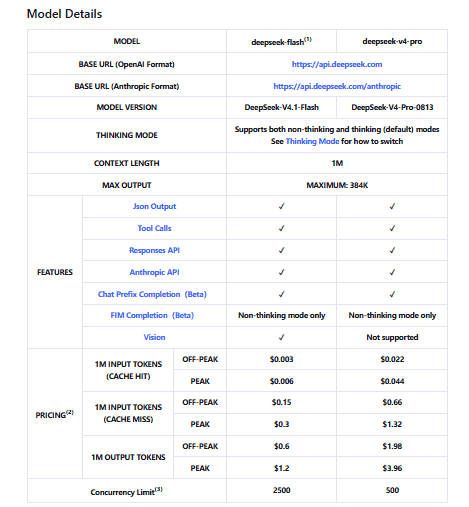
Use the official model IDs for the hosted API. Do not use Hugging Face repository names such as deepseek-ai/DeepSeek-V4.1-Flash as the API model value unless official DeepSeek docs explicitly say so.
Chat, app, Harness, API, agent, or local model?
The route matters as much as the model. A one-off chat answer, a desktop agent editing local files, and a backend API coding workflow have different controls and risks.
| Route | Best for | Watch out for |
|---|---|---|
| DeepSeek Chat or app | Quick questions, small snippets, explanations, debugging help, learning, and prompt-based code review. | Do not paste secrets, credentials, full private repositories, or confidential logs. Output still needs review. |
| DeepSeek Harness | Desktop agent workflows, local files, repo exploration, bug fixing, building features, running tests, plugin-based work, and longer tasks. | Harness can edit files and run tools, so use version control, inspect diffs, and approve risky actions deliberately. |
| Official DeepSeek API | Custom coding tools, automated review, test-generation pipelines, RAG over code, workflow automation, and backend integrations. | You must handle API keys, logs, retries, validation, privacy policy, and output review. |
| Coding-agent integrations | Codex-style, Claude Code-style, OpenCode-style, or IDE/agent workflows where the agent reads files, plans, edits, and runs tools. | Each tool has its own configuration, safety model, and model mapping. Do not assume every feature works identically. |
| Local or open-weight deployment | Research, privacy-sensitive experiments, local evaluation, and self-hosted workflows. | Operationally complex. Local deployment is not automatically cheaper, private, or safer. |
DeepSeek Harness for coding
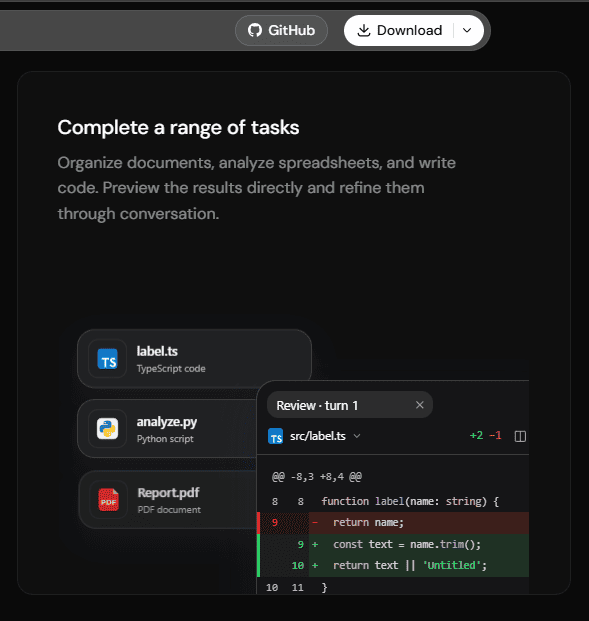
DeepSeek describes DeepSeek Harness as a public-preview, open-source harness with composable plugins. Its official page lists coding as a supported task type: explore repositories, fix bugs, build features, and run tests. The same page says Harness can work with local files, inspect execution traces, and expose detailed runtime information for tool calls and task execution.
That makes Harness closer to an agent workspace than a simple chat window. Use it when you want a coding assistant that can interact with files and tools, but treat its changes like any automated code change: review diffs, run tests, and keep a rollback path.
Official coding-agent integrations
DeepSeek’s API docs include official agent-integration pages for coding tools. For example, the Codex integration explains that Codex talks to models through the Responses API, which DeepSeek supports. The same page describes setup options that add DeepSeek models such as deepseek-flash and deepseek-v4-pro, and notes that deepseek-flash can be configured with image input in Codex’s model catalog.
Use official integration pages as setup references, not generic blog snippets. Agent tools can add their own system prompts, model mappings, file permissions, command execution settings, and safety behavior. Never paste a DeepSeek API key into unofficial scripts or untrusted configuration generators.
Prompt templates for coding with DeepSeek
Use specific prompts. “Fix my code” is too vague. The better pattern is: goal, context, constraints, code, error, expected behavior, and requested output format.
Explain code
Explain what this code does. Identify inputs, outputs, side effects, edge cases, and hidden assumptions. Keep the explanation practical and point out anything that might surprise a maintainer.Debug an error
I get this error. Ask clarifying questions only if needed. Identify the most likely causes, rank them, and suggest the smallest safe fix first. Also suggest a test to confirm the fix.Refactor safely
Refactor this code for readability while preserving behavior. Do not change public API names. List behavior-preserving changes separately from risky or behavior-changing suggestions.Generate tests
Write unit tests for the following function. Cover normal cases, edge cases, invalid inputs, and regression cases. Use descriptive test names and explain what each test protects.Review code
Review this code for correctness, security, performance, maintainability, error handling, and missing tests. Prioritize issues by severity and suggest minimal fixes.Secure coding review
Look for security issues, injection risks, secret leakage, insecure defaults, and unsafe error handling. Explain the risk and the safe fix. Do not provide exploit steps beyond what is needed to understand the issue.Agentic coding instruction
Before changing files, inspect the relevant files, explain the plan, make the smallest safe changes, run or propose tests, and summarize exactly what changed.A safe coding workflow with DeepSeek
DeepSeek output should be treated as a draft from an assistant, not as code that can be merged without review. A safe workflow looks like this:
- Describe the coding goal clearly.
- Provide only the necessary context.
- Remove secrets, tokens, private keys, customer data, and confidential details.
- Ask for a plan before code changes.
- Ask for minimal diffs or small scoped edits.
- Ask for tests that prove the change works.
- Run tests locally.
- Review the diff manually.
- Run linters, type checks, and security checks where appropriate.
- Use version control and keep a rollback path.
This workflow matters even more for coding agents. A chat answer can be ignored. An agent that edits files, calls tools, or runs commands needs stronger guardrails.
How to debug code with DeepSeek
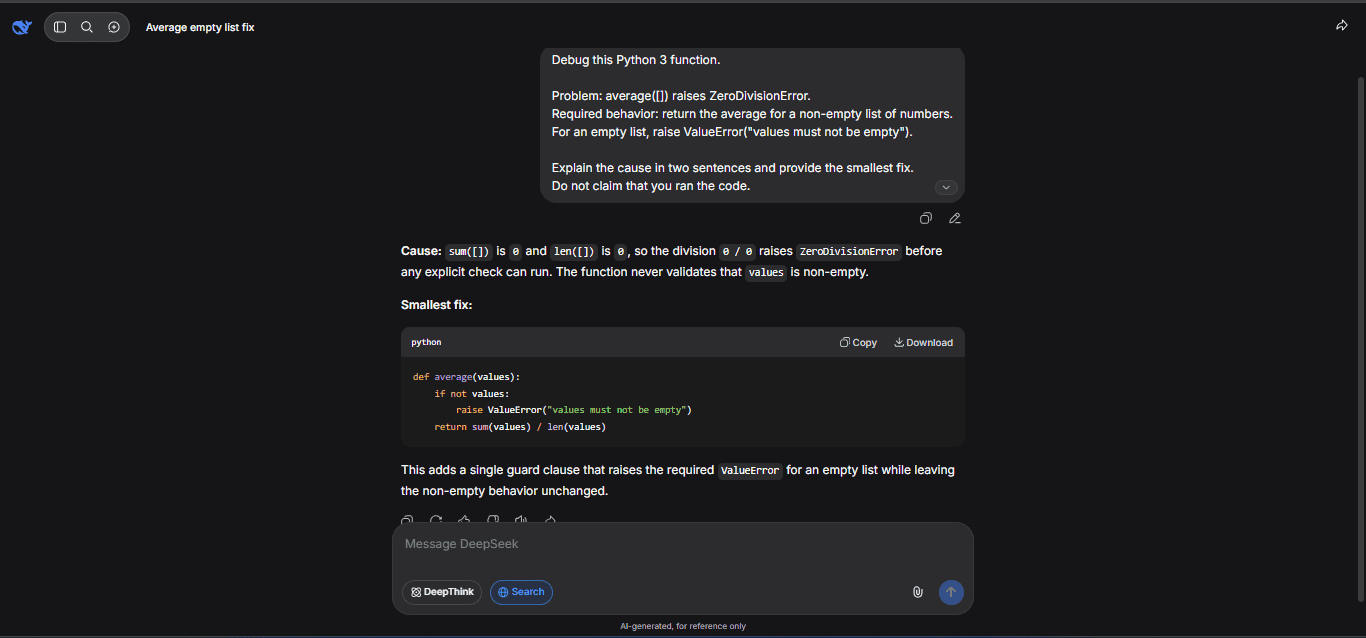
For debugging, DeepSeek works best when you provide a compact, reproducible problem instead of a vague description. Include:
- the exact error message;
- language and version;
- framework or library version;
- a minimal reproducible example;
- expected behavior vs actual behavior;
- recent changes;
- a redacted stack trace;
- package manager, OS, or deployment context only if relevant.
Ask DeepSeek to rank hypotheses, suggest one fix at a time, explain why the fix should work, and suggest a test to confirm it. Avoid broad rewrites until the cause is understood.
Do not paste API keys, access tokens, database URLs, private hostnames, customer records, confidential logs, or full proprietary repositories unless your organization has approved the workflow.
How to use DeepSeek for code review
DeepSeek can help with code review, but it cannot certify that code is correct or secure. Use it as an additional reviewer that points out likely issues.
| Review category | Ask DeepSeek to check | Human follow-up |
|---|---|---|
| Correctness | Wrong logic, missing branches, incorrect assumptions, and edge cases. | Run tests and inspect the actual behavior. |
| Input validation | Unexpected nulls, invalid types, malformed input, and untrusted data. | Confirm rules against product requirements. |
| Error handling | Swallowed exceptions, unclear messages, unsafe retries, and missing cleanup. | Test failure paths. |
| Security | Injection risks, secrets, unsafe defaults, auth issues, path traversal, and data exposure. | Use proper security review and scanners for critical code. |
| Performance | Repeated work, unnecessary I/O, inefficient loops, missing indexes, and large memory use. | Measure with realistic data. |
| Maintainability | Complex functions, duplicated logic, unclear names, and missing tests. | Apply project conventions. |
A useful severity scale is:
| Severity | Meaning | Action |
|---|---|---|
| Critical | Security, data loss, auth, money movement, or production outage risk. | Do not merge until reviewed and fixed. |
| High | Likely bug, serious edge case, or reliability issue. | Fix or explicitly accept the risk. |
| Medium | Maintainability, test coverage, or performance concern. | Address when it affects the current change. |
| Low | Style, naming, documentation, or minor cleanup. | Improve if it does not distract from the core change. |
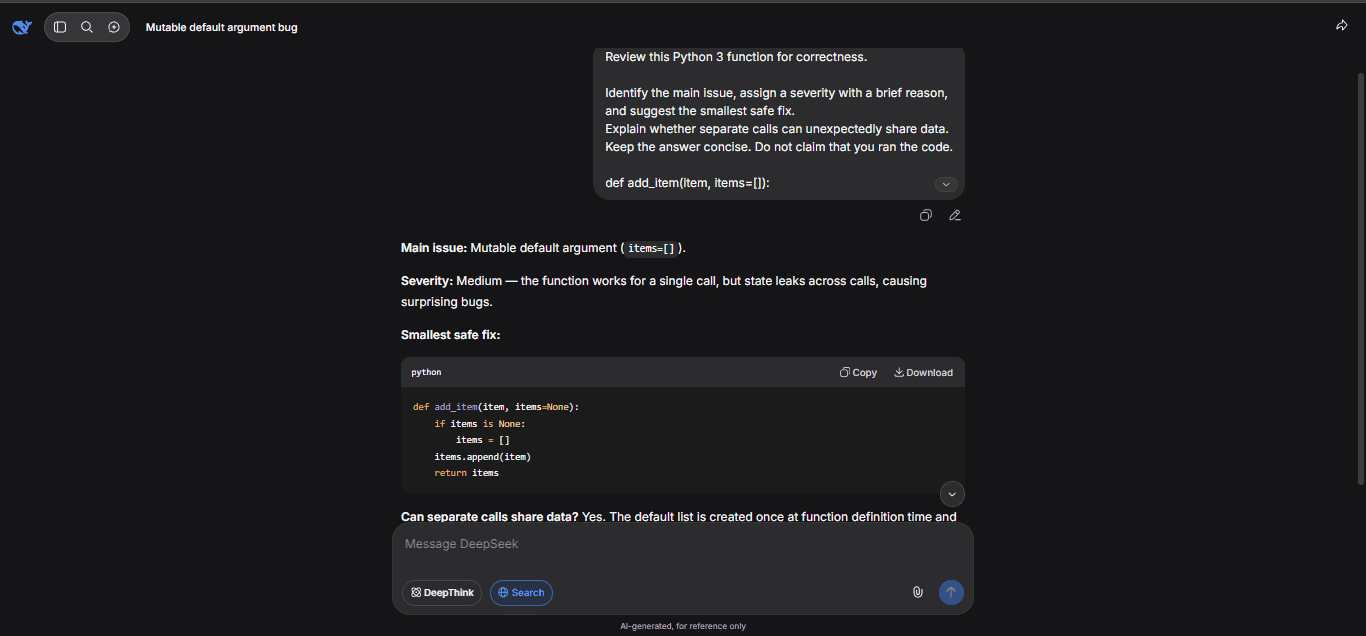
How to generate tests with DeepSeek
DeepSeek can draft useful tests, especially when you provide the intended behavior. Ask for:
- normal cases;
- edge cases;
- invalid inputs;
- regression cases for the reported bug;
- fixtures and mocked dependencies when needed;
- test names that describe behavior.
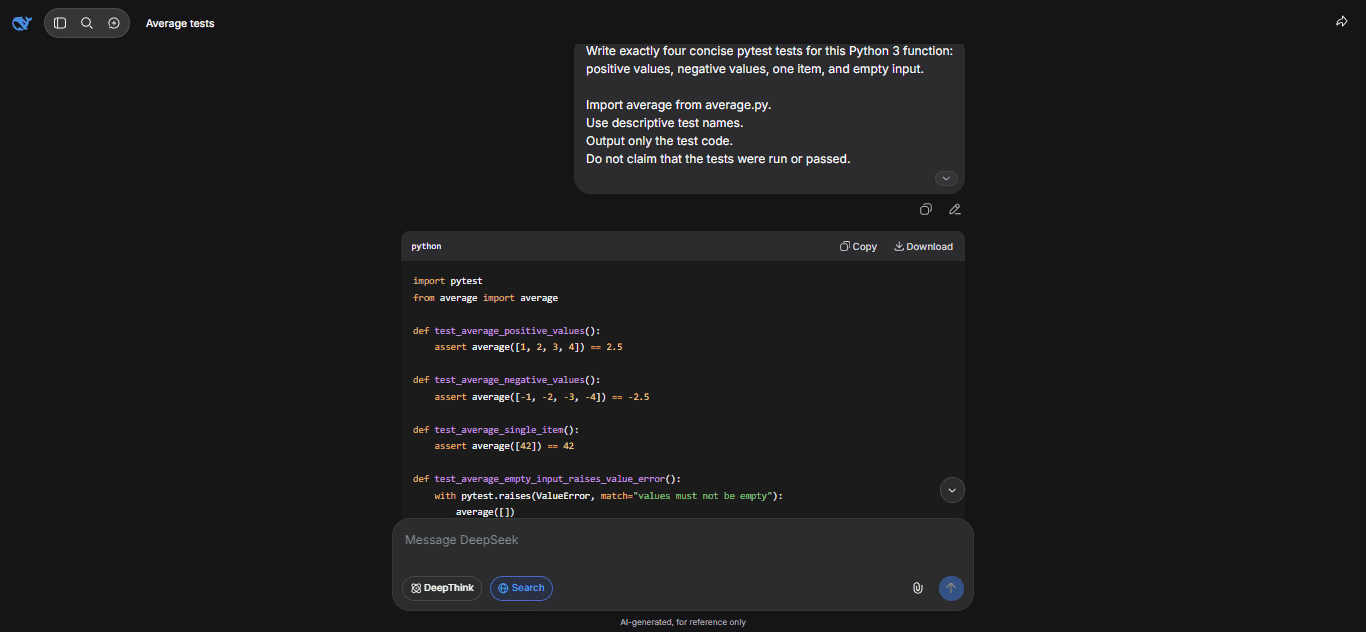
Generated tests can still be weak. They may test the current implementation instead of the intended behavior, miss a real edge case, or pass for the wrong reason. Review test logic before treating coverage as evidence that the code is correct.
How to refactor with DeepSeek without breaking behavior
For refactoring, do not ask for a huge rewrite first. Ask for behavior-preserving changes, one module or function at a time.
- Define what must not change.
- Ask for a diff-style explanation.
- Separate behavior-preserving changes from risky changes.
- Ask for tests before and after the refactor.
- Do not mix a refactor and a feature change unless you intentionally choose to do that.
Prompt example:
Refactor this for readability while preserving behavior. Do not change public API names, return values, error behavior, or database schema. List any behavior-changing suggestions separately instead of applying them.DeepSeek for long-context and repo-level coding
The current official model table lists a 1M context length for the hosted API models, which can help with larger files, logs, multi-file reasoning, and repository-level planning. But long context is not the same as persistent memory, and it does not mean you should paste an entire repository blindly.
Better repo-level workflows usually provide:
- a clear goal;
- a file tree;
- only the files related to the issue;
- relevant test failures;
- short summaries of surrounding modules;
- project conventions;
- constraints such as “do not change public API names.”
More context can increase cost, noise, and privacy risk. Exclude sensitive files, credentials, customer data, and unrelated generated artifacts.
Vision for coding screenshots and UI bugs
Because deepseek-flash supports Vision in the current official table, it can be useful for coding tasks that include screenshots: UI bugs, browser errors, chart rendering problems, visual layout issues, or screenshot-only error states.
Vision support means image understanding, not image generation. It is also not a replacement for actual logs and code. If you have text logs, stack traces, and source files, provide those instead of relying only on screenshots.
Do not use deepseek-v4-pro for image input unless DeepSeek’s model table changes; it is currently listed as not supporting Vision.
JSON Output, Tool Calls, and Responses API for coding tools
DeepSeek’s API features are especially useful for coding tools and agents.
| Feature | Coding use | Important caution |
|---|---|---|
| JSON Output | Return structured review results such as file, severity, issue, suggested fix, and test suggestion. | Valid JSON still needs application-level validation. |
| Tool Calls | Let the model request actions such as reading files, searching code, running tests, or applying patches. | The application executes the tool. Validate arguments before executing anything. |
| Responses API | Useful for Codex-style or agent-framework integrations that use the Responses schema. | Do not parse Responses output as if it were Chat Completions output. |
| Thinking Mode | Useful for harder reasoning, multi-step debugging, and tool-using coding agents. | Visible reasoning does not prove correctness. If tools are used in thinking mode, follow DeepSeek’s documented handling of reasoning_content. |
DeepSeek’s Thinking Mode documentation notes that tool calls are supported in thinking mode and that, when requests carry the tools parameter, previous reasoning_content must be passed back in subsequent requests. If your agent ignores that requirement, it may fail even if the model choice is correct.
Privacy and security rules for coding with DeepSeek
Hosted chat and API calls send content to a service provider. Local or open-weight deployment changes the data flow, but it creates infrastructure, logging, and access-control responsibilities. Third-party coding tools have their own policies and may not follow DeepSeek’s official terms.
Do not paste the following into hosted chat, API calls, issue reports, public prompts, or third-party tools unless your organization has explicitly approved the workflow:
- API keys, access tokens, passwords, and private keys;
.envfiles or secret manager exports;- database URLs, connection strings, or private hostnames;
- customer data or personal data;
- full private repositories;
- proprietary algorithms or confidential business logic;
- security vulnerabilities that have not been disclosed or approved for review;
- production stack traces that contain user data, tokens, or internal paths.
If you are using the API in a product, review DeepSeek’s Open Platform Terms. Keep API keys server-side, redact logs, disclose AI use and data handling where required, and validate outputs before they affect users or systems.
Limitations of DeepSeek-generated code
DeepSeek can produce useful code, but generated code may still:
- compile but be logically wrong;
- miss edge cases;
- use outdated package APIs;
- invent functions, flags, or dependencies;
- ignore project conventions;
- introduce vulnerabilities;
- overfit to the prompt;
- fail under concurrency;
- handle errors unsafely;
- create code with licensing or policy concerns if source material is unclear.
Use generated code as a starting point. Run tests, review dependencies, scan for secrets, check licenses where relevant, and require human approval for migrations, auth/security changes, payments, infrastructure changes, or production deployments.
Which DeepSeek route should you use for coding?
| Scenario | Best route | Why | Caution |
|---|---|---|---|
| Beginner learning | Chat or app | Fast explanations and examples. | Verify examples against current docs. |
| One-off debugging | Chat/app or API | Works well with a minimal reproducible example. | Remove secrets from traces and logs. |
| Small code generation | Chat/app or API | Good for functions, utilities, and examples. | Test before use. |
| Test generation | Chat/app, API, or agent | Can draft normal, edge, and regression tests. | Review whether tests cover intended behavior. |
| Code review | API, Harness, or agent | Can produce structured review notes and severity labels. | Not a certified security audit. |
| Multi-file changes | Harness or coding agent | Can inspect and edit files with tool support. | Use version control and inspect diffs. |
| Agentic coding | Harness, Codex-style setup, Claude Code-style setup, OpenCode-style setup, or custom API agent | Can combine model reasoning with file and tool workflows. | Require approval for destructive commands and production changes. |
| Private/proprietary code | Approved enterprise route, local/open-weight, or controlled internal workflow | Data policy matters more than convenience. | Do not paste private code into hosted tools without approval. |
| High-volume automation | API or self-hosted route | API gives managed serving; local may fit high steady utilization. | Measure cost per successful task. |
| Screenshot or UI bug | deepseek-flash Vision route | Can inspect image input when supported. | Prefer text logs and code when available. |
| Offline or self-hosted work | Open-weight/local deployment | More infrastructure control. | Operationally complex; not automatically safer. |
How to evaluate DeepSeek for your coding workflow
Do not decide based on one prompt or a generic benchmark. Build a small test set from your real coding tasks, excluding sensitive material unless the workflow is approved.
- Prepare 10 real bug-fix tasks with expected outcomes.
- Add 10 refactor tasks where behavior must not change.
- Add 10 test-generation tasks.
- Add 5 code-review tasks with known issues.
- Add 5 documentation or migration-note tasks.
- Add 3 multi-file tasks if you plan to use agents.
- Measure whether code compiles, tests pass, and bugs are actually fixed.
- Track manual corrections, security issues introduced, and reviewer confidence.
- Calculate cost per successful task, including retries and tool loops.
- Compare the workflow against your current development process, not against hype.
Common mistakes when using DeepSeek for coding
| Mistake | Why it matters | Safer approach |
|---|---|---|
| Pasting secrets into chat | Secrets can leak through prompts, logs, screenshots, or third-party tools. | Redact secrets and rotate anything exposed. |
| Trusting generated code without tests | Generated code can compile and still be wrong. | Run tests, linters, type checks, and review diffs. |
| Using vague prompts | “Fix this” usually produces broad guesses. | Provide error, context, expected behavior, and constraints. |
| Using screenshots when logs are available | Screenshot interpretation can miss text or context. | Provide text logs and code whenever possible. |
| Mixing refactor and feature change | It becomes hard to know what broke behavior. | Separate refactors from feature work. |
Assuming deepseek-v4-pro supports Vision | The current official table lists Vision for deepseek-flash, not Pro. | Use deepseek-flash for image input. |
| Letting an agent run destructive commands without approval | Agents can change files, delete data, or run unsafe commands if not constrained. | Require approval for destructive actions and inspect planned commands. |
| Confusing API model IDs with local model names | Hosted API names and Hugging Face repository names are different. | Use the official API model ID for hosted calls and repository names for local models. |
| Comparing costs without retries and tool loops | Agent workflows can multiply calls and tokens. | Measure cost per successful task. |
Bottom line
DeepSeek is useful for coding when you give it focused context, use the right route, and keep normal engineering safeguards in place. Use chat or the app for quick explanations and snippet-level help. Use Harness or coding agents for multi-file work only when you can review changes and control tool execution. Use the API for structured automation, tool workflows, and production integrations. Use local/open-weight routes when you need infrastructure control and can operate them safely.
The safest rule is simple: let DeepSeek accelerate coding work, but do not let it replace tests, code review, security review, or developer judgment.
FAQ
Is DeepSeek good for coding?
Yes, DeepSeek can be useful for explaining code, debugging, refactoring, generating tests, reviewing snippets, and powering coding-agent workflows. It should still be treated as an assistant, not a replacement for tests, review, and security checks.
Which DeepSeek model should I use for coding?
Start with deepseek-flash for quick coding help, cost-sensitive workflows, higher-throughput agents, and Vision tasks such as error screenshots. Evaluate deepseek-v4-pro for harder text-only reasoning, complex review, or long-context coding workflows where Pro behavior justifies the higher cost.
Can DeepSeek debug code?
Yes, especially when you provide the exact error message, relevant code, expected behavior, language/framework versions, and a minimal reproducible example. Do not include secrets or private data in logs or stack traces.
Can DeepSeek review code?
Yes, DeepSeek can help identify likely issues in correctness, security, performance, readability, and tests. It does not replace human review and should not be treated as a certified security audit.
Can DeepSeek generate tests?
Yes. Ask for normal cases, edge cases, invalid inputs, and regression tests. Review the generated tests to ensure they check intended behavior rather than simply mirroring the current implementation.
Does DeepSeek support coding agents?
Yes. DeepSeek’s API supports features useful for agents, including Thinking Mode, Tool Calls, JSON Output, Responses API, and Anthropic API compatibility. DeepSeek also provides official integration documentation for agent workflows such as Codex, and its Harness product is positioned for file and tool-based agent work.
Can I use DeepSeek with Codex?
DeepSeek provides an official Codex integration guide. The guide explains that Codex talks to models through the Responses API, which DeepSeek supports, and describes configuration options for deepseek-flash and deepseek-v4-pro. Use the official guide rather than old snippets.
Is DeepSeek safe for private code?
Only if your organization has approved the workflow and you understand the data route. Hosted chat and API calls send content to a service provider. Local deployment can reduce third-party data transfer but creates infrastructure and logging responsibilities. Do not paste private repositories, secrets, credentials, or confidential logs without approval.
Can DeepSeek run code?
The model itself generates or requests actions; your application, Harness, IDE tool, or agent framework executes tools and code. Tool execution must be validated and controlled by the surrounding system.
Does DeepSeek support screenshots of errors?
The current official model table lists Vision support for deepseek-flash. That can help with screenshots and UI bugs, but text logs and source code are usually more reliable for debugging when available.