

DeepSeek is a Chinese artificial intelligence company that develops AI models and offers a chatbot with the same name. You can use its assistant to ask questions, draft and summarize text, and get help with coding or problem-solving. Its official website provides access to the chat service, apps, and developer platform.
The distinction matters: DeepSeek is the company, a DeepSeek model is the underlying AI, and the chatbot is an interface for using that AI. A third-party app using a DeepSeek model is not necessarily operated by DeepSeek, and it may have different features, prices, and data-handling rules.
Last fact-checked: October 2, 2026.
Who created DeepSeek, and why did it become well known?
DeepSeek was founded in 2023 by Liang Wenfeng, who previously co-founded the quantitative hedge fund High-Flyer.
Based in Hangzhou, China, the company gained international recognition with DeepSeek-R1 in January 2025. R1 drew attention to reasoning-focused AI and openly available model weights, as explained in IBM’s account of its emergence. DeepSeek also published its R1 research and model repository, allowing developers to examine the approach and work with the released models.
That history explains why R1 appears so often in discussions of DeepSeek. However, R1 is an earlier model release, not a synonym for every DeepSeek product or its current model lineup.
What can you use DeepSeek for?
DeepSeek’s service description covers generating text, tables, and code from user input. For a useful first trial, choose a small task whose result you can check yourself.
Draft, rewrite, and summarize
Try drafting an email, shortening a paragraph, comparing two pieces of text, or turning notes into an action list. Tell the assistant who the text is for, which details must remain, and the format you need.
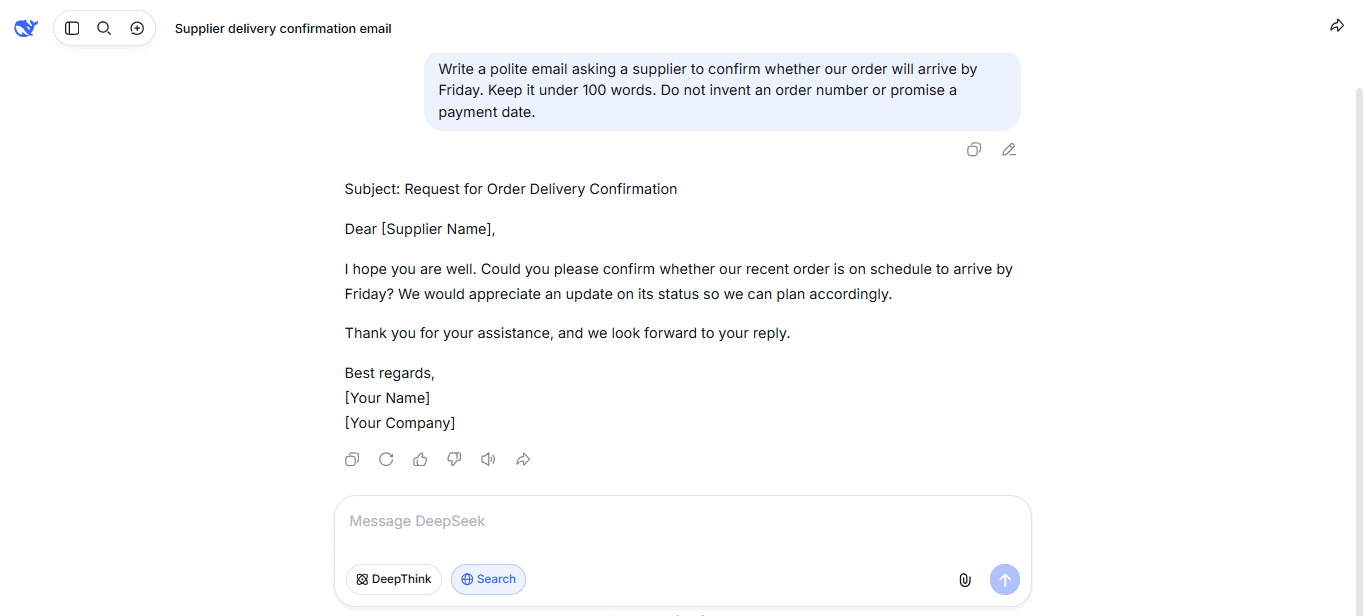
Example prompt: “Write a polite email asking a supplier to confirm whether our order will arrive by Friday. Keep it under 100 words. Do not invent an order number or promise a payment date.”
For summaries, provide the actual text and ask it to separate stated facts from unanswered questions. Compare important names, dates, and figures against the original rather than assuming the shorter version preserves everything.
Learn concepts and work through problems
Use a conversation to request a simpler explanation, an analogy, or practice questions. Specify your starting level so the answer does not assume knowledge you do not have.
Example prompt: “Explain photosynthesis to a beginner using everyday language. Then ask me three questions to check my understanding, but wait for my answers before giving feedback.”
For mathematics or technical exercises, ask for the method and check the result independently. An explanation that sounds convincing can still contain a mistaken assumption.
Understand code and organize information
For coding assistance, provide a small code sample, the error message, and the behavior you expected. Ask for an explanation and a minimal proposed fix, then test it in a suitable environment before using it.
For everyday organization, try converting non-sensitive notes into a table of tasks, owners, and deadlines. Instruct it to mark missing details as “not provided” rather than fill them in.
How to start using DeepSeek
For ordinary conversations, use the consumer assistant rather than the developer API. You do not need to write code or configure an API key.
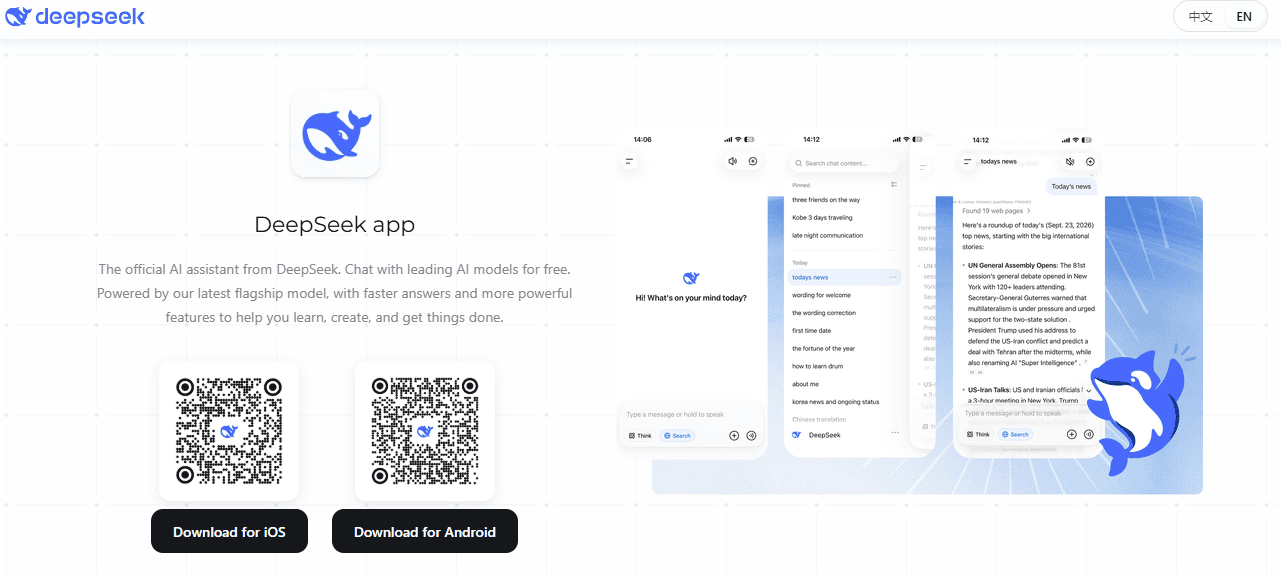
- Open an official access point. Visit DeepSeek’s web chat, or use the DeepSeek app section of its official download page for mobile access.
- Create an account or sign in. Follow the options and verification steps shown. Its account terms describe registration through email or a supported third-party account.
- Give it one clear task. Include the background it needs, your intended audience, and the desired output, such as a short explanation or a comparison table. Leave out passwords and confidential information.
- Refine and verify. Ask a follow-up to correct the tone, narrow the scope, or clarify an assumption. Check factual claims against the original material or a reliable external source.
For example, start with: “Turn these notes into an action list: the draft is due Thursday, the team review is Friday morning, and the final version is due Monday. Separate confirmed deadlines from missing information.”
The download page also lists DeepSeek Harness, a separate desktop tool for more involved tasks. It is not necessary for a first conversation in the web or mobile chat.
Is DeepSeek free?
DeepSeek offers free access to its consumer assistant, but that does not make every way of using its models free. Its official app page advertises free chat access; the developer API has a separate usage-based price schedule.
| Access option | What it is for | How costs work |
|---|---|---|
| Official consumer chat | Asking questions and working with the assistant directly. | Free consumer access; follow any limits or availability notices shown in the service. |
| DeepSeek API | Connecting a DeepSeek model to software you build. | Charges depend on the model and usage. |
| A third-party service | Using a DeepSeek model inside another provider’s product. | Check that provider’s own plans and conditions. |
| Running released model weights yourself | Deploying a model on hardware you control or rent. | You must account for hardware, hosting, and operation, even when the weights are available without a download charge. |
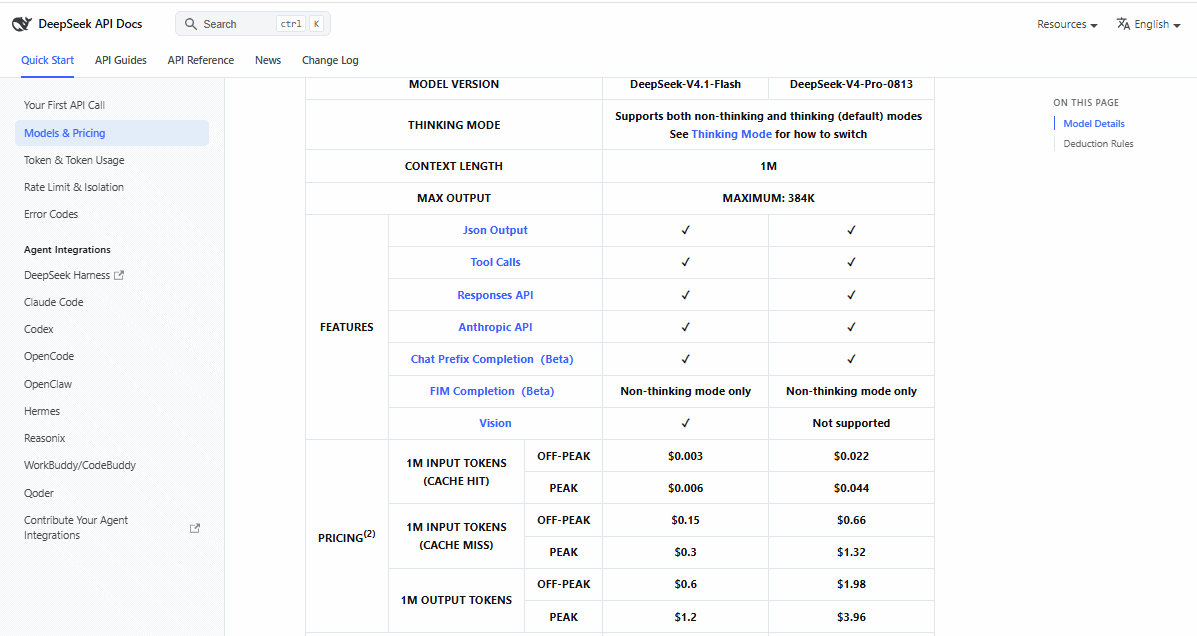
For text, API usage is measured in tokens, small pieces such as parts of words rather than a fixed number of whole words. DeepSeek’s pricing distinguishes input from output and includes conditions such as cached input and peak or off-peak usage. Check the official rate card before estimating a software project’s cost.
For a first chat, there is no need to buy an API balance. For an application, free consumer access is not a substitute for calculating API usage.
How does DeepSeek work?
DeepSeek’s models are large language models, or LLMs. During training, they learn patterns and relationships from data; further training helps them follow instructions. During a conversation, they use the supplied context to generate a response in tokens. DeepSeek describes these separate training and inference stages in its model mechanism disclosure.
This is different from simply retrieving an existing answer from a database. It also does not mean that every conversation immediately retrains the model or gives it permanent knowledge of new events.
Some DeepSeek models use a mixture-of-experts design. For example, the V4.1-Flash model card describes an architecture that activates selected parts of the network during processing. This can reduce computation compared with activating all experts for every token. “Experts” here are computational components, not human specialists.
Thinking and web search do different jobs
DeepSeek’s thinking mode generates intermediate reasoning before the final answer. Web search brings in information from external pages. A longer reasoning response does not prove that the assistant looked anything up.
A conventional search engine primarily helps you find published material; DeepSeek generates a conversational answer and can use a Search function. For current information, use search when available and inspect the linked sources. DeepSeek’s accuracy warning explicitly says that enabling Search does not eliminate incorrect answers.
Which DeepSeek models are current?
As of October 2, 2026, DeepSeek’s official change log identifies DeepSeek-V4.1-Flash as the release introduced on September 10. The current API documentation lists DeepSeek-V4.1-Flash-1017 under deepseek-flash, alongside DeepSeek-V4-Pro-0813 under deepseek-v4-pro.
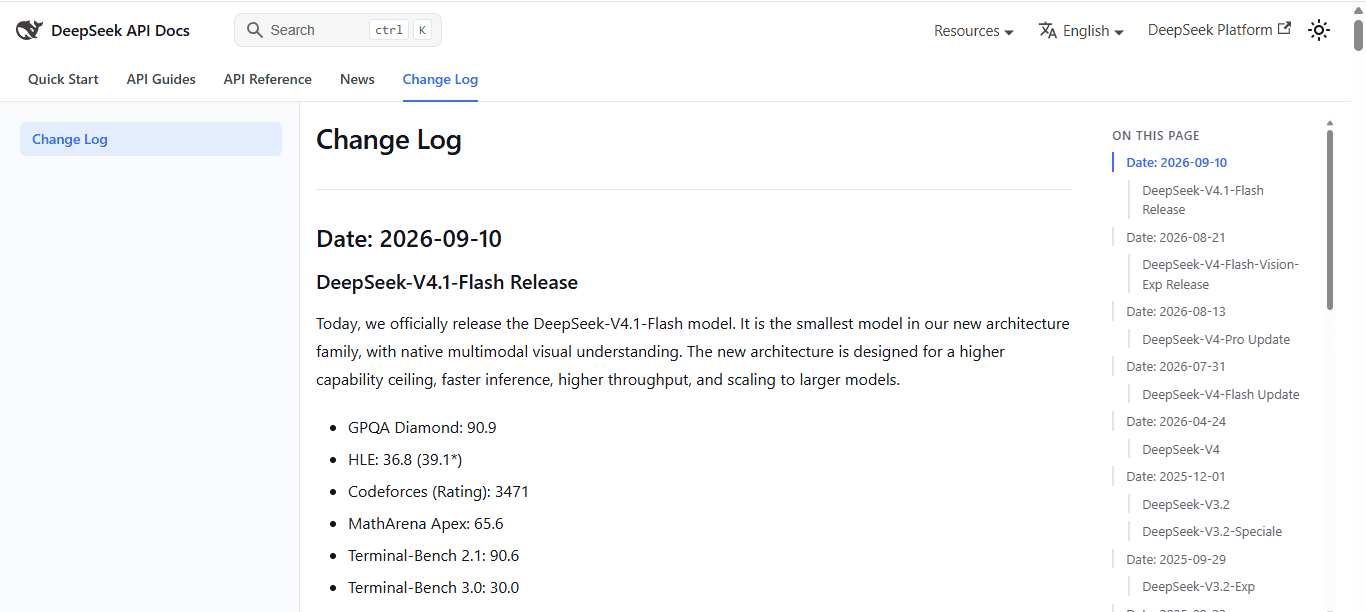
The API model table lists vision support for V4.1-Flash but not for that Pro model. V4.1-Flash’s model card describes image and text input with text output; image understanding is not the same as image generation.
For a beginner, the important lesson is to check the specific model and interface. A feature documented for an API model is not automatically available in every mobile app, web interface, or third-party service carrying the DeepSeek name.
Is DeepSeek open source?
DeepSeek publishes model weights and code for a number of its releases. Open weights means that the learned model parameters are available to download, so developers can run the model outside the company’s hosted chat service.
For example, DeepSeek lists both the repository and model weights for V4.1-Flash under the MIT License. However, downloadable weights do not by themselves mean that every training dataset or every ingredient needed to reproduce training has been released.
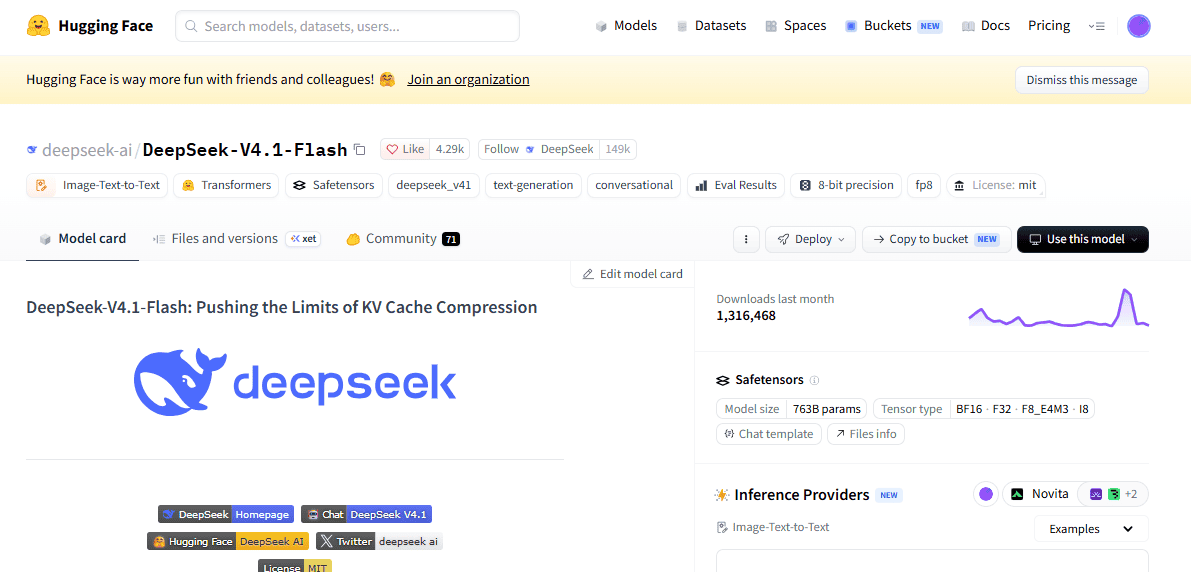
Check the exact model’s license, especially for derivatives. The R1 repository’s licensing notes, for instance, identify different underlying model families and licenses for its distilled variants.
Running a released model yourself is also not the same as installing the official chatbot. You need suitable hardware and software, and a smaller derivative should not be assumed to match the full model’s capabilities.
What should you know about accuracy and privacy?
Verify the answer, not just the wording
DeepSeek acknowledges that its models can produce incorrect or invented information, commonly called AI hallucinations. A polished answer, detailed explanation, or apparent citation is not proof of accuracy.
Check quoted sources, recalculate important figures, and test generated code. For medical, legal, financial, or other high-stakes questions, do not use a chatbot answer as a substitute for qualified professional guidance. DeepSeek’s published limitations make the same distinction.
Check what happens to your information
The DeepSeek Privacy Policy, last updated February 10, 2026, says the hosted services may collect prompts, uploaded content, chat history, account information, and device or network information. It also states that personal data is collected, processed, and stored in the People’s Republic of China.
The policy describes using information to develop and improve the service and its models. It also describes privacy rights, including a training opt-out, subject to location and applicable exceptions, and provides a contact route for requests.
Before submitting work material, check your organization’s approved-tool rules. Do not paste passwords, private customer records, or confidential documents without authorization. Use public or non-sensitive material for an initial trial.
The provider matters as much as the model
A third-party app’s handling of your information is governed by its own arrangements and policies; DeepSeek’s policy expressly distinguishes downstream applications built by developers.
Self-hosting can change where processing happens, but privacy still depends on the deployment. Check external connections, logging, access controls, and any added tools rather than assuming “local” automatically means private or secure.
Is DeepSeek the same as ChatGPT?
No. DeepSeek’s chatbot and OpenAI’s ChatGPT are separate AI assistants. Their conversational uses overlap, but their models, tools, account systems, and policies are different.
Free access is not unique to DeepSeek: OpenAI also offers a free ChatGPT tier. OpenAI’s capability guide describes tools such as image generation, voice conversations, and data analysis, with availability depending on the plan and settings. Compare the features you can actually access rather than assuming the two products are interchangeable.
To choose between them, try the same non-sensitive task in both. Check whether each follows your instructions, preserves the facts, provides usable sources when needed, and fits your data requirements. The more useful assistant for your work is the one that meets those needs—not simply the one associated with a headline benchmark.